A return audit looks simple until the volume increases. Twenty tools coming back from one project can be checked manually. Two hundred items coming back from several jobsites, storage cages, trucks, and service areas create a different problem. Someone has to identify each item, confirm whether it matches the system record, check whether anything is missing, and decide whether returned equipment is ready to be used again.
That is where RFID asset tracking can help equipment teams. RFID reduces the manual effort involved in finding and scanning individual labels because RFID tags can be read without the same direct line-of-sight requirement as barcode or QR code labels. Teams can scan tagged equipment in batches, verify what is present, and update asset records faster at defined control points such as dispatch, receiving, returns, audits, and maintenance intake.
But RFID is not a fix for broken equipment records. It does not automatically prove custody, replace check-in/check-out discipline, or give exact live location everywhere. RFID works best when equipment managers use it to improve data capture inside a defined workflow.
What is RFID asset tracking?
RFID asset tracking is the use of radio frequency identification tags and readers to identify equipment and update asset records at defined scan points. It helps equipment teams scan multiple tagged items faster than manual barcode or QR code scanning, especially during audits, returns, receiving, transfers, and maintenance intake.
RFID is most useful when it is connected to clean equipment records, clear ownership, defined locations, check-in/check-out workflows, transfer rules, maintenance status, and exception review. It should be treated as a faster verification method, not as a substitute for accountability.
What RFID Asset Tracking Does and Does Not Do
RFID asset tracking helps teams identify tagged equipment using RFID readers. Each tag carries an identifier that connects the physical item to its asset record. When the tag is detected, the system can record a scan event and, depending on workflow rules, help update location, status, or audit results.
For equipment teams, RFID is useful because it reduces the effort required to scan items one by one. A barcode or QR code usually needs direct line of sight. Someone has to find the label, position the scanner, and scan each item individually. RFID can detect tags without the same scanning angle requirement, which makes it useful for equipment stored in bins, racks, cages, carts, shelves, crates, or cases.
However, RFID has limits. A scan confirms that a tag was detected by a reader. It does not automatically confirm who is responsible for the item, whether it is usable, whether accessories are included, or whether the system record is correct. Those answers still depend on the workflow around the scan.
RFID vs Barcode vs QR Code vs GPS
| Tracking method | Best for | Limitation |
| Barcode | Low-cost, one-at-a-time scanning | Requires direct line of sight and manual scanning |
| QR code | Mobile-friendly asset lookup and scanning | Also requires line of sight and user action |
| RFID | Bulk scanning, audits, returns, receiving, and control-point verification | Requires the right tags, readers, placement, and exception handling |
| GPS | Outdoor location tracking for vehicles, trailers, and movable equipment | Better for location monitoring than item-level audit scanning |
RFID is not “better” in every situation. Barcode or QR code tracking may be enough for small teams, low-volume equipment, or assets that are scanned individually. RFID becomes more valuable when teams handle large batches, frequent audits, recurring transfers, high-value equipment, or equipment stored in dense areas where individual scanning slows work down.
When RFID Is Worth Using for Equipment Teams
RFID is worth considering when equipment movement has become too frequent or too high-volume for manual scanning to keep up. It is especially useful when the cost of slow scanning, missed items, or incomplete records is higher than the cost of implementing RFID.
Strong RFID use cases include:
- Large inventory counts
- High-volume tool crib audits
- Equipment returns from jobsites
- Warehouse receiving
- Site-to-site transfers
- Maintenance intake
- Inspection queues
- Storage cages and bins
- Equipment kits or crates
- Exception detection after audits
RFID is less urgent when teams have a small number of items, equipment rarely moves, one person controls all updates, or barcode scanning already gives accurate records without slowing the team down.
The best test is not “Can we tag this asset?” The better question is: Which equipment movement needs a stronger control point?
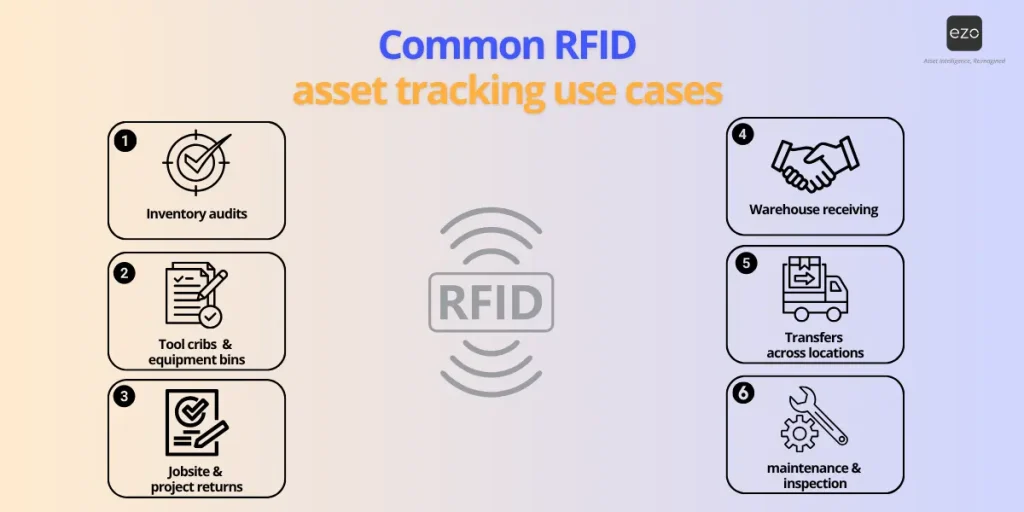
Common RFID Asset Tracking Use Cases
1. Inventory Cycle Counts and Audits
RFID can help warehouse teams complete physical counts faster by scanning tagged equipment in batches. Instead of finding and scanning every barcode individually, staff can walk through a storage area with an RFID reader and compare detected tags against expected inventory.
This is useful for quarterly audits, warehouse counts, project return audits, and stock checks in tool cages or storage rooms. The value is not just speed. RFID also helps expose mismatches between what the system says and what is physically present.
2. Tool Cribs and Equipment Bins
Tool cribs often contain many small, shared, or frequently moved items. RFID can help teams verify what is actually present before equipment is checked out or reassigned.
For example, if a tool crib record shows 10 items are available but the RFID scan detects only 8, the team can investigate the mismatch before a technician reaches the site and discovers the missing tools. This turns RFID into an exception detection tool, not just a faster scanner.
3. Jobsite and Project Returns
Returns are one of the strongest RFID use cases. Equipment often comes back in batches from a project, and warehouse teams need to confirm what returned, what is missing, what is damaged, and what needs inspection.
RFID can help teams scan returned equipment as it enters the return zone. The scan can be compared with the checkout or reservation record to identify missing items, partial returns, wrong-location returns, or equipment that should be routed to inspection.
4. Warehouse Receiving
When new equipment arrives, teams need to identify it, tag it, create or update records, assign storage locations, and prepare it for use. RFID can reduce manual scanning effort during receiving when items arrive in batches.
This workflow still needs control. New equipment should not simply be scanned and assumed complete. Teams should confirm asset IDs, categories, locations, condition, and any required documentation before the record is marked ready.
5. Transfers Between Locations
RFID can support dispatch and receipt workflows for equipment moving between warehouses, branches, jobsites, yards, or service areas. A scan at the dispatch point can confirm which items left the source location. A scan at the receiving point can confirm what arrived.
This helps logistics leads identify transfer gaps earlier. If ten items were expected at a site but only eight are detected at receiving, the exception can be reviewed before the missing equipment creates a project delay.
6. Maintenance Intake and Inspection
Maintenance teams can use RFID at repair bays, calibration areas, and inspection queues to identify equipment entering service workflows. When an item is scanned into maintenance intake, the asset record can be reviewed and updated according to the workflow.
This matters because returned equipment should not automatically become available. It may need inspection, cleaning, repair, calibration, or accessory checks before it can be reserved or dispatched again.
Benefits of RFID Asset Tracking
| RFID can help with | How it helps equipment teams |
| Faster inventory counts | Reduces one-by-one scanning during audits and cycle counts. |
| Fewer missed items | Helps detect tagged equipment stored in bins, racks, carts, shelves, crates, and cages. |
| Better movement records | Creates scan events when equipment is dispatched, received, returned, transferred, or sent for inspection. |
| More reliable location updates | Helps teams update location records at defined control points instead of relying on delayed manual updates. |
| Faster return verification | Helps project managers, site supervisors, and warehouse teams confirm what came back, what is missing, and what needs review. |
| Cleaner audit trails | Adds timestamped scan activity to the asset record when connected to an equipment management system. |
| Earlier exception detection | Flags mismatches such as expected-but-not-found items, wrong-location equipment, duplicate reads, or unassigned tags. |
RFID should improve the quality and speed of data capture. It should not be used to bypass review when the scan result conflicts with the system record.
How to Set Up RFID Workflows and Control Points
RFID works best when teams decide where scans should happen and what each scan is allowed to update. Without that structure, RFID can create faster data capture but weaker control.
Start by mapping the equipment movement lifecycle. A common workflow may look like this:
Available in warehouse → reserved for project → staged for dispatch → in transit → received at jobsite → active on project → returned to warehouse → awaiting inspection → available or under maintenance
Once the workflow is mapped, define RFID control points. A control point is a place where a scan closes an accountability gap.
Useful RFID control points include:
| Control point | What the scan confirms |
| Dispatch area | The correct equipment is leaving the warehouse. |
| Jobsite receiving area | Equipment arrived at the intended project location. |
| Warehouse return zone | Assigned equipment came back from a job or project. |
| Inspection area | Returned equipment is waiting for review before reuse. |
| Maintenance intake | Equipment has entered repair, calibration, or service workflow. |
The next step is deciding what each scan can update. Not every RFID scan should change the asset record in the same way.
For example:
- A scan in the dispatch area may update status to checked out or in transit.
- A scan at the receiving area may update location to the jobsite after receipt is confirmed.
- A scan in the return zone may update status to returned or awaiting inspection.
- A scan in maintenance intake may update status to under maintenance.
- A scan that conflicts with the record should create an exception, not automatically overwrite custody.
RFID scans identify that a tag was detected. Accountability still needs ownership. A warehouse manager may own dispatch scans, a logistics lead may own transfer exceptions, and a maintenance manager may own intake status changes. The workflow should make those responsibilities clear.
Step-by-Step RFID Implementation Guide
RFID tracking processes are designed as a workflow improvement, not a tagging project. Here is a step-by-step detailed guide on how to set up your RFID asset tracking system:
Step 1: Define the Business Problem
Start with a specific operational problem. “Improve tracking” is too broad. A better goal is:
- Reduce time spent on warehouse audits.
- Verify project returns faster.
- Reduce missing equipment after site transfers.
- Improve checkout accuracy in tool cribs.
- Identify returned equipment that needs inspection before reuse.
The clearer the problem, the easier it is to choose the right pilot, tags, readers, control points, and KPIs.
Step 2: Choose a Pilot Workflow
Do not start by tagging every item in every location. Start with one workflow where RFID can solve a visible bottleneck.
Good pilot workflows include:
- A tool cage with frequent checkouts and returns
- A warehouse return zone for project equipment
- A receiving area for new equipment
- A transfer route between one warehouse and one jobsite
- A maintenance intake area for frequently serviced equipment
A pilot should be large enough to test real conditions but small enough to troubleshoot quickly.
Step 3: Clean Asset Data Before Tagging
RFID will not fix inaccurate records. Before tags are applied, clean the asset database.
Review:
- Asset IDs
- Names and categories
- Serial numbers
- Locations
- Assigned users or teams
- Statuses
- Maintenance status
- Retired or duplicate records
- Missing records for active equipment
Start with equipment that is high-value, frequently moved, often audited, commonly misplaced, or costly to replace. Examples include generators, tools, test equipment, pumps, scanners, machines, and shared field equipment.
Step 4: Select the Right RFID Tags and Readers
Tag choice depends on the equipment, material, storage environment, scan distance, and workflow.
Consider:
- Metal surfaces
- Outdoor exposure
- Heat, moisture, dust, and impact
- Asset shape and available tag placement area
- Whether equipment is stored individually or in batches
- Whether scans happen at a distance or close range
Metal equipment often needs tags designed for metal surfaces. Rugged equipment may need durable hard tags. Boxes or consumable containers may use labels or inlays.
Reader choice also depends on workflow. Handheld readers are useful for audits, returns, and mobile scanning. Fixed readers may work better at controlled choke points such as dock doors, dispatch areas, or receiving zones.
Step 5: Tag a Controlled Asset Group
Create a test group for the pilot. The group should be representative of the workflow, not random.
For example, a warehouse team could start with 50 high-value tools that are frequently checked out to projects and returned for inspection. This gives the team enough volume to test scanning speed, placement, user behavior, and exception handling without turning the pilot into a full rollout.
Document which assets are included, where they are stored, who owns the workflow, and what success looks like.
Step 6: Test Scan Accuracy in Real Conditions
RFID performance depends on environment and setup. Test scans in the actual places where teams will use RFID.
Test:
- Different storage layouts
- Bins, carts, racks, crates, and shelves
- Different scan angles
- Tag placement on metal or curved surfaces
- Indoor and outdoor conditions
- Crowded storage areas
- Distance from reader to tag
- Duplicate or unintended reads
- Missed reads
The goal is to find where RFID works reliably and where the workflow needs adjustment. Teams may need to reposition tags, change tag type, adjust scan zones, train users, or change how equipment is staged.
Step 7: Define Exception Handling
RFID scans are most valuable when they reveal mismatches. But teams need rules for what happens next.
Common exceptions include:
- Expected equipment not found
- Equipment found in the wrong location
- Unassigned RFID tag detected
- Duplicate tag read
- Item scanned into the wrong workflow
- Returned item missing accessories
- Equipment scanned as available while still under maintenance
Define who reviews each exception and what actions are allowed. For example, if ten items were checked out to a project but only eight are scanned at return, the missing items may be marked as check-in due, missing, or pending review depending on the workflow.
Do not let every scan automatically overwrite location, status, or custody. Exception review protects record accuracy.
Step 8: Train Users by Role
RFID training should focus on workflows, not just devices.
Warehouse users should know how to scan during dispatch, receiving, audits, and returns. Logistics leads should know how to review transfer mismatches. Maintenance teams should know when to scan equipment into inspection or repair areas. Field teams should know how to confirm returns without bypassing condition checks.
Training should cover:
- What to scan
- When to scan
- Where to scan
- What each scan updates
- What to do when the scan does not match the record
- Who owns the exception
- Which scans require review before status changes
Step 9: Review KPIs Before Scaling
After the pilot, compare results against the original business problem. Do not scale just because the technology works. Scale when the workflow improves.
Review whether RFID reduced audit time, improved return verification, reduced missing equipment, lowered unresolved exceptions, or improved transfer accuracy.
If results are strong, expand to the next workflow or location. If results are mixed, adjust tag placement, reader choice, scan zones, training, or exception rules before adding more equipment.
Top RFID Asset Tracking KPIs
| KPI | What it means | Values to track |
| Inventory count time | Measures how long it takes to complete a physical count using RFID. | Time per audit, time per location, assets scanned per hour, comparison with prior manual or barcode counts. |
| Audit variance | Shows the gap between expected records and detected equipment. | Expected assets, scanned assets, missing assets, unexpected assets, variance percentage by location or category. |
| Missing equipment rate | Tracks how often assigned or expected equipment cannot be found. | Missing items, missing rate by site or project, last known custodian, days missing, recovery status. |
| Return compliance | Measures whether checked-out equipment returns on time and in expected condition. | Due date vs return date, overdue returns, partial returns, damaged returns, assets awaiting inspection. |
| Open exceptions after audit | Tracks RFID mismatches that still need action after a scan is complete. | Wrong-location assets, duplicate reads, unassigned tags, maintenance conflicts, time to resolve exceptions. |
KPIs should connect RFID to operational outcomes. A fast scan is useful only if it improves record accuracy, equipment availability, return discipline, and exception resolution.
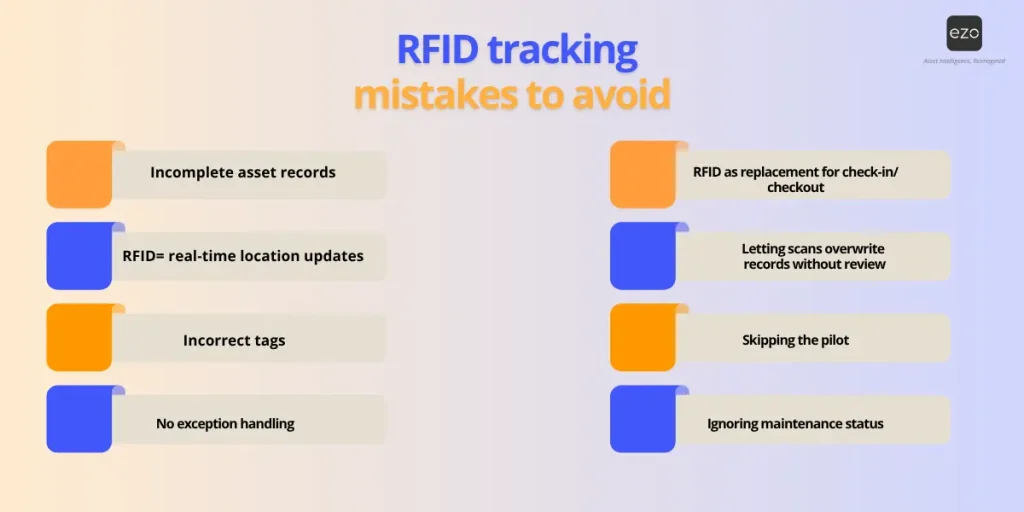
Common RFID Asset Tracking Mistakes to Avoid
1. Tagging Equipment Before Cleaning Records
RFID makes data capture faster, but it does not make bad data trustworthy. If asset names, locations, statuses, and ownership records are already wrong, RFID will only expose those gaps faster.
Clean the asset database before tagging.
2. Expecting RFID to Show Exact Live Location Everywhere
RFID confirms that a tag was detected by a reader. It should not be positioned as GPS-style live location tracking. Exact location depends on reader placement, scan frequency, tag type, environment, and workflow design.
Use RFID for control-point verification. Use GPS when the use case requires outdoor location monitoring for vehicles, trailers, or movable equipment.
3. Using the Wrong Tag for the Asset
RFID reliability depends on tag type and placement. Metal, outdoor, rugged, wet, or high-impact equipment may need specialized tags. Labels that work on boxes may not work on machines, vehicles, or tools.
Test tags before rollout.
4. Letting Scans Overwrite Records Without Review
Not every scan should automatically update status, custody, or location. A scan may be accidental, duplicated, incomplete, or outside the expected workflow.
Use exception review for mismatches.
5. Treating RFID as a Replacement for Check-In and Checkout
RFID can speed up identification, but it does not define ownership by itself. Teams still need check-in/check-out workflows to record who took equipment, when it moved, where it went, and who confirmed return.
6. Skipping the Pilot
RFID should be tested in the real operating environment before a full rollout. Storage layout, tag placement, asset material, reader type, and user behavior all affect scan reliability.
Start with one workflow before scaling.
7. Ignoring Maintenance Status
Returned equipment should not automatically become available after an RFID scan. It may need inspection, repair, cleaning, calibration, or accessory checks.
Link RFID scans to maintenance and inspection workflows.
8. Not Assigning Exception Owners
RFID will reveal mismatches, but someone must own the resolution. Without clear ownership, exceptions sit unresolved and teams continue making decisions from incomplete records.
Assign owners for audit, transfer, return, and maintenance exceptions.
How EZO Supports RFID-Enabled Equipment Workflows
RFID becomes more valuable when scan activity connects to the equipment record. EZO helps teams manage that operating record by keeping equipment details, locations, assignments, checkouts, returns, transfers, maintenance status, and activity history in one system.
For equipment managers, this means RFID scans can support cleaner audits, more accurate location updates, and stronger custody records. For logistics leads, RFID can support dispatch confirmation, receiving checks, transfer visibility, and faster exception detection. For maintenance teams, RFID can help identify equipment entering inspection or repair workflows so availability status does not get updated too early.
The goal is not to use RFID as a standalone scanning layer. The goal is to make every scan part of a controlled equipment workflow.
Final Checklist Before Scaling RFID
Before expanding RFID beyond a pilot, confirm:
- Asset records are clean and standardized.
- The pilot workflow is clearly defined.
- RFID control points are mapped.
- Tag type and placement have been tested.
- Reader type matches the workflow.
- Users know what to scan and when.
- Scans do not overwrite exceptions without review.
- Ownership is assigned for mismatches.
- Maintenance status is connected to availability.
- KPIs show measurable workflow improvement.
Conclusion: RFID Works Best When It Supports Accountability
RFID can make equipment tracking faster, especially when teams need to audit, receive, return, transfer, or inspect equipment in batches. But speed only matters when each scan improves a record people can trust.
The best RFID rollouts start with one workflow, clean the asset data, define control points, test the scanning environment, train users by role, and measure whether exceptions are being resolved faster. RFID does not replace accountability. It supports accountability when every scan connects to a clear equipment record, a responsible owner, and a defined next step.