EZO EAM Asset Lifecycle Management
Asset Lifecycle Management
Manage Assets from Purchase to Retirement

Asset Handoffs Should Not Leave Gaps In The Record
Purchase and service data split
Purchase orders, custody records, and service logs sit in separate tools. Teams must reconcile them before deciding whether to redeploy, repair, or replace an asset.
Custody and availability unclear
Outdated records force teams to call around for equipment status. Crews wait, transfers go unrecorded, and buyers may order assets already available at another site.
Missing records obscure asset loss
Missing asset records force Finance and Operations to piece together purchase costs, custody, and retirement reasons, slowing reviews and making follow-up work harder.
Preserve Asset Context At Every Handoff
EZO EAM brings acquisition details, custody transactions, service records, audits, depreciation, and retirement information together around the asset. Procurement can record what was received, Operations can update assignments and transfers, and Maintenance can review service activity against the equipment being used.
When Finance reviews depreciation or retirement, the recorded asset history provides context for the decision. Basic service records are available on the Advanced plan and above. The Premium plan includes the separately priced CMMS add-on for preventive maintenance, work orders, and technician management for complete service workflows.

Follow An Asset From Receiving To Retirement
Results Reported by EZO EAM Customers
~50%
Less Time Managing Assets
80%
Reduction in Item Loss
5-6 Hrs
Saved weekly in manual data entry
Manage The Work Behind Each Lifecycle Stage
PLAN & PROCURE
Bring Received Equipment Into The Asset Catalog

DEPLOY, ASSIGN, AND MOVE
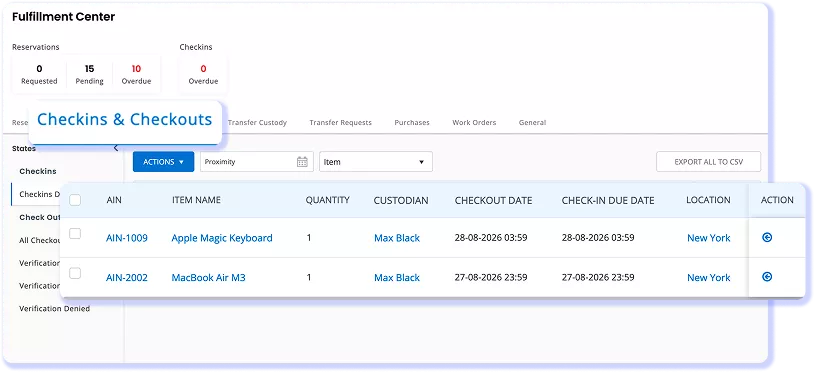
Keep Custody And Location Current As Equipment Moves
MAINTAIN AND SERVICE
Review Service Work Alongside Asset Activity


AUDIT, DEPRECIATE, AND RETIRE
Support Asset Reviews With Recorded Transactions
Review An Asset Without Rebuilding Its History
CUSTOMER STORY
How Magna IV Engineering Manages Equipment Lifecycle Across Customer Projects
Magna IV Engineering uses EZO EAM to manage the lifecycle of 2,500 assets across customer projects. The team creates custom reports in minutes, monitors calibration dates, and prevents equipment under maintenance from being checked out. QR codes simplify equipment identification, while Packages allow related items to be checked out together.
How Magna IV uses EZO EAM:
- Assigns unique project IDs to organize equipment by customer job
- Tracks equipment usage for individual projects
- Shares project updates through Comments and Mentions
- Attaches supporting documents to project records
- Manages assets without relying on a single system expert
40%
~3 hours saved daily
Thousands of dollars saved
through improved equipment tracking and booking visibility
Integrations That Support the Whole Lifecycle
Use integrations for specific tasks: bring asset context into service tickets, authenticate users through an identity provider, export supported files, or receive supported equipment location and telematics data.
- Service desk — Zendesk and Jira
- Single sign-on — Okta, OneLogin, and Microsoft Entra ID
- Storage and backup — OneDrive and Dropbox
- Location and telematics — Samsara, Trackunit, John Deere, and Hapn
Available fields, setup requirements, and plan access vary by integration.
Frequently Asked Questions
Asset lifecycle management is the process of planning, acquiring, deploying, maintaining, and retiring assets. It connects purchase details, custody, location, service activity, and retirement information as responsibility moves between teams. EZO EAM supports these activities through asset records and operational workflows, with capabilities varying by plan.
Asset lifecycle management software covers acquisition, deployment, custody, maintenance, depreciation, and retirement. A CMMS focuses on maintenance activities, including work orders, preventive maintenance schedules, and service history. EZO EAM supports asset lifecycle management, with full CMMS capabilities available through the separately priced Premium add-on or included with Enterprise.
EZO EAM links purchasing details, custody changes, service records, depreciation, and retirement information to the relevant asset. Teams can review recorded activity as responsibility moves between departments or sites, reducing the need to reconstruct asset history from spreadsheets and separate logs. Available workflows depend on the plan and configuration.
EZO EAM supports depreciation calculations based on configured settings, scheduled report delivery, and event notifications. Teams can also schedule preventive maintenance with the relevant CMMS capabilities enabled. Preventive maintenance and work order management require the separately priced CMMS add-on on Premium or are included with Enterprise. Automation availability depends on the plan and configuration.
EZO EAM supports email alerts for upcoming reservations, due or overdue returns, approval requests, asset retirement, and low stock. Low-stock alerts apply to quantity-based Inventory and Asset Stock records. Available alerts and recipients depend on enabled workflows, user permissions, and notification settings. Maintenance alerts depend on the service or CMMS capabilities enabled. The alert documentation supports these specific examples and distinguishes notifications from actions that an administrator must approve.
EZO EAM integrates with user directories, identity providers, service desks, cloud storage, and equipment location or telematics services. Directory integrations support user synchronization, while SSO handles authentication. Other connectors provide asset context in tickets, export supported files, or bring supported equipment data into asset records. Capabilities and plan requirements vary by connector. EZO’s integration guidance explicitly distinguishes user synchronization from SAML authentication and describes supported storage exports.
Implementation typically involves cleaning and importing asset records, configuring locations and custom fields, assigning user roles, and labeling equipment. Teams then configure custody, maintenance, depreciation, and reporting workflows and test representative transactions before rollout. The scope depends on asset volume, locations, integrations, and the processes being standardized.
EZO EAM offers reports covering current checkouts, check-in and checkout events, overdue assets, asset utilization, retired assets, and depreciation. Asset Utilization reports show checkout frequency and duration rather than measured operating time. Additional service and work order cost reporting depends on enabled capabilities. Report access and customization vary by plan.
The reporting documentation names these operational reports and defines utilization through checkout frequency and duration. Separate documentation supports depreciation and work order cost reporting.


