
A maintenance crew returns eight tracked items, including an impact driver and an equipment kit, and the tool crib checks all eight back in. During inspection, the impact driver fails its function test, while the kit is found to be missing a required adapter. Although custody records are accurate, recorded availability is overstated: only six items are ready for the next job.
An equipment return procedure addresses this gap by treating custody and readiness as separate decisions. Check-in records that the item’s assignment has ended and closes custody in the system. It does not establish that the item is complete, functional, or safe to reissue.
This guide covers internally issued, reusable equipment returned to a tool crib, warehouse, or equipment yard. It does not cover rental off-hire or supplier returns. For related processes, see EZO’s guide to the employee equipment return process, which covers equipment recovery from departing employees, and its guide to the equipment inventory audit, which covers register-wide verification.
Key Takeaways:
- Check-in closes custody, while release for reuse is a separate decision about condition, completeness, and authorization.
- Recording declared condition separately from inspected condition, and from any charge decision lowers the barrier to reporting faults.
- A missing item is a discrepancy to investigate, not a confirmed loss, so log it as an open exception.
- Serialized equipment reconciles by identity, while quantity-tracked stock reconciles by count, which changes what counts as a discrepancy.
- In an illustrative 30-tool return, 27 tools are received, but only 24 are ready, so check-in-based availability overstates capacity.
- Turnaround and first-pass release rates can improve by inspecting less, so pair them with a first-use defect rate.
What is an equipment return procedure?
An equipment return procedure is a controlled workflow for receiving previously issued equipment, verifying its identity and condition, reconciling returned items against expected returns, resolving exceptions, and recording the authorized next step. It begins with an expected return record and ends when each item is either assigned a final disposition (release, transfer, or retirement) or placed on hold with an assigned owner and a defined next action.
The procedure involves five distinct events that can easily become conflated during a single counter interaction:
| Event | What it establishes |
| Equipment receipt | The item physically arrived and was identified at a receiving point |
| Equipment check-in | The assignment closed, and the custody record changed |
| Equipment inspection | Condition, function, completeness, and applicable safety requirements were assessed |
| Equipment reconciliation | Actual returns were compared with expected items and quantities |
| Release for reuse | A responsible person authorized the item for another assignment |
Receipt answers one question: “Did the equipment physically arrive?” Check-in answers another: “Has custody been closed in the system?” Neither confirms whether the equipment is ready for reissue.
Importantly, a check-in does not always require someone to physically handle the item. For example, EZO EAM’s Auto Check-In feature automatically checks an item back in when its scheduled check-in time arrives.
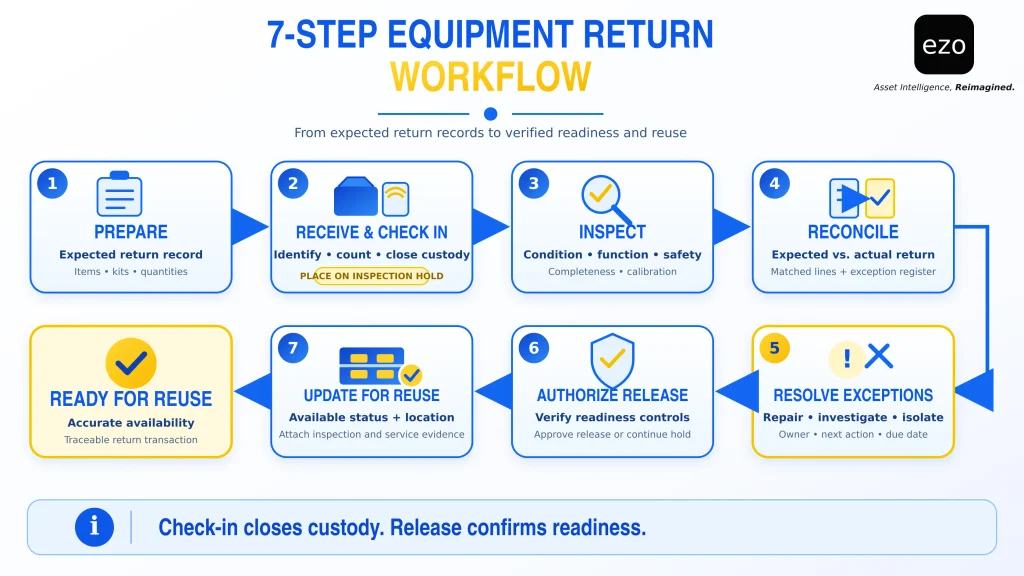
The seven steps below distinguish these events and establish the sequence for handling an equipment return.
Why a completed check-in does not mean equipment is ready
When availability is updated automatically following check-in, returned equipment can appear available for reissue before its condition has been verified. Readiness requires information that a custody record alone cannot provide: whether the item functions correctly, whether all required components are present, and whether any maintenance, calibration, or safety restrictions remain open.
Consider a generator returned to an equipment yard. Its last operator noticed that it stalled under load but did not report the fault. The custody record is accurate, but the availability record is not. The next crew discovers the problem only after taking the generator to the job site.
The last operator is often best placed to identify a fault, but may not be the person returning the equipment at the counter. Reporting a problem takes time and may invite questions about responsibility, while the benefit of that disclosure often goes to the next crew. When reporting carries an immediate cost for the person disclosing the fault but offers little direct benefit, a procedure that relies on voluntary reporting is likely to miss problems.
Two design choices can reduce this reporting barrier:
- Ask directly: At intake, identify the last operator and ask a standard question: “Were there any faults, damage, or missing parts during use?” Record the response as the declared condition, separately from the inspector’s verified findings.
- Separate findings from charges: Record condition findings independently of any subsequent responsibility or cost-recovery decision. If reporting damage automatically triggers a charge, operators have an incentive to withhold information rather than disclose problems.
Differences between declared and verified condition are useful evidence in their own right. They help identify where reporting gaps exist and where disputes over equipment condition or responsibility are more likely to arise.
Equipment return procedure: 7 steps from receipt to reuse
Each step has an action, an owner, the evidence it produces, and an output the next step depends on.
Step 1: Prepare the expected return record
Before equipment arrives, receiving staff retrieves the open checkout records for the returning crew or custodian. The expected return record should include asset IDs and serial numbers, kit contents and accessories, quantities for stock items, issuing and receiving locations, the expected return date, the condition recorded at checkout, and any open service restrictions.
This list provides the baseline against which returned equipment can be reconciled. Without it, staff have no reliable way to identify missing items, incomplete kits, or unexpected returns.
Output: An expected return list against which physically received equipment can be reconciled.
Step 2: Receive, identify, and check in returned equipment
Receiving staff scan each serialized item’s Asset Identification Number (AIN) or serial number, verify that the physical item matches the retrieved record, and count quantity-tracked stock. They also record the return date, receiving location, and returning person, ask the standard declared-condition questions, and immediately escalate any missing or unexpected items.
Once identified, each item is checked in to close its custody record. It must then be placed on hold or assigned a maintenance status that prevents it from being counted as ready-to-issue inventory until inspection is complete. A paper approval alone cannot prevent a system from issuing equipment that remains marked as available.
Physically, returned equipment should be kept separate from ready stock in a designated return area, such as a bench or cage within the tool crib. Unsafe or contaminated items should be isolated in a restricted area.
Output: A documented receipt and check-in, with each item recorded as “returned, pending inspection.”
Step 3: Inspect condition and completeness
An inspector evaluates each item against written acceptance criteria for its equipment class. These criteria should reflect manufacturer instructions, applicable regulations, and internal requirements.
The inspection covers physical damage and wear, functional performance, safety controls such as guards and emergency stops, kit contents, contamination, fuel or charge levels, calibration and service dates, and tag legibility. Comparing these findings with the condition recorded at checkout helps distinguish pre-existing damage from deterioration or damage during the latest period of use.
Standard maintenance inspection checklists help ensure consistent inspections across equipment types and inspectors.
| Equipment class (example) | What the criteria cover | Release condition |
| Portable power tool | Housing, cord or battery, guards, function | Passes every applicable check |
| Calibrated instrument | Physical condition, calibration status | Calibration valid and checks passed |
| Lifting equipment | Damage, wear, markings, required inspection | A qualified person approves continued use |
Some equipment is also subject to specific regulatory inspection and safety requirements. For example, OSHA requires powered industrial trucks found to need repair, to be defective, or to be unsafe to be taken out of service until restored to safe operating condition (29 CFR 1910.178(p)(1)). It also requires industrial trucks to be examined before being placed in service (29 CFR 1910.178(q)(7)).
These requirements apply to powered industrial trucks, not to every category of returned equipment. A return inspection also does not replace any separately required pre-use or shift inspection.
Output: A documented result for each inspection check (pass, fail, or not applicable), including identified defects, required corrective actions, photographs where necessary, and the inspector’s name.
Step 4: Reconcile actual returns against expected records
Receiving staff compare the expected return list against the receipt and inspection records. Each line item must be assigned one of the following outcomes:
- Complete
- Missing or partially returned
- Incorrect identity
- Unexpected additional item
- Missing kit component
- Quantity, custody, or location discrepancy
Serialized equipment is reconciled by identity: the specific item returned must match the item recorded against the checkout. Reusable, quantity-tracked stock is reconciled by count, with any shortfall remaining outstanding. Consumable inventory, by contrast, is not expected to be returned, so a shortfall may represent documented usage rather than a loss. EZO’s guide explains the distinction between serialized assets and inventory quantities.
A discrepancy does not automatically constitute a confirmed loss. A missing item may still be in transit, at another site, or recorded against the wrong crew. Record verified receipts separately from any unresolved discrepancies. Do not write off shortages or alter the original records simply to make system totals match the physical count.
Output: Reconciled return records and a documented exception register.
Step 5: Route damaged or incomplete equipment for resolution
Each exception must have an assigned status, an owner, a next action, and a due date. Overdue exceptions should trigger escalation, while unsafe equipment must be isolated immediately.
Where corrective work is required, create a maintenance work order to plan and assign the work. Maintain a separate service record documenting the work performed. Missing-item investigations should close only when an outcome is recorded: recovered, transferred, confirmed consumed, or written off with approval.
A maintenance hold remains in place until the item is either repaired and cleared for release or retired through an approved decision. Asset retirement removes equipment from active use in accordance with the organization’s disposal process.
Output: An accountable resolution path for each exception, with an assigned owner, next action, and deadline.
Step 6: Verify readiness and authorize release
Release must be a documented decision made by an authorized person. Assign release authority according to equipment class, risk level, and the technical competence required to verify its condition. For example, a receiving lead may be authorized to release low-risk hand tools, while lifting equipment may require inspection and approval by a qualified person.
Completing maintenance does not automatically authorize release. Repaired equipment may still require reinspection, replacement of missing accessories, or verification of calibration. Release should occur only when all four readiness controls described below have been satisfied.
Output: A documented release authorization or a recorded reason for maintaining the hold.
Step 7: Update readiness and storage location
Once release is authorized, receiving staff move the item from hold to available, update its storage location, and attach the relevant inspection and maintenance records. Before reassigning the equipment, confirm that its system status reflects its actual readiness. This ensures that the inventory availability visible to other teams corresponds to equipment that can actually be issued.
Any unresolved shortages remain on the exception register until formally closed.
Output: Accurate availability records, updated storage locations, and a traceable equipment return transaction.
| Step | Action | Owner | Evidence | Output |
| 1. Prepare | Pull expected items, kits, and quantities | Receiving staff | Open checkout records | Expected return list |
| 2. Receive | Identify, count, check in, hold | Receiving staff | Scan, timestamp, declared condition | Receipt, check-in, hold |
| 3. Inspect | Check condition, function, completeness | Inspector | Itemized results, photos, inspector name | Inspection result |
| 4. Reconcile | Compare expected with actual | Receiving staff | Matched lines, discrepancies | Exception register |
| 5. Route | Hold, repair, or investigate exceptions | Assigned exception owner | Work order or investigation record | Resolution path with due date |
| 6. Authorize | Confirm readiness controls, approve release | Designated releaser | Approval and timestamp | Release or hold decision |
| 7. Update | Change status and storage location | Receiving staff | Updated record, attached evidence | Accurate availability for reuse |
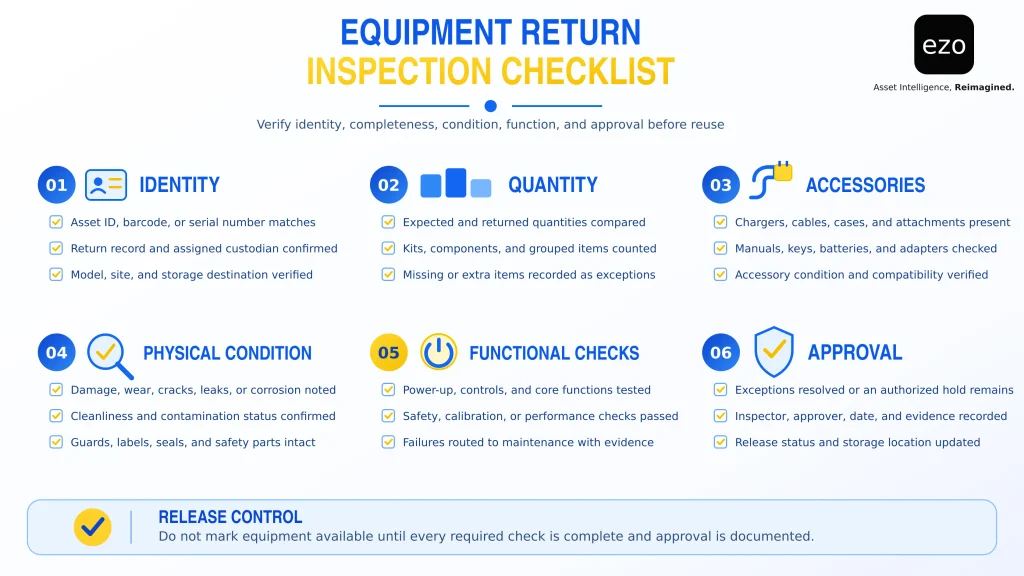
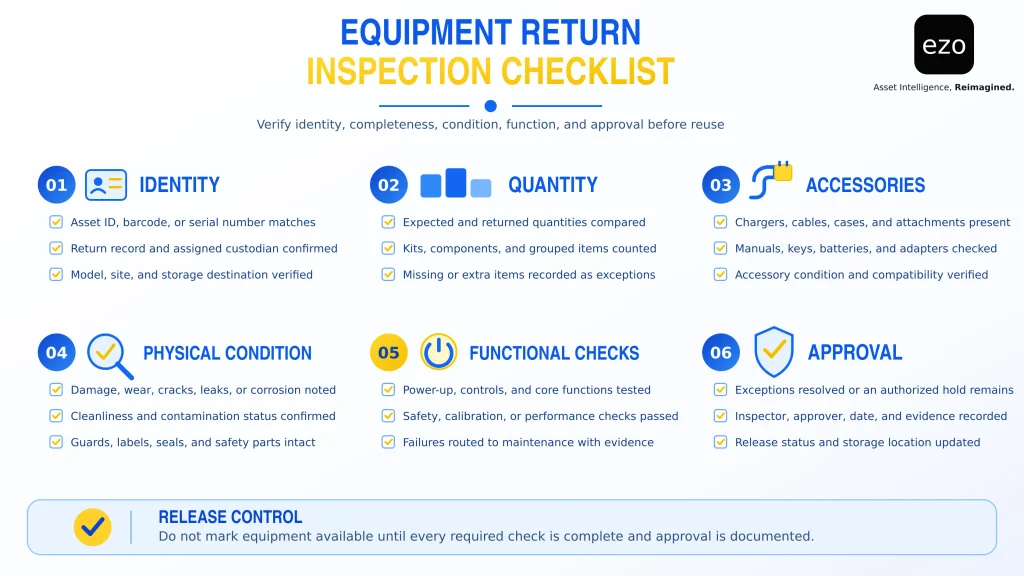
Equipment return inspection checklist
Use this checklist as a template for each equipment class, adapting it into an inspection form with a result column (pass, fail, or not applicable) and an inspector sign-off field. Sealed, unused consumables require identity and packaging checks rather than functional testing.
Assign an owner to each class-specific checklist, train inspectors on its requirements, and review it whenever equipment specifications, operating conditions, or applicable requirements change.
| Category | What to check | Evidence to record |
| Identity | Asset ID, serial number, and description match the physical item | Scan and visual confirmation |
| Receipt | Receiving location, date, returning person, last operator | Timestamp and names |
| Declared condition | Faults, damage, or missing parts reported at intake | Answer as given |
| Quantity | Received quantity against expected quantity | Count and variance |
| Completeness | Accessories, attachments, batteries, chargers, guards, cases | Missing components by name |
| Physical condition | Damage, wear, leaks, contamination, change since checkout | Notes and photos |
| Functional condition | Equipment-specific function and safety-control tests | Result per check, inspector name |
| Maintenance | Open defects, service due, calibration due | Service or calibration reference |
| Exception follow-up | Owner, due date, closure outcome | Outcome and closure date |
| Disposition | Release, transfer, or retire; otherwise hold with a named route | Disposition or route, and owner |
| Authorization | Release approval | Approver name and timestamp |
How to resolve discrepancies during equipment returns
Every return discrepancy must have a documented resolution and an assigned next disposition before the item can be released. Final dispositions include release, transfer, or retirement. Any item that has not reached one of these outcomes must remain on hold, with an assigned owner and a defined next action.
| Return outcome | Required response | Next disposition |
| Correct item, inspection passed (normal return) | Record findings and approval | Release |
| Missing equipment | Review assignment and transfer history; assign an investigator and due date | Hold: Investigation |
| Missing safety-critical component | Record the shortage by component | Hold: Replacement |
| Missing noncritical accessory | Record the shortage; approve an exception or replace it | Hold: Replacement, or release with approved exception |
| Visible damage | Document the damage and request a qualified assessment | Hold: Repair |
| Functional failure | Remove from available capacity and route to maintenance | Hold: Maintenance |
| Unknown identity or unreadable tag | Verify identity and ownership before re-tagging; quarantine meanwhile | Hold: Identification |
| Identified item with no open checkout | An earlier handoff was never recorded; reconstruct the custody chain | Hold: Records correction |
| Unexpected extra item | Give it a temporary reference, store it securely, trace its owner | Hold: Ownership trace |
| Returned to the wrong site | Record arrival location; confirm whether the site may keep it; inspect | Hold: Site approval, then transfer or release |
| Calibration or service overdue | Complete calibration or service | Hold: Calibration or service |
| Repair completed, release not approved | Reinspect and obtain authorization | Hold: Reinspection |
| Equipment beyond repair | Follow the approved retirement process | Retire |
What makes returned equipment ready for reuse?
Returned equipment is ready for reuse only when four controls have been satisfied. These are operational controls for the return procedure, not necessarily statuses available in every software system:
- Identity: The asset or stock quantity has been correctly identified and matched against the relevant record.
- Completeness: All safety-critical components and required operating accessories are present and functional. A missing noncritical component may be accepted only through a documented exception that does not compromise safety or intended use.
- Condition: All applicable inspections, repairs, and safety checks have been completed, with no unresolved mandatory safety requirements.
- Authorization: An authorized person has approved the item’s release or other applicable disposition.
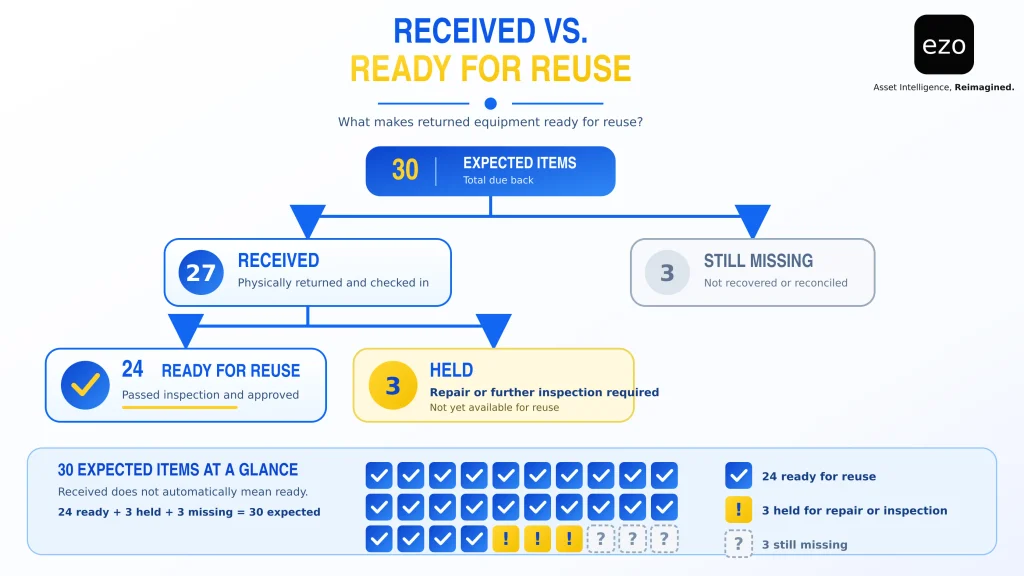
Consider a warehouse expecting 30 reusable tools. Only 27 are returned, and three are missing. During inspection, the warehouse places three of the 27 returned tools on hold for repairs or missing components, leaving 24 ready for reuse.
A system that equates check-in with availability would show 27 tools available, even though only 24 have passed the required checks. If the next job requires 26 tools, the shortage becomes apparent at the counter rather than during planning. The three missing tools remain under investigation and must not be counted as either physically received or ready for issue.
What information should an equipment return record include?
A return record should allow someone who was not present during the transaction to reconstruct what happened, what was found, and how the equipment was handled. Organize the record into four groups:
- Return data: Asset or stock identifier, returning custodian, last operator, expected and actual return dates, and receiving location.
- Equipment-specific data: Serial number for serialized assets, and expected and received quantities for stock items.
- Condition data: Declared and verified condition, identified discrepancies, maintenance references, and supporting photographs or documents.
- Decision data: Final disposition, approving person, and decision timestamp.
Preserve the original inspection findings and maintain a record of every subsequent correction rather than overwriting earlier observations. For example, an item-level audit trail can document a kit returned with missing components and subsequently completed. Verify how your system records corrections, maintains historical entries, and controls who can modify return records.
How to measure equipment return performance
Count serialized assets by item and quantity-tracked stock by unit, report them separately, and compare sites only where counting methods match. The examples use the illustrative 30-tool return.
| Metric | Formula | Example | Watch for |
| Receipt rate | Received expected units ÷ expected units × 100 | 27 ÷ 30 = 90% | Missing items closed without investigation |
| First-pass release rate | Items released without rework ÷ items received × 100 | 24 ÷ 27 = 89% | Rising because inspection became less strict |
| Return-to-reuse turnaround | Median time from receipt to authorized release, reported with open-hold aging | Measured per item | Faster release achieved by skipping checks |
| Exception rate | Items with at least one discrepancy or hold ÷ expected items × 100 | 6 (3 missing + 3 held) ÷ 30 = 20% | A falling rate because nobody records exceptions |
| Exception aging | Median days open, and count past the agreed due date | Measured across open exceptions | Old holds nobody owns |
Count each affected item only once when calculating the exception rate, while tracking individual discrepancies separately for root-cause analysis.
However, these metrics can improve for the wrong reasons. A team measured on turnaround time and first-pass release rates may improve both by reducing inspection depth. To guard against this, pair them with a first-use defect rate: the number of released items with a defect identified during their first reuse, divided by the number of released items reused within a defined observation window, multiplied by 100.
Classify each defect according to whether it could reasonably have been identified during the return inspection. Only defects that should have been detected at that stage should count against inspection quality. The next crew’s response to the condition question at intake provides one source of these defect reports.
Review equipment KPIs by equipment class rather than applying a single turnaround target across all equipment types. A torque wrench and a generator have different inspection requirements, maintenance needs, and readiness expectations.
To see how check-in records, custody history, and service records work together in one system, talk to our team about EZO EAM.
How EZO EAM supports equipment returns and reuse readiness
EZO EAM links equipment returns to their respective records, maintaining individual custody and service histories for tracked assets while recording Asset Stock by quantity. The following features support different stages of the return process:
- Scan-assisted check-in: Quick Check-In allows staff to search for or scan item labels when checking in Assets, Asset Stock, and Bundles, including individual items within a bundle. Asset Stock return locations vary depending on the check-in method and account settings, so confirm these configurations before implementing a multi-site return procedure.
- Partial stock returns: The mobile app’s Mass Asset Scan feature supports partial Asset Stock returns, applying returned quantities to the earliest outstanding checkouts first (first in, first out).
- Declared condition: Custom fields can be added to check-in forms to capture information such as damage reported at the time of return. This feature requires the Advanced plan or above.
- Maintenance holds on return: Service Triage, available under Settings > Add-ons, automatically places an asset into maintenance for a configured duration whenever it is checked in. The setting can be applied across all groups or limited to selected groups.
- Service records: Starting a service changes an asset’s status to Maintenance. Once completed, the service record captures costs, comments, and consumed inventory in the asset’s service history. Inspection findings can also be documented in the service comments. Basic service records require the Advanced plan or above.
Points to evaluate: Service Triage determines the duration of a maintenance hold through its configured time setting, not through an inspection result. Your organization must still define inspection criteria, document findings, assign release authority, and verify that all required checks have been completed.
Work order management, preventive maintenance, and inspection checklists are available through the separately priced CMMS add-on on the Premium plan or as part of the Enterprise plan. The CMMS add-on is priced per admin user, while the core subscription is priced according to item count. These pricing details are based on the EZO EAM pricing page, reviewed on October 30, 2026.
Conclusion
An equipment return is complete only when the organization knows what physically came back, what condition it is in, what remains outstanding, and who authorized its next disposition. Check-in alone closes custody in the system; it does not establish readiness for reuse.
A structured return procedure separates custody from readiness, encourages accurate fault reporting, and ensures that every unresolved exception has an assigned owner and a defined next action.