Key Takeaways:
- A shared, authoritative equipment register gives procurement teams visibility into existing assets across departments and locations.
- Equipment ownership does not equal availability; status, custody, reservations, maintenance, location, and condition determine whether an asset can meet new demand.
- Standardized equipment requests create a consistent pre-purchase decision point and reveal recurring demand, location shortages, and purchasing patterns.
- Evaluate existing equipment for reuse, reassignment, transfer, repair, or reservation before approving a new purchase.
- Procurement and asset records should remain connected after purchase so new equipment becomes visible and does not create future duplicate-purchase risk.
- Duplicate-purchase prevention should distinguish gross avoided purchase spend from net procurement benefit after the costs of reusing existing equipment.
- Effective duplicate-purchase controls require asset data governance, standardized identifiers, consistent equipment classifications, and clear ownership of equipment master data.
In a multi-site organization where departments maintain separate equipment records, a team may need a piece of equipment, check its local records, find nothing available, and submit a purchase request.
The purchase is approved.
A few weeks later, someone discovers that another department already owns the same equipment. It may be at another location, assigned to a different team, or simply unused.
Incomplete equipment visibility, disconnected requests, and missing pre-purchase checks can all contribute to avoidable purchases. When departments and locations maintain separate equipment records, procurement teams may not see what the organization already owns, where it is, who has it, or when it will become available. This increases the risk of duplicate purchases.
To prevent duplicate equipment purchases, organizations need one authoritative view of equipment across departments and locations, combined with a standard pre-purchase check. The process should verify specifications, availability, custody, condition, reservations, maintenance status, and transfer feasibility before approving a new purchase.
This guide shows procurement, asset, and operations teams how to build that process.
Why duplicate equipment purchases happen
Avoidable purchases can occur when teams cannot see suitable equipment, incoming orders, or commitments made to other departments. Fragmented records contribute to the problem, but visibility alone is insufficient. Procurement also needs a defined review, permission to release existing equipment, and a way to secure that equipment for the approved requirement.
The control should answer two questions before another order is placed: can existing or incoming equipment meet this requirement, and has that capacity already been promised elsewhere?
An avoidable duplicate purchase occurs when suitable existing or incoming equipment could meet the requirement, but that alternative is missed during approval. More often, they happen because the information needed to make a better decision is fragmented.
Departments maintain separate equipment records
A maintenance department may track its equipment in one spreadsheet while operations uses another system. A regional office may maintain its own inventory, while procurement only sees approved purchase requests.
Each team may have accurate information about its own equipment, but nobody has a complete picture.
This creates a simple problem:
Visibility into existing and incoming equipment strengthens procurement’s ability to identify avoidable purchases. Determines whether it can be reassigned.
Equipment records are spread across systems
Equipment information can live in:
- Spreadsheets
- Procurement systems
- ERP records
- Department databases
- Email threads
- Shared drives
- Local inventory tools
Even when the information exists, finding and reconciling it can take more time than approving the purchase.
Ownership does not mean availability
Knowing that an organization owns 50 generators does not mean 50 generators are available for a new request.
Some may be:
- Assigned to another department
- Reserved for upcoming work
- Under maintenance
- In transit
- At another location
- Awaiting inspection
- Retired, missing, or otherwise unavailable
A basic inventory list can confirm that an organization owns an asset, but it may not show whether that asset can actually meet a new requirement. A useful equipment record should connect inventory, location, custody, availability, reservations, maintenance, and status.
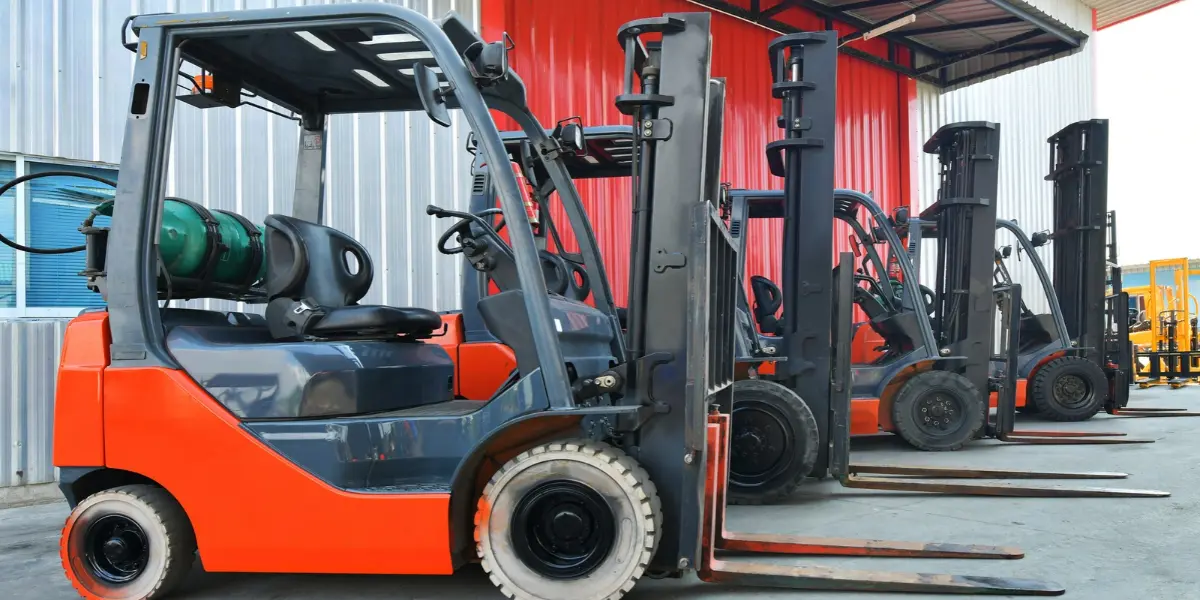
For example, “Forklift — Location A” tells procurement where an asset is. A more useful record also shows who has custody, when it becomes available, whether it is reserved, whether maintenance is scheduled, and whether it is currently operational.
The goal is to give procurement enough context to determine whether existing equipment can realistically meet the request before approving another purchase.
Purchasing happens without an availability check
Many purchasing processes ask whether a department needs equipment but not whether the organization already has equipment that can meet the requirement.
That creates a gap between equipment demand and equipment visibility.
A stronger process makes an availability check part of the purchase decision.
What should teams check before buying equipment?
Before approving a new equipment purchase, teams should be able to answer a few basic questions about existing assets.
| Information to check | Why it matters |
| Equipment type | Identifies comparable assets |
| Specifications and capacity | Confirms functional equivalence |
| Quantity | Shows whether existing supply can meet demand |
| Location | Reveals equipment at other sites |
| Custodian | Shows who currently has the equipment |
| Status | Separates usable from unavailable assets |
| Condition | Determines whether it can be reassigned |
| Availability date | Shows when it can be used |
| Reservation status | Shows committed future demand and helps avoid conflicting allocations |
| Maintenance status | Identifies equipment temporarily unavailable |
| Transfer feasibility | Shows the cost and lead time to move equipment |
| Purchase history | Shows prior purchases and recurring demand patterns |
| Open purchase orders and incoming transfers | Identifies equipment already committed, its intended recipient, and expected readiness date |
Distinguish an avoidable duplicate purchase from a duplicate record or excess capacity. An avoidable duplicate purchase adds capacity that suitable existing or incoming equipment could have supplied. A duplicate record represents the same physical asset more than once. Excess capacity means equipment exceeds operational requirements, even if its original purchase was justified. Each requires a different response: purchasing review, record reconciliation, or redeployment planning.
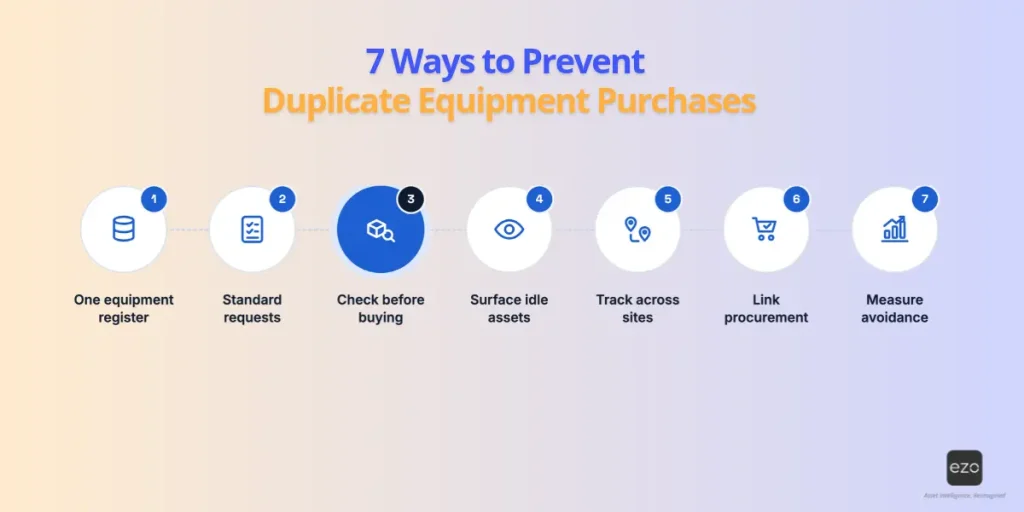
7 ways to prevent duplicate equipment purchases
1. Create one authoritative equipment register
The first step is to establish a shared record of equipment across departments and locations.
Use the pre-purchase checklist above as the minimum data standard for each equipment record. The goal is to give procurement and operations teams one authoritative source for understanding what an asset is, where it is, who has custody, and whether it can meet a new requirement.
When the same equipment is represented differently across systems, teams must reconcile records manually. A shared asset record gives departments and procurement a common reference point.
2. Standardize equipment requests before procurement
A purchase request should capture enough information to determine whether existing equipment could satisfy the requirement.
Instead of simply submitting: “We need two more generators.”
A structured request should capture:
- Equipment type
- Required quantity
- Required specifications
- Intended department
- Intended location
- Required ready-for-use date
- Expected end date or duration
- Latest acceptable delivery date, allowing for setup and inspection
- Business justification
- Existing equipment checked
- Preferred delivery date
The request can then move through a defined review and approval process.
This creates a consistent decision point before procurement commits spending.
It also creates a record of demand. Over time, those requests can reveal recurring equipment needs, locations with shortages, and opportunities to standardize purchasing.
3. Check existing equipment before approving a purchase
This should be the central control in the process.
Before approving a purchase, check whether suitable equipment already exists across departments and locations. Look first at equipment that is:
- Available at another location
- Returning from maintenance
- Becoming available after a reservation
- Held as surplus
- Assigned to an operation with excess capacity, subject to demand and critical-spare needs
Then determine whether the equipment is actually suitable for reuse. Consider its specifications, capacity, condition, required timing, operational criticality, location, and the cost and lead time of transferring it.
An asset that is idle or underused is not automatically surplus. Idle equipment is not currently being used; underused equipment operates below an agreed utilization target over a defined period; assess seasonal demand and reserve requirements before treating it as redeployable; s surplus equipment is no longer required for its current operational need. Evaluate these categories before reassignment or transfer rather than treating them as interchangeable.
If existing equipment appears suitable, confirm with the releasing department that moving it will not compromise scheduled work, seasonal demand, or critical-spare coverage. Confirm its condition and readiness date before committing it.
Then reserve the asset or record a controlled hold against the request, using the system’s supported workflow. Include the required usage period, responsible owner, and review or expiry date. Recheck availability before final approval and release the hold promptly if the request changes or is canceled.
This closes the gap between finding equipment and securing it: two departments should not approve separate reuse plans against the same available unit.
Define who owns the availability check
The availability check should have a clear owner rather than becoming an informal step that every department handles differently.
- Requester: Defines the equipment requirement, specifications, quantity, and required date.
- Equipment or asset manager: Checks existing equipment and determines whether a suitable asset is available or reusable.
- Current owning department: Confirms future demand, critical-spare requirements, and permission to release the asset.
- Procurement: Confirms the purchasing requirement and evaluates the cost and practicality of reuse or transfer.
- Final approver: Approves the purchase or documents the reason an exception is justified.
- Releasing department: Confirms future demand, authorizes release, and identifies any operational restrictions.
This division of responsibility can vary by organization, but the owner of the availability check should be explicit.
4. Make idle and surplus equipment visible
A company may own equipment that is technically available but practically invisible.
For example, a machine may be sitting unused at one location because its local team no longer needs it. Another location may be preparing to purchase the same machine because its team cannot see the first one.
That is a visibility problem.
Organizations should regularly identify:
- Idle equipment
- Surplus equipment
- Underused equipment
- Equipment approaching retirement
- Equipment available after a project ends
- Equipment held at locations with lower demand
This information can support reassignment and redistribution decisions.
The objective is not to maximize utilization of every asset. Some equipment must remain available as spare capacity, and some equipment may not be worth moving economically.
The objective is to make potentially reusable equipment visible before new demand becomes new spending.
5. Track equipment across locations
Cross-site visibility becomes particularly important as organizations grow.
When equipment moves between locations, update its asset record so procurement and operations can see its current location, custody, status, reservations, maintenance state, and availability. This reduces the risk of a department overlooking suitable equipment at another site.
Instead of asking another site whether it has a spare piece of equipment, teams can start with the shared asset record and determine whether an existing asset can meet the requirement.
6. Connect procurement to the asset record
New purchases should become visible in the authoritative equipment view when the order is committed, rather than waiting until delivery. Record incoming equipment separately from equipment ready for use, including its purchase order reference, quantity, intended recipient, and expected readiness date.
This view can come from one platform or a governed connection between procurement and asset systems. Define which system owns each record and how changes are reconciled.
Request → Existing and incoming supply check → Reuse commitment or purchase approval → Purchase order, if needed → Receipt and inspection → Ready-for-use asset record → Assignment and ongoing updates
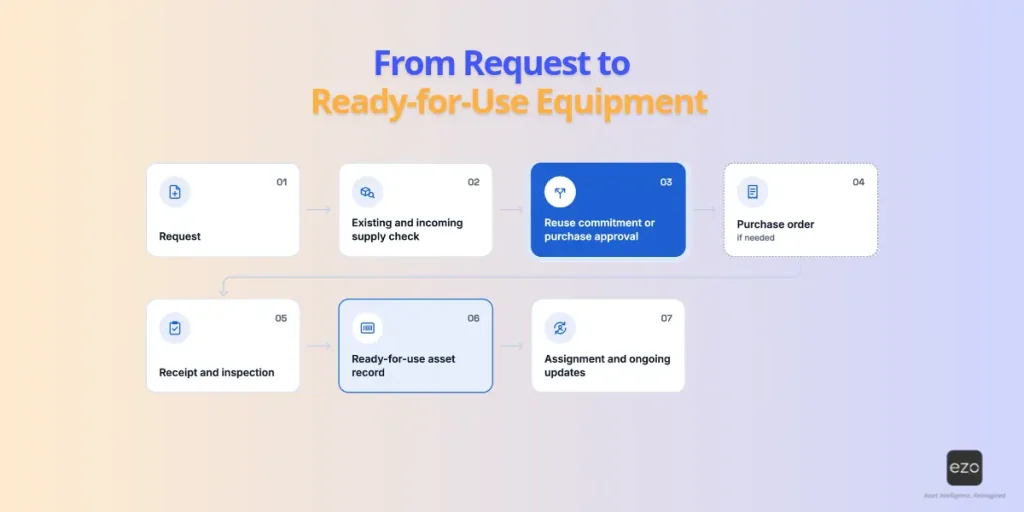
Confirming an order does not make the equipment available. Receipt, installation, inspection, or other acceptance steps may still be required.
This creates continuity between procurement and asset management.
Without that connection, an organization can solve today’s duplicate-purchase problem only to create tomorrow’s visibility problem.
For example, if a new generator is purchased but never properly added to the equipment register, another department may eventually search the inventory, find nothing available, and submit another request for the same type of generator.
The asset record therefore needs to remain current after the purchase.
Hypothetical example: two plants need the same equipment
Plant B requests two portable generators for a six-week maintenance shutdown. A cross-site review finds one suitable unit at Plant A and another already ordered for Plant B. The incoming unit is scheduled to arrive and pass acceptance checks before the shutdown.
Plant A confirms that releasing its generator will preserve its required backup coverage. The asset manager verifies its condition, reserves it for Plant B’s usage period, and records the transfer against the request. Procurement confirms the existing order’s delivery and readiness dates.
Plant B’s requirement can therefore be met through one transfer and one existing order. Neither unit is treated as ready merely because it appears in a register: the transfer requires release approval, and the incoming unit requires receipt and acceptance.
If Finance validates that the transferred unit replaces an otherwise necessary $12,000 purchase, with $1,500 in incremental transport, inspection, and setup costs, the estimated net avoided acquisition spend is $10,500. The unit already on order is excluded from that calculation because its purchase remains committed.
7. Measure procurement avoidance
If preventing duplicate purchases is an operational objective, measure both the activity and its financial impact.
Useful operational indicators include:
- Duplicate purchase requests prevented: Requests resolved through existing or incoming equipment before a new order was placed.
- Requests fulfilled from existing equipment: Requests satisfied through available equipment rather than a new purchase.
- Equipment reassigned instead of purchased: Existing equipment reassigned to meet a new requirement.
- Cross-site transfers completed: Existing equipment transferred between locations to meet demand.
- Idle equipment returned to service: Previously idle equipment returned to productive use.
- Purchase requests approved after an availability check: Requests where existing equipment was reviewed but a new purchase remained justified.
These are separate operational indicators and should not be summed. A single request can appear in more than one category. For example, a request fulfilled through a cross-site transfer may also count as a request fulfilled from existing equipment.
For financial reporting, separate gross avoided purchase spend from the costs of reusing existing equipment.
Define what qualifies before reporting avoided spend. Count a unit only when a documented requirement was fulfilled through existing equipment and a new purchase was the credible alternative. Link the outcome to the request, asset, fulfillment evidence, and comparable purchase cost.
Separate purchases canceled from purchases merely deferred. A reservation that later falls through is not a completed avoidance outcome. Exclude speculative requests that would not have proceeded and do not count the same equipment unit more than once against the same requirement.
Compare alternatives over an agreed period. Include material incremental costs such as transport, repair, inspection, installation, and disruption at the releasing site. Record operational benefits separately when they cannot be credibly valued.
Gross avoided acquisition spend = sum of validated avoided units × comparable acquisition cost for each equipment type
Net avoided acquisition spend = gross avoided acquisition spend − incremental reuse costs over the agreed comparison period
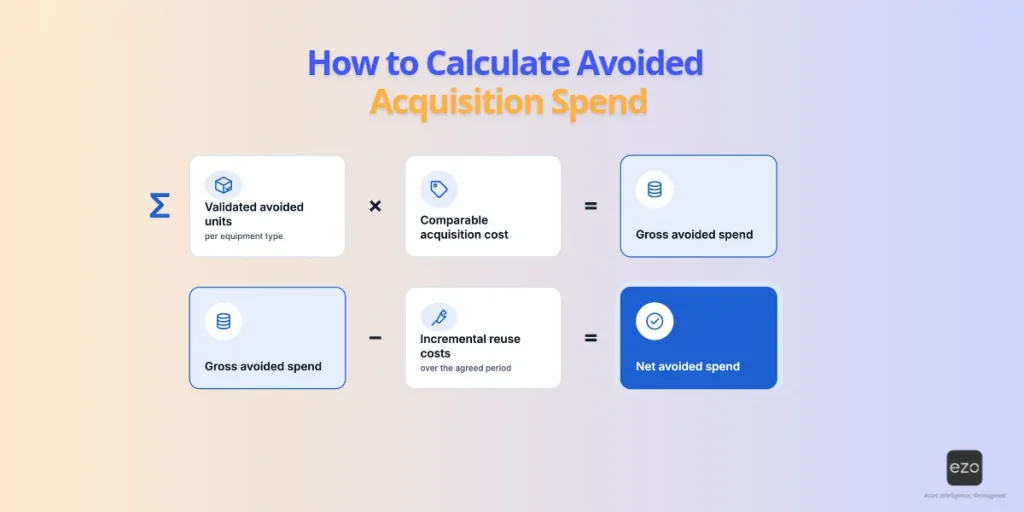
Count only documented requirements fulfilled through reuse where a new purchase was the credible alternative. For different equipment types, calculate each line separately and sum the results. Separate canceled purchases from purchases merely deferred.
Incremental reuse costs can include transportation, repair, refurbishment, configuration, inspection, installation, deinstallation, and incremental disruption or replacement costs at the releasing site required to put existing equipment into service.
Use equipment units, rather than purchase requests, as the unit for the financial calculation. Finance should validate the comparable acquisition cost and incremental reuse costs before reporting the result.
Net procurement benefit is not automatically realized cash savings. A prevented request may never have resulted in a purchase, so organizations should distinguish prevented demand from financially validated avoided spend.
Use a pre-purchase decision check
Before approving a new equipment purchase, run the request through five questions:
- Does suitable equipment already exist? Check across departments and locations.
- Can it meet the requirement? Compare specifications, quantity, condition, and required timing.
- Is it actually available? Check custody, reservations, maintenance status, and upcoming demand.
- Is reuse practical? Compare reassignment or transfer costs, lead times, and operational impact with buying new.
- If reuse is not practical, is the purchase justified? Document the reason and proceed through the normal approval process.
The equipment or asset manager should own the availability check, while procurement confirms the purchasing requirement and the designated approver authorizes the purchase. An exception may be justified when existing equipment does not meet the required specifications, will not be available in time, is in unsuitable condition, is needed as critical spare capacity, or cannot be transferred at a reasonable cost.
Document the availability check, alternatives considered, approval, and any exception before the purchase moves forward. Record the request ID, reviewer, review date, required usage period, candidate asset IDs, incoming orders checked, releasing owner’s decision, and final outcome. This turns the availability check into a repeatable procurement control without creating unnecessary approval steps.
What should the procurement policy require?
A practical pre-purchase control can require five things:
- Availability check completed: Existing equipment was reviewed across relevant departments and locations.
- Requirement documented: Specifications, quantity, timing, and business need are clear.
- Alternatives considered: Reassignment, transfer, repair, or reservation were evaluated where relevant.
- Approval recorded: The appropriate procurement and business approver reviewed the request.
- Exception documented: If existing equipment was not used, record the reason.
Keep a record of the pre-purchase decision
Procurement should be able to reconstruct why a requirement was fulfilled through reuse, transfer, repair, an incoming order, or a new purchase. Record the following before committing spending:
| Decision field | What to record |
| Requirement | Request ID, specifications, quantity, location, and usage period |
| Supply reviewed | Candidate asset IDs, open orders, incoming transfers, and competing requests |
| Readiness | Condition, inspection requirements, availability, and verification date |
| Release authorization | Releasing owner, decision, and operational restrictions |
| Commitment | Reservation or hold reference, responsible owner, and expiry |
| Outcome | Reuse, transfer, repair, incoming supply, or new purchase |
| Approval or exception | Approver, date, rationale, and supporting evidence |
| Fulfillment | Equipment delivered, readiness confirmed, and actual completion date |
Apply review effort according to purchase value, operational risk, and urgency. Emergency requests can follow an expedited approval path, with a named owner responsible for completing the record afterward.
What should you do when the equipment already exists?
Finding an existing asset does not automatically mean you should reject a purchase. Choose the appropriate action based on availability, condition, timing, location, and total reuse cost.
| Situation | Potential action |
| Another department can release suitable equipment without compromising its requirements | Reassign |
| Equipment at another site can arrive ready for use within the required period at an acceptable cost | Transfer |
| Suitable equipment becomes ready before the required start date and remains available throughout the usage period | Reserve |
| Equipment can be repaired, inspected, and released in time at an acceptable cost | Repair and reuse |
| Suitable equipment is already ordered and can meet the requirement | Confirm incoming allocation |
| Existing and incoming equipment cannot meet the requirement | Justify and approve a new purchase |
The goal is informed purchasing, not purchasing avoidance at any cost.
How EZO EAM helps prevent duplicate equipment purchases
These controls are easier to sustain when requests, availability, and purchase records live in one system. EZO EAM connects equipment records with operational workflows so teams can evaluate existing equipment before approving new purchases and keep newly purchased equipment visible afterward.
Check recorded availability for the required dates
EZO EAM’s Request Portal supports reservation, check-in, and general requests. Its availability information helps teams determine whether equipment already exists and is available for the requested dates, subject to recorded reservations, maintenance, and account settings, giving procurement and operations a more current view than a static inventory list. Confirm condition and release readiness with the asset owner before committing equipment to another team.
Route equipment and purchase requests
The Request Portal captures equipment and general requests, while configured purchase request workflows handle purchasing approvals. Define who checks existing and incoming supply, where the decision is recorded, and how suitable equipment is reserved before a purchase proceeds.
This creates a defined decision point before equipment is issued or a purchase moves forward.
Reassign or transfer existing equipment
When suitable equipment already exists, teams can use asset records, location, custody, and availability information to determine whether reassignment or transfer is practical. The decision can then account for condition, timing, transportation, and other reuse costs.
Connect purchase orders to the equipment record
EZO EAM’s purchase order workflow allows teams to receive items against a purchase order, with an option to update the product catalog when items are received. This helps carry procurement information into the system used to manage the equipment afterward.
Keep maintenance context connected
Equipment availability also depends on whether an asset is operational and ready for use. Connecting maintenance information with the asset record gives teams additional context when deciding whether to reuse, transfer, repair, or purchase equipment. Configure whether maintenance makes equipment unavailable, and confirm inspection or release requirements before returning it to service.
EZO EAM does not eliminate the need for procurement judgment. It gives teams connected equipment, request, availability, and purchase information to make that judgment with better context. These workflows support a pre-purchase review; they should not be presented as an automatic duplicate purchase detector or a mandatory purchasing block without a demonstrated configuration.
Plan note: Purchase orders are available from Advanced. The Request Portal and multi-tier approvals require Premium or Enterprise. Basic service records start on Advanced; formal work orders and preventive maintenance require the Premium CMMS add-on or Enterprise.