
Disclosure: This guide is published by EZO. EZO EAM is our product and appears in this comparison. Every platform is assessed against the same published criteria set out in How we evaluated these platforms. Where a vendor documents plan gating, we record it, including for our product. We do not rank the platforms against each other; we group them by the workflow they are built for.
The best approval workflow software for equipment requests depends on what happens after someone clicks “Approve”. Maintenance-centered platforms convert approved requests into work orders and purchase orders. Equipment-centered platforms connect the approval to availability, reservations, checkout, custody, and fulfillment. Enterprise EAM platforms are embedded in a wider governance structure.
This guide compares ten platforms: EZO EAM, Cheqroom, Asset Panda, ToolSense, MaintainX, UpKeep, Limble, eMaint, Fiix, and IBM Maximo Application Suite. Each is assessed against the same criteria within its relevant workflow family rather than across all platforms. If you are starting from the operational side of the problem, our guide to asset request fulfillment software covers the same ground from a fulfillment perspective.
Key Takeaways
- The right platform depends on what approval triggers: equipment fulfillment, maintenance work, purchasing, or enterprise governance.
- Approval alone does not secure equipment. Effective workflows connect the decision to availability, reservation, fulfillment, custody, and lifecycle records.
- Approvers need equipment context before making a decision, including availability, location, condition, existing reservations, custody, and expected returns.
- Evaluate vendors with realistic scenarios that match your workflow family. Feature lists cannot show where fulfillment breaks down.
- Compare the plan that includes your required workflow capabilities, not entry-level pricing that may exclude critical approvals or routing.
- Design workflows around operational outcomes and exceptions. Define what approval triggers when equipment becomes unavailable, overdue, or restricted.
- Measure approval time separately from approval-to-fulfillment time to distinguish decision bottlenecks from downstream execution delays.
Introduction
Equipment requests rarely end when someone clicks Approve.
A field technician needs a diagnostic device for next week’s job. A production team needs shared equipment for a new project. An employee needs to borrow a camera for a defined period. In each case, approval is just one step in a longer process. The operations team still has to answer: Is the equipment available and unreserved? Where is it, and is it in working condition? Who fulfills the request, and who becomes responsible for it afterward?
This is what separates approval workflow software for equipment requests from generic approval automation. A basic workflow moves a request from submission to decision. An equipment-aware workflow connects that decision to availability checks, reservations, purchasing, fulfillment, custody tracking, and the asset lifecycle history.
Every platform in this guide records a decision. They diverge on what the decision triggers. We use a six-level model to describe that difference:
- Request capture
- Approval control
- Equipment context
- Fulfillment
- Accountability
- Lifecycle connection
The gap between levels 2 and 4 is where much of the buyer disappointment occurs. An employee can be approved in seconds and still wait days for equipment because approving a request and placing a hold are different operations. We call this distance the approval-to-fulfillment gap. It is our editorial model, not an industry standard, and is explained later in this guide. The same gap appears in the hidden costs of informal equipment handoffs, where the decision is recorded but the handover is not.
One caveat before the comparison: for maintenance-centered platforms, fulfillment means completing work orders rather than a physical handoff. Levels 4 to 6 apply differently there, not as a lesser version of the same workflow. A lower level number describes a different workflow, not a worse product.
The sections below compare the ten platforms across request intake, routing, approvals, equipment context, availability, fulfillment, custody, integrations, auditability, pricing, and implementation, with particular attention to what happens after the decision.
Quick answer
| Your recurring request | Start with | Also consider |
|---|---|---|
| “I need this shared equipment for these dates” | EZO EAM, Cheqroom | Asset Panda |
| “This asset needs repair” | MaintainX, Limble, UpKeep | eMaint, Fiix |
| “We need to buy this” | Limble, UpKeep | eMaint |
| “This request needs enterprise governance” | IBM Maximo Application Suite | eMaint |
| “We need both circulation and maintenance” | EZO EAM, ToolSense | IBM Maximo Application Suite |
Compare
- How we evaluated these platforms
- Platform comparison at a glance
- Equipment and asset operations platforms: EZO EAM · Cheqroom · Asset Panda · ToolSense
- Maintenance-centered platforms: MaintainX · UpKeep · Limble · eMaint · Fiix
- Enterprise EAM platforms: IBM Maximo Application Suite
- Capability matrix
- The approval context test: four demo scenarios
- Which platform fits your workflow
Understand
- What is an equipment and asset request approval workflow?
- What types of asset and equipment requests need approval?
- How equipment approval workflows differ from generic approval automation
- What equipment approval workflow software should include
- Equipment-native vs. generic workflow platforms
Implement
- How to design an equipment approval workflow
- Metrics to track
- Frequently asked questions
How we evaluated these platforms
Candidate universe. We reviewed platforms marketed for equipment, asset, or maintenance request approval workflows. Generic workflow automation platforms, IT service management suites, and open-source asset trackers were excluded because they address adjacent problems and are covered separately. For background on how a maintenance intake queue differs from an equipment queue, see our explainer on work requests.
Inclusion criteria. A platform is included if it meets all three criteria:
- Physical asset or equipment records: It manages requests against these records.
- Native approvals: It provides a platform-native approval step rather than integrating through another system.
- First-party documentation: It publishes enough first-party documentation to evaluate the workflow.
Evidence sources. Capability and pricing claims are drawn from first-party product and support documentation and vendor pricing pages. Third-party review platforms are used only for user experience observations, never for feature availability. Vendor-submitted feature checklists on review sites are often out of date.
How to check our work. Every plan-gating claim in this guide links inline to the specific vendor document and includes the date checked, rather than relying on a general reference at the end of the section. Where a claim rests on third-party analysis rather than vendor documentation, as with Asset Panda’s pricing structure and Limble’s feature-to-tier mapping, we say so at the point of the claim. Where a vendor publishes nothing, we write “not published.”
Criteria. The same nine capability areas listed above, plus pricing transparency and implementation scope, are applied to every platform.
We do not rank these platforms against each other. A platform can be an excellent choice for one type of equipment workflow and a poor fit for another, and a ranked list would obscure that distinction. Instead, we group platforms into three families: equipment and asset operations, maintenance-centered, and enterprise EAM, and compare within each family. The ten profiles are numbered in sequence so you can navigate and cite them. The numbers do not indicate rank: number 1 is not our top pick, and number 10 is not our last. The demo test in this guide is also segmented by family for the same reason: a shared equipment reservation scenario is not a fair instrument for evaluating a CMMS.
Plan gating. Where a vendor documents that a capability requires a specific tier, we name the tier. Where a vendor does not publish tier details, we say so rather than assuming inclusion. This can disadvantage vendors that publish more detail, including us, so read an unmarked capability as undocumented, not as included in every plan.
Verification date. All pricing, plan, and ownership claims were checked on 18 August 2026. SaaS packaging changes frequently, so confirm directly with the vendor anything that affects your budget.
Platform comparison at a glance
| Platform | Family | Primary workflow focus | Main post-approval action |
|---|---|---|---|
| EZO EAM | Equipment and asset operations | Equipment requests and fulfillment | Reserve, check out, transfer, purchase |
| Cheqroom | Equipment and asset operations | Shared equipment bookings | Approve booking, reserve, check out |
| Asset Panda | Equipment and asset operations | Configurable asset requests and actions | Assign, check out, update asset workflow |
| ToolSense | Equipment and asset operations | Facility asset and maintenance workflows | Approve or escalate work and asset actions |
| MaintainX | Maintenance-centered | Maintenance work requests | Convert request into work order |
| UpKeep | Maintenance-centered | Maintenance and purchasing | Work order or purchase order |
| Limble | Maintenance-centered | Maintenance and purchasing | Work task or approved purchase |
| eMaint | Maintenance-centered | Maintenance and reliability approvals | Authorized work or procurement |
| Fiix | Maintenance-centered | Work requests and automation | Maintenance workflow |
| IBM Maximo Application Suite | Enterprise EAM | Enterprise service and asset requests | Workflow-driven fulfillment |
Equipment and asset operations platforms
The physical asset is central to the request, so availability, asset records, reservations, checkout, and custody carry more weight than the depth of work order functionality.
1. EZO EAM: Best for request-to-fulfillment equipment workflows
Best for: Teams that need equipment requests to move from submission and approval through reservation, fulfillment, checkout, custody, and ongoing asset management.
Plan note: The capabilities this guide treats as EZO EAM’s differentiators, including request handling, multi-tier approvals, automation, and smart dispatch, require the Premium tier. Purchase orders, custody transfers, and custody audits require Advanced. See the EZO pricing plans for current pricing. Full CMMS functionality is packaged and priced separately for admin users. If maintenance workflows are in scope, budget for the Premium tier plus the relevant CMMS package rather than the entry tier.
Why it fits. What distinguishes EZO EAM is what happens after approval. Its Request Portal gives requesters a structured entry point for reservations and general requests, while workflows support conditional and multi-tier approval paths.
Availability, reservations, equipment checkout, transfers, custody, purchasing, and fulfillment are managed in the same system as the request. The original submission remains connected to the equipment handed over, rather than requiring a separate manual step at each stage.
Watchouts.
- Every request workflow capability that justifies EZO EAM for this use case requires the Premium tier or higher. Entry-tier pricing will not deliver the workflow described here.
- Maintenance functionality is packaged separately from the asset and request tiers. Teams that need both should scope both.
- The platform assumes a willingness to configure workflows to align with real operational processes.
- Implementation typically covers request types, approval rules, asset records, locations, roles, fulfillment steps, and integrations.
Not the right fit if you only need generic form approvals and have no meaningful physical asset or equipment workflow.
Pricing and plan
| Pricing visibility | Published tiers |
|---|---|
| Billing metric | Tiered plans; CMMS functionality priced separately by admin user |
| Relevant tier | Premium includes request handling, multi-tier approvals, automation, and smart dispatch. Advanced includes purchase orders, custody transfers, and custody audits. |
| Key gated capability | Request handling and multi-tier approvals: Premium |
| Trial or demo | Available |
| Implementation fees | Not published; request a quote |
2. Cheqroom: Best for booking and approving shared equipment
Best for: Organizations where teams regularly request shared equipment for specific dates and administrators need approval, availability, reservation, checkout, and return controls in one place.
Why it fits. Cheqroom’s data model centers on shared equipment operations: booking, availability, checkout, and return. Requests submitted through the booking portal enter an approval queue. An administrator reviews and confirms them, converting the pending request into an active reservation. The same queue handles internal team members and external users.
Approval requirements can be tiered: low-value items can be auto-approved, while high-value or high-risk items require manual sign-off. Availability rules can be set by role, item, and location, and the platform supports reservations, checkouts, digital sign-offs, returns, and complete equipment histories.
Watchouts.
- Per-admin billing means the cost is driven by the number of people who need elevated permissions, not the total number of users. See Cheqroom pricing.
- Count admin seats carefully before comparing headline prices. Location and workspace allowances vary by tier, which can matter more to multi-site buyers than the per-seat rate.
- Test approval flow complexity and conditional approver depth against your actual routing rules during a demo.
- A booking-first platform is more likely to fall short when you need a broader workflow engine. Maintenance and purchasing capabilities are more limited than those of the CMMS platforms in this guide.
Not the right fit if you need deep industrial maintenance, reliability engineering, or broader enterprise EAM capabilities.
Pricing and plan
| Pricing visibility | Published |
|---|---|
| Billing metric | Per admin seat, per workspace; end users unlimited |
| Relevant tier | Core / Business / Enterprise, plus custom Enterprise License Agreement (ELA) |
| Key gated capability | Location and workspace allowances scale by tier |
| Trial or demo | Free trial available at signup |
| Implementation fees | Not published; request a quote |
3. Asset Panda: Best for configurable asset request and approval actions
Best for: Organizations that need configurable asset records and workflows around requesting, assigning, checking out, and managing physical assets.
Why it fits. Asset Panda ships as a flexible framework rather than a prescriptive workflow. Administrators define asset records, request types, approval actions, and routing rules. The model supports asset requests, administrative approval or denial, checkout, assignment, expected returns, and other configurable actions centered on the asset record.
This suits organizations where the approval must reference the asset record directly rather than sit in a disconnected form or ticketing system. It is particularly relevant where requirements differ sharply by asset type or department and a prescriptive out-of-the-box workflow would be a poor fit.
Watchouts.
- Configurability shifts effort to setup. Asset records, workflows, user roles, request actions, assignment rules, and approval processes must be defined before the platform can support the intended workflow.
- Map your intended workflows before configuring the platform. Pricing scales along two axes, asset count and user seats, so growth in either dimension increases costs.
- Confirm multi-stage routing against your approval hierarchy. The platform’s strength is asset-record flexibility rather than workflow orchestration.
Not the right fit if your central requirement is complex maintenance or reliability workflow control.
Pricing and plan
| Pricing visibility | Quote only; no public rate card |
|---|---|
| Billing metric | Assets tracked and user seats, in volume tiers |
| Relevant tier | Essentials / Professional / Enterprise |
| Key gated capability | Not published; confirm workflow and approval features by tier |
| Trial or demo | Short free trial; no permanent free plan |
| Implementation fees | Not published; request a quote |
4. ToolSense: Best for facility asset and maintenance approval workflows
Best for: Organizations managing physical equipment across facilities that need asset tracking, maintenance, approvals, and escalation to work as one system.
Why it fits. ToolSense combines physical asset management with maintenance workflows for machinery, tools, and equipment. Its asset management product covers QR/NFC asset records, work requests, work orders, inventory, lifecycle tracking, approval chains, escalation rules, automated task assignment, and ERP and accounting integrations. Equipment maintenance history remains attached to each record.
This suits facility and multi-plant operations where an equipment request often becomes a maintenance or service workflow. The request remains tied to the asset record and its history, while approval and escalation rules determine what happens next. Its center of gravity is facility operations rather than shared equipment booking.
Watchouts.
- No published pricing for any tier, making early-stage budget comparison difficult.
- Equipment reservation and booking calendars are the weakest area relative to the booking-first platforms in this family. Confirm this capability explicitly if shared equipment scheduling is a primary need.
- Scope purchase approval separately from work approval; the two are not equivalent.
- Multi-site organizations should define facility and equipment workflows before scoping configuration, since approval chains and escalation rules depend on organizational structure.
Not the right fit if you need sophisticated shared equipment reservations and booking calendars rather than facility asset and maintenance workflows.
Pricing and plan
| Pricing visibility | Not published as of 18 August 2026 |
|---|---|
| Billing metric | Not published |
| Relevant tier | Not published |
| Key gated capability | Not published; confirm approval, asset management, and workflow features in the proposed package |
| Trial or demo | Demo on request |
| Implementation fees | Not published; request a quote |
Maintenance-centered platforms
Requests become work orders, purchases, or reliability processes. The governing question is whether this work should be authorized and executed. Fulfillment here means completing the work, not handing over equipment.
5. MaintainX: Best for approving maintenance and work requests
Best for: Maintenance teams that need to control incoming work requests and convert approved requests into structured maintenance work.
Ownership: Autodesk completed its acquisition of MaintainX on 3 August 2026 in a transaction valued at approximately $3.6 billion, integrating it into Autodesk Operations Solutions (Autodesk newsroom; closing confirmed in Autodesk’s Form 8-K filed the same day). Autodesk funded the purchase with cash and new borrowings. Buyers signing multi-year contracts should ask how the acquisition will affect pricing tiers, feature availability, and product roadmap.
Why it fits. MaintainX approaches approvals from a maintenance operations perspective. Request portals accept submissions from people without an account, including through QR codes tied to specific assets and locations. When an administrator approves a work request, MaintainX converts it into a work order, carries over the requester’s data, and locks the original request. If the request is declined, the requester receives the reason.
The model answers “Does this equipment need work, and should we authorize it?” rather than “Can I reserve or check out this equipment?”
Watchouts.
- Request routing to specific teams requires the Enterprise plan. MaintainX’s Work Request Settings, verified 18 Aug 2026, document this capability. It allows different departments to manage requests from their own queues, a feature often assumed to be standard. Custom fields on work requests also require Enterprise.
- Multi-site management, SSO, advanced security, and Report Builder are available only on the Enterprise plan, and Enterprise pricing is not published.
- Requester accounts are free and unlimited across all tiers, per MaintainX pricing. This materially changes total cost in operations with high operator-to-technician ratios, so factor it into per-user pricing comparisons across vendors.
- The platform does not provide shared equipment reservation or custody workflows.
Not the right fit if your primary requirement is equipment reservation, booking, custody, and circulation rather than maintenance request management.
Pricing and plan
| Pricing visibility | Published for lower tiers; Enterprise quote only |
|---|---|
| Billing metric | Per user, per month; requester accounts are free and unlimited on all tiers |
| Relevant tier | Free / Essential / Premium / Enterprise |
| Key gated capability | Request routing to teams: Enterprise. Custom work request fields: Enterprise |
| Trial or demo | Free tier available |
| Implementation fees | Premium and Enterprise include a structured onboarding program with a dedicated implementation specialist |
6. UpKeep: Best for maintenance and purchasing approval workflows
Best for: Maintenance organizations that need approval workflows that connect maintenance requests to purchasing and work execution.
Why it fits. UpKeep pairs maintenance workflow management with equipment procurement, which matters when a request involves both the work and the resources required to complete it. Technicians, limited technicians, and view-only users can submit purchase requests through a shareable link. Admins can approve or deny each request, and a fulfilled purchase order automatically restocks inventory.
Approval sits within the maintenance process rather than alongside it: a request begins as a maintenance requirement, passes through approval, and proceeds to work execution or, when parts are required, procurement.
Watchouts.
- Purchase order request approval requires Business Plus or above. UpKeep: How to Approve Purchase Order Requests, verified 18 Aug 2026, documents this requirement. Verify the tier before assuming purchase approvals are included.
- Purchase orders are not available in UpKeep’s mobile apps. UpKeep: Public Request Portal, verified 18 Aug 2026, documents this limitation. For teams whose approvers work in the field, this is a material constraint that is not apparent from the product’s mobile-first positioning.
- The public work request portal is gated to Professional or Enterprise, while the purchase order portal requires Business Plus. These are separate tier requirements, so confirm both if you need both.
- The platform does not provide shared equipment reservation or custody workflows.
Not the right fit if your primary requirement is shared equipment reservation, booking, checkout, and custody rather than maintenance and purchasing workflows.
Pricing and plan
| Pricing visibility | Published tiers; Enterprise quote only |
|---|---|
| Billing metric | Per user, per month |
| Relevant tier | Starter / Professional / Business Plus / Enterprise |
| Key gated capability | Purchase order approval: Business Plus and above. Public work request portal: Professional and Enterprise. Purchase orders are unavailable in mobile apps |
| Trial or demo | Free trial available |
| Implementation fees | Not published; request a quote |
7. Limble: Best for reviewing work requests and approving purchases
Best for: Maintenance teams that need controlled work-request intake, purchasing approvals, and spending controls.
Why it fits. Limble handles approvals across maintenance and purchasing workflows. Incoming work requests are reviewed by the appropriate team, approved or declined, and communicated back to the requester. Approved requests then become maintenance tasks. Every purchase request requires explicit approval before proceeding. Approved requests are automatically converted into purchase orders, while denied requests require the approver to document a reason.
Purchasing workflows add another layer of control through approval requirements, spending thresholds, and multi-stage purchasing. This suits workflows that begin with a maintenance requirement and frequently require parts to complete the work.
Watchouts.
- Custom approval workflows and custom roles are listed at the Enterprise tier, alongside multi-location reporting, inventory cycle counts, and SSO. This mapping comes from third-party plan analysis rather than Limble’s own published comparison. Confirm it against Limble’s current pricing page before budgeting. Basic purchase approval is not the same as configurable multi-stage approval routing, so confirm which capability your quoted tier includes.
- API access is restricted to Premium and Enterprise, which matters if approval data needs to reach an ERP or BI tool.
- Enterprise pricing is not published and requires a vendor conversation.
- The 21 CFR compliance capability is Enterprise-only and relevant for pharmaceutical and certain food production environments.
Not the right fit if you are primarily looking for equipment reservation, shared equipment booking, and custody workflows rather than maintenance operations.
Pricing and plan
| Pricing visibility | Published for lower tiers; Enterprise quote only |
|---|---|
| Billing metric | Per user, per month |
| Relevant tier | Standard / Premium+ / Enterprise |
| Key gated capability | Custom approval workflows and custom roles: Enterprise. API: Premium+ and above |
| Trial or demo | Free tier and trial available |
| Implementation fees | Standard onboarding included with annual plans |
8. eMaint: Best for configurable maintenance approvals and controlled work
Best for: Organizations that need configurable maintenance authorization, controlled procedures, procurement workflows, and reliability-focused asset management.
Why it fits. eMaint frames approvals within maintenance control and reliability governance. Work requests are reviewed and authorized before work proceeds, while higher-cost or more complex activities can require additional management oversight.
For regulated environments, eMaint provides capabilities relevant to requirements such as FDA 21 CFR Part 11 and ISO 55001. These include audit trails and authenticated, password-protected e-signatures for workflows where approval records must withstand regulatory scrutiny. Compliance remains the operator’s responsibility; the software supports the workflow rather than conferring certification. Approval here is part of a governance model rather than a request-and-checkout step.
Watchouts.
- No published pricing at any tier.
- Implementation is typically more structured than with the mid-market CMMS platforms in this family. Maintenance processes, approval authorities, procedures, procurement, signatures, asset records, and ERP integrations must work together. Define governance requirements before implementation rather than during it.
- The e-signature and compliance capabilities that differentiate eMaint may be packaged separately. Confirm which are included in the proposed quote.
- No shared equipment reservation or booking workflow.
Not the right fit if you primarily need a lightweight workflow for shared equipment booking, reservation, checkout, and circulation.
Pricing and plan
| Pricing visibility | Not published as of 18 August 2026 |
|---|---|
| Billing metric | Not published |
| Relevant tier | Not published |
| Key gated capability | Not published; confirm approval, signature, procurement, and reliability capabilities in the proposed package |
| Trial or demo | Demo on request |
| Implementation fees | Not published; request a quote; expect a structured implementation |
9. Fiix: Best for industrial work request workflows and automation
Best for: Industrial organizations that need incoming work requests to feed structured maintenance and reliability workflows.
Why it fits. Fiix, part of Rockwell Automation since 2020, approaches request workflows through an industrial maintenance lens. Custom request forms let users and guests submit and track requests. Workflows, conditions, notifications, and field updates then move those requests into the appropriate maintenance process.
Fiix connects requests directly to maintenance and reliability operations and integrates with Rockwell’s industrial control and analytics stack.
Watchouts.
- We did not find a dedicated shared equipment booking workflow in the Fiix product documentation reviewed as of 18 August 2026. This reflects an absence in the documentation we reviewed, not a confirmed absence from the product. Confirm directly if a reservation is a requirement.
- No published pricing; tiered plans vary by users and features.
- Approval configuration depth should be tested against multi-stage and threshold-based routing rather than assessed from workflow-automation marketing.
- The Rockwell integration is a genuine differentiator for industrial environments and largely irrelevant outside them. Weight it accordingly.
Not the right fit if your primary requirement is a dedicated equipment reservation and approval process for shared assets.
Pricing and plan
| Pricing visibility | Not published as of 18 August 2026 |
|---|---|
| Billing metric | Not published; tiered by users and features |
| Relevant tier | Not published |
| Key gated capability | Not published; confirm workflow, request portal, automation, and integration capabilities |
| Trial or demo | A free tier has historically been available; confirm current availability. |
| Implementation fees | Not published; request a quote |
Enterprise EAM platforms
Service requests live inside much larger asset, maintenance, inventory, procurement, and governance environments.
10. IBM Maximo Application Suite: Best for complex enterprise service requests
Best for: Large organizations that need equipment and service requests to operate within enterprise asset management, maintenance, inventory, procurement, and governance processes.
Why it fits. Rather than focusing on a single workflow, Maximo embeds service requests and approvals within a comprehensive enterprise asset management environment spanning work management, procurement, inventory, and maintenance. Self-service users or contact center agents can raise requests for services, assets, locations, or personnel.
Approval routing requires building a structured workflow process with defined nodes, conditions, and transitions rather than selecting a pre-built template. Workflow processes support manager review, rejection, reassignment, escalation, and handoff into downstream work management. Because approvals run within a full EAM environment, requests remain connected to the surrounding asset operations context. Asset hierarchy, location, work history, inventory position, and procurement status are available during approval and in downstream workflows.
Watchouts.
- Implementation scope is the dominant cost and timeline driver, not licensing. Workflow configuration, asset structures, maintenance processes, procurement, inventory, integrations, governance, and user roles must be designed before the system can support the intended workflows.
- Approval routing is built, not simply configured. Expect to model workflow processes as a project, with the specialist expertise that it implies.
- Enterprise EAM pricing varies substantially by scope, modules, users, integrations, and configuration. Establish required capabilities before comparing total cost of ownership with more specialized platforms.
- For teams needing only a focused equipment request workflow, Maximo is typically more of a platform than necessary. The enterprise implementation requirement is the specific reason, not a general assessment of the product.
Not the right fit if you simply need a lightweight workflow for shared equipment approval, reservation, and checkout.
Pricing and plan
| Pricing visibility | Not published; enterprise agreement |
|---|---|
| Billing metric | By modules, users, and deployment scope |
| Relevant tier | Suite licensing with modular application entitlements |
| Key gated capability | Not published; confirm which applications are entitled under the proposed agreement |
| Trial or demo | Trial and demo available |
| Implementation fees | Substantial; typically a formal implementation project |
Capability matrix
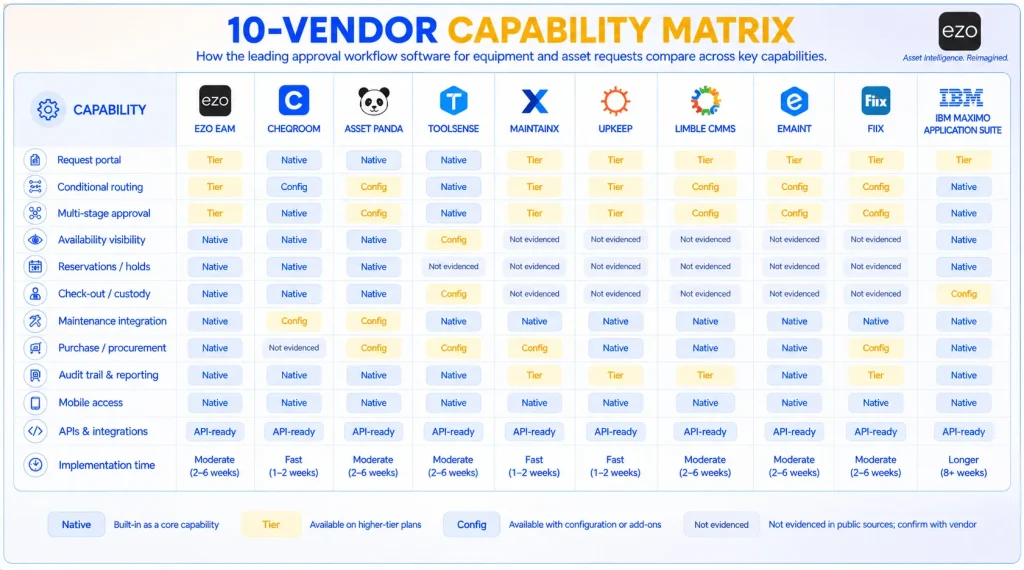
How to read the states. Each cell records what first-party documentation establishes, not what a marketing page implies:
- Native: confirmed in the vendor’s product or support documentation as a standard capability
- Tier: confirmed, but requires a specific plan; the tier is named in the vendor’s profile above
- Config: confirmed, but requires workflow or system configuration to deliver
- Not evidenced: not found in the first-party documentation reviewed as of 18 August 2026
“Not evidenced” is not the same as “absent.” It means we did not find documentation, so you should confirm directly. A red X based only on the absence of a capability from a marketing page is not evidence, and we do not record it.
Rather than counting entries, focus on which capabilities align with your primary workflow. Fewer equipment-specific capabilities are not necessarily worse if the capabilities that are present match your actual workflow and your asset utilization data.
| Capability | EZO EAM | Cheqroom | Asset Panda | ToolSense | MaintainX | UpKeep | Limble | eMaint | Fiix | IBM Maximo |
|---|---|---|---|---|---|---|---|---|---|---|
| Self-service request portal | Tier | Native | Native | Native | Native | Tier | Native | Native | Native | Native |
| Guest / no-account requests | Native | Native | Config | Config | Native | Tier | Native | Config | Native | Native |
| Conditional routing | Tier | Config | Config | Native | Tier | Config | Config | Config | Config | Native |
| Multi-stage approval | Tier | Native | Config | Native | Tier | Config | Tier | Native | Config | Native |
| Cost threshold routing | Config | Not evidenced | Config | Not evidenced | Config | Native | Native | Native | Not evidenced | Native |
| Asset-linked approval | Native | Native | Native | Native | Native | Native | Native | Native | Native | Native |
| Availability visibility | Native | Native | Native | Config | Not evidenced | Not evidenced | Not evidenced | Not evidenced | Not evidenced | Native |
| Reservations | Native | Native | Native | Not evidenced | Not evidenced | Not evidenced | Not evidenced | Not evidenced | Not evidenced | Native |
| Checkout / custody | Native | Native | Native | Config | Not evidenced | Not evidenced | Not evidenced | Config | Not evidenced | Native |
| Maintenance work orders | Native | Config | Config | Native | Native | Native | Native | Native | Native | Native |
| Purchase requests | Tier | Not evidenced | Config | Config | Native | Tier | Native | Native | Config | Native |
| Audit history | Native | Native | Native | Native | Native | Native | Native | Native | Native | Native |
Verification status. Every cell marked Tier is confirmed against the vendor documentation linked in that platform’s profile and was checked on 18 August 2026. Cells marked Native, Config, or Not evidenced reflect our interpretation of first-party product and support documentation on the same date. We have not published a per-cell citation for these, so treat them as our assessment rather than individually sourced claims, and confirm anything that will decide your purchase directly with the vendor.
The approval context test: Four demo scenarios
Feature lists tell you whether a platform supports approvals, not how those approvals behave in a real operation. Send every shortlisted vendor the same request, but tailor the scenario to the workflow family you are buying for. A shared equipment reservation scenario is not a fair test of a CMMS, and a work order scenario does not show you how booking works.
Scenario A: shared equipment allocation
For EZO EAM, Cheqroom, Asset Panda, ToolSense
A field team requests two thermal cameras from Warehouse B for Project Delta for a five-day period next month.
| # | Test question | What a weak answer looks like |
|---|---|---|
| 1 | Can the requester find available equipment? | A free-text field with no catalog |
| 2 | Can the request specify dates? | No date range, so availability cannot be assessed |
| 3 | Can the platform detect reservation conflicts? | Approves both units despite an existing hold |
| 4 | Can routing depend on location or department? | One approval path for every request |
| 5 | Can multiple approvers be required? | Single approver only |
| 6 | Can cost trigger an additional stage? | No threshold logic when the request becomes a purchase |
| 7 | Can the approver see the maintenance condition? | Shows availability but not that a unit is due for inspection |
| 8 | Does approval reserve the equipment? | Approved, but another team can still reserve the units |
| 9 | Can fulfillment staff pick or dispatch it? | Fulfillment happens outside the system |
| 10 | Does custody update? | No record of the Warehouse → Field Team handoff |
| 11 | Is an expected return recorded? | No return date, so future availability is unknown |
| 12 | Is the full sequence auditable? | Approval logged; everything after it is not |
Questions 1 and 2 are baseline checks that nearly every platform in this family passes. Question 8 is the differentiator and is easy to overlook in a demo. If approval does not place a hold, another team can reserve the same units before the original requester collects them. The approval would still need to be followed by a separate operational handoff before the equipment is secured.
Scenario B: maintenance request
For MaintainX, UpKeep, Limble, eMaint, Fiix
A production line reports unusual vibration on Conveyor 7. The request must be routed for authorization before a work order is created.
Ask whether a requester can submit without a license and whether the request can be tied to the specific asset and location. Confirm whether routing sends the request to the right team’s queue and at what tier. Then test whether approval converts the request into a work order, preserves the requester’s data, returns a reason for decline, exposes the asset’s work history to the approver, and supports a second authorization for high-cost or high-risk work.
Scenario C: purchase approval
For UpKeep, Limble, eMaint, and any platform where spend approval matters
A technician requests a $12,000 replacement gearbox, exceeding the department’s $5,000 threshold.
Ask: Does cost trigger an additional approval stage automatically? Who is in the chain, and can that chain vary by department or project? Does an approved request become a purchase order without re-keying? Does a decline require a documented reason? Does receipt update inventory? Can approvers act from mobile?
Scenario D: enterprise service request
For IBM Maximo Application Suite and eMaint in regulated environments
A site raises a service request that must pass through departmental review, budget authorization, and procurement before work is scheduled.
Ask: How is the routing built, and by whom? What happens on reassignment or escalation? What is preserved in the audit record, and for how long? How does the approval connect to the inventory position and
Which platform fits your workflow
| Primary need | Consider first | Also consider | Confirm before buying |
|---|---|---|---|
| Request → approval → reservation / checkout / fulfillment | EZO EAM | Cheqroom | Premium tier requirement, CMMS packaging, integrations |
| Shared equipment booking with approval | Cheqroom | EZO EAM | Approval complexity, admin seat count, workspace allowances |
| Configurable asset request actions | Asset Panda | EZO EAM | Multi-stage routing, fulfillment, asset, and seat volume pricing |
| Facility asset + maintenance approval workflows | ToolSense | EZO EAM | Reservation support, approval depth, pricing (unpublished) |
| Maintenance requests → work orders | MaintainX | Limble | Request routing is Enterprise-tier; post-acquisition roadmap |
| Maintenance + purchase approval | UpKeep | Limble | Purchase order approval is Business Plus and above; purchase orders are unavailable in mobile apps |
| Work request review + controlled purchasing | Limble | UpKeep | Custom approval workflows are Enterprise; API tier |
| Controlled reliability / regulated approvals | eMaint | Fiix | Signature and compliance packaging, ERP scope, pricing |
| Industrial maintenance workflow automation | Fiix | eMaint | Reservation absence, approval depth, pricing |
| Complex enterprise EAM approvals | IBM Maximo Application Suite | eMaint | Implementation scope, workflow build effort, governance |
If you need both circulation and maintenance, first check whether one platform can credibly cover both. EZO EAM, ToolSense, and IBM Maximo Application Suite are the primary candidates here, and the boundary between the two disciplines is set out in CMMS vs. EAM. Then price the alternative honestly: integrating a specialized circulation tool with your existing CMMS has both a build cost and an ongoing maintenance cost, and both need to appear in the comparison.
Start by mapping your most frequent request type to one of the families above, then run the matching demo scenario with each shortlisted vendor.
What is an equipment and asset request approval workflow?
An equipment and asset request approval workflow is the process that moves a request for a physical resource from submission through authorization and fulfillment, resulting in the creation of the corresponding asset or maintenance record. It is one part of broader physical asset management rather than a standalone approval tool.
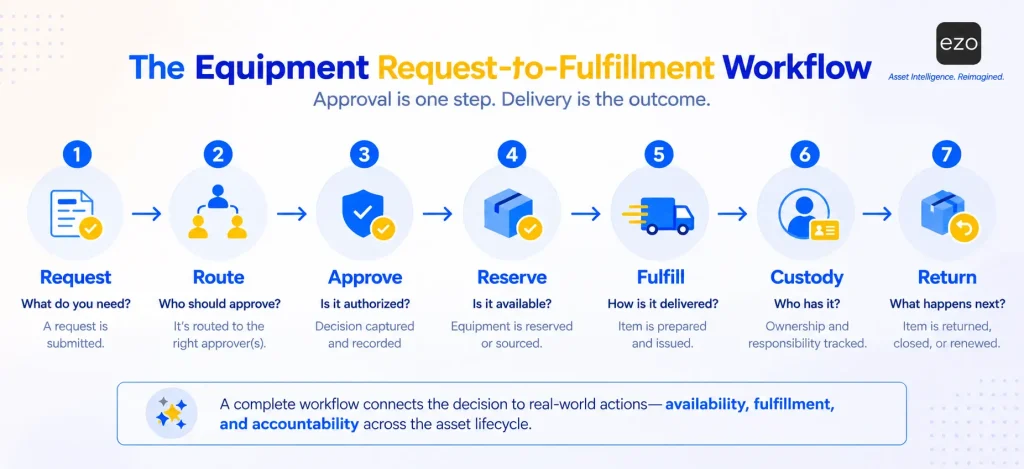
A typical workflow looks like this:
Request → Validate → Route → Approve → Reserve or source → Fulfill → Assign → Close
Approval authorizes the next action. It does not perform it. What follows depends on the request type and the organization’s available operational capabilities.
What happens after an equipment request is approved?
| Post-approval action | Resulting operation |
|---|---|
| Reserve | Holds available equipment for a future date or project |
| Check out | Assigns an asset temporarily to an employee, department, or project through a quick checkout |
| Transfer | Moves equipment between locations, facilities, warehouses, or teams using transfer requests |
| Purchase | Initiates procurement when the equipment, replacement, or spare part is unavailable |
| Create maintenance work | Converts an approved repair, inspection, service, or calibration request into a work order |
| Assign custody | Records who received the equipment and when responsibility changed hands |
| Set expected return | Records the due-back date at reservation or checkout, so future availability is known |
| Check in / record return | Captures actual return date, condition, and location through check-in, closing the custody record and returning the asset to available stock |
An approver needs to know more than who is asking. They need to know whether the asset is available, where it is, whether it is already reserved, what condition it is in, and who holds it. That is especially true for rotating field crews. Without that context, teams revert to email, spreadsheets, and manual handoffs to fulfill the approved request.
What types of asset and equipment requests need approval?
Six common request types account for most equipment and asset workflows, and each follows a distinct post-approval path.
| Request type | What it is | Post-approval path |
|---|---|---|
| Reservations | Shared cameras, tools, diagnostic devices, and project gear needed temporarily rather than permanently assigned | Weigh authorization against availability and existing reservations, then place a hold |
| Checkouts | An employee, department, or project receives an asset temporarily and returns it by a defined date | Connect approval to the equipment checkout and record who received it, when, where it is used, when it is due back, and who is accountable |
| Transfers | Assets move between facilities, warehouses, departments, and projects | Authorize before the move; preserve location and custody history afterward |
| Purchase and replenishment | The requested item is unavailable, so the workflow shifts to procurement, whether for new equipment, replacements, spare parts, or consumables | Sourcing → receiving → asset creation |
| Maintenance and repair | Work on assets the organization already has: inspections, repairs, servicing, calibration | Approval authorizes the work rather than the handover; the request then becomes a scheduled work order |
| Replacement and retirement | Repair-versus-replace and disposal decisions involving cost, condition, downtime impact, lead time, regulatory requirements, and operational risk | Tie the approval to the asset record so decision-makers see the history before retiring the asset |
Note the fifth row: not every request asks for equipment to be allocated. Requests for work on an existing asset are also directly tied to an asset record. The distinction is allocation versus work, not asset versus non-asset.
How equipment approval workflows differ from generic approval automation
For readers arriving at this section directly: The approval-to-fulfillment gap is an editorial model we use in this guide to compare platforms consistently. It is not an industry standard, and we do not treat it as one. We use it as the primary lens because two products can both advertise approval workflows while supporting very different depths of execution.
The approved-in-seconds, delivered-in-days pattern described in the introduction is the most familiar version of this gap, but it is not the only one. A manager can approve a purchase without knowing that an identical unused asset sits idle at another location. A reservation can be approved without the equipment ever being placed on hold. In each case, the decision is sound, but the outcome still fails.
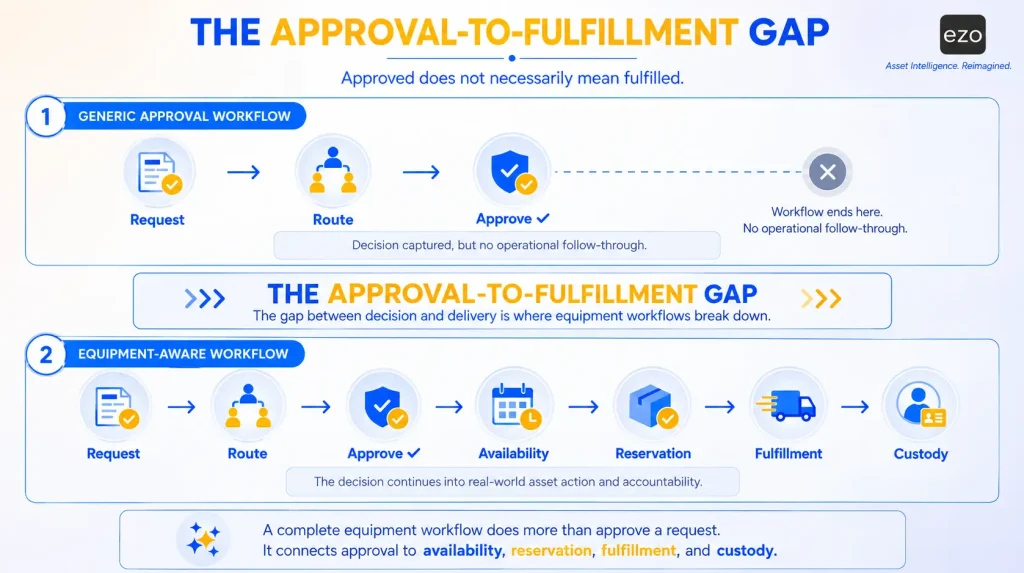
Six levels of an equipment request workflow
| Level | What the system manages | Question it answers |
|---|---|---|
| 1. Request capture | Form, portal, requester | What is being requested, by whom, and why? |
| 2. Approval control | Route, approve, reject, revise | Who reviews it, and what did they decide? |
| 3. Equipment context | Asset, location, condition, availability | Is the equipment available and usable? |
| 4. Fulfillment | Reserve, transfer, checkout, purchase, create work | How does the organization actually provide it? |
| 5. Accountability | Custody, expected return, history | Who has it, where is it, and when is it due back? |
| 6. Lifecycle connection | Maintenance, inventory, utilization, retirement | What happens to the asset after this request closes? |
Level 4 produces the fulfillment outcome. Level 5 adds custody and accountability after fulfillment. Level 6 connects the request to the asset’s longer lifecycle.
Every platform in this comparison supports request capture and approval routing in some form, though some capabilities vary by plan, as recorded in the capability matrix above. Differentiation begins at Level 3.
As noted at the top of this guide, a CMMS that converts an approved request into a scheduled work order against an asset record operates at Levels 4 and 6. It simply does not express Level 5 as physical custody. Read the levels as a description of workflow shape, not a scoreboard.
What equipment approval workflow software should include
Nine capability areas matter. Which ones matter most depends on your primary workflow.
| # | Capability area | What to look for |
|---|---|---|
| 1 | Request intake | Self-service request portal, searchable catalog, distinct request types, structured fields capturing dates, quantity, location, project, and justification |
| 2 | Conditional routing | Rules based on location, department, asset type, value, quantity, project, requester, manager, budget, and request type |
| 3 | Multi-stage approvals | Sequential and parallel approvers, hierarchies, thresholds, auto-approval and auto-denial, revision, delegation, escalation |
| 4 | Equipment context | Availability and quantity, location and custodian, existing reservations and expected returns, condition, and replacement cost, with that context visible at the moment of decision |
| 5 | Reservation and availability | Calendar visibility, conflict detection, and a hold created by the approval itself |
| 6 | Fulfillment | Reserve, pick, check out, transfer, dispatch, purchase, assign, or create maintenance work |
| 7 | Custody and accountability | Assignment, custodian, handoff date, expected return, return status, and condition, which, in some platforms, extends to custody verification |
| 8 | Maintenance and purchasing | Conversion into work orders or purchase orders |
| 9 | Operational infrastructure | Mobile access, APIs, role-based permissions, notifications, reporting, and an audit trail preserving requester, approver, decision, timestamp, comments, revisions, fulfillment activity, and asset assignment |
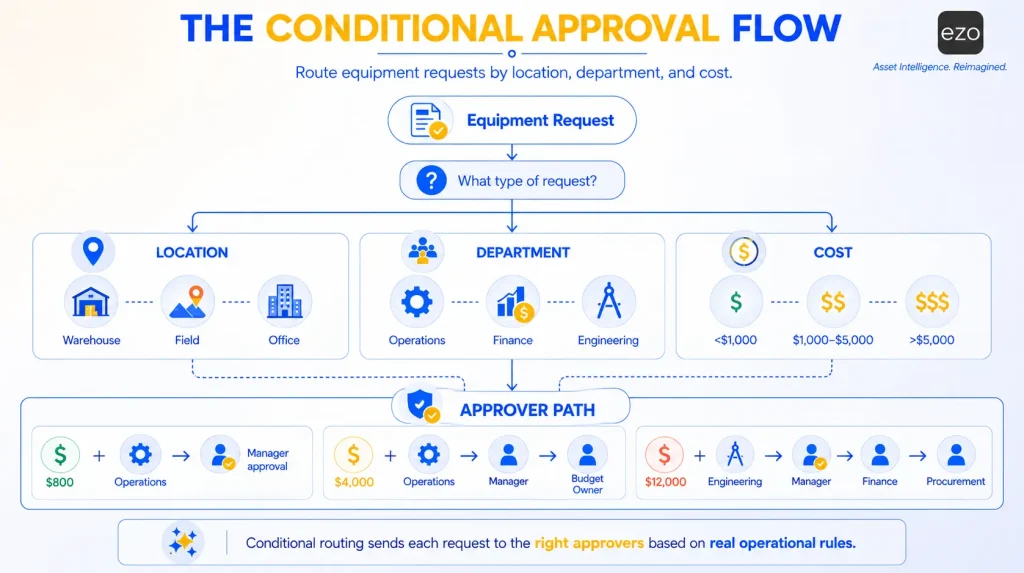
We use the following terminology consistently: Multi-stage means multiple sequential approval stages; parallel means multiple approvers at one stage; hierarchy means reporting-chain routing; conditional routing means rules that determine the path. Vendors use these terms interchangeably; we do not.
Two of the nine deserve emphasis. Equipment context (4) is where equipment software diverges from generic workflow automation: the approver should see the asset’s state before deciding, not after.
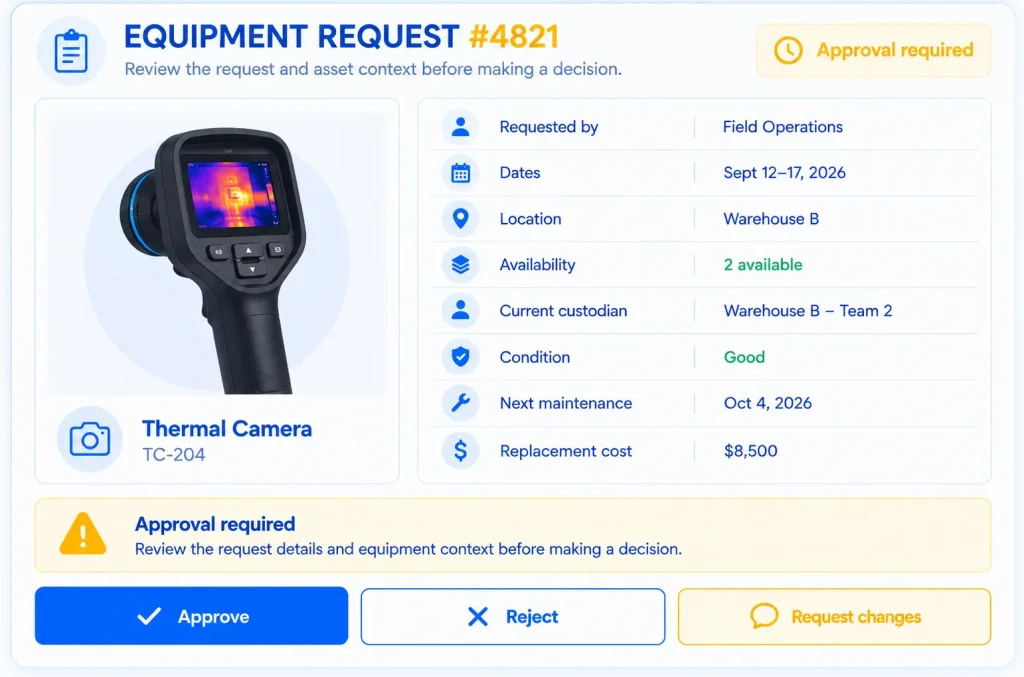
Fulfillment (6) is the most useful single distinction between approval management and request-to-fulfillment workflows. We place mobile access in the ninth area rather than treating it as a separate category. Equipment work happens in warehouses and in the field, so mobile access can materially affect whether teams complete approvals and checkouts promptly. An offline mobile app matters where connectivity is unreliable, though the process can still be completed at a desk.
Enterprise readiness
Buyers in regulated or multi-site environments usually assess governance before workflow. Confirm the following with every vendor on your shortlist, since few vendors publish this information consistently:
| Dimension | What to ask |
|---|---|
| Authentication | SSO/SAML support and the applicable tier |
| Provisioning | SCIM or directory sync for joiners and leavers |
| Permissions | RBAC granularity by role, location, asset category, or request type, including custom roles |
| Audit retention | How long is approval and custody history retained, and is it exportable |
| Data residency | Where data is stored, and whether region selection is available |
| Integration | REST API and webhook coverage, ERP and procurement connectors, and tier gating |
| Portability | Export formats, API access to historical approval and custody records, contract exit terms |
| Certification | SOC 2, ISO 27001, or sector-specific attestations |
Portability deserves particular attention. Approval and custody histories are critical when you change platforms, yet they are also among the records most difficult to extract. Ask for a sample export before signing.
Pricing and implementation
Evaluate price alongside implementation scope and ask for both in writing. A lightweight maintenance request workflow and a full EAM deployment that connects inventory, purchasing, maintenance, and asset records are distinct projects with different configuration and process-change costs. Request implementation timelines and professional-services quotes from every vendor, and confirm what onboarding includes versus what is chargeable.
Equipment-native vs. generic workflow platforms
Many organizations already route forms and collect approvals in a generic workflow tool. The question is not whether a generic platform can handle an equipment request. A mature workflow platform can route based on any field, evaluate complex conditions, call APIs, write back to asset systems, and trigger downstream fulfillment. The question is what it costs to build and maintain that workflow, and how that compares with purpose-built EAM workflow automation.
| Equipment-native platform | Generic workflow platform | |
|---|---|---|
| Equipment catalog | Native to the request object | Integrated or replicated |
| Availability at decision time | Read natively from the asset record | Requires an API call to the system of record |
| Reservation and hold | Created by the approval itself | Written back to an external system |
| Custody and asset history | Written natively | Maintained separately and reconciled |
| Audit trail | Request, asset, and custody in one record | Assembled across systems |
The real trade-off: Native context removes integration and reconciliation work. A generic platform can reach the same outcome, but requires engineering effort and ongoing maintenance as either system changes.
Generic automation remains the right answer when requests do not involve physical assets, fulfillment happens in another established system, availability does not affect the decision, and no asset-linked audit trail is required. Adding equipment-specific functionality in those cases only adds complexity.
How to design an equipment approval workflow
Software only performs as well as the workflow underneath it. Define the journey from request to fulfillment, handoff, and return before configuring approval rules.
Step 1: Define your request types. Reservations, checkouts, transfers, purchases, maintenance, replacement, and retirement each need their own path. A reservation may need only operational approval; a purchase also needs budget authorization; a maintenance request goes to a maintenance manager, not an equipment administrator.
Step 2: Define the required request context. Decide what a requester must supply before approval: asset type, dates, quantity, location, department, project, manager, cost, and justification. Custom fields typically capture much of this context. For shared equipment, dates are what make availability assessable.
Step 3: Define the routing logic. Rules can depend on department, location, asset type, equipment value, request type, project, requester, manager, or budget. For example: equipment reservation → department manager; high-value purchase → department manager → budget owner → procurement; maintenance request → maintenance manager. Employees should not need to determine the correct approver manually.
Step 4: Define approval authority. Routing determines where a request goes; authority determines who may decide. Make approval authority proportional to consequence: a low-value tool checkout needs one supervisor, while a capital purchase may require department head, finance, and procurement sign-off. Set thresholds in currency, not adjectives. Establish who can delegate and what happens when an approver does not respond.
Step 5: Define what happens after approval. For each request type, name the operational action the approval authorizes: reservation → reserve equipment; checkout → prepare and issue; transfer → move the asset; purchase → initiate procurement; maintenance → create work; replacement → begin the replacement process. This is the step most often left undefined.
Step 6: Define exceptions. Define what happens when equipment is unavailable, reserved, on maintenance hold, or overdue; when inventory is short; when a request exceeds a threshold; or when dates change or an approver is unavailable. Each condition needs a defined path, such as reassignment, rescheduling, or a fresh approval, rather than a manual workaround.
Step 7: Define the evidence you preserve. At minimum: requester, request details, approver, decision, timestamp, comments, revisions, fulfillment activity, asset assignment, custodian, and return information. For high-value or shared equipment, a periodic custody audit turns that record into verified possession rather than an assumption.
Taken together, the workflow runs:
Request → Validate required information → Check equipment context → Route to approver → Approve / reject / revise → Reserve, source, or purchase → Fulfill → Assign custody → Track return or next lifecycle event
Design the process around the operational outcome, not the approval form.
Metrics to track
Measure the whole request-to-fulfillment process, not just how fast approvals clear. Each metric below needs a defined measurement window and a review cadence. Monthly is a reasonable default for most metrics; use quarterly reviews for structural metrics.
| Metric | How to measure | What it tells you |
|---|---|---|
| Request volume | Count by location, department, asset type, and request type | Where demand concentrates |
| Approval cycle time | Submission timestamp → decision timestamp, by approver and stage | Where decisions stall |
| Approval-to-fulfillment time | Approval timestamp → equipment handoff or start of work | Whether approved requests actually reach requesters |
| Revision rate due to missing information | Revisions requiring requester input ÷ total requests | The cleanest available signal of intake-form quality |
| First-pass approval rate | Approved without revision ÷ total requests | Directional only; also driven by eligibility, budget, policy, and approver behavior. Read alongside the revision rate |
| Rejection rate | Rejected ÷ total requests, segmented by rejection reason | How often do requests fail approval? Segment before drawing any conclusion. A high rate can mean effective controls or poor requester guidance |
| Requests by site or location | Count by site, normalized for headcount or asset base | Geographic imbalances and chronic shortages |
| Fulfillment SLA | % of requests fulfilled within target, by request type | The requester’s actual experience |
| Availability at request time | % of requests where the requested asset was free at submission | Frequently requested assets and chronic shortages |
| Reservation conflicts | Conflicting holds ÷ total reservations | May indicate demand/supply imbalance, location mismatch, late returns, or scheduling and data-quality issues |
| Overdue returns | Past due ÷ open checkouts, tracked against the equipment return process | Downstream availability risk |
| Approval exception rate | Exceptions ÷ total requests, with reason recorded | Distinguish designed exceptions from workflow failures; not every exception is a defect |
| Manual handoffs | Manual handoffs per fulfilled request, or % of requests requiring an out-of-system step | Where information moves between systems by hand |
Approval speed and fulfillment speed are distinct metrics. A request approved in ten minutes and fulfilled three days later has a fast approval process but a slow equipment workflow. Only one of those metrics is visible on an approvals dashboard.