Disclosure: EZO publishes this guide, and EZO EAM is one of the eight platforms compared. The products are not ranked: they are grouped by product family, and heading numbers are for navigation only. Every platform faces the same scenario and evidence standard, with EZO EAM’s limitations stated as plainly as every other platform’s.
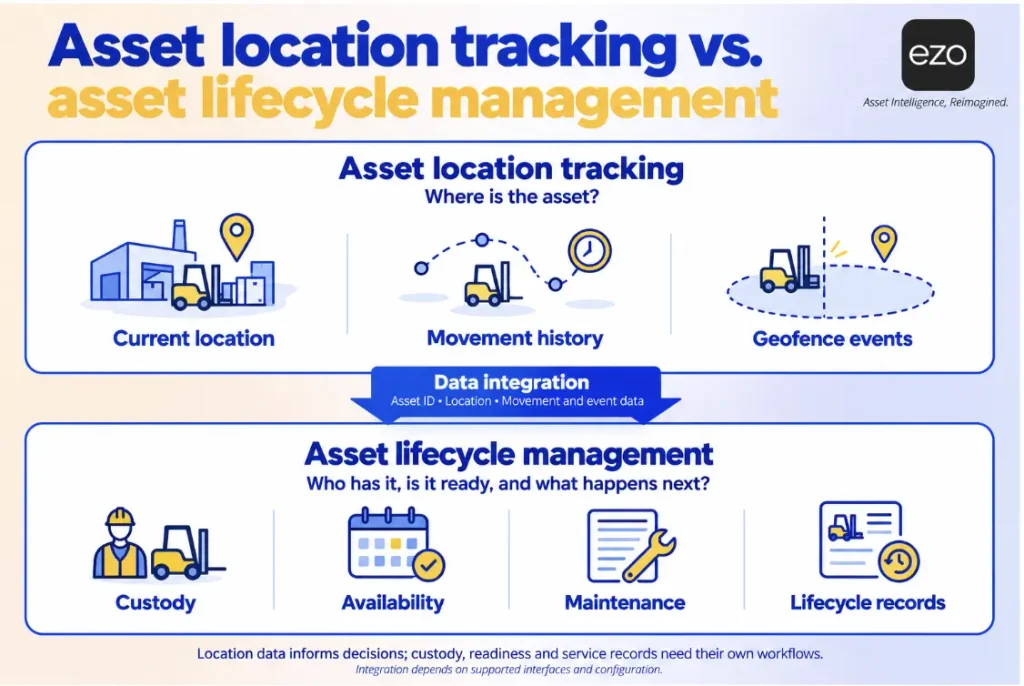
A production crew needs a shared calibration gauge. The asset register says it is in the tool crib. In reality, it is on a bench two cells away, and its calibration expired nine days ago. The record is wrong twice: it shows the wrong location, and it says nothing about whether the gauge is fit for use. Finding the asset is only half the problem. Someone also needs to know whether it is ready to return to production.
Eight IoT asset tracking systems for manufacturing are worth evaluating in 2026: EZO EAM, KINEXON OS, Ubisense SmartSpace, Zebra MotionWorks Enterprise, HID Sewio UWB RTLS, Litum RTLS, WISER Systems, and Samsara. There is no universal winner. Real-time location systems (RTLS) show where an asset is, while enterprise asset management (EAM) platforms help teams track custody, maintenance, and readiness for use. Some products cover both sides, but the emphasis varies. The right choice depends on what your plant needs to know and what it needs to do with that information. This guide compares each platform’s technology, workflows, integrations, implementation requirements, and cost drivers. It also scores each against the same manufacturing scenario, making the differences easier to evaluate.
Key Takeaways:
- A barcode scan or passive RFID read identifies an asset at a single point in time and place, not where it went afterward.
- Assets that often move without a transaction are candidates for automatic tracking, while assets moving through checkouts mainly need accurate custody and status.
- Faster location doesn’t prevent misuse unless you check a gauge’s calibration status before releasing it.
- RTLS platforms and asset-management platforms document different steps for different scenarios, so a plant may need both.
- An API is not a connector: five of the eight platforms document APIs rather than named ERP or MES connectors.
- Compare the three-year total cost of ownership, because a software subscription for asset tracking doesn’t include positioning infrastructure.
What are the best IoT tracking systems for manufacturing?
The best IoT tracking system for a plant is the one whose tracking method matches how its assets move and what decisions the location data needs to support. Tracking work in progress (WIP) to sub-meter accuracy is a different purchase from maintaining custody records across multiple sites.
The eight systems fall into three groups: an asset management platform (EZO EAM), six real-time location system (RTLS) platforms that automatically locate tags indoors, and an outdoor equipment tracking platform (Samsara). Here, “native RTLS” means the vendor provides its own positioning hardware and location engine, although KINEXON OS also accepts third-party inputs. Samsara provides its own GPS and Bluetooth hardware, while EZO EAM records location through scans and transactions such as check-outs and transfers, and receives GPS or telematics coordinates from connected third-party providers.
| Solution and best fit | Tracking technology | Platform type | Deployment consideration | Pricing |
| EZO EAM: Asset lifecycle and custody | Barcode, QR, and RFID scans; GPS and telematics via providers | Connected asset management platform | No anchors; location comes from scans, transactions, or a connected provider. | Published item-based plans; Enterprise by quote |
| KINEXON OS: Manufacturing orchestration | UWB, BLE, RFID, GPS, vSLAM | Native RTLS and orchestration software; accepts third-party inputs | Anchor grid; vendor cites two to six weeks of installation | Quote |
| Ubisense SmartSpace: Complex production workflows | UWB, BLE, GPS, RTK-GPS | Native RTLS and process software | PoE sensor network and CAD-based facility map | Quote |
| Zebra MotionWorks Enterprise: Enterprise location visibility | UWB, BLE, passive RFID, GPS via SDK | Native multi-technology location platform | Fact sheet (2022) describes on-premises servers and Zebra locate appliances; confirm current options | Quote |
| HID Sewio UWB RTLS: Precise indoor location | UWB | Native RTLS | UWB anchors and RTLS Studio location engine | Quote |
| Litum RTLS: Hybrid and hazardous areas | UWB and BLE | Native RTLS | Gateways and anchors; ATEX hardware for classified zones | Quote |
| WISER Systems: Tools and gauges in cluttered plants | UWB | Native RTLS | Wireless mesh antennas; vendor cites a one-day site survey | Quote |
| Samsara: Outdoor and mobile equipment | GPS gateways and Bluetooth asset tags | Native GPS and Bluetooth tracking platform | Gateways and tags; no fixed indoor positioning grid | Per-device licenses by quote |
What is IoT asset tracking in manufacturing, and how does it work?
IoT asset tracking in manufacturing uses connected tags, sensors, readers, networks, and software to identify physical assets, locate them, and, in some systems, monitor their condition. The basic flow of location data is:
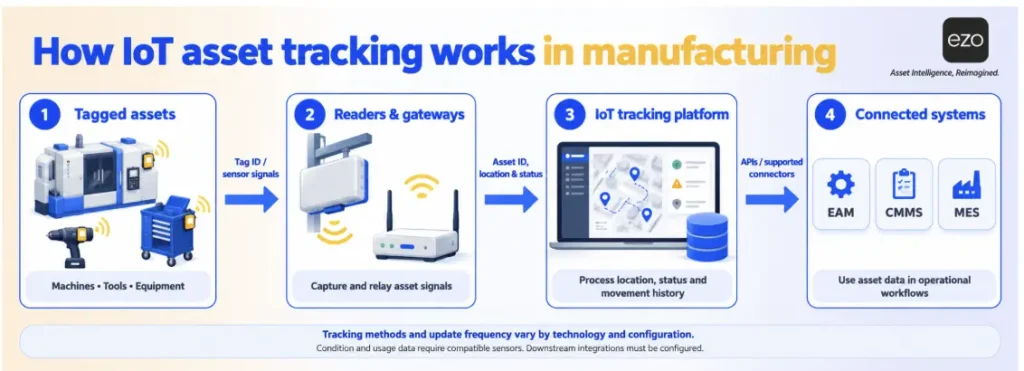
Asset with a tag or sensor → reader, anchor, or gateway → tracking platform → location, alerts, and history → ERP, MES, EAM, or CMMS.
Data can also flow in the other direction. An ERP or CMMS can send assignments, service status, and work orders back to the tracking platform.
Three distinctions matter.
Identification is not positioning. A barcode scan or a conventional passive RFID read identifies an asset at a particular time and reading point. It does not show where the asset goes afterward. Active RFID and RFID-based RTLS can estimate an asset’s position, but they use a different tracking setup. A tag identifies an asset; by itself, it does not tell you where that asset is.
Real time can mean different things. An RTLS recalculates a tag’s position at a set interval, ranging from fractions of a second to about a minute in the systems reviewed here. Other trackers report events on a schedule, while inventory systems update their records when they process a scan. All three approaches may be described as real-time, but they provide different levels of visibility.
Location is not condition. Knowing that a compressor is in Bay 4 tells you nothing about its runtime, temperature, or service status. Location, condition data, and maintenance status answer different questions, even when one platform brings them together.
When a tagged cart leaves the tool crib, ceiling anchors detect its tag, and the tracking platform records the movement. Whether a team can then reassign the cart or see that its tools are due for service depends on how the location data connects to the relevant workflows.
Why asset location records become outdated
Accuracy is the obvious first question: 30 centimeters or one meter? A more useful question is how quickly an asset’s location record becomes outdated.
Every location record captures an asset’s position at a particular time. A scan at the tool crib records where a gauge was at 7:40 a.m. Whether that is still true at 2:00 p.m. depends on how often the gauge has moved without anyone recording it. If an asset moves more often than its location is updated, the record may be wrong by the time someone checks it.
Consider two illustrative assets. A torque wrench leaves the crib through a checkout and returns through a check-in. When the team records every checkout, custody transfer, and return, the record answers the planner’s question: who has it, and since when? It does not show which station the holder takes it to, and a missed scan or informal handoff can still make the record outdated. A material cart, by contrast, might move 15 times per shift between cells without recording any transactions. A scan-based record of that cart can become outdated within minutes, making continuous positioning easier to justify when the time saved searching for it outweighs the cost.
The second problem is asset status, not location. Faster tracking does not prevent misuse. Unless a system checks calibration status before releasing an asset, a gauge found in seconds can still be put to work with an expired calibration. RTLS reduces search time; it does not determine whether an asset is fit for use. Four of the eight platforms reviewed below do not document a service or calibration workflow.
Assets that move without being recorded are stronger candidates for automatic tracking. Assets already managed through checkouts have a custody record, so their bigger risk may be whether they are fit for use.
How we selected and scored these platforms
Each platform is commercially available in 2026, documents tracking for the scenario’s asset types (tools, carts, forklifts, or yard equipment), publishes enough first-party technical material to score, and represents a distinct approach. This list is a selection, not a market census or performance ranking, and it does not include other RTLS vendors.
The scenario involves a shared pool of calibrated gauges, torque tools, and carts across two plants, alongside forklifts and trailers operating in a yard. We assess each platform against seven steps:
- Identify: Tag each asset with a readable identifier (a baseline every platform meets).
- Locate indoors: Know where it is on the shop floor without a manual scan.
- Alert on movement: Receive a zone exit or movement alert.
- Record custody: Know which person has the asset.
- Service and calibration: Schedule service, record it, flag the asset when it is due, and keep it out of use from the due date until it is serviced.
- Locate in covered outdoor areas: Find assets in yards and between buildings; road tracking between plants needs GPS.
- Exchange data: Pass events to an ERP, MES, WMS, or CMMS. A named integration scores Yes; a documented API that requires configuration, or an integration mentioned but not publicly documented, scores Partial.
Scores describe only whether first-party documentation shows the step’s outcome:
- Yes: Documented as a packaged capability, on the plan or module named in the profile.
- Partial: Part of the step’s workflow is documented; the cell names the missing part.
- Restricted: The vendor documents the full workflow, but also specifies a limitation that constrains its use.
- Config: Can be assembled from documented native components, specified in the platform profile.
- Gap: Not found in the vendor’s documentation. This does not establish that the capability is absent.
Evidence was weighted in this order: help documentation and datasheets first, followed by product pages and then customer stories. Where a vendor publishes no technical documentation, scores are based on its product pages. Where a score relies on a customer story, this is noted explicitly. Platforms are presented in family order, not by score, and alphabetically within each family, except that the three enterprise platforms (KINEXON, Ubisense, and Zebra) lead the RTLS family. Readers primarily interested in indoor positioning should start with the second platform.
Scenario steps 1 to 4: Identification, indoor location, alerts, and custody
| Platform | 1. Identify | 2. Locate indoors | 3. Movement alerts | 4. Custody |
| EZO EAM | Yes | Gap: No automatic indoor positioning documented; updates by scan or transaction | Gap: No movement or zone alerts documented | Yes |
| KINEXON OS | Yes | Yes | Yes | Gap |
| Ubisense SmartSpace | Yes | Yes | Yes | Gap |
| Zebra MotionWorks Enterprise | Yes | Yes | Yes | Gap |
| HID Sewio UWB RTLS | Yes | Yes | Yes | Gap |
| Litum RTLS | Yes | Yes | Yes | Gap |
| WISER Systems | Yes | Yes | Yes | Gap |
| Samsara | Yes | Restricted: Approximate, near a gateway or phone | Yes | Partial: Assets to jobs, not people |
Scenario steps 5 to 7: Service, outdoor location, and data exchange
| Platform | 5. Service and calibration | 6. Covered outdoor areas | 7. Exchange data |
| EZO EAM | Partial: Scheduling, due alerts, and records documented (Premium with CMMS add-on, or Enterprise); out of use only once service starts | Partial: Latest coordinates only; tracking hardware comes from a connected provider | Config: REST API and web requests |
| KINEXON OS | Gap | Yes | Yes: SAP EWM and SAP DM |
| Ubisense SmartSpace | Partial: Blocks overdue use (product page); scheduling not documented | Yes | Config: REST, .NET, and database APIs |
| Zebra MotionWorks Enterprise | Gap | Config: GPS devices via SDK or REST API | Config: REST API and event publisher |
| HID Sewio UWB RTLS | Gap | Gap | Config: REST, WebSocket, and UDP APIs |
| Litum RTLS | Partial: Monitors calibration schedules and repair records, flags overdue (product page); blocking use not documented | Restricted: Outdoor coverage is BLE zone-level only | Partial: Integration claimed; no interface documented |
| WISER Systems | Gap | Yes | Config: REST API and server-sent events |
| Samsara | Partial: PM for powered equipment; calibration and use-blocking not documented | Yes | Yes: Named AssetWorks integration (customer example) |
Where each platform’s scores come from (each source is linked in the platform’s profile)
| Platform | Sources behind its cells |
| EZO EAM | Pricing feature table, GPS API guide, services guide, calibration guide, integrations page, automation connectors post |
| KINEXON OS | KINEXON OS product page, RTLS products page, asset tracking page |
| Ubisense SmartSpace | DIMENSION4 page, WIP Tracker page, asset tracking page, automotive page |
| Zebra MotionWorks Enterprise | 2022 MotionWorks Enterprise fact sheet, Dart UWB page |
| HID Sewio UWB RTLS | HID product page, Sewio API documentation, HID yard RTLS page |
| Litum RTLS | Asset tracking page and FAQ, process tracking page, ATEX page |
| WISER Systems | WISER FAQ, WISER RTLS page |
| Samsara | Equipment tracking page, Bluetooth location help article, Unpowered Asset Gateway page, maintenance page, 2019 scheduling post |
The tables show a split, not a leader. The six RTLS platforms document steps one to three, while Samsara documents them using approximate tag positions. In the evidence reviewed, only EZO EAM documents person-level custody as a packaged capability, but it also has a Gap rating for indoor location. Only Ubisense documents blocking overdue equipment from use; EZO EAM makes an asset unavailable once its service starts. No platform documents all seven steps, so a plant may need to pair a location layer with a records layer after confirming they can exchange the required data.
8 IoT asset tracking platforms compared for manufacturing
Asset-management platform
1. EZO EAM: Best for connected asset lifecycle and custody management
Shortlist if: You run several plants and need custody, availability, and service history in one record, with location from scans, transactions, or connected trackers.
Overview: EZO EAM manages assets after identification, with plants set up as locations, per its manufacturing asset management page.
Tracking technology: Barcodes, QR codes, and handheld RFID scans; no native RTLS. Its GPS asset tracking integration records the latest coordinates and timestamp provided by the connected tracking service.
Key capabilities:
- Custody: Checkouts and reservations on every plan; custody transfers and audits from Advanced, per the pricing page.
- Location data: GPS Integration (Premium); Telematics Integration (Enterprise).
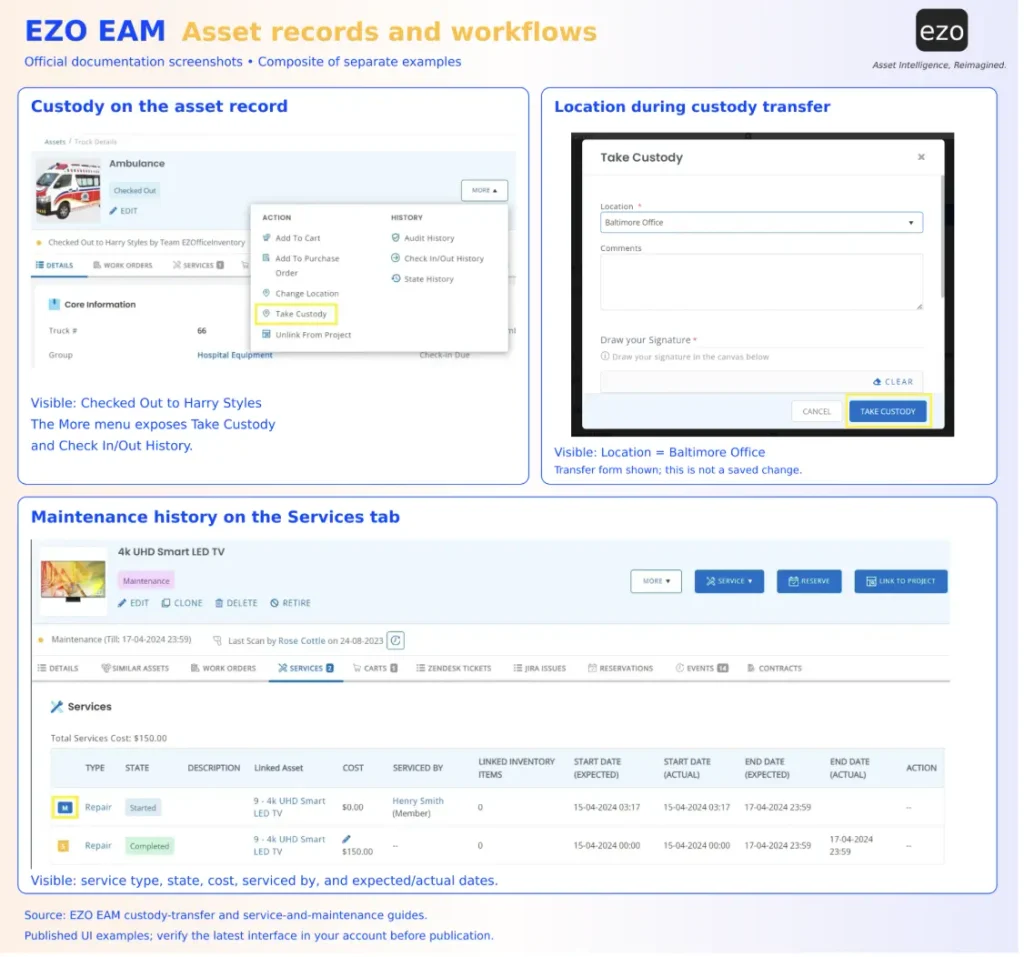
- Maintenance: Service records are available from Advanced. The CMMS add-on includes preventive maintenance and work orders on Premium and Enterprise. EZO EAM’s calibration guide describes calibration schedules and due alerts. According to the services guide, assets in active service are unavailable.
Manufacturing application: With service triage enabled, a gauge returned at check-in is routed to maintenance before it can be checked out again, according to EZO EAM’s services guide.
Integrations: The integrations page lists identity providers, Jira, Zendesk, QuickBooks Online, and providers such as Samsara and Trackunit. No named ERP or MES connector was found. Custom connections can use the API on Advanced or web request nodes on Premium, subject to confirmation of the required endpoints and data mapping.
Pricing: Published plans are priced by item and include unlimited users under a fair use policy. Enterprise pricing is available by quote, and the CMMS add-on is priced per admin user.
Limitations: Indoor positioning and geofence alerts aren’t documented, so shop-floor location depends on the last scan or transaction. The documentation doesn’t state whether an asset in Pending Service can still be checked out or whether GPS history is available. Offline mobile use, Item Relationships, and Telematics Integration require Enterprise.
RTLS platforms
2. KINEXON OS: Best for real-time manufacturing orchestration
Shortlist if: You want location events to drive production decisions, such as replenishment requests.
Overview: KINEXON OS is an orchestration platform that connects shop floor operations with enterprise systems through low-code workflows.
Tracking technology: UWB, BLE, RFID, GPS, and vSLAM, including third-party hardware inputs. KINEXON’s RTLS hardware includes RTLS Pro, with accuracy down to 10 cm and up to 100 updates per second, and wireless RTLS Mesh, with accuracy down to 30 cm and updates in under a minute. Both figures represent vendor-stated best cases.
Key capabilities:
- Process events: Converts geofence events into process steps and generates alerts for process violations.
- Automation: No-code triggers can open gates or switch traffic lights.
- Analytics: Tracks utilization across production areas, tools, and machinery.
Manufacturing application: MTU Aero Engines uses UWB tags to track cage pallets, drawer cabinets, and picking carts. The December 2023 customer story does not report quantified results.
Integrations: Standard integrations include SAP EWM and SAP DM, plus MQTT, Kafka, and REST APIs.
Pricing: Available by quote following a demo request.
Limitations: Person-level custody and maintenance scheduling are not documented. KINEXON’s asset tracking page recommends six to nine anchors per 1,000 m² and cites installation periods of two to six weeks, depending on the scope. It also notes that accuracy depends on the production environment, describes RTLS Mesh for indoor and outdoor use, and lists yard management.
3. Ubisense SmartSpace: Best for complex production workflows
Shortlist if: You run non-linear production, such as automotive or aerospace, and need work in progress (WIP) and tools matched to specific process stages.
Overview: SmartSpace maps the facility layout, asset locations, and process context. Its WIP Tracker combines WIP location with planning data and alerts on aging WIP, process overruns, and entry into prohibited zones.
Tracking technology: DIMENSION4 uses UWB sensors powered over Ethernet, with the vendor stating centimeter-level accuracy in three dimensions. Ubisense’s RTK GPS tag lists 3 cm CEP (circular error probable, two-dimensional) outdoors and requires a separately sold correction base unit.
Key capabilities:
- Process logic: Business rules can prioritize WIP and tasks.
- Service gating: The asset tracking page states that the system prevents the use of equipment overdue for maintenance or calibration.
- Long-life tags: Up to 15 years of battery life, depending on the tag model.
Manufacturing application: Ubisense’s vehicle assembly page reports that BMW tracks cars and tools “to within 15cm, 10 times per second.” This is a vendor-reported result.
Integrations: ERP and MES connections through REST services, .NET, and direct database integration, according to its automotive page.
Pricing: Available by quote.
Limitations: Person-level custody and service scheduling are not documented. Service gating is described on a product page rather than in technical documentation. Importing a CAD-based map and installing a cabled sensor network require additional design and installation work before deployment.
4. Zebra MotionWorks Enterprise: Best for enterprise-wide location visibility
Shortlist if: You run a large plant that already uses Zebra RFID or scanning hardware and want several locating technologies in one platform.
Overview: The 2022 MotionWorks Enterprise fact sheet describes on-premises software with maps, reports, alerts, dashboards, and a rules engine.
Tracking technology: Zebra supports UWB, BLE, EPC Gen2 passive RFID, WhereNet RTLS, and magnetic beacons, as well as Aruba BLE data. GPS devices connect through the MotionWorks SDK or REST API. Zebra’s UWB hardware page claims “up to 30 cm accuracy,” but provides no test conditions for this figure.
Key capabilities:
- Multi-technology: One platform manages several locating technologies.
- Alerts: User-defined alerts and business-rule exceptions.
- Device health: Diagnostics for the location infrastructure itself.
Manufacturing application: In Toyota Material Handling’s plant, more than 400 UWB tags on forklifts and 60 RFID sensors cover a quarter of a 1.3 million square-foot facility.
Integrations: REST API and an event publisher. In one customer example, Toyota used existing APIs to link order numbers to product statuses.
Pricing: Available by quote. Software downloads require an active annual capacity license subscription.
Limitations: Person-level custody and asset maintenance are not documented. The available architecture information comes from a 2022 fact sheet, so confirm current deployment options with Zebra.
5. HID Sewio UWB RTLS: Best for precise indoor asset location
Shortlist if: You need indoor tracking of tools, pallets, and WIP where precision matters most.
Overview: HID acquired Sewio Networks in August 2024, and the product is now sold as HID Sewio UWB RTLS.
Tracking technology: UWB anchors and tags with the RTLS Studio location engine, at “up to 30 cm / 1 ft.”
Key capabilities:
- Asset visibility: Track tools, machinery, and inventory on a live map.
- WIP: Order status and lead-time tracking.
- Geofencing: Geofencing alerts within WIP tracking.
- Tracking history: Historical positions available through the REST API.
Manufacturing application: The product page describes WIP tracking for order status, lead times, and e-Kanban.
Integrations: Sewio’s API documentation covers REST for metadata and history, WebSockets for real-time positions and zones, and UDP for fast updates from tags. HTTPS and WSS provide encryption.
Pricing: Available by quote.
Limitations: Custody and maintenance are not documented, and outdoor UWB use is not documented. HID’s separate yard RTLS uses GNSS, Bluetooth, and LoRaWAN, with an approximate outdoor range of 5 m. Plants needing both indoor and outdoor tracking should confirm how the two systems can connect.
6. Litum RTLS: Best for hybrid tracking in industrial and hazardous environments
Shortlist if: Your facility needs sub-meter UWB in some areas, cheaper BLE zones in others, and certified hardware in classified zones.
Overview: Litum’s asset tracking RTLS combines location, geofencing, utilization reporting, and movement history.
Tracking technology: The Dualis Tag combines UWB for sub-meter indoor accuracy with BLE for wider coverage, including outdoor areas, at zone or room level. A site survey should confirm gateway layout and outdoor range.
Key capabilities:
- Geofencing: Alerts on unauthorized movement.
- Utilization: Usage hours, movement frequency, and peak periods by zone.
- Hazardous areas: Litum describes the ATEX Gateway and ATEX Dualis Tag as carrying gas and dust certifications for Zone 1 and Zone 2 areas; no other tags are described as ATEX-certified.
Manufacturing application: Litum’s process tracking page describes monitoring calibration schedules and repair records, flagging assets past their due dates, and triggering maintenance requests through a tag’s call button.
Integrations: The FAQ on Litum’s asset tracking page states that ERP, WMS, and CMMS integrations are supported, but no API or named connector is documented publicly.
Pricing: Available by quote following an assessment or demo.
Limitations: The documentation does not cover person-level custody or blocking overdue assets from use. The maintenance capabilities are described on product pages rather than in technical documentation. Integration methods and the tags required for each classified zone must also be confirmed.
7. WISER Systems: Best for tracking tools and gauges in industrial environments
Shortlist if: You run a machine shop or fabrication plant and need to locate tools, gauges, and carts in cluttered, reflective spaces.
Overview: WISER sells a UWB RTLS with the WISER Tracker App, deployable on-premises or in the cloud; its current site no longer uses the ATLAS product name.
Tracking technology: Tags talk to antennas over UWB, and the antennas form a wireless mesh. The WISER FAQ says antennas run on wall outlets, USB batteries, or PoE, and states sub-meter accuracy “in most environments” and “in some cases down to 6 inches,” with four antennas covering 2,500 to 10,000 square feet.
Key capabilities:
- Search: Search for tagged items on a floor plan.
- Alerts: Zone alerts when items move into areas where they should not be.
- Outdoor coverage: Outdoor antennas can cover yards and areas between buildings, according to the WISER RTLS page. This does not extend to tracking between plants on the road.
Manufacturing application: Danville Metal Stamping keeps 1,000 tags on hand for calibrated gauges. At Crystal Group, technicians use WISER to locate the 10 to 20 gauges due for calibration each week.
Integrations: REST API and server-sent events for connecting with ERP or MES systems.
Pricing: Available by quote. WISER states that licensing is not based on data rate or number of seats.
Limitations: WISER identifies gauges due for calibration but does not document calibration scheduling or person-level custody. Those records therefore need to be managed elsewhere.
Outdoor equipment tracking
8. Samsara: Best for outdoor and mobile equipment visibility
Shortlist if: Your equipment sits in yards, on trailers, or leaves the plant.
Overview: Samsara’s equipment tracking combines gateways and tags with geofence alerts, utilization and dormancy reports, and theft recovery.
Tracking technology: The Unpowered Asset Gateway uses GPS and LTE and checks in twice daily by default, with configurable reporting intervals. Bluetooth Asset Tags report an approximate location when a nearby Samsara gateway or app detects them. Their reported location includes an accuracy radius.
Key capabilities:
- Geofencing: Entry and exit alerts around yards and sites.
- Utilization: Reports on equipment use and dormancy.
- Maintenance: Usage-based preventive maintenance and work orders driven by odometer readings and engine hours.
Manufacturing application: A plant can set a geofence around its yard, receive alerts when a trailer or forklift leaves, and flag dormant equipment for redeployment.
Integrations: Samsara offers an open API and an App Marketplace. Its equipment tracking page cites XPO’s integration with AssetWorks as a customer example. Samsara is also listed as a location provider on EZO EAM’s integrations page.
Pricing: Per-device licenses are available in one-, three-, five-, or seven-year terms. Prices are available by quote.
Limitations: Bluetooth tag positions are approximate and depend on nearby gateway or phone coverage, so Samsara is not a substitute for sub-meter shop floor positioning. The only documentation found on assigning assets to jobs is a 2019 feature post. Confirm current custody capabilities with Samsara.
How do RFID, UWB, BLE, and GPS tracking compare in manufacturing?
Each technology answers a different location question. The barcode vs. QR code vs. RFID choice governs identification; the rest govern positioning.
| Technology | Role in the system | Typical application | Key consideration |
| Passive RFID | Identification | Checkpoints, portals, and inventory counts | Needs readers; records a read, not continuous position |
| UWB | Positioning | Precise indoor real-time location | Needs anchors and site validation; vendors here cite best cases of 10 to 30 cm |
| BLE | Positioning | Zone-level location in typical beacon setups | Direction-finding setups can be more precise but need locator infrastructure |
| GPS/GNSS | Positioning | Outdoor equipment, yards, and vehicles | Weak indoors; HID cites around 5 m for its GNSS yard system |
| LoRaWAN | Connectivity | Wide-area, low-power telemetry | Position accuracy depends on the locating method paired with it |
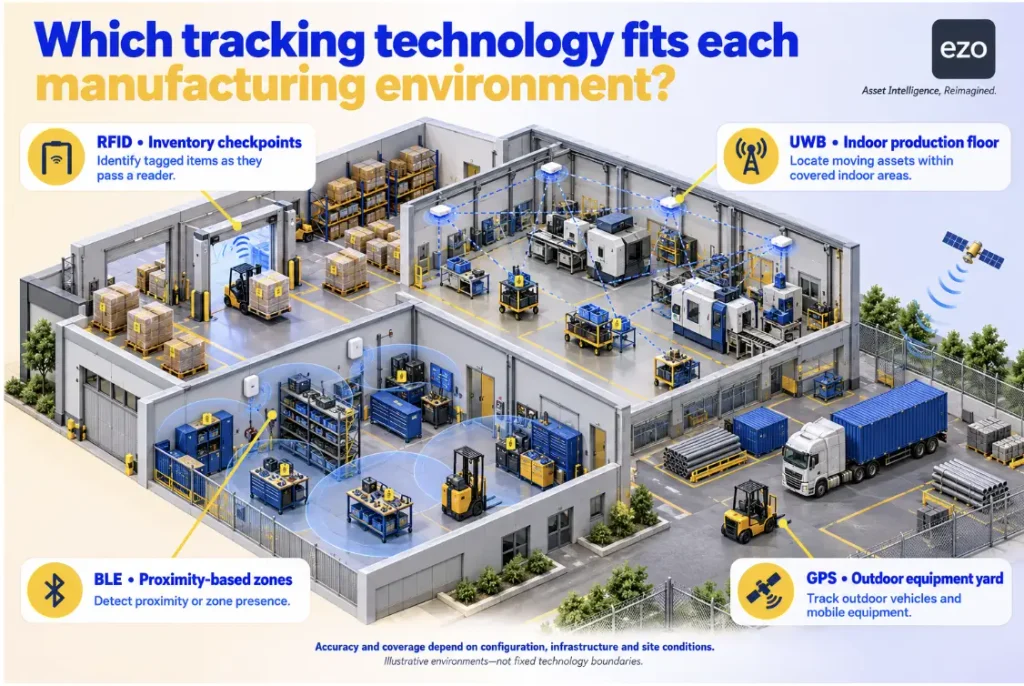
Choose RFID or barcodes when the workflow needs identification at known points. Choose BLE when knowing the zone is enough, or BLE direction finding when you need more precise positions and can install locators. Choose UWB when decisions depend on knowing which cell, rack, or station an asset is in. Choose GPS when assets leave the building. Choose sensors when the question concerns condition rather than location.
Survey indoor sites early. Metal racking can reflect radio signals, anchors need mounting points and power, and layout changes can create new coverage gaps.
What should manufacturers look for in an IoT asset tracking system?
Evaluate an IoT asset tracking system first on whether its data supports decisions you need to make today, then on whether its hardware and tracking performance can withstand your plant’s conditions.
| Criterion | Buyer question |
| Tracking accuracy | Is checkpoint, zone, or precise location required? |
| Factory environment | Has the system been tested around your metal, machinery, and interference? |
| Asset coverage | Which machines, tools, WIP, and mobile equipment can be tagged? |
| Multi-site support | Does it support several plants and yards under one record? |
| Workflow integration | Can a location event trigger a manufacturing action? |
| Lifecycle visibility | Can teams see custody, maintenance, and availability? |
| Security | Are OT/IT segmentation, remote access, credential management, patching, and data retention documented? |
| Implementation effort | How much hardware, calibration, and training is required? |
| System performance | How do accuracy, update latency, and missed detections hold up with your expected tag count? |
For OT security guidance, NIST SP 800-82 Rev. 3 is a useful reference, but it does not establish any vendor’s compliance. EZO EAM’s documented capabilities can then be assessed against the lifecycle criteria in this comparison.
How much does IoT asset tracking cost for manufacturers?
IoT asset tracking costs for manufacturers fall into four categories, and software is only one of them:
- Hardware: Tags, sensors, gateways, readers, and anchors.
- Software: Licenses charged per asset, device, site, or user.
- Deployment: Site surveys, installation, mapping, calibration, and integration.
- Ongoing costs: Connectivity, tag batteries, hardware replacement, and support.
A simple three-year model separates one-time from recurring costs:
3-year TCO = one-time costs (hardware, survey, installation, mapping, calibration, and integration) + three years of recurring costs (licenses, connectivity, batteries, hardware replacement, and support).
To compare quotes, ask every vendor to price the same asset count, number of sites, tag types, coverage area, and integration scope. The return on investment then depends on measured benefits, such as time saved searching for assets, weighed against the total cost.
Seven of the eight platforms provide pricing by quote, while Samsara licenses each device for a fixed term. EZO EAM publishes item-based plan pricing. Deployment requirements also vary. WISER cites a one-day site survey and two to three days of commissioning on its homepage, while KINEXON cites installation periods of two to six weeks. These figures may cover different scopes, so treat them as starting points for questions to each vendor, not as directly comparable estimates.
Do not compare a software-only subscription, such as EZO EAM’s, with the cost of a full RTLS deployment.
How to choose the right IoT tracking system for your manufacturing plant
Six steps keep the evaluation tied to your assets and the decisions you need to make:
- List asset classes and the cost of losing them. Record how often each class moves without a corresponding transaction.
- Define accuracy and update frequency. Specify whether you need checkpoint identification, zone-level location, or precise positioning, and how frequently the system must report location.
- Map coverage. Mark indoor areas, outdoor yards, cells with dense metal structures, and classified zones.
- Select the technology. Confirm anchor, gateway, and power requirements in writing.
- Test integration. During the pilot, send a location event to your MES, ERP, EAM, or CMMS. Confirm data mapping, timing, and who is responsible for maintaining the connection.
- Pilot against a baseline. Measure search time, location accuracy, update latency, missed detections, and record accuracy before and after deployment. Agree on go or no-go thresholds in advance.
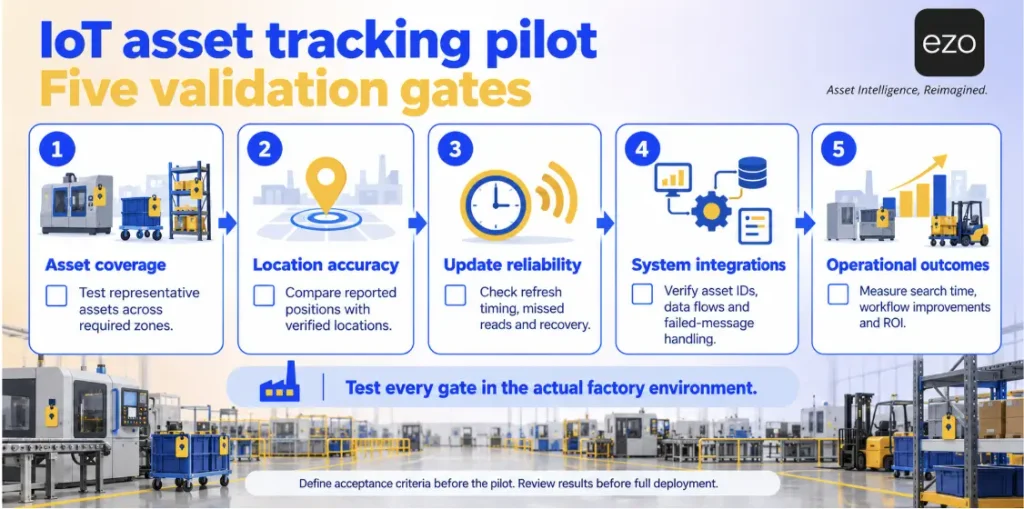
Test exceptions as well as the expected workflow. Take a located gauge out of service and check whether the system prevents it from being used. Send a duplicate location event and check whether the receiving system creates a duplicate record. Location tracking and lifecycle control are related but distinct needs. A pilot should reveal which capability your plant lacks.
How EZO EAM supports IoT asset tracking in manufacturing
EZO EAM serves as the records layer: it tracks who holds an asset, whether it is available, and what service is due next. It does not provide indoor positioning, so automatic shop floor location requires a separate RTLS. No RTLS integration is documented, so connecting the two would require confirming available API options and any needed custom development. GPS and telematics integrations can provide location data for outdoor equipment.
Conclusion
An asset tracking system needs to answer two questions: where is the asset, and can you trust its record? Start by identifying where your location and status records become outdated. Where assets move without recorded transactions, prioritize positioning. Where they move through checkouts and service events, improve the records first.