
Disclosure: EZO EAM is developed by EZO, which publishes this comparison. It is assessed against the same criteria as every other platform, and its limitations are stated explicitly. Readers should consider that relationship when evaluating our recommendations.
Last reviewed: September 2026. Capabilities, plan gating, and pricing were checked against first-party vendor sources on September 23, 2026. Reconfirm before issuing an RFP.
The best enterprise equipment request portal software does more than capture a request. It connects that request to availability, approval, a specific item, a recorded handoff, and, ultimately, a return. We tested that full chain across eight platforms using the same shared-equipment scenario. Three form the leading group, but for different reasons: CHEQROOM is built around reservation-led equipment operations, EZO EAM connects requests with equipment moving across departments and sites, and Reftab offers a lighter workflow with documented approval routing. None of the three documents an automatic inspection that keeps returned equipment unavailable until it has been checked, so buyers should test that step directly. ServiceNow takes a different approach, supporting hardware requests within a broader enterprise service-management environment.
Request portals are easy to evaluate from the requester’s perspective: the catalog, the form, the status page. That is what vendors demo, but it tells you the least about whether the process works end-to-end. The difficult part begins after approval, when a request has to become a specific item, at a specific site, in a specific person’s custody, and due back on a specific date.
Key Takeaways:
- CHEQROOM, EZO EAM, and Reftab lead this comparison, but each leaves a different step of the request-to-return scenario partial or unverified.
- Return inspection is the weakest documented step: no platform here packages a hold that keeps returned items unavailable until they are inspected.
- When approval is slow, asking a colleague becomes faster than the portal, and custody records can drift from reality.
- A reservation calendar measures booked time, while checkout history measures usage; therefore, equipment purchases should be based on checkout data.
- On several platforms, the request portal sits above the entry plan, so price the minimum plan the scenario needs, not the headline tier.
The best equipment request portals at a glance
The eight platforms approach the same problem from opposite ends. Asset-first platforms—CHEQROOM, EZO EAM, Reftab, Asset Panda, and Snipe-IT—start with the equipment record and build requests around it. Service-first platforms—ServiceNow, Freshservice, and Jira Service Management—start with the request and connect it to asset records. That difference shows up in the workflow: in this comparison, asset-first platforms document more of the custody and return process, while service-first platforms document more of the routing and approval layer.
The seven steps each platform is scored on
Every platform is evaluated against the same shared-equipment scenario. An employee at Site A requests a camera kit for future dates. The request requires manager approval, the kit may need to come from Site B, and the equipment must be scanned out, returned on time, and inspected before it becomes available again. We break that workflow into seven steps. The “Steps supported” column counts how many of those steps each platform documents:
- Dated request: the employee books the kit for specific start and end dates.
- Manager approval: the request goes to a manager for a decision before anything is issued.
- Kit: the camera, lenses, and accessories are reserved and issued as one unit.
- Site B sourcing: if Site A has no kit, the fulfiller finds one at another site and moves it.
- Scanned custody: the items are scanned at pickup, and the borrower is recorded as the custodian.
- Reminders: the borrower is reminded before the due date, and someone is alerted if the kit is late.
- Inspection hold: the returned kit stays unavailable until someone inspects it and releases it.
The evaluation section below gives the exact test for each step and shows how every platform scored on each one.
| Platform | Type | Request portal | Approvals | Steps supported (of 7) | Minimum plan for the scenario | Pricing |
| CHEQROOM | Equipment operations platform | Yes (Enterprise) | Partial | 4, plus 2 partial | Enterprise | Published, per admin |
| EZO EAM | Equipment and asset management platform | Yes (Premium) | Yes (Premium) | 4, plus 2 partial | Premium | Published, per item tier |
| Reftab | IT asset platform with reservations | Yes | Yes (plan to confirm) | 5 | Hardware Asset Management | Published, per asset |
| Asset Panda | Configurable asset platform | Partial | Partial | 3, plus 3 partial | Quote | Quote |
| ServiceNow | Service platform with a loaner flow | Yes | Yes | 2, plus 3 partial | ITSM plus HAM | Quote |
| Freshservice | Service platform with loaner items | Yes (Growth) | Yes | 2, plus 1 partial | Growth | Published, per agent |
| Jira Service Management with Assets | Configurable service platform | Yes | Yes | 1, plus 1 partial, 4 config | Standard | Published, per agent |
| Snipe-IT | Basic request tool | Partial | Not verified | Not eligible | Not applicable | Free or hosted plans |
The table uses the same labels as the scenario table below: Yes means the capability is documented on the plan or module shown; Partial means the documented capability covers only part of the step; Config means the outcome can be built from documented native components; and Not verified means we did not find it in the documentation reviewed, which does not prove that it is absent. “Steps supported” counts documented coverage across the seven scenario steps, not hands-on performance. Information reviewed September 23, 2026.
Which equipment request portal should you choose?
Start with the event that poses the greatest risk to your operation. If an employee requests something that is not available, review sourcing and procurement. If two teams are expecting the same kit, examine reservation conflicts. If equipment is leaving without a reliable handoff, or is coming back damaged and going straight out again, examine scanning, custody history, and return inspection.
| If your priority is | Start with | Confirm before purchasing |
| Reservation-intensive equipment operations | CHEQROOM | Enterprise requirement and approval routing |
| Shared equipment across departments and locations | EZO EAM | Premium requirement and return inspection |
| A lighter booking and checkout system with approvals | Reftab | Which plan includes approval flows |
| Highly configurable asset records and forms | Asset Panda | Approval support in the product version you buy |
| Complex hardware sourcing within enterprise ITSM | ServiceNow | Modules, implementation effort, and total cost |
| IT service requests alongside asset management | Freshservice | Multi-item loans and Asset Unit costs |
| Atlassian-based IT request workflows | Jira Service Management | Configuration effort and Marketplace app costs |
| Open-source asset-request basics | Snipe-IT | Manual approval and scheduling workload |
A second question helps when two platforms look close: when does the system assign a specific item to the request? If equipment is scarce and specific, a platform that commits an item at booking can give the requester greater certainty. If equipment is plentiful and interchangeable, assigning the item at fulfillment may be simpler to operate. Multi-site buyers should also test a live transfer between locations, not just whether the system can change an item’s location.
What is an enterprise equipment request portal?
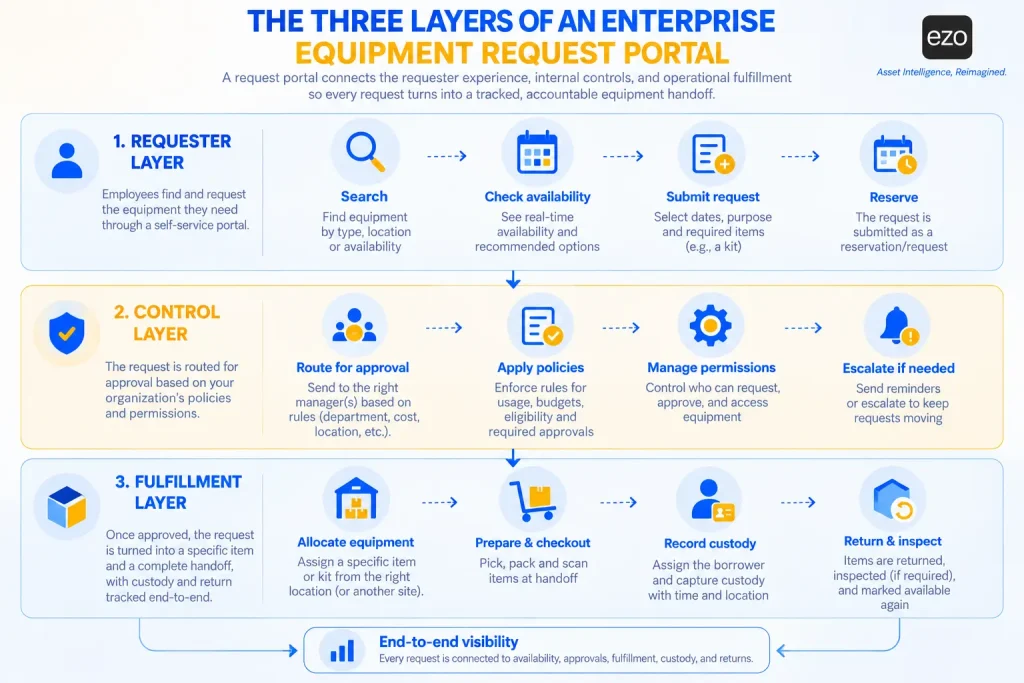
An enterprise equipment request portal is an employee-facing system for finding, requesting, reserving, receiving, and returning company-owned equipment through controlled approval and fulfillment workflows. It works across three layers:
- Requester layer: search, availability, request forms, reservations, and status tracking.
- Control layer: approvals, policies, permissions, and escalations.
- Fulfillment layer: allocation, checkout, custody, pickup, and return.
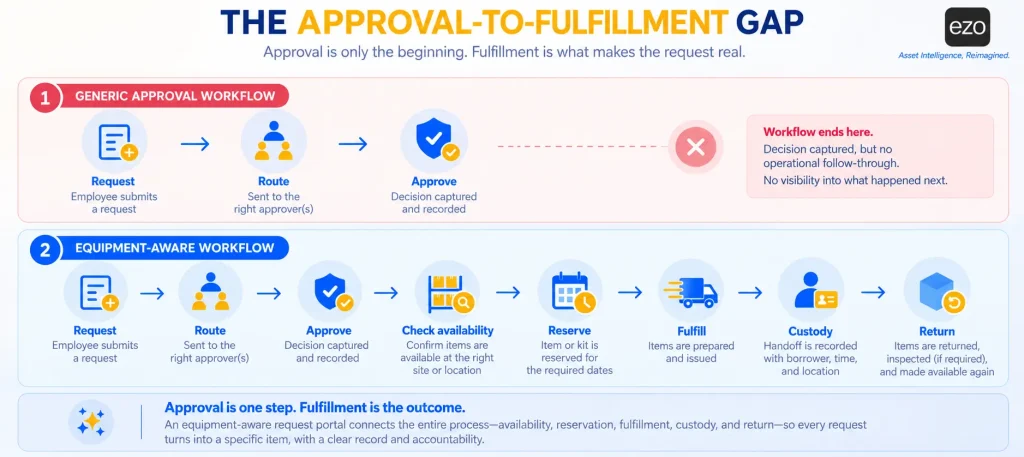
A portal that is strong at the request stage but weak at fulfillment can give employees a smooth experience while leaving the organization with an unreliable record. That is what distinguishes this category from asset request fulfillment software more broadly: fulfillment is only one stage of the process here, and a loan is not complete when the item is handed over. It is complete when the item comes back.
Equipment request portal vs. equipment reservation software
A reservation holds a specific item or quantity for a defined period. A request asks for something that may not yet be tied to an item. The difference matters because it determines when the organization commits its equipment.
A system that binds early, attaching a named item at booking, gives the requester certainty but can leave that item idle while it waits for someone who may never collect it. A system that binds late approves a category, such as “one camera kit,” and selects the item at fulfillment. That gives the fulfiller more flexibility, but unless the system checks pool-level availability before approval and allocates the item before pickup, a shortfall can surface at the counter rather than when the request is made.
Neither approach is inherently better. The right binding point depends on where scarcity sits. Plentiful, interchangeable equipment such as standard laptops can tolerate late binding. Scarce, specific equipment, such as a calibrated survey instrument or a matched camera kit, may require early binding because the nearest alternative may not be a substitute at all.
When nothing suitable is available, three separate actions may follow: detecting the shortfall, requesting a transfer from another site, and raising a purchase through equipment procurement. Of the eight platforms reviewed here, only ServiceNow documents transfer and purchase within the same request flow, and that flow is designed for provisioning rather than loans. The profiles below show which of these actions are connected and which remain separate.
Equipment request portal vs. IT service catalog
An IT service catalog is built around provisioning, such as a laptop or phone issued to an employee, often indefinitely. An equipment portal is built around loans. A catalog request can reasonably be considered closed when the item is delivered, whereas a loan is only half complete at that point. Buyers should check how a catalog models due dates and returns, not just delivery.
Equipment requests vs. maintenance requests
A maintenance request reports a fault or asks for service. It does not request custody of anything. Platforms that accept work requests through a portal are not, on that basis alone, equipment request portals. The two still need to share a record, so that an item under repair never appears available to a requester.
How we evaluated the platforms
We used only first-party sources: product pages, documentation, pricing pages, and trust pages, reviewed on September 23, 2026. We did not use review-site ratings or aggregator pricing. Review sites can surface implementation and usability questions, but they cannot establish whether a feature exists, and their pricing dates quickly, so those questions belong in reference calls and the proof of concept. We did not run hands-on trials of all eight platforms, so buyers should confirm documented capability in a proof of concept.
Vendors name the staff roles differently: administrator in EZO EAM and CHEQROOM, agent in Freshservice and Jira Service Management, and fulfiller or procurement administrator in ServiceNow. This article uses “fulfiller” to refer to whoever processes a request and retains each vendor’s own term when discussing its licensing.
Every profile records the same fields: best for, overview, key capabilities, a standout workflow, integrations, pricing, limitations, and best fit. The appendix maps each scenario score to its evidence.
Eligibility
A platform is ranked only if its request can carry a date range and be routed to a person for a decision, whether packaged or partial. Those are the scenario’s first two steps, and a request that cannot pass them never reaches the rest. Seven platforms qualify. Snipe-IT does not. It supports basic requests for specific assets or asset models. Its request does not capture the required date range or go through a formal approval/denial workflow, so it does not meet the first two ranking criteria. We profile it separately as a basic alternative.
The shared scenario
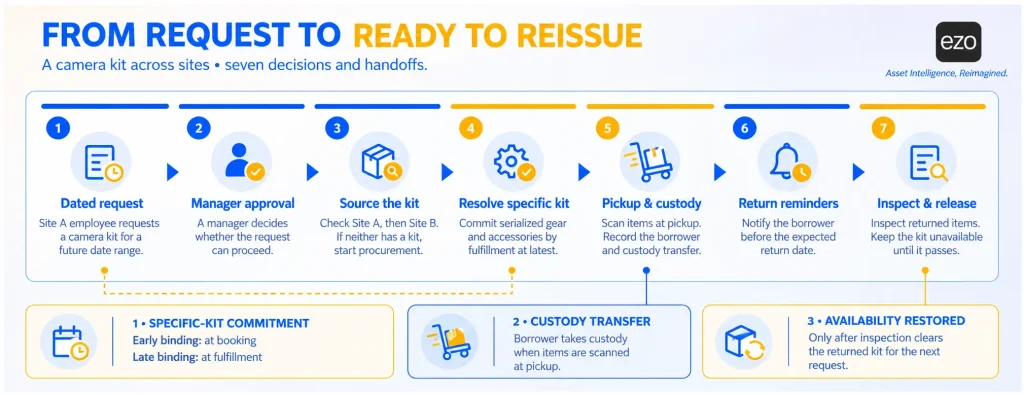
An employee at Site A requests a camera kit for a future date. The kit contains serialized equipment and accessories. The request requires manager approval. If Site A has no available kit, the fulfiller checks Site B before initiating procurement. At pickup, the items are scanned, and custody is recorded. The system sends return reminders and updates availability after inspection.
Each step has a specific test:
- Dated request: the requester sets start and end dates, and the request or reservation holds them.
- Manager approval: the request can be routed to the requester’s manager or a designated approver before fulfillment.
- Kit: several items are reserved and issued as one unit.
- Site B sourcing: the fulfiller can find stock at another site and move it within the request’s workflow.
- Scanned custody: items are scanned at handoff using barcodes, QR codes, or RFID, and the custodian is recorded.
- Reminders: the borrower is reminded before the due date, and someone is alerted when the item is overdue. Alerts that reach staff only are Partial.
- Inspection hold: a returned item automatically enters an unavailable state, an authorized person inspects it, and release restores availability. A flag that quarantines an item only when someone reports a problem is Partial.
Scenario coverage and how it sets the order
How to read the table:
- Yes: documented for this outcome, as packaged capability or a vendor-published setup, on the plan or module named in the profile.
- Partial: documented, but covering only part of the step or sitting in a separate workflow.
- Config: buildable from documented native components; the profile explains how.
- Not verified: not found in the documentation we reviewed, which is not proof of its absence.
| Platform | Dated request | Manager approval | Kit | Site B sourcing | Scanned custody | Reminders | Inspection hold |
| CHEQROOM | Yes | Partial (a) | Yes | Not verified | Yes | Yes | Partial (b) |
| EZO EAM | Yes | Yes | Yes | Partial (c) | Yes | Partial (d) | Not verified |
| Reftab | Yes | Yes (e) | Yes | Not verified | Yes | Yes | Not verified |
| Asset Panda | Yes | Partial | Yes | Partial | Yes | Partial | Not verified |
| ServiceNow | Yes | Yes | Not verified | Partial | Partial | Partial | Not verified |
| Freshservice | Yes | Yes | Not verified | Not verified | Partial | Not verified | Not verified |
| Jira Service Management | Partial | Yes | Config | Config | Not verified | Config | Config |
| Snipe-IT (not eligible) | Partial | Not verified | Yes | Not verified | Yes | Yes | Not verified |
Notes: (a) Manager routing is described on marketing pages but not confirmed in help documentation. (b) Damage flags quarantine an item only when someone sets them. (c) Transfers are a separate workflow the fulfiller starts. (d) Reminders go to administrators, not borrowers. (e) Plan entitlement for approval flows should be confirmed.
Two rules determine the order. Eligible platforms that document at least four of the seven steps form the leading group, listed alphabetically. The remaining platforms are ordered by the number of Yes steps, followed by Partial and Config. Snipe-IT appears last as an adjacent option because its requests do not meet the eligibility criteria; its later cells show documented capabilities, but those capabilities are not counted because the scenario cannot reach them.
The leading group is presented as a group rather than a ranking because the three platforms have different strengths. Reftab documents five steps fully and leaves two unverified. CHEQROOM and EZO EAM each document four fully and two partially. Treating each Partial as half a step would put all three at five, but assigning different weights to the steps would introduce a judgment about which parts of the workflow matter more. That is difficult to justify when the steps form a chain: strong approval routing has limited value if a returned kit can go straight back into circulation without inspection. EZO EAM is therefore one of the three leaders. The useful question is which gaps matter most to your operation, and the decision table above is designed to answer that.
The 8 best enterprise equipment request portal software platforms
The first three profiles are the leading group, listed alphabetically. Numbers are for navigation only.
1. CHEQROOM: Best for reservation-led equipment operations
Scenario coverage: Leading group. Four steps documented; manager approval and the inspection hold are partial; Site B sourcing not verified. Minimum plan for the scenario: Enterprise, for the Booking Portal.
Best for
Media teams, universities, production departments, and equipment centers where demand arrives as date-specific bookings.
Overview
CHEQROOM is an equipment operations platform built around reservations, checkouts, and custody. Its Booking Portal, listed on the pricing page only for the Enterprise and E.L.A. tiers, lets end users request equipment without full workspace access. (E.L.A. is CHEQROOM’s custom agreement tier; the pricing page does not expand the acronym.)
Key capabilities
- Booking Portal (Enterprise): browse, select dates, add to a cart, and submit.
- Reservations and booking rules: calendar views and booking windows, with location-level rules from Business.
- Kits: reserved and checked out as a single unit.
- Checkout and custody: barcode or QR scanning, a custody log, and loan agreements signed at pickup (Business).
- Reminders: CHEQROOM’s checkout feature page says it “automatically notifies users before their items are due back,” by email, SMS, push, or Slack, with escalation for overdue items.
- Flags: damage reports that can make an item unavailable for booking.
- Operations Requests (sold as an add-on to any plan, per CHEQROOM’s FAQ): procurement requests move through intake, triage, ordering, documentation (such as attached vendor quotes), and receiving, without a native purchase-order record.
Standout workflow
The requester selects the camera kit and dates in the Booking Portal and submits the request. According to the Booking Portal guide, the request moves to Reserved and holds the equipment; an administrator can edit it on the requester’s behalf. At pickup, the reservation converts to a checkout and the agreement is signed. CHEQROOM reminds the borrower before the due date. At check-in, its documentation says the item “becomes available again.” A kit remains out of circulation only if someone sets a damage flag.
Integrations
SAML SSO with Okta, Microsoft Entra ID, Google, OneLogin, ADFS, and Shibboleth, plus Slack, API, webhooks, and Zapier, all from Core. Teams, ServiceNow, and Jira are listed without saying which connect natively. SCIM is not documented.
Pricing
Published per administrator and billed annually: Core at $184, Business at $275, and Enterprise at $367 per admin per month, per workspace. Minimum administrator counts apply but are not stated, so one Enterprise admin ($4,404 a year) is a floor, not an entry price. Users and items are unlimited. RFID is an add-on below Enterprise, and maintenance management is a paid add-on. CHEQROOM describes itself as “SOC 2 Type II compliant.”
Limitations
- Manager routing is not confirmed in the help center. CHEQROOM’s marketing pages describe approval steps, including sign-off by department or equipment type, but its help center documents only administrator review of requests already marked as Reserved. Confirm which plan includes approval routing and what happens to held equipment when a request is declined.
- Returned items become available at check-in unless someone flags them, making the inspection step dependent on staff discipline.
- The Booking Portal requires Enterprise, and locations are capped at 1, 3, and 10 on Core, Business, and Enterprise, respectively.
- We found no purchase order records and no documented workflow for sourcing a kit from another site before booking; items can be checked in at a different location.
Best fit
Choose CHEQROOM if reservations and borrower communication are the center of your equipment operation. Consider another option if requests need documented manager routing or purchase-order records.
2. EZO EAM: Best for shared equipment across departments and sites
Scenario coverage: Leading group. Four steps documented; Site B sourcing and return reminders partial; the inspection hold not verified. Minimum plan for the scenario: Premium, which includes the Advanced features used here.
Best for
Organizations sharing equipment, tools, and kits across departments and sites that want requests, custody, transfers, and purchasing in one system.
Overview
EZO EAM is an enterprise asset management platform with a native request layer, not an IT service catalog. Employees submit requests through the Request Portal. Administrators act on them in the Fulfillment Center, a shared workspace for reservations, checkouts, custody transfers, purchase orders, and general requests, where each action still creates its own record.
Key capabilities
- Request Portal (Premium): requests to reserve equipment, requests to return it (check-in requests), and general requests, with customizable forms.
- Multi-tier approval (Premium): approvers by name, role, or manager hierarchy, with auto-approve rules.
- Reservations (all plans): availability calendar, recurring reservations, and an optional conflict-free setting.
- Packages (Advanced): kits are reserved, checked out, and checked in as a single unit.
- Checkout and custody: checkout from the reservation, mandatory e-signatures, and custody transfers (Advanced).
- Locations and purchasing (Advanced): stock transfers between sites and purchase orders with approvers.
Standout workflow
The employee books the camera kit package for the required dates, and the request routes to the manager. If Site A has no kit, the fulfiller raises a transfer request from Site B, a separate workflow rather than a step the reservation triggers. At pickup, the fulfiller scans the items by barcode, QR code, or RFID, checks them out from the reservation, and captures a signature. EZO’s email alerts warn administrators before a check-in is due and repeat when it is overdue; the borrower does not receive these reminders. Check-in can require mandatory custom fields, such as condition, but a required field only ensures a value is entered; it does not keep a returned kit unavailable until someone inspects and releases it.
Integrations
SAML single sign-on with Okta, OneLogin, Microsoft Entra ID, Ping, and Google Workspace (Premium), plus SCIM. Jira, Zendesk, Zapier, and Topaz signature pads are listed, with a REST API from Advanced. No native Slack, Teams, or HRIS connector is documented.
Pricing
Published. Plan prices scale with the number of tracked items, and the listed examples are for 300 items with monthly billing shown by default (a yearly option is available): Essential at $63.55, Advanced at $85.51, and Premium at $100.88 per month; Enterprise is custom. The premium on monthly billing is about $1,211 per year for 300 items. The portal, multi-tier approval, the Fulfillment Center, and SAML are available starting at Premium. Users are unlimited under the fair use policy, and the free trial requires no credit card. The CMMS add-on is priced separately per admin user, and the Enterprise plan includes an enterprise-grade CMMS. EZO’s security page lists SOC 2 Type 2 and ISO/IEC 27001.
Limitations
- Return reminders reach administrators only, so borrowers rely on staff follow-up or an external process.
- We found no documented hold that keeps a returned item unavailable pending inspection; staff would need to open a service record manually.
- A reservation request does not automatically trigger a site transfer or purchase order. A fulfiller can initiate a separate transfer, while a portal General Request can be used to create a purchase order through the Dispatch Center.
- The self-service portal and multi-tier approvals require Premium, and item-based pricing means accessories should be counted carefully before modeling cost.
Best fit
Choose EZO EAM if shared equipment moves between people and sites and approvals, transfers, and purchasing need to sit in one system. Consider another option if borrower reminders and return quarantine matter more to you than cross-site control, or if your requests are mainly for permanent IT provisioning within an ITSM platform.
3. Reftab: Best for straightforward equipment booking and checkout
Scenario coverage: Leading group. Five steps documented; Site B sourcing and the inspection hold not verified. Minimum plan for the scenario: Hardware Asset Management, with approval flows to be confirmed.
Best for
Mid-sized, often IT-led organizations and schools that want self-service reservations and real approval routing without a large deployment.
Overview
Reftab is an IT asset management platform covering hardware, software, and maintenance. Its user portal supports two paths. When equipment is available, employees reserve it directly on a calendar. When a category has no items available, the portal prompts for an equipment request instead, and a public request form accepts requests without a login.
Key capabilities
- Reservations: the requester drags across start and end dates on a calendar, and Reftab blocks dates when the item is checked out, or its only unit is already reserved.
- Equipment requests: quantity, equipment type, reason, and pickup dates, with email notification to administrators; the fulfilled request becomes a loan or reservation linked to the original request.
- Approval flows: multiple steps, named approvers or the requester’s manager, and approval by email.
- Kits and accessories: reusable bundles; accessories are not billed.
- Checkout controls: signatures by category.
- Reminders: Reftab emails the borrower when a loan is overdue, and publishes a workflow setup that emails borrowers about loans due within the next week.
Standout workflow
The scenario runs through Reftab’s reservation path: the requester books the camera kit for a date range, and the reservation record holds those dates and blocks overlapping bookings through the return date. If no kit is available, the requester submits an equipment request instead; the manager approves it by email, and the administrator scans an available kit to fulfill the request, creating a loan or reservation linked to the request. That link preserves what was asked for alongside what was issued. A signature is captured at checkout, the borrower is reminded before the due date, and an overdue email follows if the kit is late.
Integrations
Okta, Microsoft Entra ID, SAML, and SCIM; BambooHR, HiBob, and Workday; Slack and Teams notifications; Zapier; Intune, Jamf, and Kandji; and Jira and Zendesk. The REST API is for paying customers, and webhooks are not documented.
Pricing
Published and based on assets. A free tier covers up to 50 assets; Hardware Asset Management starts at $125 per month with unlimited users, and Complete ITAM is custom. The pricing page does not show how many assets the $125 figure covers. A 14-day trial is available. Reftab states that it “maintains SOC 2 Type II certification.”
Limitations
- Help documentation places approvals on a “Business plan” that does not appear on the current pricing page, so the price of the full scenario is unconfirmed until Reftab states which plan includes approval flows.
- We found no condition record at check-in and no cross-site sourcing workflow.
- Approval flows capture PO numbers and vendors, which is procurement tracking, not purchase order management.
Best fit
Choose Reftab if you want reservations, borrower reminders, and genuine approval routing in a lighter system. Consider another option if inter-site sourcing or return inspection is part of the fulfillment process.
4. Asset Panda: Best for configurable asset workflows
Scenario coverage: Three steps documented, three partial, and the inspection hold not verified. Ahead of ServiceNow on one more documented step. Minimum plan for the scenario: by quote.
Best for
Organizations that want to design their own request and checkout process and have the administrative capacity to maintain it.
Overview
Asset Panda is a no-code platform built on configurable collections, forms, and automations, with two products: the legacy application and Asset Panda Pro, launched in September 2025. In Pro, enabling reservations on a collection adds Reserve, Check Out, and Check In forms. There is no separate requester portal; requesters work in the application with their own accounts.
Key capabilities
- Reservations: calendar views with reserved, checked-out, and overdue states.
- Kits: template or one-off groupings, with individual kit items blocked from double reservation in Pro.
- Approvals: described for reservations on the marketing page and in the legacy help center, but not listed among Pro’s automation actions.
- Checkout: check-out and due-back dates, with a daily check in Pro’s equipment checkout template that marks late items overdue.
- Signatures: a DocuSign automation action.
- Mobile: barcode scanning, including offline use.
Standout workflow
The requester reserves the camera kit in Pro, and the system blocks any kit item already reserved for those dates. At pickup, staff scan the kit, complete the Check Out form, and send it for DocuSign signature. A daily check marks the kit overdue if it is late. Whether a manager approves the reservation, and how, is not documented for Pro, so the full sequence is unverified in the current product.
Integrations
SSO and user sync with Google Workspace, Microsoft Entra ID, and Okta; Slack, Teams, webhooks, Zapier, and an API; NetSuite, QuickBooks, and Xero; and ticketing and device-management tools. No HRIS connector is listed.
Pricing
Quote-based, with a free seven-day trial. Asset Panda states that user accounts are unlimited but does not publish the pricing basis. Its security page states that it is “SOC 2 Type II certified as of February 2023.”
Limitations
- Approvals are documented for the legacy product but not for Pro, so confirm how they work in the version you buy.
- Flexibility moves design work to the buyer, so the request-to-return connection is only as good as the configuration.
- No native purchase order module or public pricing.
Best fit
Choose Asset Panda if your process is unusual enough that configurability matters more than packaged workflow. Consider another option if you want the request-to-return sequence to work out of the box.
5. ServiceNow: Best for complex enterprise hardware request workflows
Scenario coverage: Two steps documented, three partial, and kits and the inspection hold not verified. Its strongest capability, inter-site sourcing, sits in a different flow from the one the scenario needs. Minimum plan for the scenario: ITSM for the catalog plus Hardware Asset Management.
Best for
Large enterprises already running ServiceNow that want hardware requests in the same catalog, approval, and procurement records as the rest of IT.
Overview
Requests start in the Service Catalog, and Hardware Asset Management (HAM) documents two relevant flows. They are easiest to understand as a map:
- Loaner flow (HAM, packaged): the Loaner Asset Request item handles short-term loans, including dates, preparation, deployment, and reclamation.
- Standard hardware request flow (HAM and procurement, packaged): the Standard Hardware Asset Request flow handles provisioning and sourcing, either through a transfer order from another stockroom or a purchase order.
- Connecting the two (implementation): using stockroom transfers for a loan is not documented as a packaged path.
Key capabilities
- Catalog requests: Employee Center, Service Portal, and Now Mobile.
- Approvals: the Flow Designer “Ask for Approval” action, with rules such as anyone, all, or a percentage.
- Loaners (HAM): start and return dates, with prepare, deploy, and reclaim tasks and a waitlist when stock runs out.
- Sourcing (HAM and procurement): transfer orders between stockrooms and purchase orders, in the hardware request flow.
- Deployment: pick tasks in the Mobile Agent app, with the asset’s state, assignee, and location updated at close.
Standout workflow
The employee submits a Loaner Asset Request for the camera kit’s dates, and an approval step added in Flow Designer routes it to the manager. ServiceNow creates a prepare task two days before the start date, a deploy task at handoff, and a reclaim task one day before the return date. If no loaner is available, the order is added to a waitlist rather than triggering a transfer from Site B.
Integrations
Integration scope depends on which ServiceNow applications the organization licenses. We did not assess specific connectors for this use case, and buyers should scope them in the proposal.
Pricing
Quote-based. HAM is licensed by active assets in subscription units, for example, four end-user computers or 15 monitors per unit, and per-user subscriptions count fulfiller and business stakeholder users. We did not find first-party confirmation of how requesters are licensed.
Limitations
- The scenario spans several applications: ITSM for the catalog, HAM for assets and loaners, and procurement for purchase orders.
- Setup requires HAM hardware models, a flow per catalog item, and configured stockrooms.
- HAM licensing categories are documented for IT hardware, so confirm how tools or AV kits would be licensed.
Best fit
Choose ServiceNow if you are invested in the platform and need hardware requests tied to enterprise procurement. Consider another option if you need a focused shared-equipment portal without a service-management program.
6. Freshservice: Best for employee IT equipment requests
Scenario coverage: Two steps documented and one partial; the kit, Site B sourcing, reminders, and the inspection hold not verified. Minimum plan for the scenario: Growth.
Best for
IT departments that want equipment requests alongside incidents, onboarding, and other employee service requests.
Overview
Freshservice is an IT service management platform with an asset management layer. Equipment requests are service catalog items in the employee portal, available from the Growth plan. Loaner service items add a reservation-like step: requesters enter start and end dates; a request cannot be placed if the item is unavailable, and Freshservice suggests other times.
Key capabilities
- Service catalog (Growth): a shopping-style catalog with requester-group visibility and cost and delivery estimates.
- Loaner items: date ranges, availability checks, and suggested alternative times, limited to one unit per request.
- Approvals: multi-level approval chains, including reporting managers and department heads, decided in the portal, by email, or in Slack or Teams.
- Fulfillment: requests linked to an asset type and product, with the asset assigned during fulfillment.
- Mobile scanning: barcode and QR scanning for agents.
- Purchase orders: in the ITAM Pro package.
Standout workflow
An employee requests a loaner for specific dates; if none is available, Freshservice suggests an alternative period. The approval chain routes the request, and the agent assigns the asset during fulfillment. The camera kit is harder: loaner requests are limited to one unit, so a multi-item kit cannot be handled as a single loan request.
Integrations
SSO on all plans, a ServiceBot for Slack and Teams, BambooHR and Workday connectors, webhooks through the Workflow Automator, and API limits that rise by plan.
Pricing
Published per agent, billed annually: Starter at $19, Growth at $49, and Pro at $99 per agent per month, with Enterprise quoted. Agent seats are not the only cost. Growth and above include the ITAM Growth package with 100 Asset Units; additional units are sold in packs of 500, and upgraded ITAM functionality such as purchase orders costs extra. Requesters are not charged. A 14-day trial is available, and Freshworks lists SOC 2 on its pricing page.
Limitations
- Loaners are limited to one unit per request, and early returns are recorded manually.
- E-signatures are a paid add-on, and purchase orders require ITAM Pro.
- Fit for non-IT shared equipment should be tested directly, including how many Asset Units the equipment pool consumes.
Best fit
Choose Freshservice if equipment requests are one part of a wider IT service desk. Consider another option if most requests are short-term loans of multi-item equipment.
7. Jira Service Management with Assets: Best for Atlassian-based IT teams
Scenario coverage: Manager approval documented, the dated request partial, four steps buildable from documented native components, and scanned custody not verified. Minimum plan for the scenario: Standard, which now includes Assets.
Best for
IT teams already in Jira that want equipment requests on their existing service portal and accept ownership of the configuration.
Overview
Jira Service Management is now sold as part of Atlassian’s Service Collection, alongside Assets. Portal request types, workflow approvals, and automation rules are native. The Assets object field lets a request form offer assets from a schema, filtered by a query. This is a configurable pattern, not a packaged equipment portal.
Key capabilities
- Portal request types: customizable forms and fields, including date fields.
- Approvals: approval steps in workflow statuses, with approvers set per request type or chosen by customers.
- Assets on forms: object fields filtered by query, for example by status and location attributes.
- Automation: rules that update object attributes when a request moves through the workflow.
- Booking: no native reservation calendar or checkout; Marketplace apps fill the gap.
Standout workflow
The employee selects a camera kit object from a status-filtered form, and the manager approves it in the portal. The remaining steps are assembled from documented native parts:
- Kit: a Kit object type with reference attributes that point to its camera, lenses, and accessories, so a query can return these components.
- Site B: a status-and-location filter shows kits marked available at another site, and an agent or the Edit object automation action changes the location. The filter is not date-aware: it cannot see future reservations, so overlapping requests must be tested explicitly.
- Reminders: a daily scheduled automation rule with a JQL condition on a return-date field emails the requester.
- Inspection hold: a workflow status for returned items awaiting inspection, with automation setting the object to Available only on the inspection-passed transition.
Each part is documented; the combination is a design the team builds and maintains, not a published Atlassian recipe. Scanned custody is the exception. Atlassian documents printable QR codes that open an object in the Jira Cloud mobile app, but Atlassian feature requests describe mobile support for Assets as incomplete, and nothing documented says a scan records custody.
Integrations
Assets lists more than 30 integrations for importing and discovering data, and the Atlassian Marketplace supplies booking and checkout apps. Assets Data Manager and scheduled imports are available only in Premium and Enterprise.
Pricing
Published per agent. The pricing page lists Standard at $20 and Premium at $51.42 per agent per month, with Enterprise quoted, and customers are unlimited and free. Atlassian announced in February 2026 that Standard now includes 5,000 Assets objects, alongside 50,000 on Premium and 500,000 on Enterprise, with overage at $0.02 per object per month. The Free plan excludes Assets.
Limitations
- Reservations, checkout, and returns are not packaged, so an administrator builds and maintains custody logic.
- Marketplace apps add cost and a separate vendor to evaluate.
- Approving a request is not the same as holding agent permissions. Atlassian’s approval guide states that people “don’t need a Jira Service Management license to approve requests”; that wording is from its Data Center documentation, and we could not retrieve the equivalent Cloud wording, so Cloud buyers should confirm approver licensing.
Best fit
Choose Jira Service Management if your IT team lives in Atlassian and equipment loans are occasional. Consider another option if shared equipment loans are part of the daily workload.
8. Snipe-IT: Basic open-source alternative (not ranked)
Scenario coverage: Not eligible. Requests carry no dates and no approval step, so the scenario cannot reach the checkout and return steps that Snipe-IT supports.
Best for
Technical teams that need low-cost asset tracking with simple request capture and can handle approvals and scheduling manually.
Overview
Snipe-IT is open-source IT asset management software, self-hosted for free or hosted by its developer, Grokability. Administrators can mark individual assets or asset models as requestable, and requests appear in a Requested Assets view for administrators to act on.
Key capabilities
- Requestable assets and models: requests without dates or approval.
- Predefined kits: grouped items for faster checkout.
- Acceptance: per-category acceptance, an end-user license agreement (EULA), and an optional signature.
- Expected check-in alerts: email alerts as the return date approaches, which need a scheduled job on self-hosted installations.
- Labels and scanning: QR code labels and support for most handheld barcode scanners.
Standout workflow
A user requests a camera model. The administrator sees it in Requested Assets, selects a serialized unit and kit, and checks it out with an expected check-in date. The user accepts via an email link, and an alert fires as the date approaches. Because requests do not include a recorded period, two users can request the same model for overlapping plans, and staff must manually resolve the conflicting dates.
Integrations
LDAP and Active Directory, SAML SSO, SCIM, a REST API, and Slack, Teams, and Google Chat webhooks for check-in and checkout events. No HRIS connector is listed.
Pricing
Self-hosting is free. Hosted plans start at $39.99 per month, with unlimited users and assets. We did not find any SOC 2 or ISO 27001 claims on Snipe-IT’s security page, and no trial is mentioned.
Limitations
- No native approvals; a request for manager approval was closed without implementation.
- No reservations; the open feature request notes that requests carry only a creation timestamp.
- The official mobile app is described as being in beta.
Best fit
Choose Snipe-IT if budget is the binding constraint and request volume is low. Consider another option if requests need approval or future-dated bookings.
Why a request portal competes with informal borrowing
A request portal competes with the informal route. An employee who needs a projector can submit a request and wait, or borrow one from the team down the corridor. The two routes distribute costs differently. The formal route asks the requester to pay now, fill out form fields, wait, and face uncertainty about the outcome. The benefit of that effort, an accurate custody record and reliable utilization data, accrues later and mostly to someone else. The informal route reverses the arrangement: it is cheap for the requester today, and its cost arrives later for the administrator who cannot find the projector.
When the formal route is slower, requesters have a reason to take the informal one. Each informal handoff leaves the system naming a custodian who no longer has the item. Staff then learn to trust a phone call over the system, which makes the next informal handoff more likely.
Approval design is one of the main parts of the process a buyer can control. Each additional approval step can add delay, and delay can make the informal route more attractive. Some approvals are required by policy, so removing them entirely is not the answer. An unapproved loan of a high-value kit is still a control failure, even if it was fast.
A better approach is to route requests by risk, using approval thresholds based on value, category, duration, or requester role. High-value or long-duration requests can go to a manager, while routine requests can be approved automatically. For each approval step, track decision time and the rejection or revision rate. A step that rarely rejects or revises a request adds delay without adding much control and may be a candidate for automatic approval.
To see where the formal process slows, measure three intervals separately: request-to-decision, decision-to-ready, and ready-to-pickup. A single approval-to-fulfillment time combines approval, stock, staffing, and scheduling into a single metric. Custody discrepancies provide another signal. If the system indicates that one person has an item but that person does not, the formal record may no longer reflect how the equipment is actually being moved.
Capabilities to test against your equipment workflow
These are the capabilities that decide whether the scenario succeeds, and the first place to look when two platforms seem close.
Availability that changes at the right moment
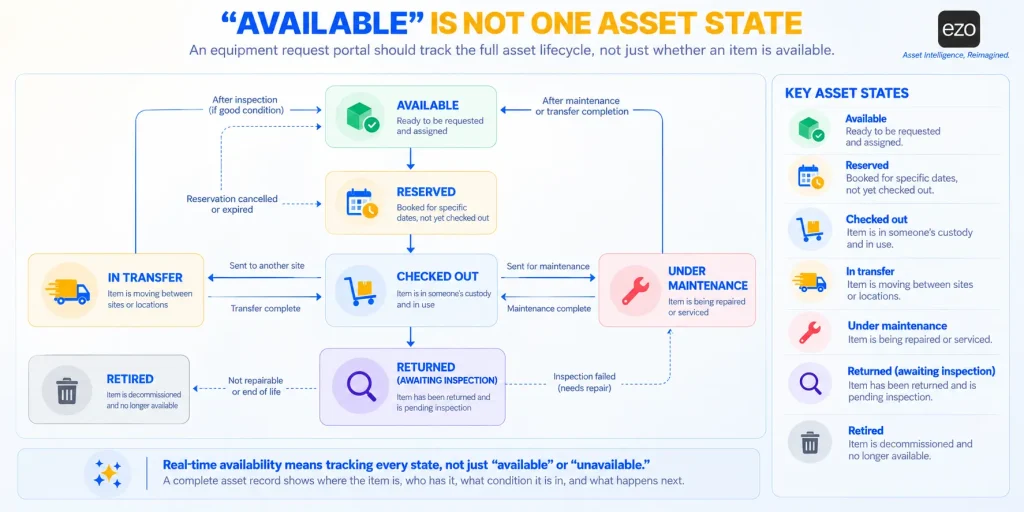
“Available” is not one state. The portal should distinguish between available, reserved, checked out, under maintenance, in transfer, and retired. Just as important is when each state changes. An approval does not necessarily remove an item from circulation, whereas a confirmed reservation should block other bookings for the same period. Calendar visibility is only as reliable as the state changes behind it.
Multi-location sourcing
The fulfiller should be able to see available stock across locations and move it before initiating a purchase. But visibility is only the starting point. The test should include transfer lead time, whether the source site’s stock remains committed while in transit, receipt at the destination, and who holds custody throughout transit. Without those controls, a shortage at one site can look like a shortage across the organization, leading it to buy equipment it already owns.
Reservation and checkout records that link
This requirement can change a purchasing decision. Suppose a team manages 12 camera kits and the reservation calendar shows them booked for 90 percent of working hours across a quarter. The obvious conclusion is that the team needs more kits.
Now suppose checkout records show that a quarter of those reservations were never collected, while collected kits often came back early. The same calendar now describes a different problem: not a shortage of kits, but more booked time than actual use. The team may have a surplus of claims rather than a shortage of equipment.
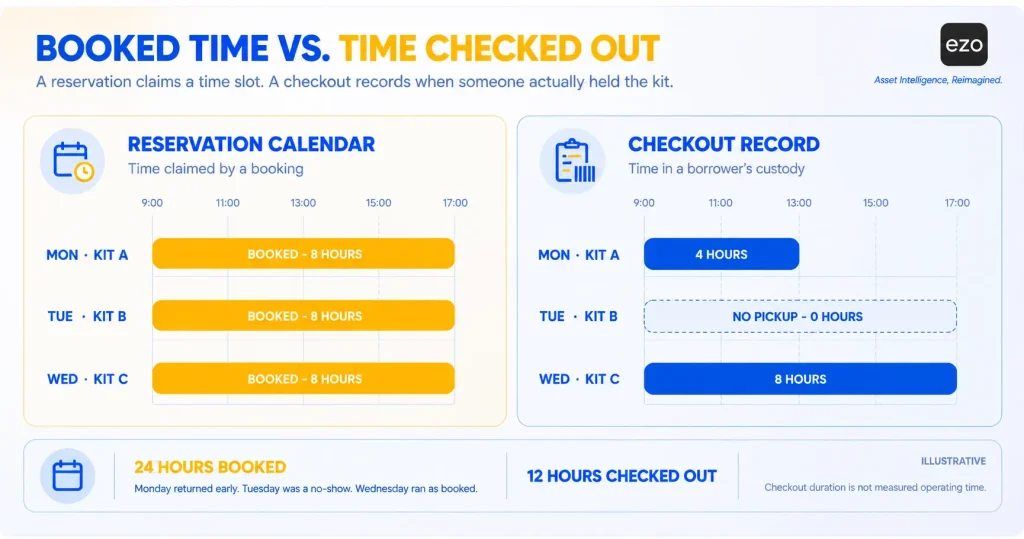
When approval is slow, or availability is uncertain, requesters have an incentive to reserve earlier, longer, and more broadly than they need. The cost of an idle reservation falls on colleagues, not the person who made the reservation. The calendar measures claims; checkout history measures use. A system that links reservation and checkout records with comparable timestamps lets buyers compare the two before approving a purchase. Asset utilization should therefore be calculated based on usage rather than bookings. It is also worth deciding what happens to a reservation that nobody collects.
Custody and return control
Look for scanned handoffs, electronic acknowledgment, due dates, borrower reminders, condition records at return, and a complete custody history. A defined equipment return process matters because availability should be restored after inspection, not when someone leaves an item on a counter. Test whether a returned item automatically enters an unavailable state, or whether someone has to remember to flag it.
Audit-ready history
The record should show who requested the item, who approved it, what was issued, when custody changed, and who edited the transaction. Those details should remain in audit trails long enough to reconstruct a disputed loan months later.
Enterprise controls to verify
This comparison did not score the following, but an enterprise buyer should check each one with the shortlisted vendors:
- Role permissions for requesters, approvers, fulfillers, and administrators
- Audit trail retention period and export
- Data residency and hosting region
- Which plan includes SSO and SCIM provisioning
- API rate limits and webhook availability
- Accessibility of the requester portal
- Who owns each integration after go-live
Equipment request portal pricing explained
Headline prices are hard to compare because the platforms charge on different bases and put the request portal on different tiers. The table separates the pieces.
| Platform | Base license | Published starting prices | Asset allowance or consumption | Relevant paid add-ons or modules |
| CHEQROOM | Per admin, per workspace, billed annually | $184 to $367 per admin per month; E.L.A. quoted | Items unlimited | RFID below Enterprise, maintenance, Operations Requests |
| EZO EAM | Plan price by tracked-item tier | $63.55 to $100.88 per month for 300 items; Enterprise quoted | Price rises with item count | CMMS, priced per admin user |
| Reftab | Per asset | Free to 50 assets; Hardware from $125 per month | Asset count; accessories not billed | Complete ITAM, quoted |
| Asset Panda | Not published | Quote | Not published | Not published |
| ServiceNow | Per-user subscriptions for fulfillers; HAM per asset | Quote | HAM subscription units by asset type | ITSM, HAM, procurement |
| Freshservice | Per agent, billed annually | $19 to $99 per agent per month; Enterprise quoted | 100 Asset Units from Growth; more in packs of 500 | ITAM Pro, e-signature packs |
| Jira Service Management | Per agent | $20 to $51.42 per agent per month; Enterprise quoted | Asset objects by plan; overage from $0.02 per object | Marketplace booking apps |
| Snipe-IT | Free self-hosted or flat hosting fee | Hosted from $39.99 per month | Unlimited | None |
Two billing details change the comparison. EZO EAM defaults to monthly billing, with an annual option, while CHEQROOM and Freshservice bill annually. CHEQROOM does not state its minimum administrator count, so its per-admin price is a floor rather than an entry cost.
Pricing can also change how an organization operates. If per-administrator pricing encourages a team to keep only two fulfillers, the queue gets longer. If per-item pricing encourages it to stop tracking accessories, those accessories can disappear from kits without a record of where they went. Neither effect appears in the quote.
Requester access deserves its own line. Free requester seats and access to the request experience are not the same thing: CHEQROOM’s users are unlimited, but its Booking Portal requires an Enterprise plan. Separate the cost of requesters, approvers, fulfillers, and administrators, and check whether SSO, API access, and conditional approvals are included in the quoted plan.
Model cost in two parts:
- Year one: subscription for the minimum scenario plan, implementation, integration, migration, and training.
- Each following year: subscription, support, paid add-ons, asset or object overages, and internal time for administration and configuration maintenance.
A configurable platform can reproduce a sophisticated process, but someone still has to design, test, and maintain it. That effort is easier to justify when the process is unusual enough to require configuration. EZO EAM, CHEQROOM, Freshservice, and Jira Service Management publish plan-level feature comparisons; EZO EAM’s is on its pricing page. ServiceNow and Asset Panda answer these questions through the sales process.
How to test equipment request software before buying
Test the scenario, not the demo. Run seven stages with your own users, equipment, and locations:
- Find: Can an employee find the right equipment without administrator help?
- Request: Can the employee specify dates, location, purpose, and accessories?
- Reserve: Does the system hold the dates and block overlapping requests for the same kit?
- Approve: Does the request follow a policy-based route, including automatic approval for routine cases?
- Source: Can the fulfiller check other locations, move stock with its lead time and in-transit custody recorded, and only then raise a purchase?
- Fulfill: Can the team scan equipment at handoff and establish custody?
- Return: Does the borrower get a reminder, does the system record condition, and does availability return only after inspection?
Then break the scenario on purpose. Remove one accessory from the kit before pickup. Place the main camera under maintenance after the reservation is approved. Ask a second user to request overlapping dates. Request a transfer that cannot arrive by the start date. Return the kit damaged. The normal path shows that the software works; the exceptions show whether the record remains accurate when operations do not go as planned.
Record each outcome as pass, partial, or fail for every vendor. Before the trial, decide which outcomes are must-haves, which your team can address through configuration or process, and which you can waive. The scenario table suggests that every vendor will have at least one partial or fail. What matters is whether the gap falls on a step your team can cover. Time the three intervals from the informal-borrowing section as well. They capture a cost every requester experiences, but a standard demo rarely reveals. A structured software evaluation and procurement process helps ensure the same criteria are applied consistently across vendors.
Choose a portal that connects requests with equipment operations
A polished request form tells you very little about an equipment request portal. What matters is whether availability, approval, fulfillment, custody, and return remain connected when a request crosses sites, requires a manager’s decision, or returns damaged. The three leading platforms cover most of that chain, but through different routes and with different gaps. That is why the choice should follow the gap your operation can least afford, not the number of capabilities a vendor can claim.
Choose based on your operating model, existing systems, and implementation capacity, then test the full scenario, including its exceptions, before you sign.