Disclosure: EZO EAM is developed by EZO, the publisher of this comparison. It is evaluated against the same scenario and methodology as every other platform, with its limitations disclosed as clearly as those of its competitors. Scores reflect publicly available vendor documentation; no hands-on product testing was conducted. Readers should consider this relationship when evaluating the comparison and its recommendations.
Your system may show a generator at Site A, a crew lead as its custodian, and a green “available” status. Site B needs it next Tuesday. None of those facts tell Site B whether the generator is due for inspection, whether Site A has already promised it elsewhere, or whether the receiving crew can record the handoff from a jobsite with no signal. This comparison focuses on that gap between seeing equipment and being able to commit it.
Remote asset management software helps organizations track and coordinate physical assets across locations without requiring managers to be present at every site. Depending on the platform, it can support asset records, location tracking, custody, transfers, maintenance, mobile updates, and operational reporting. No platform in this category does all of these equally well, and several were never designed to do so.
This guide compares 13 platforms for enterprises managing distributed physical equipment: EZO EAM, Asset Panda, MaintainX, UpKeep, Limble CMMS, Fiix CMMS, Fracttal One, Tenna, Samsara, Asset Essentials (previously marketed as Brightly Asset Essentials), IBM Maximo Application Suite, IFS Cloud EAM, and Octave Attune EAM. There is no universal winner. Here, “best” means the platform that best fits a particular operational need: managing and tracking equipment, executing maintenance, coordinating construction equipment and telematics, maintaining facilities, or managing enterprise-wide assets. The right choice depends on the cross-site decision your team struggles with most. Every platform below is evaluated against the same documented seven-step equipment transfer, so the differences are visible rather than asserted.
Key Takeaways:
- A location record shows where equipment was assigned or last verified, but not whether it is ready, uncommitted, or available for transfer.
- Low utilization can reflect precautionary holding when lending sites cannot rely on getting equipment back in time.
- GPS and telematics report position and machine data, while custody workflows record who is responsible for equipment.
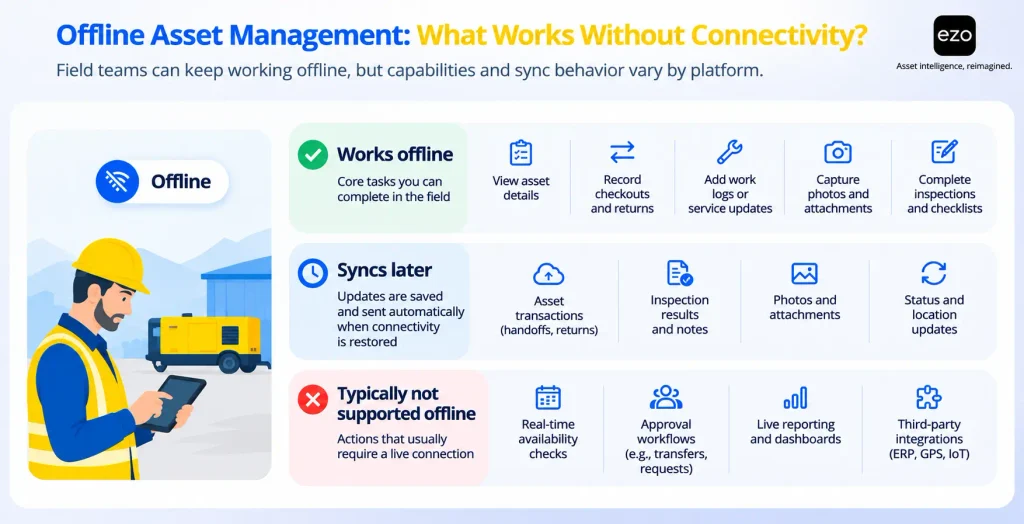
- Offline capability is a list of permitted actions, so test each field step with the device disconnected.
- None of the documentation reviewed shows an upcoming maintenance requirement automatically blocking a future transfer, so test this in vendor demonstrations.
- Request portals, approvals, multi-site support, and offline mode often sit behind enterprise tiers, add-ons, or separate licenses.
- Equipment operations platforms fit shared-equipment moves, CMMS platforms fit maintenance execution, and telematics fit live machine data.
13 best remote asset management software platforms at a glance
The 13 platforms fall into five families. Asset operations and tracking platforms (EZO EAM, Asset Panda) focus on custody, requests, reservations, and equipment movement. Maintenance-first CMMS platforms (MaintainX, UpKeep, Limble CMMS, Fiix CMMS, Fracttal One) focus on work orders and preventive maintenance. Construction and telematics platforms (Tenna, Samsara) prioritize equipment location and machine data. Facilities maintenance platforms (Asset Essentials) focus on building and campus maintenance. Enterprise EAM suites (IBM Maximo, IFS Cloud EAM, Octave Attune EAM) address complex asset hierarchies, asset reliability, and integration with enterprise processes.
Who should shortlist each family:
- Equipment moves between people and sites every week: Asset operations and tracking platforms.
- Technicians spend most of the day executing maintenance: Maintenance-first CMMS platforms.
- Vehicles and heavy construction equipment move between jobsites: Construction and telematics platforms.
- Buildings and campuses need maintenance across many sites: Facilities maintenance platforms.
- Assets are capital-intensive, regulated, or tightly tied to enterprise resource planning (ERP) finance: Enterprise EAM suites.
| Software | Category | Best for | Remote operation strength | Pricing model |
| EZO EAM | Asset operations / EAM | Multi-site equipment operations | Transfer requests, custody transfers, reservations | Per item tracked; Enterprise by quote |
| Asset Panda | Configurable asset tracking | Custom asset records and custody | Configurable forms, approved reservations, offline edits | Custom quote |
| MaintainX | Mobile-first CMMS | Frontline maintenance execution | Mobile work orders and procedures | Per user; Enterprise by quote |
| UpKeep | CMMS | Mobile maintenance coordination | Mobile work orders with offline drafts | Per user; upper tiers by quote |
| Limble CMMS | CMMS | Structured preventive maintenance | Preventive maintenance scheduling; Enterprise tool check-out | Price calculator; no list prices |
| Fiix CMMS | CMMS | Manufacturing maintenance teams | Approved asset moves between sites | Per user; Enterprise by quote |
| Fracttal One | CMMS / EAM with IoT | Connected and offline maintenance | Own IoT sensors; offline work orders | Custom quote |
| Tenna | Construction equipment management | Equipment across jobsites | GPS, Bluetooth, and QR tracking; requests and dispatch | Custom quote by asset count |
| Samsara | Telematics / connected operations | Remote equipment visibility | Location, utilization, and diagnostics | Per-device license by quote |
| Asset Essentials | Facilities CMMS | Distributed facility maintenance | Multi-site work orders; asset check-out | Not publicly listed |
| IBM Maximo Application Suite | Enterprise EAM and asset performance | Complex asset-intensive enterprises | Offline mobile work; asset health | AppPoints; entry tiers listed |
| IFS Cloud EAM | Enterprise EAM within IFS Cloud | Integrated asset and service operations | Site-to-site equipment moves with history | Not publicly listed |
| Octave Attune EAM | Enterprise EAM | Industrial asset and infrastructure management | Disconnected mobile work and inspections | Not publicly listed |
What is remote asset management software?
Remote asset management software helps organizations track and coordinate distributed physical equipment, and the records that govern it, without requiring managers to be present at every site. It primarily covers equipment such as generators, pumps, forklifts, test instruments, and trailers. Physical custody of IT hardware can fall within this scope, but remote monitoring and management (RMM) of IT endpoints, such as patching and device control, falls into a different category and is outside this comparison.
How remote asset management differs from GPS tracking, CMMS, and EAM
The term covers several software categories that overlap without being interchangeable. Choose the category by the primary decision you need to make remotely, then choose the vendor within it.
| Category | What it manages | Choose it when your primary requirement is |
| Physical asset tracking | The asset register, including what exists, where it was last verified, and who holds it | Configurable inventory and custody records |
| Equipment operations | Requests, approvals, reservations, check-out, check-in, and transfers between people and sites | Multi-site equipment operations |
| CMMS (computerized maintenance management system) | Work orders, preventive maintenance, inspections, and technician activity | Remote maintenance execution |
| EAM (enterprise asset management) | The asset lifecycle, typically maintenance, inventory, procurement, and finance links | Complex industrial asset lifecycle, often with asset performance management (APM) |
| GPS and telematics | Position and movement from trackers, plus engine hours and diagnostics from engine-connected gateways | Live vehicle and equipment monitoring |
| IoT asset monitoring | Condition from sensors such as temperature, vibration, pressure, or runtime | Remote condition alerts and asset health |
These categories behave differently when equipment needs to move. A GPS tracking platform may show where a machine is and how much it ran, but it might not manage the request, the custody handoff, or the maintenance approval. A CMMS can run inspections and preventive maintenance well while never recording who is holding the asset today or managing cross-site reservations. An EAM system can cover more of the asset lifecycle, but its scope varies by product. The CMMS vs. EAM distinction is therefore better understood through a platform’s capabilities than its category label.
The categories also overlap, and many organizations use two of them. For example, they may use a telematics platform for live data alongside an asset operations platform or CMMS for custody and maintenance. When combining systems, decide which one owns each record before purchasing, not after. An EZO guide to remote asset management strategies covers the operating practices behind the software, while EZO’s separate list of enterprise equipment management software narrows the field for equipment-heavy environments.
Why seeing equipment does not mean you can use it
The common assumption is that remote equipment problems are visibility problems: if every asset had a tag or a tracker, the coordination would follow. Visibility matters, but it answers only one of the three questions a remote transfer depends on.
- Location: A record of the past. In asset tracking, an assigned location is where the system was told the asset belongs, a last verified location comes from a scan or handoff, and a live location comes from a tracker.
- Custody: A record of responsibility. It identifies which person, crew, or site is accountable for the asset.
- Availability: A commitment about specific future dates. It indicates whether the asset is free of reservations, maintenance, and other commitments for the dates Site B needs it.
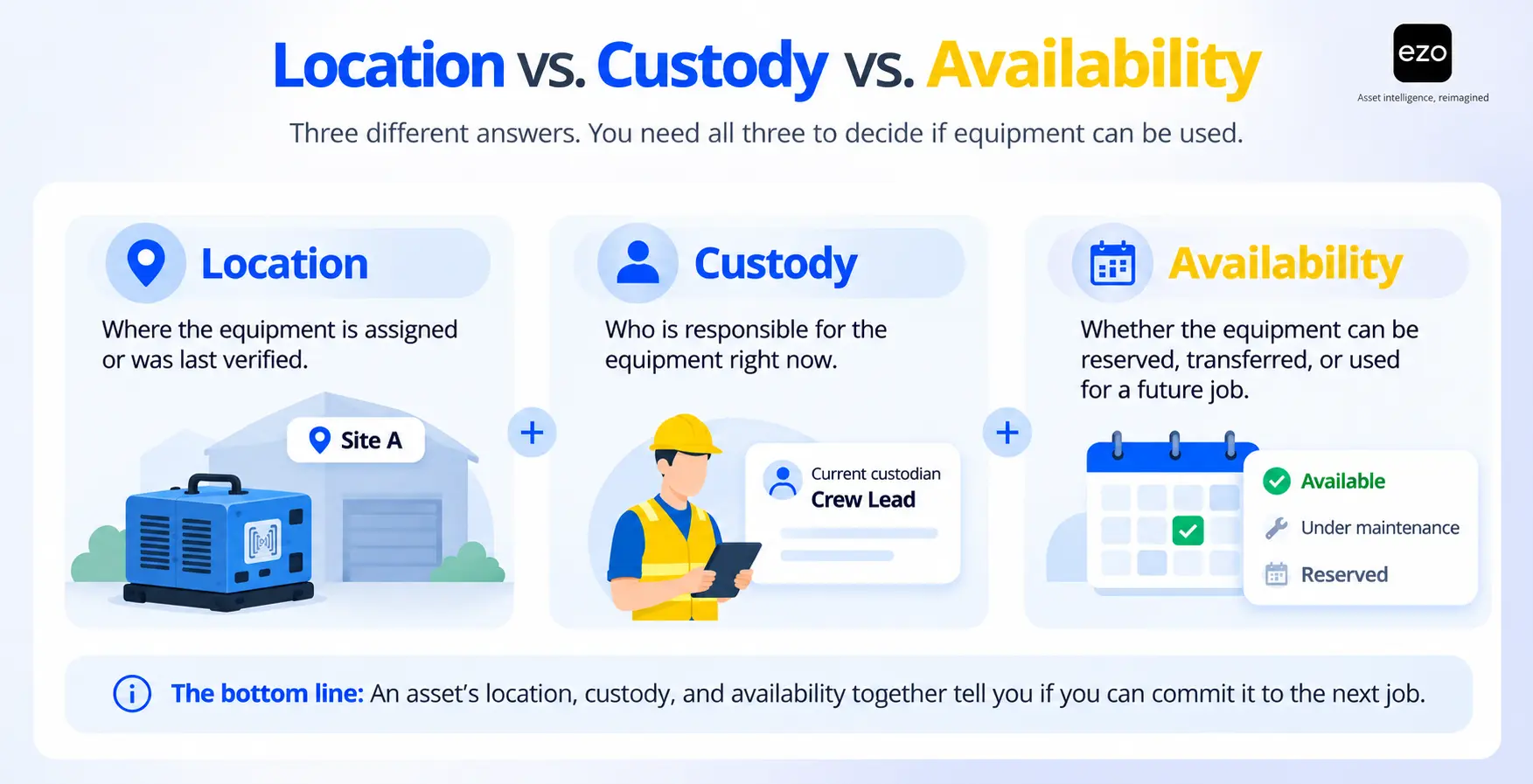
Tracking hardware can answer the first question at configured intervals for powered equipment. It does nothing, by itself, for the third.
Consider an illustrative fleet of 30 generators spread across 20 sites. Over a year, the fleet has 10,950 available generator-days and logs 4,380 days in use, so the utilization report shows 40%. Three site managers have each submitted a request to buy another generator. At first glance, this suggests the company owns too many generators, so it should refuse the purchase requests.
Consider one more variable. At several sites, the “idle” generators are being held for jobs scheduled weeks out, and the site managers have no reliable way to lend a unit and get it back in time. Lending a generator exposes the lending site to the risk of not getting it back before its own job starts, while another site receives the immediate benefit. Under those conditions, holding the generator can be a rational choice for each manager, even though it is a poor outcome for the company. The utilization report is accurate, but the low figure may reflect equipment held for future work, a form of precautionary holding, rather than surplus.
Under these conditions, the binding constraint may be the reliability of the return path rather than fleet size. Other explanations, such as generators sitting at the wrong sites or units out for repair, can produce the same report, so check reservation lead times, declined lending requests, and the reasons units sat idle before deciding. A platform that records the request, approved dates, readiness checks, and custody handoff reduces the lending site’s risk by making the commitment visible to both parties and the approving manager. This is why asset utilization data should be considered alongside reservations and custody, rather than viewed only through a separate telematics dashboard.
This is also why the comparison below scores each platform on a full transfer, not on a feature checklist. A platform can track every unit and still leave the commitment problem untouched.
How we evaluated the best remote asset management software
Each platform was assessed against documented enterprise requirements for operating physical equipment across locations, using six criteria.
1. Multi-location asset visibility: Location records and hierarchies, asset status and availability, centralized reporting, and whether the platform separates an assigned location from a live location.
2. Custody and equipment movement: Assignment, check-out and check-in, transfers between sites, request and approval workflows, and handoff history.
3. Mobile and offline functionality: Mobile records and scanning, the specific actions permitted offline, synchronization after reconnecting, and the plans that include offline use.
4. Maintenance and equipment readiness: Work orders, preventive maintenance, inspections, service history, and whether maintenance status affects availability.
5. Enterprise integration and governance: Single sign-on (SSO), role-based access, audit trails, APIs, ERP connectivity, and telemetry connections where relevant.
6. Cost and suitability: Licensing model, tier and add-on requirements, tracking hardware, implementation effort where the vendor documents it, and the organization each platform fits.
Evidence standard. Every capability claim is supported by first-party sources: vendor help centers and documentation, feature and pricing pages, trust pages, and newsrooms, checked on November 3, 2026. Review sites and aggregators were not used as evidence. Not all evidence carries equal weight: current help documentation for the exact workflow ranks highest, followed by plan and pricing pages, feature pages, dated announcements, and customer stories or brochures. Where a finding relies on a product page, customer story, brochure, older blog post, or vendor-hosted community post rather than help documentation, the relevant cell or profile identifies the source.
No hands-on product testing was performed for this article. The scenario scores describe what each vendor documents, not what we observed in a live account. The transfer scenario is only one lens: it does not measure maintenance depth, telemetry quality, or reliability analytics, areas in which several maintenance and enterprise platforms are strongest.
What the order means. The platforms are grouped by operating model: equipment operations and tracking, maintenance-first CMMS, construction and telematics, facilities maintenance, and enterprise EAM suites. EZO EAM appears first because EZO publishes this article and because the comparison focuses on the equipment operations model that the product is designed to support. The order is not a performance ranking, and position within a group carries no score.
What the list leaves out. This is a selection of 13 representative platforms across five operating models, not a census of the market. A platform was included if it met four criteria: it documents multi-location management of physical assets, is marketed to enterprises with multi-site deployments, provides sufficient first-party material (such as documentation, support pages, or product sheets) to assess most of the scenario, and represents one of the five platform families. Other platforms, including asset modules within large ERP suites, additional CMMS products, and other telematics providers, also meet some of these criteria. They were excluded to keep the list to 13; their absence should not be interpreted as a judgment about their quality or capabilities. IT endpoint management tools were excluded because they manage software state rather than physical custody. For a broader view of the category, see this comparison of enterprise asset management platforms.
The shared scenario: moving a generator between remote sites
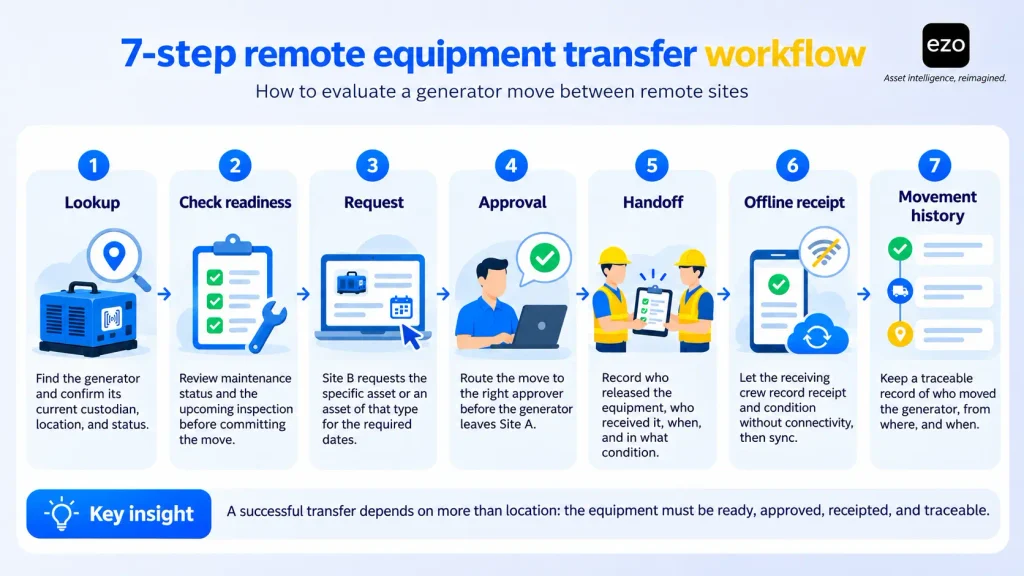
Every platform below is evaluated against the same transfer scenario, including three stages where a transfer can break down: readiness, approval, and offline receipt.
An enterprise manages equipment across 20 locations. Site B needs a 100 kW diesel generator, and the only suitable unit is currently checked out to a crew lead at Site A. The generator is due for inspection, and the receiving crew at Site B may be working without reliable internet access.
Before reading the scores: This scenario assumes the asset platform, rather than an ERP, is the system of record for custody and location. If your ERP owns those records, the integration questions in each profile matter more than the platform’s native scores.
The seven steps:
- Locate and identify the custodian: Find the generator (scored as 1a) and identify which person or site is responsible for it (scored as 1b). These are scored separately because a platform can track an asset’s location without recording who holds it.
- Check readiness: Check the generator’s maintenance status, including any upcoming inspection, and whether that status affects its availability.
- Request the equipment: Let a user at Site B request that specific asset or an asset of that type.
- Approve the transfer: Route the request or transfer to an authorized approver before the generator leaves Site A.
- Record the handoff: Record the receiving person or site as the new custodian through a transaction that identifies who made the change and when. Simply editing a location field without an attributed transaction counts as partial.
- Capture receipt offline: Allow the Site B crew to record receipt and condition while offline, then sync the record once connectivity is restored.
- Show movement history: Show who held or moved the generator, from where, and when.
The scenario ends at receipt. Return controls, such as due dates, overdue alerts, and return inspections, are not scored here, even though the lending site’s confidence depends on them. The buyer test later in this guide covers these controls.
Each profile below discusses the steps where additional detail is useful. The full scores for all 13 platforms follow the profiles.
13 best remote asset management software solutions for enterprises
Each profile follows the same structure, with plan and license requirements listed alongside each capability. The ordering policy is explained once in the methodology above. Each scenario walkthrough covers only the steps where the profile adds detail beyond the score tables. Steps that would simply repeat information already captured in the tables are omitted.
1. EZO EAM: Best for connected multi-site equipment operations
Overview: EZO EAM is an asset operations platform for organizations that move equipment between people, projects, and locations. It brings custody, reservations, requests, transfers, and service status together in a single asset record. Maintenance management is available through a CMMS add-on or the Enterprise plan. It is better suited to equipment allocation and lifecycle coordination than to reliability modeling or predictive asset performance management.
Key remote asset capabilities:
- Custody: Check out to people on all plans; check out to locations by admins; and custody transfers with signatures on Advanced and above.
- Requests and approvals: A self-service request portal and multi-tier approval workflows on Premium and above. The documented workflows cover purchase requests and cart reservations.
- Transfers: Staff can raise transfer requests that admins approve or deny from one queue.
- Planning: Reservations and an availability calendar on all plans; the Dispatch Center for 6- to 12-month allocation planning on Enterprise.
- Location data: GPS coordinates through a GPS integration API, with GPS integrations on Premium and telematics integrations on Enterprise. The pricing page does not specify which named providers are available under each tier.
How it handles the transfer scenario:
- Locate and identify the custodian: The asset record shows the current custodian, whether a person or a location.
- Check readiness: Starting a service event puts an asset into maintenance and makes it unavailable (Advanced and above). However, you cannot start a service event while the asset is checked out, so the crew lead must first close the check-out. A scheduled inspection configured through recurring services or the CMMS add-on is not documented as blocking a future transfer.
- Request the equipment: Site B can raise a location transfer request or make a reservation through the request portal on Premium.
- Approve the transfer: An authorized admin approves or denies the transfer request. If custody-transfer arbitration is enabled, an admin must also approve the custody change.
- Record the handoff: Custody transfer records the receiving person and captures their signature.
- Capture receipt offline: Offline receipt is not documented. The documented offline capabilities cover cached work orders, checklist updates by the Primary Assignee, previously synced requests, and bookmarked asset views.
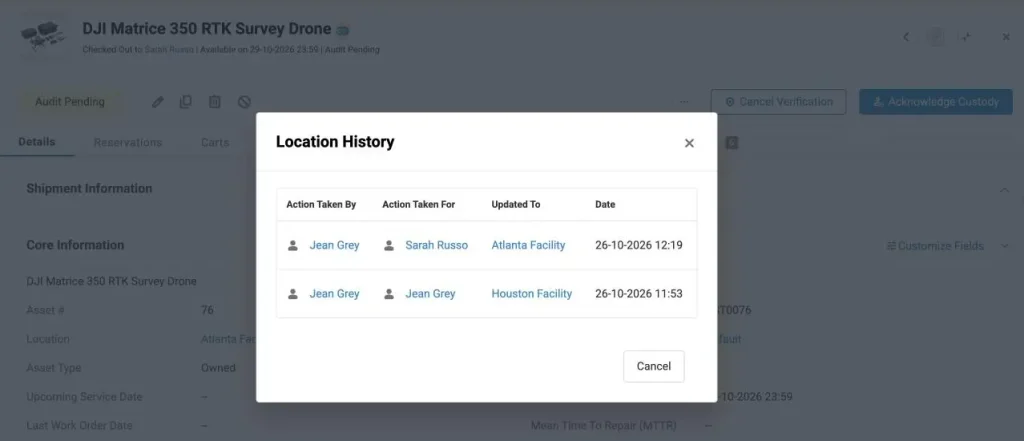
- Show movement history: On all plans, the item’s location history records who requested and approved the transfer. On Enterprise, Item Trail records every field and status change, including check-outs and location changes. Each entry identifies the user who made the change, the previous value, and a filterable timestamp. Access is limited to account owners and administrators.
Integrations and security: EZO EAM lists SAML SSO integrations with Okta, Microsoft Entra ID, OneLogin, Ping Identity, and Delinea (Premium and above). Its integrations also include Samsara, SkyBitz, Trackunit, Hapn, and John Deere. A REST API is available from Advanced. ERP connections are handled through the API rather than a packaged SAP or Oracle connector. EZO’s security page lists a SOC 2 Type 2 report and ISO/IEC 27001 certification.
Pricing: Pricing scales with the number of items tracked rather than the number of users. Essential, Advanced, and Premium include unlimited users under a fair-use policy. Using the pricing page’s default of 500 items and annual billing, Essential, Advanced, and Premium are listed at $81.41, $117.11, and $142.10 per month, respectively. Enterprise is quoted. The CMMS add-on is priced separately per admin user, with no published figure. A 14-day free trial is available.
Limitations: Enterprise offers offline mode, but its documented scope is limited. Technicians can view up to 20 previously synced work orders and add work logs without connectivity. The cached set refreshes once a day at first login. Primary Assignees can update checklist line items on cached work orders. The offline FAQ also documents access to previously synced requests and up to 100 bookmarked assets. Updates sync after reconnection, but offline check-in and custody transfers are not documented. Dispatch Center, Item Relationships, telematics integrations, and Item Trail are Enterprise features. On Premium, work orders and preventive maintenance require the CMMS add-on. The platform does not include built-in GPS hardware or offer the same documented industrial asset performance and reliability capabilities as specialized APM platforms.
Best-fit scenario: Companies with equipment yards, project sites, and shared tool pools, where the recurring questions are who has what, whether it will be available next week, and who approved the transfer.
Why shortlist it: Its documentation covers requests, approvals, and custody handoffs on a single asset record. The trade-off is that offline field work and dispatch are available on the Enterprise plan. For example, Pepsi MidAmerica’s vendor-published EZO EAM case study describes how the company connects requests, check-out, work orders, and dispatch across roughly 6,000 vending machines at 11 sites. It illustrates multi-site request-to-dispatch operations rather than the full transfer scenario.
2. Asset Panda: Best for configurable asset tracking
Overview: Asset Panda is a configurable asset tracking platform, now sold as Asset Panda Pro. Administrators can define collections, fields, and forms to suit their organization’s asset types. It suits organizations with diverse assets that want to build their own workflows rather than adopt a fixed structure.
Key remote asset capabilities:
- Custody: Assignment through configurable fields and forms, such as the documented assign-to-person use case.
- Reservations: Native calendar reservations with check-out, check-in, conflict handling, and an optional manager-approval step.
- Structure: Accounts, modules, and collections, with Location as a default collection in each module.
- GPS capture: GPS coordinates recorded from the phone when an asset is scanned or saved on mobile.
- Maintenance: Configurable maintenance management with work orders, recurring service, inspections, and service history, plus an equipment maintenance tracking template.
How it handles the transfer scenario:
- Locate and identify the custodian: The record shows the assignee and location.
- Check readiness: Asset Panda’s inspection guidance describes how permissions, required fields, and automations can ensure staff complete inspections before checking out equipment. However, the system does not automatically enforce form sequencing, and it does not document blocking a future-dated reservation.
- Request the equipment: Site B reserves the generator.
- Approve the transfer: Approval is documented for reservations, but location-transfer forms lack a documented approval step.
- Record the handoff: Check-out and assignment forms record the handoff.
- Capture receipt offline: Offline mode allows record edits, forms, scanning, and audits after a manual per-module download. An assignment form can therefore be used to record receipt. Attachments are excluded, custom actions do not run offline, and the documentation does not specify whether reservation check-in works offline.
- Show movement history: The activity stream logs record, form, and reservation actions.
Integrations and security: Asset Panda lists SAML SSO with Google Workspace, Microsoft Entra ID, and Okta, along with an API, webhooks, and connectors for NetSuite, Workday, QuickBooks, Xero, and ServiceNow in its integrations store. Asset Panda’s security page states that a SOC 2 Type 2 examination covering the Security criterion was dated February 2023.
Pricing: Pricing is available through a custom quote, with a free 7-day trial. No pricing tiers are published, so plan requirements for offline access, SSO, and API availability cannot be verified publicly.
Limitations: Offline data must be downloaded per module before connectivity is lost. Cross-site transfers rely on admin-built forms without a native approval step. Maintenance workflows are configurable and include work orders, preventive maintenance, inspections, and service history. Buyers should verify whether the configured processes provide the scheduling, approval, and coordination depth their operations require. Telematics and RFID support are not documented, so buyers should confirm these capabilities separately.
Best-fit scenario: A university, health system, or public agency with diverse asset types, each requiring different fields and forms, and an internal team willing to configure them.
Why shortlist it: It combines flexible asset records with native reservations and one of the more specific documented offline capability sets in this comparison.
3. MaintainX: Best for mobile-first maintenance teams
Overview: MaintainX is a mobile-first CMMS built around work orders, procedures, and frontline technician communication. It became part of Autodesk in August 2026 and continues to operate under its own name. The platform suits maintenance organizations that need technicians to execute work orders and procedures on mobile devices across multiple sites.
Key remote asset capabilities:
- Work execution: Work orders and procedures with inspection checks and signatures on all plans, with limits on Basic.
- Multi-site: Linked organizations under a Global Organization, with global reporting available on Enterprise.
- Location check-in: GPS verification that a technician is on site before completing steps, available on Premium and Enterprise.
- Telematics and OT: A Samsara integration (Premium or Enterprise, plus the integration purchase) and operational technology (OT) data connectors.
- Asset moves: Transfers between organizations, including sub-assets and work order history.
How it handles the transfer scenario:
- Locate and identify the custodian: The asset has a recorded location, but person-level custody is not documented.
- Check readiness: Maintenance status and schedules are visible, but no availability or reservation model is documented.
- Request the equipment: No equipment request workflow is documented.
- Approve the transfer: One administrator initiates a cross-organization transfer, and another completes it. This provides a two-sided check rather than a formal request-and-approval workflow.
- Record the handoff: The transfer feature is Enterprise-only, available on the web, and disabled by default.
- Capture receipt offline: Offline mode supports updates to cached work orders only.
- Show movement history: Work order history moves with the asset, but the sources reviewed did not document custody history.
Integrations and security: MaintainX offers SAML SSO on Enterprise, a REST API from Premium, and webhooks. Its SAP integration requires Enterprise and a paid services package. MaintainX states that it has a SOC 2 Type 2 report and ISO 27001:2022 certification covering the platform and its Montreal office.
Pricing: Pricing is per user. The pricing page lists Basic at $0, Essential at $20 per user per month billed annually, Premium at $65, and Enterprise at custom pricing. Requester accounts are free.
Limitations: Equipment check-out, custody, and reservations are not documented. Location hierarchies support only one parent level. The help documentation says offline mode works on all plans, but the pricing table lists it only for Premium and Enterprise. Buyers should confirm which applies before purchasing.
Best-fit scenario: A multi-plant manufacturer or distributor whose primary remote challenge is consistent maintenance execution rather than shared equipment allocation.
Why shortlist it: MaintainX is designed for technicians working from mobile devices. Its vendor-published US LBM customer story describes standardized maintenance across more than 40 plants.
4. UpKeep: Best for mobile maintenance coordination
Overview: UpKeep is a CMMS that now positions itself as an asset operations management platform, offering modules for maintenance, safety, fleet, and IoT. UpKeep received a growth investment from Accel-KKR in May 2026; no change of control was announced. It suits maintenance teams that need mobile coordination and, on Enterprise, basic asset check-out.
Key remote asset capabilities:
- Check-out: Asset check-in and check-out with activity history, on Enterprise.
- Multi-site: A Multi-Site Module that links separate site accounts, on Enterprise.
- Offline work orders: View, update, and draft work orders offline in Professional and Enterprise.
- Fleet telematics: A Samsara connection in UpKeep Fleet for location, engine status, and fault codes.
- IoT: UpKeep Edge sensors and a cellular gateway, available through a separate subscription.
How it handles the transfer scenario:
- Locate and identify the custodian: Enterprise check-out shows who has the asset.
- Check readiness: The original documentation reviewed does not establish whether maintenance status or upcoming maintenance affects asset availability.
- Request the equipment: No equipment request workflow is documented. Approvals cover work requests and purchase orders, rather than equipment requests.
- Approve the transfer: A transfer approval workflow is not documented.
- Record the handoff: Check-out records the person holding the asset, but transfers between site accounts are not documented.
- Capture receipt offline: Offline mode automatically caches up to 5 work orders on Professional and up to 100 on Enterprise.
- Show movement history: The check-out activity log shows who checked the asset in or out.
Integrations and security: SSO, API access, and webhooks are available on Enterprise. The SAP integration costs $5,000 per year and also requires Enterprise. UpKeep’s trust center states that the company has undergone a SOC 2 Type 2 examination.
Pricing: The pricing page lists Essential at $24 and Premium at $55 per user per month, but does not specify the billing period. Professional and Enterprise pricing is available on request.
Limitations: Check-out, multi-site, SSO, API access, and webhooks all require Enterprise. Multi-site functionality operates through separate accounts, with users added to each. Reservations and cross-site transfers are not documented.
Best-fit scenario: A multi-location service business, such as a car wash or retail chain, where maintenance coordination matters more than equipment lending.
Why shortlist it: It combines mobile work orders with offline drafts that submit automatically when connectivity is restored, making it useful for technicians who frequently move in and out of coverage.
5. Limble CMMS: Best for structured preventive maintenance
Overview: Limble CMMS is a maintenance platform focused on preventive maintenance, work orders, parts, and asset hierarchies. It suits maintenance teams seeking structured preventive maintenance (PM) programs, with multi-location operations available only on Enterprise.
Key remote asset capabilities:
- Preventive maintenance: Unlimited work orders and PM schedules from Standard, with meter-based scheduling from Premium+.
- Tool check-out: Tools in Limble can be requested, checked out with an optional approver, and tracked through activity logs on Enterprise.
- Asset moves: Moving an asset to another location carries its tasks, history, and child assets.
- Multi-location: Multiple locations, regions, and multi-location reporting are available on Enterprise.
- Geolocation: Asset geolocation and request-location capture are available on Enterprise.
How it handles the transfer scenario:
- Locate and identify the custodian: Enterprise tool check-out logs who is using a tool and why.
- Check readiness: The profile’s documented capabilities cover preventive maintenance and work orders, but the sources reviewed do not establish whether maintenance status or an upcoming inspection blocks an asset transfer.
- Request the equipment: Users can request a tool, with or without an associated task.
- Approve the transfer: Tool check-out can require an approver, but an asset move between locations does not have a documented approval step.
- Record the handoff: Asset moves are documented on the web. The new mobile app does not yet support asset moves or tool check-out.
- Capture receipt offline: Offline mode covers open and in-progress tasks. The new app does not support QR-code scanning offline.
- Show movement history: The tool log records check-in and check-out activity.
Integrations and security: OpenID Connect (OIDC) SSO is available as a paid add-on on Premium+ and included on Enterprise, although additional costs may apply. An open REST API is available from Premium+. Named ERP integrations include SAP S/4HANA, NetSuite, and Microsoft Dynamics 365 Business Central, as listed on its Enterprise page. Limble states that its SOC 2 Type 2 attestation covers security, availability, and confidentiality.
Pricing: The pricing page lists Standard, Premium+, and Enterprise tiers through a price calculator, but does not publish fixed prices. No free trial offer was found.
Limitations: Standard and Premium+ are designed for single-location operations, so multi-site deployments require Enterprise. Equipment reservations are not documented. During the 2026 mobile app transition, tool check-out and asset moves remain unavailable in the new app.
Best-fit scenario: A manufacturer or facilities team running disciplined PM programs across several plants, with tool cribs as a secondary concern.
Why shortlist it: It is one of the few CMMS platforms in this comparison that documents a tool-request and approval workflow, alongside a strong PM foundation.
6. Fiix CMMS: Best for manufacturing maintenance teams
Overview: Fiix CMMS, from Rockwell Automation, is a maintenance platform designed for manufacturing, with asset hierarchies, inventory, purchasing, and an integration layer for plant systems. Its rotating assets module supports asset moves between sites, subject to approval, on Professional and Enterprise. It suits plant maintenance organizations already working within the Rockwell ecosystem or those that need operational technology (OT) connectivity.
Key remote asset capabilities:
- Multi-site: One tenant with each location configured as its own site, plus cross-site dashboards, on Professional and Enterprise.
- Custody: Rotating assets can be checked out to users, businesses, or work orders, with check-in records.
- Move control: Move managers per site can approve or reject asset moves requested by other users. Temporary moves can also include return dates.
- Maintenance: Unlimited PMs and pass-fail inspections from Basic, with nested PMs and cycle counts on Professional.
- OT connectivity: OT integrations connect PLCs, sensors, and telematics service providers through partner solutions or the API.
How it handles the transfer scenario:
- Locate and identify the custodian: Rotating assets show the current user or site.
- Check readiness: Fiix documents preventive maintenance and inspections, but the sources reviewed do not establish whether maintenance status or an upcoming inspection affects asset-transfer availability.
- Request the equipment: A user can request an asset move.
- Approve the transfer: A site move manager can approve or reject the request in the web app.
- Record the handoff: The move records the new site or user, with a return date for temporary moves.
- Capture receipt offline: Fiix states that “most features” work offline, with automatic syncing after reconnection. However, the documentation does not itemize receipt actions.
- Show movement history: Move history remains in the asset’s activity log.
Integrations and security: SAML and OpenID Connect SSO are available on Enterprise, with an additional setup fee and platform fee. An API is also available on Enterprise. ERP integrations include SAP, NetSuite, Microsoft Dynamics, Epicor, and others, with additional costs on Enterprise. Fiix’s security page states SOC 2 Type 2 report. Its ISO 27001 reference applies to AWS, not Fiix itself.
Pricing: The pricing page lists Free at $0, Basic at $45, and Professional at $75 per user per month. Enterprise pricing is custom.
Limitations: Mobile asset moves are documented only when move control is switched off, so approved moves must be completed through the web app. Reservations and native GPS are not documented. SSO, API access, and ERP connections require Enterprise and carry additional fees.
Best-fit scenario: A multi-plant manufacturer that rotates spares, tools, and portable equipment between plants and wants a site owner to approve asset moves.
Why shortlist it: Among the CMMS platforms in this comparison, Fiix has one of the most complete documented workflows for requesting, approving, and recording asset moves between sites.
7. Fracttal One: Best for connected and offline maintenance
Overview: Fracttal One is a cloud-based CMMS with EAM features, built around work orders, task plans, inventory, and its IoT product line, Fracttal Sense. Fracttal acquired TCMAN, maker of the GIM maintenance platform, in April 2026. It suits maintenance teams that want condition data to feed into work orders.
Key remote asset capabilities:
- Hierarchy: Locations, equipment, and tools are organized through a “located in or is part of” field, with location-restricted user access.
- IoT: Fracttal Sense devices, including a gateway and sensors for temperature, vibration, current, fuel level, and other measurements.
- Maintenance: Task plans can be triggered by date, meter, or event, while work requests can be converted into work orders.
- Warehouses: Tools can be assigned to a person through a warehouse output. Approved warehouse transfers are available through the Advanced Warehouses add-on.
How it handles the transfer scenario:
- Locate and identify the custodian: Asset location is recorded, while tool assignment is available only through warehouse outputs.
- Check readiness: Task plans can be triggered by date, meter, or event, but the sources reviewed do not establish whether maintenance status or an upcoming inspection affects equipment-transfer availability.
- Request the equipment: No equipment request workflow is documented.
- Approve the transfer: Approval is documented for warehouse stock transfers, not equipment moves.
- Record the handoff: Relocating an asset involves editing its location rather than using a documented custody-transfer workflow.
- Capture receipt offline: Offline mode must be activated manually and covers work orders downloaded beforehand.
- Show movement history: The Transaction Log add-on records each user’s actions, but a source-to-destination custody history is not documented.
Integrations and security: A REST API is available through the API Connections add-on. SSO options include SAML, Google, and Office 365. Named ERP integrations include SAP, Oracle, Microsoft Dynamics, Infor, and Sage, as listed on its integrations page. Two-way ERP synchronization is available through the Fracttal Hub add-on. Fracttal displays ISO 27001, SOC 2, and ENS badges but does not specify their scope or the SOC 2 type.
Pricing: Fracttal One is sold through a quote-based annual subscription that includes a set number of transactional users. Request-only users are not charged. Roughly 30 add-ons are priced separately.
Limitations: Equipment check-out, reservations, and cross-site transfer workflows are not documented. Offline use requires records to be downloaded manually while a reliable connection is available. Many capabilities, including the API and audit log, require add-ons.
Best-fit scenario: A hospitality, retail, or industrial operator that wants sensor readings to trigger maintenance across multiple branches.
Why shortlist it: Its own gateway and sensor line, sold alongside the CMMS, lets teams get condition-monitoring hardware and maintenance software from one vendor.
8. Tenna: Best for construction equipment across jobsites
Overview: Tenna is a construction equipment management platform that combines GPS, Bluetooth, and QR tracking with scheduling, dispatch, maintenance, and job costing. Tenna is now part of John Deere but continues to operate under its own name as a mixed-fleet platform. It suits contractors moving heavy construction equipment, attachments, and small tools between yards and jobsites.
Key remote asset capabilities:
- Tracking hardware: Trackers use cellular GPS, Bluetooth beacons, and QR tags. The platform also receives OEM telematics feeds from CAT, John Deere, Komatsu, Volvo, and others.
- Sites and geofences: Assets automatically transfer to a site when they enter its geofence, per the site details documentation.
- Requests: Asset and labor requests support multi-level approval and feed into dispatch.
- Dispatch: A Dispatch Command Center coordinates asset and crew transfers between locations.
- Maintenance: Work orders, inspections, and driver vehicle inspection reports (DVIRs) are available under separate Maintenance and Safety licenses.
How it handles the transfer scenario:
- Locate and identify the custodian: The asset record shows its assignee and current site.
- Check readiness: Maintenance status is available through the separate Maintenance license.
- Request the equipment: Site B can request a specific asset or an asset category.
- Approve the transfer: Field and asset approvers review and approve requests in sequence.
- Record the handoff: Dispatch transfers the asset, while the geofence confirms its arrival at the receiving site.
- Capture receipt offline: The app can scan QR tags, detect Bluetooth signals, and create inspections and work orders for assets saved beforehand. However, reassigning an asset is not available offline.
- Show movement history: The assignee history report and site transfer log record asset movement.
Integrations and security: Integrations, SSO, and the Open API each require separate licenses. Available integrations include Viewpoint, Sage, Procore, and B2W. Tenna publicly confirmed a SOC 2 Type 1 report, announced in August 2024.
Pricing: Pricing is quote-based. Data and hardware costs depend on the number of assets, with installation, training, and purchased features priced separately.
Limitations: Requests, dispatch, maintenance, integrations, and API access each require separate licenses in addition to the base platform. Custody is managed through an assignee model rather than check-out and check-in. The platform is designed for construction, so facility and office assets may be a less natural fit.
Best-fit scenario: A heavy civil or general contractor managing mixed-brand equipment across dozens of jobsites, with a dispatcher coordinating asset movements.
Why shortlist it: Tenna is the only platform in this comparison that documents location hardware, requests, approvals, and dispatch together, provided the relevant modules are licensed.
9. Samsara: Best for remote equipment visibility and telematics
Overview: Samsara is a connected operations platform that uses its own gateways and tags to report equipment location, utilization, engine diagnostics, and safety data. Its equipment tracking products cover both powered and unpowered assets. It suits operations that need visibility into equipment location and operating conditions, often alongside vehicle fleets.
Key remote asset capabilities:
- Hardware tracking: Asset gateways and Bluetooth asset tags can locate assets through nearby gateways and phones.
- Utilization and diagnostics: Its equipment tracking products provide engine hours, idle time, fault codes, and geofence information.
- Access by region: Tag-based administrative access limits users to tagged devices and supports parent and child tags.
- Inspections offline: DVIRs can be completed offline in the driver app and synced later.
- Maintenance: Preventive maintenance schedules and work orders are available with a Maintenance license.
How it handles the transfer scenario:
- Locate and identify the custodian: Live position is available, while custody is limited to driver-to-vehicle assignment.
- Check readiness: Maintenance status and diagnostics are visible with the Maintenance license.
- Request the equipment: The product page lists “Asset Scheduling,” but the request workflow appears only in a 2019 blog post. Therefore, it is scored as not verified. Ask Samsara to demonstrate the workflow during a product walkthrough.
- Approve the transfer: An approval workflow is not verified for the same reason.
- Record the handoff: GPS records equipment movement automatically, but a custody handoff is not documented.
- Capture receipt offline: The driver app saves DVIRs and other documents offline. Custody receipt is not documented.
- Show movement history: Location and trip history are available, but custody history is not documented.
Integrations and security: Samsara supports SAML SSO with Microsoft Entra and Okta, a REST API, and webhooks, although some API endpoints require specific licenses. ERP connections are built through the API rather than packaged connectors. Samsara’s security page states that it has a SOC 2 Type 2 report. Its privacy page also lists ISO 27001, 27017, 27018, and 27701 certifications.
Pricing: Pricing is quote-based. Software licenses are sold per hardware device on 1-, 3-, 5-, or 7-year terms.
Limitations: If a license lapses, the gateways and sensors associated with it stop working. Current help content does not document custody check-out, reservations, or transfer approvals. Tracking requires Samsara hardware under per-device licenses, while maintenance requires a separate license.
Best-fit scenario: A crane, rental, or field services company where the main remote question is where powered equipment is and whether it is operating.
Why shortlist it: Its hardware reports location and utilization without requiring someone to scan a tag. Maxim Crane Works, for example, operates more than 6,300 Samsara devices across 60+ locations, according to a vendor-published customer story.
10. Asset Essentials (previously marketed as Brightly Asset Essentials): Best for distributed facility maintenance
Overview: Asset Essentials is a cloud-based CMMS for facilities, public sector, and education organizations. Brightly, its developer, now operates under the Siemens brand as Siemens Asset Management Software, while the product retains the Asset Essentials name. It suits facilities teams managing work orders and preventive maintenance across multiple buildings or campuses.
Key remote asset capabilities:
- Sites: Regions, sites, and locations, with multiple sites available on the Enterprise edition.
- Check-out: An asset check-out and return log records the user or crew, site, and date.
- Work orders: Reactive, preventive, and meter-based work, with approval rules configured by region or site.
- IoT: A paid Smart Assets add-on connects remote monitoring sensors to assets and creates work orders when readings exceed set limits.
- Inspections: A separately priced inspections add-on that includes mobile inspections.
How it handles the transfer scenario:
- Locate and identify the custodian: The check-out log shows who holds the asset.
- Check readiness: The platform supports reactive, preventive, and meter-based work orders, but the sources reviewed do not establish whether maintenance status or an upcoming inspection affects equipment-transfer availability.
- Request the equipment: No equipment request workflow is documented. Facility bookings are handled through a separate Siemens product.
- Approve the transfer: Approval rules cover work orders and projects, not equipment moves.
- Record the handoff: Check-out records the site from which an asset was signed out, but no asset-transfer function is documented. Transfers are documented for parts.
- Capture receipt offline: Offline work covers work orders downloaded before going offline. The download must be completed manually.
- Show movement history: The check-out and return log records who held the asset, where it was, and when.
Integrations and security: A documented API is available, alongside Connector Tool and Data Share add-ons for data exchange and business intelligence. No named SAP or Oracle connector was found, and no Asset Essentials SSO setup guide was found. Brightly announced a SOC 2 Type 2 report without publishing its scope.
Pricing: Pricing is not publicly listed. The product page directs buyers to request a demo. Add-ons cost extra, and multi-site functionality requires the Enterprise edition.
Limitations: Check-out has no documented due dates or mobile workflow. The offline help page contradicts itself on whether assets can be created offline, while the approval-rules page states that approval routing is not supported in the mobile app. The product is undergoing a rebrand, so its name in contracts and documentation may differ.
Best-fit scenario: A school district, university, or municipal facilities department maintaining buildings across multiple sites.
Why shortlist it: Asset Essentials is designed for multi-site facilities maintenance. Its vendor-published Plexus customer story describes a rollout extending from Wisconsin to UK sites.
11. IBM Maximo Application Suite: Best for complex asset-intensive enterprises
Overview: IBM Maximo Application Suite combines enterprise asset management, asset performance management, inspection, and facilities modules under one licensing model. It is suited to utilities, transportation operators, energy companies, and other organizations that need deep asset hierarchies, reliability analysis, and strict financial control over asset movements.
Key remote asset capabilities:
- Organization structure: Organizations contain sites, with security privileges that restrict data by site.
- Asset moves: Move/Modify Asset moves an asset between operating locations and transfers its value between general ledger (GL) accounts. An operational move therefore also creates a financial transaction.
- Tools: Tool issue allows tools to be issued to a person or work order from a storeroom.
- Offline mobile: Maximo Mobile switches automatically between online and offline modes and syncs data when connectivity is restored.
- Asset health: Asset performance management provides health scores and failure predictions using IoT and maintenance data.
How it handles the transfer scenario:
- Locate and identify custodian: The asset’s location is recorded. Person-level custody is documented for tools, but not for general equipment.
- Check readiness: The reviewed public documentation does not establish whether maintenance status or upcoming inspections restrict an asset move.
- Request equipment: An end-user equipment request workflow was not found in the accessible documentation. IBM’s product documentation site blocked automated access during this review, so this step is scored as not verified.
- Approve transfer: Approval of an equipment move could not be verified for the same reason.
- Record handoff: Move/Modify Asset records the movement between operating locations.
- Capture receipt offline: The Maximo Mobile blog describes reading, updating, and creating data, as well as performing inspections offline. Offline asset moves are not documented.
- Show movement history: The move posts a value transfer, but the level of detail available in the move history could not be established from public documentation.
Integrations and security: Maximo supports OIDC SSO with multiple identity providers and ERP connectors, including an SAP connector. SOC 1 and SOC 2 reports are available on request for the SaaS edition.
Pricing: The suite is licensed through AppPoints, which IBM describes as credits or units of value used to license the suite. The pricing page lists Essentials Maintenance starting at under USD 40K per year for 150 AppPoints and Essentials Inspection at under USD 47K. Standard, Premium, and client-managed editions are quote-based. Subscriptions have a minimum 12-month, non-cancellable term.
Limitations: The entry cost is high for organizations that primarily need shared equipment coordination. The multi-site structure, which distinguishes organizations from sites, also requires configuration decisions with accounting implications and adds to implementation effort.
Best-fit scenario: A port operator, utility, or transit agency where asset movements carry financial and regulatory consequences. DP World, for example, describes a standard Maximo deployment template across its marine terminals in a vendor-published case study.
Why shortlist it: It combines offline mobile work with asset health analytics, a combination that few platforms in this list attempt.
12. IFS Cloud EAM: Best for integrated enterprise asset and service operations
Overview: IFS Cloud EAM is the asset management component of IFS Cloud, which also covers ERP, field service, and project operations. It suits organizations that want to manage assets, service delivery, and finance on a single vendor platform.
Key remote asset capabilities:
- Equipment moves: Move Serial Object moves equipment to another site, recreates its preventive maintenance at the destination, and records the move in the object’s history.
- Readiness controls: Equipment cannot be moved while it has open work orders.
- Rental and reservations: Rental management covers rent-in, rent-out, rent to project, and rent to work order, with automatic or manual reservation of rental lines.
- Mobile work: IFS Mobile Work Order supports work assignments, time-and-materials recording, and equipment updates, both online and offline.
- IoT: An IoT controller maps connected devices to equipment objects.
How it handles the transfer scenario:
- Locate and identify custodian: Equipment location is recorded by site. Tool check-out is documented for tool groups.
- Check readiness: Open work orders block an equipment move, linking maintenance status to movement readiness.
- Request equipment: Planners can reserve resources and arrange rentals between sites, but a self-service equipment request workflow is not documented.
- Approve transfer: The reviewed documentation did not include an approval step for equipment requests.
- Record handoff: Move Serial Object records the equipment’s new site. The move also recreates its preventive maintenance for the destination site.
- Capture receipt offline: Mobile Work Order supports offline work assignments and equipment updates, although some features are available online only. Offline receipt or transfer confirmation is not specifically documented.
- Show movement history: The move is retained in the equipment object’s history.
Integrations and security: IFS provides OData APIs, SSO with multi-factor authentication, and native finance and procurement modules. Its trust center states that IFS holds ISO/IEC 27001 certification and SOC 1 and SOC 2 Type 2 attestations for its cloud operations.
Pricing: Pricing is not publicly listed. In April 2026, IFS announced a pricing model in which customers pay based on assets rather than users. The announcement does not establish whether this model applies to EAM.
Limitations: Equipment handling is designed around maintenance planners rather than self-service requesters. Moving equipment between sites cancels its existing preventive maintenance actions and recreates them for the destination site. Implementation is a platform-wide project rather than a departmental rollout.
Best-fit scenario: An asset-intensive service business that wants maintenance, field service, rental, and finance capabilities within one platform.
Why shortlist it: Its documented site-to-site equipment move includes movement history and maintenance consequences, which matter when asset movements have operational and accounting implications.
13. Octave Attune EAM: Best for industrial asset and infrastructure management
Overview: Octave Attune EAM, formerly HxGN EAM, is a cloud-based enterprise asset management platform for industrial and infrastructure operators. It is sold by Octave Intelligence plc, which became an independent listed company following its spin-off from Hexagon in May 2026. It suits manufacturers, utilities, and infrastructure owners that need deep EAM capabilities alongside reliability tools.
Key remote asset capabilities:
- Asset hierarchy: Assets can be tracked by location, functional position, or tag, with previous locations retained.
- Requests: A Requestor module covers work requests, parts requisitions, and reservation requests, according to the Attune EAM brochure.
- Mobile: A disconnected mobile app supports work orders and inspections, while a connected app syncs automatically, according to its mobile product sheet.
- Reliability: Attune APM (asset performance management) connects to machines, sensors, and historians.
- ERP: An SAP-certified S/4HANA connector supports integration with SAP S/4HANA.
How it handles the transfer scenario:
- Locate and identify custodian: Asset location is recorded, but person-level custody is not documented publicly.
- Check readiness: The reviewed public documentation does not establish whether maintenance status or upcoming inspections restrict an asset move.
- Request equipment: The brochure mentions reservation requests but does not explain how the workflow operates or whether it supports requesting equipment transfers.
- Approve transfer: The brochure describes embedded workflow approvals, but does not establish whether these apply specifically to equipment moves or reservation requests.
- Record handoff: The Asset Move app, documented under the HxGN EAM name, moves assets between locations and records damage before and after the move. The documentation does not establish whether the move records who performed it or supports transfers across sites, so this step is scored as partial.
- Capture receipt offline: The disconnected mobile app supports work orders and inspections, but its documentation does not itemize specific offline actions for asset transfers or receipt confirmation.
- Show movement history: Previous locations and maintenance history are retained, but custody history is not documented.
Integrations and security: Attune provides REST and OData APIs, alongside its SAP connector. Octave’s certifications page lists ISO/IEC 27001:2022 and ISO 27017 certifications that name Attune EAM, as well as a SOC 2 report for Octave Cloud.
Pricing: Pricing is not publicly listed. The platform runs on AWS, with on-premises deployment also available.
Limitations: Most of Octave’s product documentation could not be accessed during this review, so several scenario assessments rely on brochure-level evidence. Equipment custody is not documented publicly, and the Asset Move documentation does not confirm attribution or cross-site transfers. The company is newly independent, so older HxGN names may still appear in product materials.
Best-fit scenario: A manufacturer or infrastructure operator with complex asset hierarchies. WEPA Group, for example, describes using the platform across 13 European locations in a vendor-published customer story.
Why shortlist it: It combines enterprise EAM, reliability tooling, and SAP certification from a vendor focused on industrial assets.
How the 13 platforms score on the transfer scenario
The tables below score each platform against the seven steps in the shared scenario. Step 1 is divided into two separately scored components: location (1a) and custodian (1b).
How to read the scores:
- Yes: Documented as a packaged capability on the plan or module named in the cell.
- Partial: Documented for part of the step; the cell identifies what is not addressed.
- Restricted: The full outcome is documented, but a vendor-documented limitation, such as a device, permission, or pre-download requirement, affects how the step is performed. The cell identifies the limitation.
- Not documented: Not found in first-party documentation. This does not prove the capability is absent.
- Not verified: First-party material mentions the capability, or the relevant documentation could not be accessed during this review. Confirm it with the vendor in a demo.
The score label indicates whether the documentation confirms that the platform can complete the step. Plan, module, and license requirements appear in parentheses because an Enterprise-only “Yes” has a different procurement cost from a capability available on every plan. The pricing section provides the corresponding tier costs.
For step 2, “status only” means maintenance status is visible, but the documentation does not establish whether it blocks a future commitment. For step 6, recording condition through a cached work order or inspection counts as partial completion; recording receipt or custody offline is the full outcome.
Scenario scores, steps 1 and 2
| Platform | 1a. Location | 1b. Custodian | 2. Readiness |
| EZO EAM | Yes (all plans) | Yes (person or location; all plans) | Partial (Advanced+; active maintenance blocks check-out; future blocking not documented) |
| Asset Panda | Yes (location collection) | Yes (assignee field and forms) | Partial (configurable inspection-before-checkout; not enforced automatically) |
| MaintainX | Yes (locations; one-level hierarchy on Premium+) | Not documented | Partial (status only; no availability model) |
| UpKeep | Yes (locations; multi-site on Enterprise) | Yes (Enterprise check-out) | Partial (status only) |
| Limble CMMS | Yes (multiple locations on Enterprise) | Yes (Enterprise; assets flagged as tools) | Partial (status only) |
| Fiix CMMS | Yes (sites; multi-site on Professional+) | Yes (Professional+; user or site) | Partial (status only) |
| Fracttal One | Yes (location hierarchy) | Partial (tool assignment via warehouse only) | Partial (status only) |
| Tenna | Yes (sites, geofences, and trackers) | Yes (assignee) | Partial (status only; Maintenance license) |
| Samsara | Yes (live GPS; Samsara hardware) | Partial (driver-to-vehicle only) | Partial (status only; Maintenance license) |
| Asset Essentials | Yes (multiple sites on Enterprise edition) | Yes (check-out log, user or crew) | Partial (status only) |
| IBM Maximo | Yes (locations within sites) | Partial (tool issue to person or work order) | Partial (status only) |
| IFS Cloud EAM | Yes (sites and equipment structures) | Partial (tool check-out for tool groups) | Partial (open work orders block moves) |
| Octave Attune EAM | Yes (location, functional position, or tag) | Not documented (custody not public) | Partial (status only) |
Scenario scores, steps 3 to 5
| Platform | 3. Request | 4. Approval | 5. Handoff |
| EZO EAM | Yes (transfer requests, plan not stated; request portal on Premium+) | Yes (transfer request approval; custody arbitration on Advanced+) | Yes (Advanced+) |
| Asset Panda | Yes (reservation requests) | Partial (reservation approval; transfer forms have none) | Yes (check-out and assign forms) |
| MaintainX | Not documented | Partial (Enterprise admin-to-admin transfer) | Restricted (Enterprise, web, admin only) |
| UpKeep | Not documented | Not documented (approvals cover work requests) | Partial (Enterprise check-out; no cross-site transfer) |
| Limble CMMS | Yes (Enterprise tool requests) | Partial (check-out approval; asset moves have none) | Restricted (new mobile app cannot move assets yet) |
| Fiix CMMS | Yes (Professional+ move requests) | Yes (site move manager; Professional+, web) | Yes (Professional+) |
| Fracttal One | Not documented | Not documented (approvals cover warehouse stock) | Partial (location edit; no handoff record) |
| Tenna | Yes (asset requests; Resource Management license) | Yes (multi-level approval; Resource Management license) | Yes |
| Samsara | Not verified (Asset Scheduling named; workflow only in 2019 blog) | Not verified (2019 blog only) | Partial (GPS records movement; no custody handoff) |
| Asset Essentials | Not documented | Not documented (approvals cover work orders) | Partial (check-out records site; no asset transfer) |
| IBM Maximo | Not verified (IBM docs blocked automated access) | Not verified (IBM docs blocked automated access) | Partial (Move/Modify Asset; attribution detail not public) |
| IFS Cloud EAM | Partial (planner reservations, inter-site rental) | Not documented | Yes (Move Serial Object) |
| Octave Attune EAM | Partial (reservation requests named in brochure) | Partial (workflow approvals named in brochure) | Partial (Asset Move app moves assets between locations; attribution not documented) |
Scenario scores, steps 6 and 7
| Platform | 6. Offline receipt | 7. Movement history |
| EZO EAM | Partial (Enterprise; condition via cached work-order checklists; receipt not documented) | Yes (Enterprise Item Trail logs user, prior value, and time; other plans log requester and approver) |
| Asset Panda | Restricted (receipt via forms after manual per-module download) | Yes |
| MaintainX | Partial (condition via cached work orders; receipt not documented) | Partial (work order history; no custody history) |
| UpKeep | Partial (Professional+; condition via work orders; receipt not documented) | Yes (Enterprise check-out activity) |
| Limble CMMS | Partial (Premium+; condition via open tasks; receipt not documented) | Yes (Enterprise tool log) |
| Fiix CMMS | Not verified (vendor says “most features” work offline; actions not itemized) | Yes (Professional+) |
| Fracttal One | Partial (condition via downloaded work orders; receipt not documented) | Partial (Transaction Log add-on logs user actions; custody history not documented) |
| Tenna | Partial (offline scans and inspections; reassignment not offline) | Yes |
| Samsara | Partial (condition via offline driver inspection reports; receipt not documented) | Partial (location history; no custody history) |
| Asset Essentials | Partial (condition via downloaded work orders; receipt not documented) | Yes (check-out and return log) |
| IBM Maximo | Partial (offline inspections; offline asset moves not documented) | Partial (move posts value transfer; history detail not public) |
| IFS Cloud EAM | Partial (offline object updates; receipt not documented) | Yes (move kept in object history) |
| Octave Attune EAM | Partial (offline inspections; actions not itemized) | Partial (prior locations kept; no custody history) |
Four patterns stand out across the tables.
First, all 13 platforms document location (1a), but only seven document a named custodian as a packaged capability (1b). The remaining platforms record location but don’t identify who is responsible for the equipment.
Second, every platform scores only “Partial” on step 2. Most document maintenance status. EZO EAM and IFS Cloud EAM document controls that block a commitment when maintenance is active or open work orders exist, while Asset Panda describes a configurable inspection-before-checkout control. However, none of the documentation reviewed establishes that an upcoming inspection blocks a future transfer.
Third, offline receipt (step 6) is the weakest area across the comparison. Asset Panda documents receipt through offline forms after a manual download. Tenna documents offline scans and inspections, but not offline reassignment. Most other platforms document offline work orders or inspections rather than receipt or custody confirmation. EZO EAM’s offline scope is also limited to work orders, requests, and bookmarked asset views on its Enterprise plan.
Fourth, request and approval capabilities are implemented through different workflows: EZO EAM uses transfer requests and custody-transfer approval, Fiix uses site move managers, and Tenna routes asset requests through dispatch. Each puts at least part of this functionality behind a higher tier or separate license.
What features should enterprises prioritize in remote asset management software?
Priorities depend on the operating model. For shared equipment that moves between sites, prioritize custody records, request-and-approval workflows, readiness checks, and offline field capabilities. These determine whether a transfer is properly authorized, recorded, and completed. Maintenance-first buyers should prioritize work order execution and preventive maintenance depth, while construction and fleet buyers should prioritize tracking hardware and machine data. Industrial buyers should focus on asset hierarchies, reliability analytics, and financial integration.
Centralized visibility across multiple locations
A useful multi-site record starts with a location hierarchy, from region to site to yard or room. This lets reports roll up across locations and assign permissions at the right level. On top of that hierarchy, each asset needs a status, a custodian, and a last verified location. Platforms also implement multiple sites differently: some treat a site as a location within one account, while others link separate accounts or organizations for reporting, which affects user management and transfers.
Two kinds of location are easy to confuse. A last verified location is where a check-in, scan, or transfer last placed the asset. A live location is where a tracker last reported the asset, at its configured interval. A last verified location set through a custody workflow carries accountability because a named person accepted the change; a manually edited field does not. Live location carries freshness because hardware reports it without anyone scanning. Buyers managing equipment across multiple locations should ask which location type each report displays and how the system handles discrepancies between the two.
Equipment custody, transfers, and accountability
Custody answers a question GPS cannot: who is answerable for the asset right now. A transfer workflow records the request, authorization, releasing party, and receiving party. If an asset goes missing or is damaged, the record identifies an accountable person instead of leaving teams to reconstruct the handoff.
Recorded handoffs matter even when live tracking is available. A tracker can show that a generator arrived at Site B; it cannot show whether the Site B crew accepted it, inspected it, or agreed it was in working condition. The hidden costs of informal equipment handoffs can surface weeks later, when nobody can reconstruct who had the asset last.
Custody updates also create an incentive problem. The person responsible for updating a custody record bears the immediate cost, while much of the benefit accrues later to a planner or another team. When an update becomes an additional task that primarily benefits someone else, it is more likely to be skipped. Embedding the update into an action the receiving crew already needs to perform, such as scanning to accept custody before using the equipment, makes the process more likely to be completed and keeps records current.
Mobile and offline field operations
Mobile access does not necessarily mean offline capability. Some mobile apps require an active internet connection, while others allow crews to continue specific tasks without one. The 13 profiles above show how much offline functionality varies, from accessing cached work orders to scanning equipment, conducting inspections, and editing records without connectivity.
Ask each vendor to demonstrate the following with the device disconnected:
- Data available offline: Which records are stored on the device, and does this include asset records or only work orders?
- Actions permitted offline: Can the crew scan equipment, check it in, accept custody, complete inspections, or create new work without connectivity?
- Caching: Is data cached automatically, through bookmarks, or by manual download? What triggers a cache refresh, and how frequently does it occur?
- Reconnection: Do updates sync automatically when connectivity returns? How does it handle conflicting edits, and can data be lost if the user logs out before synchronization completes?
- Failure cases: What happens after an interrupted sync, an expired session, a device restart, or simultaneous edits to the same record by two users?
- Plan restrictions: Which plans, user types, or additional licenses include offline functionality?
Maintenance coordination and equipment readiness
Readiness depends on an asset’s maintenance status, open work orders, and inspection schedule. A generator may be on site, assigned, and idle, yet still be unsuitable for a job if its inspection is due during the intended use period.
The strongest setups link preventive maintenance and inspection checklists to equipment availability, helping prevent teams from accidentally committing assets undergoing maintenance. The scenario scores above show that every platform remains at “Partial” on this connection. Asset moves can also affect the maintenance plan itself. IFS Cloud EAM, for example, cancels and recreates an asset’s preventive maintenance actions when it moves to another site.
GPS, IoT, RFID, and barcode capabilities
Each tracking technology provides a different type of visibility, with different cost and infrastructure requirements:
- Barcodes and QR codes: Confirm an asset’s identity and record its location when someone scans it. They are inexpensive but depend on users scanning at the relevant point in the workflow.
- RFID: Particularly UHF RFID with suitable readers, can detect multiple tags simultaneously. This makes it useful for audits in dense storerooms and high-volume equipment returns. The comparison of barcodes, QR codes, and RFID explains the trade-offs.
- Bluetooth Low Energy (BLE) tags: Report location when a nearby gateway or a phone running the vendor’s app detects them.
- GPS trackers: Report position at configured intervals. Engine-connected telematics gateways can also capture engine hours and diagnostics, usually through vendor hardware and a recurring subscription.
- IoT sensors: Monitor equipment conditions, such as vibration and temperature. When readings cross defined thresholds, automation rules can trigger maintenance work orders.
Connected hardware is useful when operational decisions depend on frequent, automatically collected data, such as engine hours for usage-based maintenance or theft alerts for equipment left on open jobsites. If your preferred custody platform doesn’t provide its own tracking hardware, check whether it integrates natively with your telematics provider or requires an API connection.
Integrations, security, and enterprise controls
Enterprise rollouts depend on SSO, role-based permissions, audit trails, APIs, and a clearly defined system of record for each data type. The most important integration question is ownership: which system maintains the authoritative asset master, custody records, maintenance costs, and depreciation data? Without an agreed allocation of responsibility, two connected systems can each hold a different version of the same record. A clear EAM integration architecture defines system ownership before the first synchronization takes place.
Security attestations also need to be evaluated within their stated scope. A SOC 2 report examines controls against defined criteria over a specified period; it is not a certification. ISO/IEC 27001, by contrast, certifies an information security management system within a defined scope. Ask each vendor which products, services, and locations are covered by each report or certificate. The table summarizes the information each vendor makes publicly available, with supporting sources linked in the relevant profile.
| Platform | Stated attestation | Scope or caveat |
| EZO EAM | SOC 2 Type 2 report; ISO/IEC 27001 certification | Report available on request |
| Asset Panda | SOC 2 Type 2 examination | Security criterion; dated February 2023 |
| MaintainX | SOC 2 Type 2 report; ISO 27001:2022 certification | Platform and Montreal office |
| UpKeep | SOC 2 Type 2 examination | Scope not stated |
| Limble CMMS | SOC 2 Type 2 attestation | Security, availability, and confidentiality |
| Fiix CMMS | SOC 2 Type 2 report | ISO 27001 reference applies to AWS |
| Fracttal One | ISO 27001, SOC 2, and ENS badges | Scope and SOC 2 type not stated |
| Tenna | SOC 2 Type 1 report | Announced August 2024 |
| Samsara | SOC 2 Type 2 report; ISO 27001, 27017, 27018, and 27701 | Scope not stated |
| Asset Essentials | SOC 2 Type 2 report announced | Scope not published |
| IBM Maximo | SOC 1 and SOC 2 reports for the SaaS edition | Available on request |
| IFS Cloud EAM | ISO/IEC 27001; SOC 1 and SOC 2 Type 2 | Cloud operations |
| Octave Attune EAM | ISO/IEC 27001:2022 and ISO 27017 naming Attune EAM | SOC 2 covers Octave Cloud |
Enterprise buyers should also confirm the deployment model (multi-tenant cloud, single-tenant, or on-premises), data residency, backup and recovery commitments, user provisioning through System for Cross-domain Identity Management (SCIM) or a directory, support service-level agreements (SLAs), and who owns the data on exit. These terms can decide an enterprise purchase as much as any feature.
How to evaluate remote asset management software before buying
Run every shortlisted platform against the same cross-site transfer scenario in a sandbox configured with your own asset types and sites. Record what each platform actually does. A scripted demo shows the vendor’s best path; a scenario test shows yours.
Equipment transfer test
Use the generator scenario above, adapted to your equipment and sites. Ask the vendor to demonstrate each stage while you observe. The table follows the same seven steps used in the scenario scores. It also tests synchronization during offline receipt and adds return controls to the final stage, since the lending site’s confidence depends on the generator being returned.
| Stage | Ask the vendor to show | What the platform should record | Who acts |
| 1. Lookup | The generator’s custodian and location | Current custodian, location, and status | Requester at Site B |
| 2. Readiness | Whether the inspection due date blocks the transfer dates | Open work orders and the next inspection date | Requester or maintenance lead |
| 3. Request | A request for that asset or its type, with dates | Asset, dates, purpose, and receiving site | Requester at Site B |
| 4. Approval | Routing to the right approver | Approver, decision, and conditions | Equipment manager or site owner |
| 5. Handoff | Custody moving to the receiving person | Releasing person, receiving person, time, and condition | Custodian at Site A |
| 6. Offline receipt | Receipt recorded offline, then synced | Receiving person, time, condition, and sync result | Crew at Site B |
| 7. History and return | The full history, the return date, and the overdue alert | Complete history, due date, and return inspection | Equipment manager |
These are evaluation tasks, not claims that every platform supports each step. The point is to see where each platform stops. Return controls differ too: EZO EAM’s availability calendar shows overdue items that are due for return, and Fiix gives temporary moves a return date.
Test the exceptions as well as the happy path
The steps above describe a transfer that goes as planned. Exception scenarios reveal limitations that standard demos may not expose:
- Readiness changes after approval: The generator is approved for Site B, but a technician subsequently starts a repair. Does the approved request flag the conflict, or can the move still proceed?
- Competing requests: Two sites request the same generator for overlapping dates. Which request takes priority, and are both requesters notified?
- Rejected transfer: The approver rejects the move. Does the requester receive a reason, and does the asset remain correctly assigned to Site A?
- Offline conflict: The Site B crew records receipt offline while an office user edits the asset record. Which changes does the platform retain after synchronization?
- No-show: The generator never arrives. Does the platform alert anyone, or does the record continue to show it at Site B?
- Late return: The generator is due back at Site A but has not arrived. Who receives an alert, and does the next reservation at Site A reflect the conflict?
Record the results consistently
Record each task across separate fields because each captures a different aspect of the evaluation.
- Outcome: Records whether the task was completed.
- Method: Identifies whether it was handled natively or through an integration.
- License: Identifies the required plan, add-on, or separate license.
- Evidence: Records what you observed and where.
Keeping these fields separate prevents a task completed through a paid add-on from receiving the same assessment as one available on the base plan.
| Task | Pass criterion | Outcome | Method and license | Evidence |
| 1. Lookup | Custodian and location shown on one record | Completed / Partly / Not | Native or integration; plan | Screen and plan used |
| 2. Readiness | Inspection due date blocks or flags the transfer | Completed / Partly / Not | Native or integration; plan | Did maintenance block commitment? |
| 3. Request | Request names the asset, dates, and site | Completed / Partly / Not | Native or integration; plan | Request record |
| 4. Approval | Request routes to the named approver | Completed / Partly / Not | Native or integration; plan | Approval record |
| 5. Handoff | Receiving person accepts custody | Completed / Partly / Not | Native or integration; plan | Custody record |
| 6. Offline receipt | Receipt recorded offline and synced intact | Completed / Partly / Not | Native or integration; plan | Device disconnected? |
| 7. History and return | History shows who, where, and when; overdue alert fires | Completed / Partly / Not | Native or integration; plan | History export |
| Exceptions | Each exception handled as described above | Completed / Partly / Not | Native or integration; plan | Notes per exception |
| Security and access | SSO, roles, and audit trail shown | Completed / Partly / Not | Native or integration; plan | Plan required |
Assign an owner to each task before the demo, and mark which tasks are required and which are optional for your shortlist. Do not convert the results into a single numeric score unless every vendor ran the same test under the same conditions. A detailed evidence record is more defensible in a procurement review than an unsupported composite score. A guide from EZO to the software evaluation and procurement process covers how to structure the wider review.
What should enterprises consider about pricing and implementation?
Remote asset management costs depend not just on the headline plan price, but also on the billing model and which features are reserved for higher tiers. Two platforms with similar list prices can have significantly different total costs once you factor in multi-site operations, offline access, SSO, and integration requirements.
The variables that move total cost
- Per-user versus per-asset pricing: Under per-user pricing, costs increase with the number of billable users, so check which roles require paid accounts. MaintainX, for example, does not charge for requester accounts. Under per-asset pricing, costs increase with the number of tracked items, meaning additional requesters and field crews may not increase the subscription cost.
- Administrative-user licensing: Some platforms charge only for administrators or transactional users, reducing the cost of extending access to field staff.
- Quote-based enterprise contracts: Multi-site functionality, SSO, and API access may be reserved for quoted tiers, making the published entry-level price less relevant to enterprise buyers.
- Maintenance add-ons: Work orders and preventive maintenance may require a separate module or subscription when purchased alongside an asset management platform.
- Tracking hardware: GPS trackers and telematics gateways introduce hardware costs and recurring subscriptions, sometimes with multi-year commitments.
- Implementation and migration: Data cleanup, location hierarchy design, and record imports require time and resources regardless of the vendor.
- Integrations: ERP, identity management, and telematics connections may involve separate licensing fees or implementation services.
- Rollout and training: Each site needs trained requesters, approvers, and field crews, adding to deployment costs.
For an initial estimate, apply each vendor’s billing model to your expected usage: number of sites, tracked assets, paid users, connected devices, and required integrations. Then identify the lowest-priced tier that includes all your essential features, rather than selecting a tier simply because its headline price fits your budget. Treat this estimate as a starting point. Minimum commitments, tier thresholds, included quantities, volume discounts, and hardware terms can only be confirmed through a vendor quote. EZO’s pricing guide explains how item-based pricing works for asset management software.
Which remote asset management software is right for your enterprise?
Use this table as navigation back to the profiles: each row names a use case, not a universal winner, and the last column says when to look elsewhere.
| If your main need is | Shortlist | Look elsewhere if |
| Connected multi-site equipment operations | EZO EAM | You need predictive asset performance, or broad offline field work below Enterprise |
| Customizable asset records and tracking | Asset Panda | You want packaged workflows rather than configuring them |
| Mobile maintenance execution | MaintainX, UpKeep | Equipment lending and reservations are central |
| Preventive and manufacturing maintenance | Limble CMMS, Fiix CMMS | Equipment reservations are central |
| Connected and offline maintenance | Fracttal One | You need equipment check-out or cross-site transfers |
| Construction equipment tracking | Tenna | Most assets are facility or office equipment |
| GPS and telematics monitoring | Samsara | You need custody check-out or reservations |
| Distributed facility maintenance | Asset Essentials | You need equipment booking or asset transfers |
| Complex industrial EAM | IBM Maximo, IFS Cloud EAM, Octave Attune EAM | You mainly need shared equipment coordination and a short rollout |
These recommendations address different operating needs. A platform that fits one use case well may be a poor fit for another. Enterprises with two dominant requirements may reasonably use two platforms, provided they establish a clear integration boundary between them.
Final verdict
The right remote asset management platform depends on whether your enterprise primarily needs equipment accountability, maintenance coordination, location and machine data, facilities maintenance, or complex lifecycle and reliability management. Each of the 13 platforms suits some of these needs better than others, and the scenario scores show where their documented capabilities begin and end.
The central finding of this comparison is that seeing equipment and committing it are different capabilities. Platforms that connect requests, readiness checks, approvals, and custody records make shared equipment easier to allocate and safer to lend. This can release capacity that a distributed fleet already owns but cannot reliably coordinate.
Before shortlisting, take three steps:
- Identify the decision that causes the most friction: Write down the cross-site decision that most frequently creates problems in your operation, such as lending equipment, scheduling maintenance, or locating machines. Use the decision table above to identify the relevant platform family.
- Test two or three shortlisted platforms: Use your own assets and sites, include the exception and return tests, and record outcome, method, license, and evidence separately.
- Price the tier that passes your tests: Calculate the cost of the plan or license that supports your required workflows, including add-ons, hardware, and integrations.
EZO EAM is worth considering when you need equipment visibility, requests, approvals, custody, transfers, reservations, maintenance, and reporting connected through shared asset records across locations. Check its plan requirements against your operational needs: the request portal and multi-tier approvals start at Premium, maintenance requires the CMMS add-on or Enterprise, and offline mode and Dispatch Center are Enterprise features.