
Disclosure: EZO develops EZO EAM, one of the platforms discussed in this guide. The comparison uses the same published criteria for every platform and distinguishes documented capabilities, plan or module dependencies, and information that could not be verified publicly. The numbered order is not an overall ranking.
IBM Maximo alternatives to evaluate in 2026 include EZO EAM, Octave Attune EAM, IFS Cloud EAM, SAP S/4HANA Asset Management, Oracle Fusion Cloud Maintenance, eMaint, Accruent Maintenance Connection, Fiix, MaintainX, and Limble. The right shortlist depends on what you need to replace: enterprise asset and reliability capabilities, maintenance inside an enterprise resource planning (ERP) system, connected equipment operations, or maintenance execution. Compare required workflows, packaging, total cost, and migration readiness before choosing.
- Keeping enterprise lifecycle and reliability depth: start with Octave Attune EAM, IFS Cloud EAM, or current Maximo.
- For maintenance within the ERP that owns materials and cost, start with SAP S/4HANA Asset Management or Oracle Fusion Cloud Maintenance.
- Replacing a defined maintenance subset: compare eMaint, Maintenance Connection, Fiix, MaintainX, and Limble. Include EZO EAM’s CMMS package when your required scope centers on work orders, preventive maintenance, checklists, and parts and labor tracking.
- Managing shared or mobile equipment alongside maintenance: shortlist EZO EAM when custody, conflict-checked reservations, stock, and maintenance need to share one record. Compare Fiix and Limble where tool check-out is the primary requirement.
The comparison rests on one rule: scope a replacement by what breaks without each workflow, not by how often people use it. Some Maximo configurations run in the background, so they can look unused precisely because they work.
The trigger may be a renewal, the end of regular support for Maximo Asset Management 7.6.1.x, administrative load, or field adoption. IBM’s Maximo Application Suite (MAS) combines maintenance, inspections, reliability, and facilities, so an alternative may replace the deployed suite, a defined subset of workflows, or only the maintenance application. A broad suite and a narrower computerized maintenance management system (CMMS) solve different needs.
Key Takeaways:
- Choose among EAM and CMMS platforms based on the Maximo workflows you must preserve, including reliability depth, ERP-owned maintenance, or maintenance execution.
- Prioritize Maximo workflows by what breaks without them, because rarely accessed configurations may enforce essential safety, approval, or scheduling controls.
- Shared equipment requires custody, conflict-checked reservations, and maintenance release controls that a maintenance-only evaluation can overlook.
- Verify the quoted plan includes required capabilities, especially offline work, because mobile apps may support only limited disconnected tasks.
- Compare Maximo alternatives over three years using identical requirements, because lower subscription prices can conceal higher implementation, integration, and add-on costs.
- Give every vendor the same operational scenarios and predefined pass criteria, including exceptions, to test workflow integrity beyond a polished demonstration.
- Validate migrated equipment maintenance history separately from scheduling behavior, because imported records may remain accessible without determining future preventive maintenance dates.
IBM Maximo alternatives at a glance
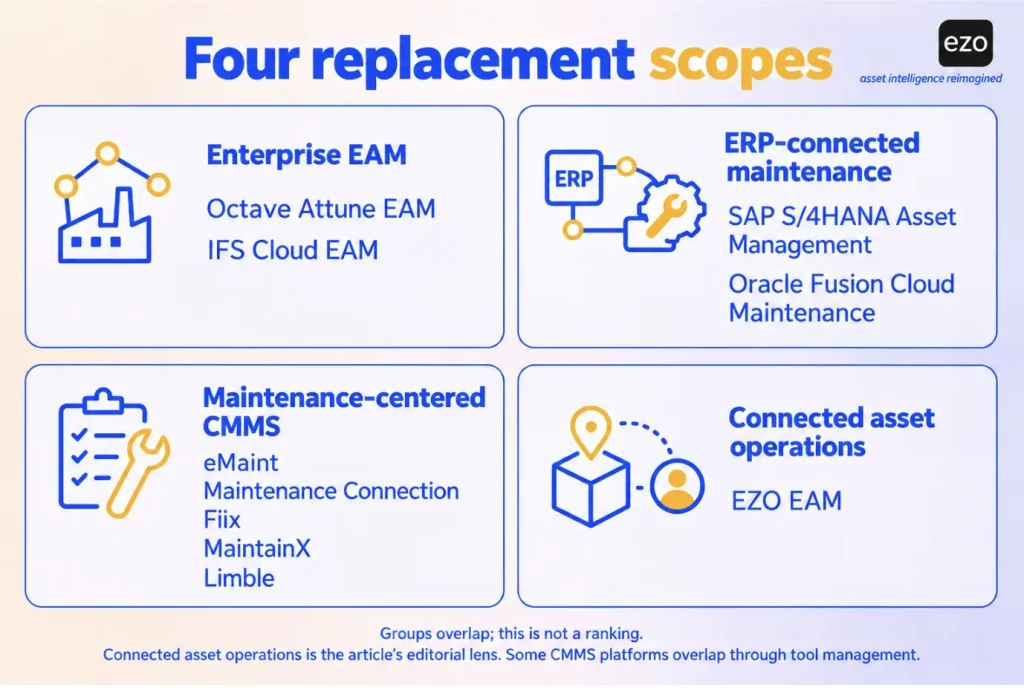
The ten platforms fall into four replacement scopes. Enterprise asset management (EAM) suites (Octave Attune EAM, IFS Cloud EAM) keep a broad lifecycle and reliability depth, including links to asset performance management (APM). ERP-connected maintenance (SAP S/4HANA Asset Management, Oracle Fusion Cloud Maintenance) runs maintenance inside the ERP’s materials and costing processes. Maintenance-centered CMMS platforms (eMaint, Maintenance Connection, Fiix, MaintainX, Limble) concentrate on work orders, preventive maintenance (PM), parts, and field execution.
Connected asset operations is an editorial lens rather than a market category: it describes platforms that keep custody, reservations, stock, and maintenance in one record. EZO EAM is built around it, and Fiix, Limble, and eMaint overlap it through tool check-out or tool cribs. None of these labels is a rigid boundary; a CMMS can serve an enterprise, and an enterprise asset management platform may still need external reliability or finance components.
| Platform | Shortlist it when | Main qualification | Deployment | Pricing basis |
|---|---|---|---|---|
| 1. EZO EAM | Custody, reservations, stock, and maintenance share one record | CMMS package needs Premium plus add-on, or Enterprise | Cloud on Amazon Web Services (AWS); Private Cloud on Enterprise | Tracked items, plus CMMS admin users |
| 2. Octave Attune EAM | Enterprise lifecycle or linear-asset depth is required | APM and integration tooling are separate products | Cloud; on-premises to confirm | Quote |
| 3. IFS Cloud EAM | Asset, supply, and service processes must stay connected | Inventory, procurement, and APM use other IFS components | Cloud or customer-hosted | Quote |
| 4. SAP S/4HANA Asset Management | Maintenance must post into SAP materials and costing | Edition decides capability; mobile and APM are separate products | Public cloud, private cloud, or on-premises | Quote |
| 5. Oracle Fusion Cloud Maintenance | Oracle Fusion owns inventory and costing | Needs Inventory Management and Cost Management | Software as a service (SaaS) | Quote |
| 6. eMaint | Controlled maintenance with condition monitoring | SSO and ERP connectors on Enterprise; confirm Professional application programming interface (API) access | Cloud on AWS | Per user, annual; prices unpublished |
| 7. Maintenance Connection | Multi-site maintenance with controlled procedures | Mobile is a paid add-on | Cloud or on-premises | Per named user; list price published |
| 8. Fiix | Plant work execution and parts dominate | Multi-site needs Professional; API and SSO on Enterprise | Cloud on AWS | Per user; list price published |
| 9. MaintainX | Mobile procedures and technician execution dominate | Multi-site, SSO, and custom ERP on Enterprise | Cloud | Per user; requesters free |
| 10. Limble | Multi-location administration defines the need | Multiple locations and part transfers on Enterprise | Cloud on AWS | Calculator quote; prices unpublished |
Source note: Reviewed October 7 and 8, 2026, using the primary sources linked in each profile. Availability depends on the plan, components, and deployment named.
How we selected these Maximo alternatives
We aimed for coverage, not a market census. We chose ten platforms representing four ways to replace Maximo: two enterprise EAM peers; SAP’s and Oracle’s native maintenance applications for buyers whose ERP owns materials and cost; five maintenance-centered CMMS platforms spanning configurable, industrial, and frontline models; and EZO EAM for shared equipment operations. Each had to be actively offered for physical asset management and documented well enough to assess. Other credible platforms exist, so treat the list as a starting set rather than the complete market.
We gathered evidence from vendor help centers, product documentation, pricing pages, trust centers, and newsrooms; we did not use review sites for capability or pricing claims. We compared every platform on the same criteria: asset structure and site access, custody, parts and purchasing, maintenance execution, mobile and offline work, reporting and reliability, integration, security, and pricing.
EZO EAM is listed first as the publisher of this guide. The remaining platforms are grouped by replacement scope.
The 10 IBM Maximo alternatives to consider
Each profile uses the same fields. “Limitations and open questions” separates documented limits from requirements the public evidence did not settle, and “Who should look elsewhere” names only documented limitations.
1. EZO EAM for connected equipment and maintenance operations
EZO EAM is an asset operations platform with maintenance capability. It fits Maximo workflows where equipment moves between people, sites, and jobs, and custody, reservations, stock, and maintenance must share one record; it fits less well for deep industrial reliability.
What it covers
- Item types: Individually tracked Assets, reusable Asset Stock, and consumable Inventory, held in nested locations. Item Relationships, which link one asset to another, are on Enterprise.
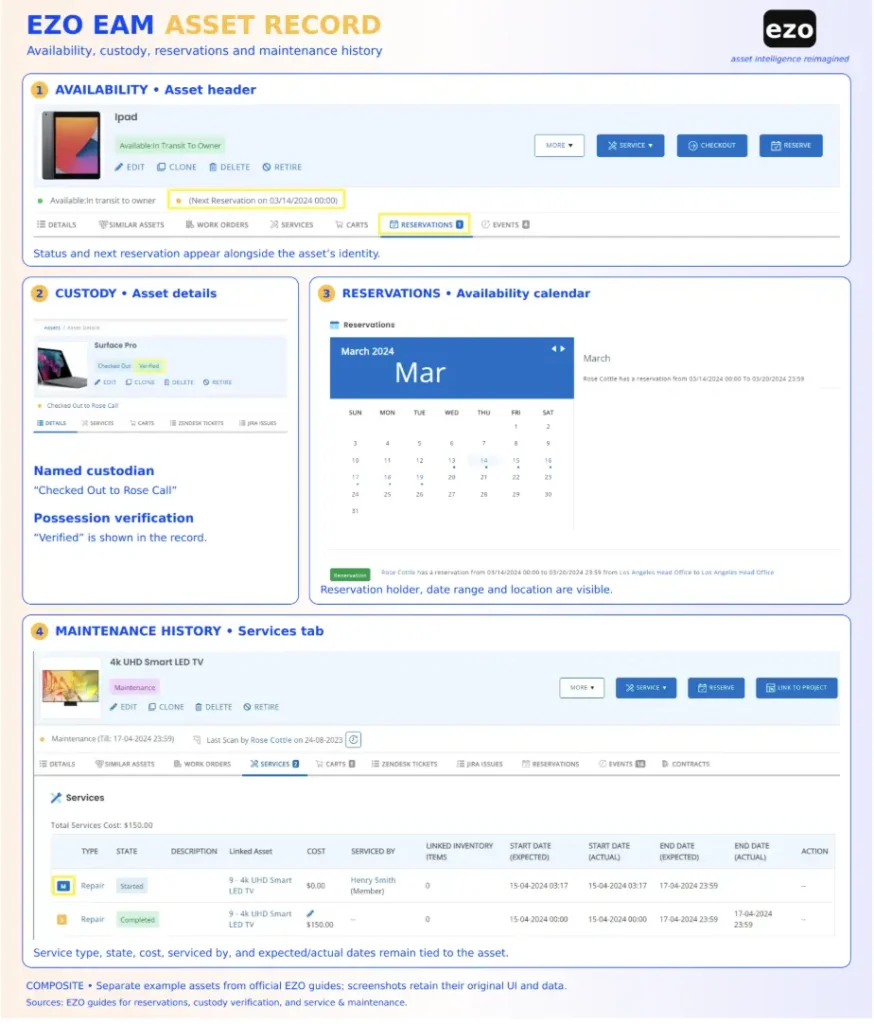
- Custody and reservations: Check-out and reservations on all plans, with administrator overrides at checkout; custody transfer from Advanced.
- Maintenance: Basic services that log consumed inventory and service costs, from Advanced. The CMMS package adds preventive maintenance, work orders, technician management, checklists, automations, and a work planner, as a Premium add-on or within Enterprise.
- Parts and purchasing: Purchase orders (POs) and stock transfers from Advanced. In the CMMS package, work orders record labor, consumed parts, and service costs against the asset.
Why consider it over Maximo
EZO’s maintenance workflow guide states that an active service makes an asset unavailable, as does a work order’s optional “Make Items Unavailable” setting until completion, while a plain service record logs work without changing availability. With Service Triage enabled, each check-in sends the asset into maintenance for a set duration, and maintenance cannot start while the asset is checked out. The return, the service, and the next booking therefore sit in one record; an inspection sign-off before release is a separate requirement to test.
Limitations and open questions
- Offline: Enterprise only. EZO’s offline guide describes viewing up to 20 work orders and adding work logs to them, synced once a day at first login, while its offline FAQ adds work requests and up to 100 bookmarked assets. Confirm the scope before relying on offline checklists, parts, or completion.
- Meters: Meter-triggered work orders appear in EZO’s CMMS help pages, not EZO EAM’s, so confirm them in the add-on you are quoted.
- Hierarchies and integration: EZO’s engineering and maintenance FAQ says complex hierarchies may need additional configuration. Test whether component history, cost rollups, and schedules follow the parent-child links you use in Maximo. The REST API is not a prebuilt ERP connector.
- Overdue items: An optional overdue-availability setting lets users reserve items past their due date, which suits teams that expect late returns to arrive. Test the warnings, overrides, and dispatch rules for returns that do not.
Pricing and deployment
Pricing scales with tracked items: each asset counts as one item, and bulk stock counts by line, with each line holding up to 5,000, 15,000, or 30,000 units on Essential, Advanced, and Premium, respectively. On October 8, 2026, Premium showed US$142.10 per month for 500 items on yearly billing. That figure excludes the CMMS add-on, which is priced per admin user while other roles are free, so it is not an all-in maintenance price. Users are unlimited under a fair-usage policy. Hosting is cloud on AWS, with Private Cloud on Enterprise. LDAP and SAML sign-on start on Premium, and EZO’s security page lists a SOC 2 Type 2 report, ISO/IEC 27001 certification, and CSA STAR Level 1.
Who should look elsewhere?
- Organizations that require on-premises hosting; EZO states that it hosts all its products on AWS.
- Programs that need health scoring, reliability-centered maintenance analysis, or linear asset management in the same platform; the CMMS package lists execution and planning functions, not those.
Pre-purchase checks
- Demonstrate that a returned asset cannot be reissued before an authorized release, and confirm which plan includes Service Triage.
- Trace a consumed part and logged labor from the work order to the asset’s cost history.
- Test the offline tasks your technicians need on an Enterprise account.
Check EZO EAM against your release workflow. If equipment moves between people and sites, run your own return, inspection, and reissue steps in a scoped EZO EAM demo.
2. Octave Attune EAM for enterprise industrial asset management

Octave Attune EAM is an enterprise EAM that Octave describes as “the updated, rebranded version of HxGN EAM.” Shortlist it when you are leaving Maximo but still need enterprise lifecycle, materials, and infrastructure depth.
What it covers
- Asset structure: Asset hierarchies and groups, risk calculations, and linear asset management with geospatial tracking.
- Work management: Work requests, automated work orders, labor scheduling, reliability-centered maintenance, and built-in calibration compliance.
- Materials: Requisitions, quotes, purchase orders, and stock optimization within the EAM product.
- Mobile: The Octave Attune EAM Offline app for iOS and iPadOS 16 or later, which its App Store listing says can create and modify data in disconnected mode after an initial sync.
Why consider it over Maximo
It keeps the comparison within enterprise EAM, so a buyer with broad hierarchy, materials, and asset management compliance requirements can compare like with like rather than trade depth for simplicity.
Limitations and open questions
- Attune APM is sold separately and adds AI-based failure prediction, condition-based work triggers, and failure-mode strategy management. Map each reliability function you need to EAM or APM before quoting.
- The certified SAP S/4HANA connector runs through Octave Databridge Pro, a separate product.
- The product page presents a cloud offering, while other Octave pages, including a blog and a customer story, reference on-premises deployment.
Pricing and deployment
Licensing and any non-cloud deployment are scoped by quote, and no public pricing or self-service trial is documented. Octave’s certifications page names Attune EAM on its ISO/IEC 27001 certificate, while its SOC 2 scope reads “Octave Cloud.” Octave became independently listed after its separation from Hexagon in May 2026, so confirm the contracting entity and support terms.
Who should look elsewhere?
Buyers whose required workflows are work execution without enterprise materials, linear assets, or compliance depth, and who lack capacity for an enterprise implementation.
Pre-purchase checks
- Confirm which products (EAM, APM, Databridge Pro) your requirements need and how each is licensed.
- Complete offline tasks on your devices with photos and attachments.
- Import Maximo hierarchies and work history records, then reconcile them.
3. IFS Cloud EAM for connected asset and service lifecycles
IFS Cloud EAM is the EAM capability of the IFS Cloud suite, and a separate product from IFS Ultimo. Evaluate it when you need asset lifecycle, maintenance, supply, and service processes to stay connected in a single enterprise platform.
What it covers
- Asset structure: Equipment object structures with functional and serial objects, plus linear assets, under site-dependent maintenance organizations.
- Work management: Work orders from PM, fault reports, or service requests, with task templates carrying instructions, tools, and materials.
- PM triggers: Calendar events, accumulated values such as operating time, and measurements outside limits, which automatically generate work orders.
- Mobile: IFS Maintenance Mobile Work Order (MWO), which works online and offline, with some features limited to online use.
Why consider it over Maximo
An organization standardizing on IFS, or running asset-heavy service operations, can hold asset, stock, and service records in fewer systems.
Limitations and open questions
- Material reservations and requisitions depend on IFS Cloud inventory and procurement components; whether those are licensed separately depends on the quote.
- IFS’s APM page places APM within IFS Cloud EAM but says it requires IFS Operational Intelligence integration; Copperleaf, for investment planning, is a separate product.
- Users are connected to sites through a “Sites per User” setup; test the permission sets that apply at each site.
- A broad deployment still needs process design, asset register cleanup, and implementation services.
Pricing and deployment
The EAM page describes cloud delivery, and IFS states that IFS Cloud can also run in a location of your choice, including on-premises. Pricing is quote-based, and no trial is documented. The IFS trust center lists SOC 1 and SOC 2 Type II reports and ISO/IEC 27001.
Who should look elsewhere?
Buyers who need maintenance execution without IFS Cloud’s connected supply, service, or finance processes.
Pre-purchase checks
- Confirm the licensed applications and which system owns finance and stock.
- Test which MWO tasks are online-only at your sites.
- Evaluate IFS’s Data Migration Manager on a sample of Maximo assets and work history; it is a general legacy-import utility, not a documented Maximo path.
4. SAP S/4HANA Asset Management for SAP-centered operations
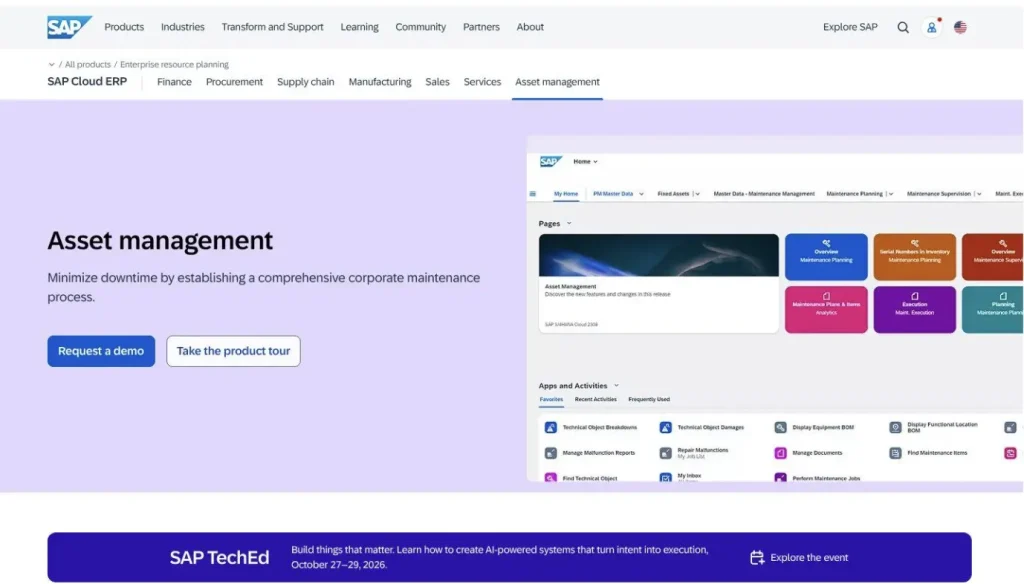
SAP S/4HANA Asset Management runs maintenance inside SAP’s ERP. Start with the edition: SAP offers S/4HANA in public cloud, private cloud, and on-premises forms, and the capabilities below come from SAP’s Cloud ERP asset management page, which does not tie them to an edition, so confirm each one for the edition you would license. Evaluate it based on whether maintenance must post into SAP materials, procurement, and costing, not simply because the organization owns SAP.
What it covers
- Asset structure: Hierarchies built from functional locations and equipment, with measurement points for instantaneous or counter-based values.
- Work management: Maintenance request screening, preventive maintenance plans, and order planning against resource availability and priority.
- Parts and cost: Approval workflows for order costs and spare parts procurement, with drill-down analysis of planned versus actual costs.
- Mobile: SAP Service and Asset Manager, a separate app that SAP describes as working online and offline.
Why consider it over Maximo
Removing the EAM-to-ERP interface can reduce the number of places where a work order, a part, and its cost must be reconciled, simplifying inventory control, though replacing Maximo can still be a substantial SAP implementation.
Limitations and open questions
- SAP’s page also mentions predictive plans. SAP runs failure prediction from sensor data in Asset Performance Management, a separate product that needs condition data from connected equipment.
- SAP publishes per-user subscription terms for Service and Asset Manager and object-block pricing for SAP APM; the field service management page reviewed does not state licensing. Confirm entitlements by edition and contract.
- SAP Asset Accounting, not Asset Management, holds fixed asset accounting.
- The public S/4HANA Cloud trial reviewed does not establish an asset management evaluation scope; request an edition-specific demonstration or sandbox.
Pricing and deployment
Core pricing is “price upon request,” and SAP’s S/4HANA page lists the editions. Service and Asset Manager is priced per user per month, and SAP APM is priced in blocks of 100 objects per year. A SOC 2 report covering S/4HANA Cloud Public Edition is available under a nondisclosure agreement.
Who should look elsewhere?
Organizations without SAP materials and finance processes.
Pre-purchase checks
- Confirm the edition, components, and how work, parts, and labor post as work order costs.
- Test the mobile packaging and the offline tasks it supports.
- Estimate partner effort and internal SAP resources for hierarchy and history migration.
5. Oracle Fusion Cloud Maintenance for Oracle-centered operations
Oracle Fusion Cloud Maintenance is part of Oracle Fusion Cloud Supply Chain & Manufacturing. Evaluate it when Oracle Fusion already owns inventory, procurement, and costing, and maintenance should work inside that model.
What it covers
- Asset structure: Physical and logical asset hierarchies that can group assets across inventory organizations.
- PM: Maintenance programs that forecast on calendar patterns, day intervals, or utilization meters, whichever comes due first.
- Work management: Work orders with material reservations, plus operational rules that create work orders from fault or parameter events.
- Requests: Work requests run through the Oracle Help Desk offering, which must be enabled for internal service requests and supports only internally owned assets. Help Desk agents and administrators typically need licenses; employees who only submit requests typically do not.
Why consider it over Maximo
Assets operate in maintenance-enabled inventory organizations, so maintenance shares the structure that Inventory Management and Cost Management already use: work order transactions update inventory reservations, and Cost Management defines cost by asset, work order, or work type. Financial assets remain in a separate application.
Limitations and open questions
- Inventory Management and Cost Management are documented dependencies, and Fixed Assets is a separate application.
- Oracle documents a technician mobile interface, but the guides reviewed do not document offline work in Oracle Fusion Cloud Maintenance; Oracle Field Service, a separate product, documents offline workflows.
- As its import guide states, imported PM work order history does not feed Oracle’s maintenance forecast; the migration section explains what that means for other record types.
Pricing and deployment
SaaS only. Oracle publishes a Fusion price list, but mapping Maintenance to a specific subscription line needs Oracle’s confirmation, so treat pricing as quote-based. Oracle lists ISO/IEC 27001 and SOC reports for its cloud applications, available through sales.
Who should look elsewhere?
Organizations seeking a standalone maintenance replacement without adopting the Oracle Fusion components it depends on, such as Inventory Management and Cost Management.
Pre-purchase checks
- Confirm the applications, user roles, and Help Desk licensing your request process needs.
- Test the mobile tasks your technicians must complete without connectivity.
- Import sample history, check how it appears in forecasts and maintenance history reports , and trace how labor and parts post in Cost Management.
6. eMaint for configurable maintenance and condition monitoring
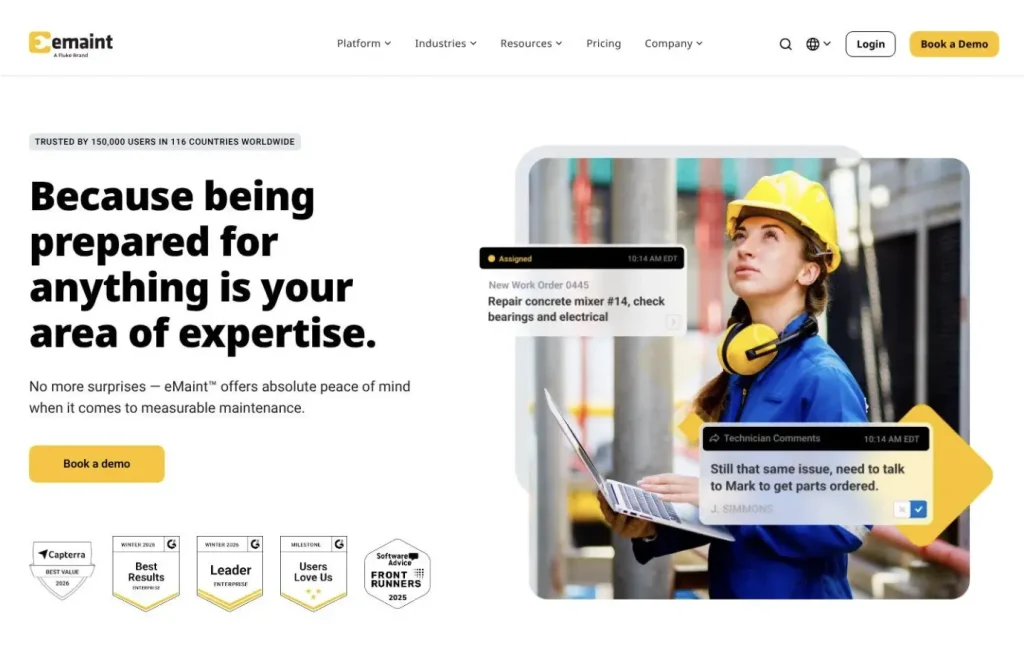
eMaint is a configurable CMMS sold as part of the Fluke brand. Shortlist it when controlled maintenance with condition monitoring defines the required workflows, and you don’t need the wider MAS suite.
What it covers
- Asset structure: Organizes assets into hierarchies by site, building, system, equipment, and component, with role-based permissions at the department or site level.
- Work management: Supports work requests, failure codes, root cause analysis, and meter-based, threshold-based, and condition-based preventive maintenance across both plans.
- Condition monitoring: Fluke Azima sensors send data to eMaint’s condition monitoring system. When a reading exceeds a user-defined threshold, the system generates a prioritized work order. An optional Remote Condition Monitoring service provides Fluke analysts who monitor and assess asset conditions. Pricing and service terms are not publicly listed.
- Parts management: Supports parts requisitions and transfers across multiple locations. Both plans also include tool crib functionality.
Why consider it over Maximo
Condition data, work orders, and parts can share one maintenance platform without reproducing the whole suite. Regulatory requirements still need separate validation.
Limitations and open questions
- Prebuilt ERP connectors, SSO, and global multi-site management are Enterprise. The pricing table marks Professional as “API capable” but lists “Access to eMaint APIs” under Enterprise, so confirm API entitlement in the quote.
- Audit trails and electronic signatures are included, and eMaint says they are designed to align with FDA 21 CFR Part 11. Validation services are a paid add-on, so plan to validate each regulated workflow yourself.
- The reviewed pages list a tool crib but don’t describe how check-out or custody works.
Pricing and deployment
Cloud SaaS on AWS. Prices are not published: Professional has a three-user minimum and Enterprise a five-user minimum, both billed as a prepaid annual commitment. Implementation and on-site training are paid add-ons. eMaint lists ISO 27001 certification and reports a SOC 2 Type II audit.
Who should look elsewhere?
Buyers who require on-premises hosting; eMaint describes itself as a 100% cloud-based SaaS solution.
Pre-purchase checks
- Demonstrate signature and approval workflows on your regulated records.
- Test offline evidence capture against eMaint’s stated offline scope.
- Confirm user minimums, add-ons, data conversion from Maximo, and how tool check-out fits your tool crib management process.
7. Accruent Maintenance Connection for controlled multi-site maintenance
Maintenance Connection is Accruent’s CMMS for industrial and multi-site maintenance. Shortlist it when work orders, inventory, reporting, and controlled procedures across repair centers define the required workflows.
What it covers
- Asset structure: Parent-child asset hierarchies, with repair centers at the top level to restrict record access.
- Work management: PM on time and meter schedules, whichever comes first, with procedures and failure analysis captured at close.
- Parts: Purchase orders that update inventory on receipt, and transfers between stockrooms across repair centers.
- Controls: Optional compliance features include audit trails, approved procedure versions, and electronic signatures.
Why consider it over Maximo
A configurable maintenance environment can cover defined work and records requirements, and Maintenance Connection still offers on-premises deployment for buyers with hosting constraints. The evidence reviewed does not establish a lighter or faster implementation.
Limitations and open questions
- Mobile runs through the MC Kinetic app, a paid add-on, which works offline except for live asset search and some record views.
- Accruent must enable the compliance features on your tenant. It describes them as supporting 21 CFR Part 11 adherence, so validate your own regulated process separately.
- The reviewed public pages did not establish the plan entitlement for SSO or REST API access.
- The help pages document tools and tool rooms that carry into work order estimates, but not tool check-out to a person.
Pricing and deployment
Accruent’s pricing page lists cloud and on-premises deployment under subscription licensing, and also offers perpetual licenses with an annual support contract; confirm which deployments a perpetual license covers. The indicative Professional price is US$110 per named user per month (three-user minimum, one-year contract), plus US$58 per user per month for mobile; Enterprise is a custom quote from five users. Service requesters are unlimited. Accruent’s trial page advertises no time limit; confirm current scope and terms.
Who should look elsewhere?
Teams that need mobile execution inside the base license, since MC Kinetic is priced as an add-on.
Pre-purchase checks
- Test the offline tasks in MC Kinetic, including how attachments behave.
- Confirm repair center roles and cross-site reporting dashboards.
- Confirm the ERP connection direction and total integration cost, including implementation, monitoring, updates, and support.
8. Fiix for industrial maintenance execution and parts
Fiix is Rockwell Automation’s CMMS for structured plant maintenance. Shortlist it when you need to replace work orders, PMs, parts, and plant-floor data.
What it covers
- Work management: Time and meter triggers, asset-event triggers, and downtime tracking for mean time to repair (MTTR) and mean time between failures (MTBF). Check how each measure is calculated before comparing it with Maximo reports.
- Sites: Multi-site tenants on Professional or Enterprise, where sites share parts and task groups but keep users, work orders, and assets separate.
- Parts: Purchasing, requests for quotation (RFQs), and cycle counts on Professional, with parts transfers between sites once Fiix enables them.
- Tools: A tool crib built on rotating assets, with check-out to a user, on Professional and Enterprise.
Why consider it over Maximo
Plant teams can focus on execution, parts, and downtime data without carrying suite applications they don’t use. Rockwell ownership matters only where a specific operational technology (OT) integration is proven for your equipment.
Limitations and open questions
- The API, Integration Hub, and SSO are Enterprise, with additional costs indicated on the pricing page.
- Failure codes are Enterprise-only, and roles are universal across sites, even though user groups are site-specific.
- Fiix is moving customers to v6 Equipment in phases, and on v6 it cannot yet generate work orders from meter readings or event triggers. If the proposed tenant uses v6 Equipment, require Fiix to demonstrate the meter-triggered workflow, or explain the available options, before shortlisting.
Pricing and deployment
Cloud SaaS on AWS. Published pricing lists Free, Basic at US$45 and Professional at US$75 per user per month, and custom Enterprise; month-to-month and annual terms are offered. A Lite License gives operators and frontline teams limited access to complete assigned tasks; it is quote-priced and must be combined with Basic, Professional, or Enterprise. OT integrations are priced per plant. Fiix states SOC 2 Type 2 compliance.
Who should look elsewhere?
Buyers who need failure codes, API access, or ERP integration without Enterprise packaging.
Pre-purchase checks
- Test site roles and cross-site reporting against your structure.
- Test offline completion, including what happens when a technician logs out before syncing.
- Confirm which Equipment version your tenant runs, and map your equipment failure history to Fiix codes.
9. MaintainX for frontline procedures and mobile maintenance
MaintainX is a maintenance and frontline operations platform that Autodesk acquired in 2026. Shortlist it when procedure-based technician execution is the dominant buying problem.
What it covers
- Work management: Work orders with procedures, signature capture, and inspection checks. Basic and Essential allow two and three work orders with attached procedures per month, respectively; Premium and Enterprise are unlimited.
- Procedure logic: Conditional logic fields on Premium, labeled beta on the pricing page. Validate their behavior before relying on them for controlled procedures.
- Triggers: Meter-based maintenance and meter-triggered automations on Premium and above.
- Parts: Parts inventory and purchase orders on Premium; multi-location parts and PO approvals on Enterprise.
- Requests: Unlimited free requester accounts on every plan.
- Analytics: Asset health insights and anomaly detection on Enterprise.
Why consider it over Maximo
Buyers whose required workflows center on technician execution may prefer a model built around the mobile task, provided history, records, and controls survive the move.
Limitations and open questions
- Offline mode runs on a configurable cache of work orders for full users and administrators but not requesters, and users cannot switch organizations offline. The help page lists offline on every plan; the pricing table, rechecked October 8, shows Premium and Enterprise.
- Multi-site management, custom roles, SSO, and global reporting are Enterprise.
- Custom ERP integrations are Enterprise, and the SAP integration services package is a paid add-on.
Pricing and deployment
Cloud. Published pricing lists Basic free, Essential at US$20 and Premium at US$65 per user per month billed annually (US$25 and US$75 billed monthly), and custom Enterprise. A user is anyone with a login; requester accounts are free. MaintainX lists SOC 2 Type 2 on its pricing page.
Who should look elsewhere?
Teams that need multi-site management, custom roles, or SSO below the Enterprise plan.
Pre-purchase checks
- Confirm which work orders and attachments are cached, and how sync conflicts are resolved.
- Map every role to a plan against your role-based access requirements, and confirm how equipment check-out would work if you need it; the documentation reviewed does not describe it.
- Import Maximo history, job plans, and procedures, then reconcile them.
10. Limble for maintenance execution with location-based controls
Limble is a maintenance-centered CMMS with multi-location controls on its Enterprise plan. Shortlist it when maintenance tasks, PM, parts, and location administration define the required workflows.
What it covers
- Asset structure: Unlimited asset hierarchies on every plan, with roles assigned per location.
- Requests: A request portal for unlimited requesters, with review and approval on Premium+.
- Work management and parts: Unlimited recurring PMs on every plan; Standard caps at three work orders with attached procedures per month; Premium+ adds meter and threshold scheduling, spare parts, and purchase orders.
- Tools: Tool check-in and check-out with an optional approver and a tool log, on Enterprise.
- Analytics: Anomaly detection on Premium+.
Why consider it over Maximo
Location-scoped administration may fit a defined site model, subject to permission testing. Unlimited requesters on every plan also remove a cost reason to route requests around the system.
Limitations and open questions
- Multiple locations, regions, multi-location reporting, and part transfers between locations are Enterprise.
- Offline mode is on Premium+ and differs by app. In the new Limble mobile app, bookmarked tasks download to the device (up to 10 per device) and support every instruction type, time logging, and consuming parts already on the task; adding parts and creating tasks require a connection, and the app must stay open while offline. Limble’s separate offline mode article, which does not name an app version, limits offline work to open or in-progress tasks and requires a connection to request approval, capture signatures, verify location, add parts, or start a task.
- SSO is an add-on on Premium+ and included on Enterprise.
Pricing and deployment
Cloud SaaS on AWS. Limble does not publish prices; each plan links to a price calculator, and SSO, ERP integrations, and on-site implementation may incur extra costs. Its trust center lists a SOC 2 Type 2 report.
Who should look elsewhere?
Buyers who need multi-site governance below the Enterprise plan.
Pre-purchase checks
- Test site roles and corporate reporting across plants on Enterprise.
- Confirm which mobile app your technicians will use, then run the offline tasks your field conditions require, including approvals, signatures, and parts.
- Reconcile parts transactions and imported Maximo history.
What must your Maximo replacement retain?
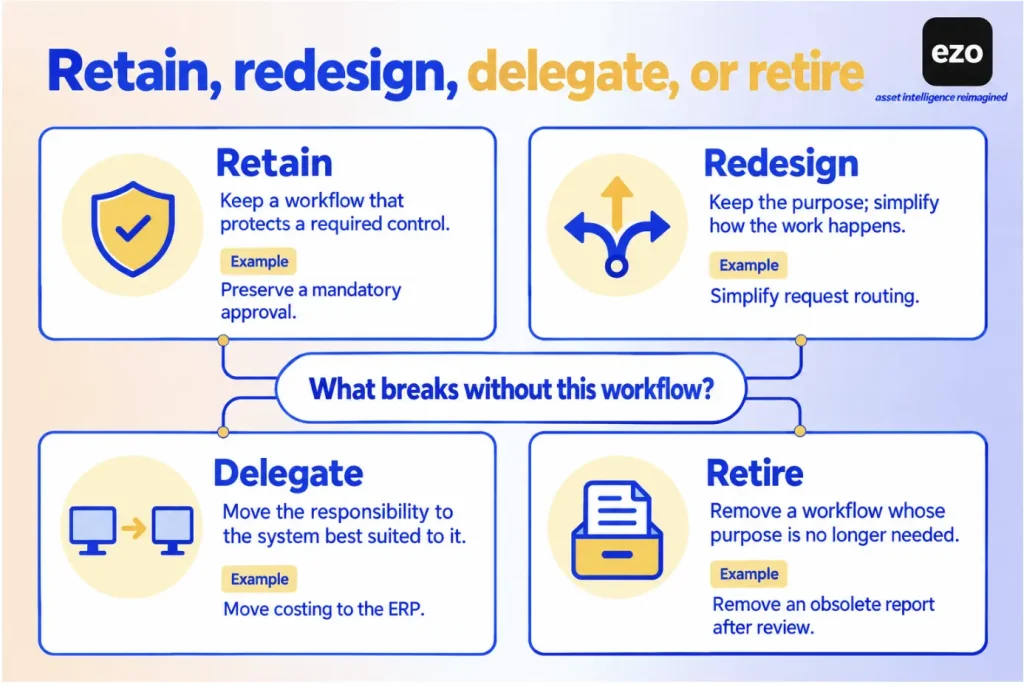
Start with the workflows and records your organization uses in Maximo today, and give each one a decision:
- Retain: The new platform must reproduce it.
- Redesign: Keep the outcome, but change how the platform delivers it.
- Delegate: Another system, such as the ERP or an APM product, takes it over.
- Retire: Drop it, with a recorded reason.
A maintenance-focused replacement is legitimate when someone made and recorded a decision to reduce the set of workflows, not when someone discovers a gap after go-live.
Which Maximo are you replacing?
Maximo Manage is the EAM core of MAS, where assets, work orders, and inventory live; applications such as Health, Monitor, and Predict add asset performance management (APM). A team using Manage for work orders and storerooms is replacing different applications from a team using Health and Predict for reliability decisions, and the two need different shortlists.
Legacy Maximo Asset Management 7.6.1.x is a third case. IBM ended its regular base support on September 30, 2025, with paid extended options for eligible customers. Separately, IBM’s dual-support notice states that dual support for 7.6.1.x under a MAS license ends April 30, 2027, and that customers who traded up perpetual licenses must complete their migration to MAS by that date. Neither date means Maximo is discontinued, and your exact options depend on your entitlement.
Rank workflows by what breaks without them
The obvious way to decide what a replacement must cover is usage. Suppose an illustrative usage review shows that technicians open a handful of applications every day, while dozens of configurations are rarely touched. The tempting conclusion is that a tool covering the handful is enough.
The complication is that some configurations do their work without being opened. A status rule that blocks closure without a sign-off, a meter that schedules the next preventive maintenance job, and a reservation that holds a part all run in the background. Low usage can mean low value, or it can mean a control doing exactly what it was built to do. A usage report cannot tell those two apart.
Relationships between records carry the same risk. A maintenance manager can approve a repair while an equipment coordinator still cannot release the asset because the inspection hasn’t been signed off. A replacement may show a part as on hand without preserving the reservation that stops another team from consuming it. A platform that loses either relationship can look complete in a demo and still fail in operation.
So ask a different question of each workflow: what happens on the day it is gone? Before retiring a customization, find out why it was added. A configuration can encode an old audit finding or incident, and the person who remembers the reason may have moved on. A control nobody can explain is a reason to investigate, not a reason to delete. Carrying every control across has its own cost, since it rebuilds the complexity you were trying to leave. The aim is a known reason for each one.
| Area | Record in the inventory | Question that decides the outcome |
|---|---|---|
| Asset and location hierarchy | Levels, parent-child links, site boundaries | Does the new structure preserve meaning or flatten it? |
| Work requests and work orders | Statuses, required fields, approval rules | Which rules enforce a control rather than a preference? |
| PM, job plans, and meters | Triggers, intervals, meter types, instructions | Which schedules depend on meter or condition data? |
| Inventory and purchasing | Storerooms, reservations, reorder rules, PO approvals | Which system owns stock value and purchasing? |
| Custody and reservations | Holders, bookings, release rules | Does equipment move between people or sites? |
| Safety, regulated maintenance, and industry processes | Permits, isolation and lockout procedures, safety plans, calibration traceability, electronic signatures | Which of these would disqualify a candidate outright? |
| Reliability and condition | Failure codes, health scores, condition data | Does this belong in an APM product or in maintenance reporting? |
| Integrations and reports | Systems, direction, frequency, definitions | Who owns each interface after the cutover? |
Safety and regulated requirements can disqualify an otherwise suitable platform, so test them before weighing anything else. Multiple location records do not, by themselves, reproduce Maximo’s organizations and sites either. Check who can see and change what at each site, not how many locations across sites exist.
Compare the capabilities and dependencies that matter
The three tables use the same labels across platforms, with IBM Maximo as a separate baseline. Each cell gives a functional label, then, after a semicolon, the plan, add-on, or product that delivers it, or the documented detail where no plan gate applies. A plan name means that plan and above.
- Yes: Documented and meets the column definition.
- Limited: Documented, but narrower than the column definition; the cell names the gap.
- Not verified: The reviewed public sources did not establish it; this is not a claim of absence.
- †: The evidence is a marketing or feature page, an app listing, or a customer story rather than product documentation. Pricing and plan tables count as packaging documentation.
- Plan not stated: The capability is documented, but the entitling plan is not.
Numbered notes after Table C carry qualifications that are too long for a cell.
Baseline: Maximo Manage in MAS 9.2, plus Health, Monitor, and Predict where a cell names them, without industry solutions. The baseline cells draw on IBM’s MAS product page and Maximo Manage page, the Maximo Manage REST API catalog, IBM support articles on independent security groups, the Tools and Stocked Tools applications, Maximo Mobile offline mode, and IBM’s FedRAMP announcement. Compare them with the release, industry solutions, and entitlements you actually run.
Table A: Asset structure and operational control
Columns: Equipment hierarchy means parent-child equipment relationships that carry history, meters, or cost, not a location tree. Site-scoped access means restricting what users see or change by site; defining sites is not enough. Custody and reservations means check-out to a named person plus conflict-checked bookings; either alone, or tools issued to work orders, is Limited. Inventory and purchasing means stock by location, updated by purchase orders or requisitions.
| Platform | Equipment hierarchy | Site-scoped access | Custody and reservations | Inventory and purchasing |
|---|---|---|---|---|
| IBM Maximo (baseline) | Yes; Manage | Yes; independent security groups | Limited: tools issued to people and work orders | Yes; multi-location inventory, purchasing |
| 1. EZO EAM | Limited: Item Relationships on Enterprise only; otherwise nested locations | Not verified: roles from Advanced, advanced roles from Premium | Yes; check-out and reservations on all plans, custody transfer from Advanced | Yes; POs and transfers from Advanced |
| 2. Octave Attune EAM | Yes†; hierarchies, linear assets | Not verified: multi-organization use in a customer story only | Not verified | Yes†; requisitions, POs, stock |
| 3. IFS Cloud EAM | Yes; object structures, linear assets | Yes; sites assigned per user | Limited: tools allocated to work | Yes; IFS inventory and procurement components |
| 4. SAP S/4HANA Asset Management | Yes†; functional locations, equipment | Not verified | Not verified | Yes†; spare parts procurement |
| 5. Oracle Fusion Cloud Maintenance | Yes; physical and logical hierarchies | Not verified: maintenance organizations defined | Not verified | Yes; Inventory Management, Procurement |
| 6. eMaint | Yes†; site to component | Yes†; permissions by site, global management on Enterprise | Not verified: tool crib listed, mechanism not described | Yes†; multi-location inventory, requisitions |
| 7. Maintenance Connection | Yes; parent-child | Yes; repair centers, access groups | Limited: tools and tool rooms, no check-out to a person found | Yes; POs, stockroom transfers |
| 8. Fiix | Yes; hierarchical import | Limited: user groups by site, roles universal; Professional | Limited: tool check-out, no reservations found; Professional | Yes; purchasing on Professional, site transfers once enabled |
| 9. MaintainX | Yes; Premium | Yes; sub-organizations on Enterprise | Not verified | Yes; Premium, multi-location on Enterprise |
| 10. Limble | Yes; all plans | Yes; location-based roles, multiple locations on Enterprise | Limited: tool check-out, no reservations found; Enterprise | Yes; Premium+, transfers on Enterprise |
In the inventory column, ask whether a quantity means on hand, reserved, or in transit; the multi-plant spare parts comparison covers those questions.
Table B: Maintenance and field execution
A meter trigger responds to a recorded reading. Automated, continuous condition monitoring requires a connected data source, while periodic condition checks can use recorded measurements or inspections. Either way, the test is whether the reading raises a maintenance work order without someone retyping it.
Columns: Work orders and PM means work orders plus calendar- or usage-based schedules. Meter and condition triggers means work generated from meter readings or condition data crossing a limit. Mobile means a vendor app or mobile interface for technicians; the cell says which. Offline means completing work without a connection; viewing cached records is not enough.
| Platform | Work orders and PM | Meter and condition triggers | Mobile | Offline |
|---|---|---|---|---|
| IBM Maximo (baseline) | Yes; Manage | Yes; meters, condition monitoring | Yes; Maximo Mobile | Yes; Maximo Mobile disconnected mode |
| 1. EZO EAM | Yes; CMMS add-on on Premium or Enterprise | Not verified: meters in EZO’s CMMS help only | Yes; iOS and Android, all plans | Limited: view and log work on up to 20 synced work orders; Enterprise |
| 2. Octave Attune EAM | Yes†; requests, work orders, labor scheduling | Not verified: EAM triggers; condition triggers sit in Attune APM | Yes†; Attune EAM Offline app | Yes†; Attune EAM Offline app |
| 3. IFS Cloud EAM | Yes; PM actions, task templates | Yes; operating time, measurements outside limits | Yes; MWO | Limited: some features online only |
| 4. SAP S/4HANA Asset Management | Yes†; requests, plans, orders | Limited†: counter readings; failure prediction needs SAP APM | Yes†; Service and Asset Manager, separate product | Yes†; Service and Asset Manager, separate product |
| 5. Oracle Fusion Cloud Maintenance | Yes; maintenance programs, work orders | Yes; meters, operational rules (note 2) | Yes; technician mobile interface, delivery model not stated | Not verified |
| 6. eMaint | Yes; both plans | Yes; meter, threshold, and condition triggers, both plans | Yes; eMaint Mobile App, both plans | Yes†; offline work mode, both plans |
| 7. Maintenance Connection | Yes; Professional | Yes; time and meter, telemetry through Observe (note 1) | Yes; MC Kinetic add-on | Limited: live search and some views online only |
| 8. Fiix | Yes; 25 active PMs on Free | Limited: meter and event triggers not yet on v6 Equipment | Yes; plan not stated | Yes; plan not stated (note 4) |
| 9. MaintainX | Yes; attached procedures capped below Premium | Yes; Premium | Yes; plan not stated | Limited: cached work orders only (note 5) |
| 10. Limble | Yes; all plans, attached procedures capped on Standard | Yes; Premium+ | Yes; plan not stated | Limited: up to 10 bookmarked tasks in the new app; Premium+ |
Table C: Reporting, integration, and security
A report that consolidates sites doesn’t prove each site defines its KPIs the same way; standardized workflows can still produce incomparable plant data.
Columns: Maintenance reporting means reports on work, downtime, or maintenance cost, with cross-site consolidation noted where documented. Reliability analytics means health scores, failure prediction, or anomaly detection, the territory of asset performance management, recorded as vendors describe them without assessing results. Under Integration, an API is programmatic access for building integrations, while an ERP connector is a prebuilt, maintained connection to a named ERP. Security reports means published third-party reports or certifications. SSO means single sign-on and the plan that includes it.
| Platform | Maintenance reporting | Reliability analytics | Integration | Security reports | SSO |
|---|---|---|---|---|---|
| IBM Maximo (baseline) | Yes; maintenance history, cost, and compliance reports | Yes; Health, Monitor, Predict | Yes; Maximo Manage REST APIs | Limited: FedRAMP Moderate for MAS as a Service for Government only | Not verified |
| 1. EZO EAM | Yes; custom reports from Advanced | Not verified | Limited: API from Advanced; QuickBooks Online connector on Premium | Yes; SOC 2 Type 2, ISO/IEC 27001 | Yes; LDAP and SAML from Premium |
| 2. Octave Attune EAM | Yes†; reporting and analytics | Yes†; Attune APM, separate product | Limited†: SAP connector through Databridge Pro; native API not verified | Yes; ISO/IEC 27001 names Attune EAM, SOC 2 covers Octave Cloud | Not verified |
| 3. IFS Cloud EAM | Yes; maintenance analysis model for Power BI | Yes; APM requires IFS Operational Intelligence | Yes; OData web APIs (note 3), IFS Cloud ERP | Yes; SOC 1, SOC 2 Type II, ISO/IEC 27001 | Not verified |
| 4. SAP S/4HANA Asset Management | Yes†; planned versus actual cost analysis | Yes†; SAP APM, separate product | Yes; same ERP | Limited: SOC 2 covers Public Edition only, under a nondisclosure agreement | Not verified |
| 5. Oracle Fusion Cloud Maintenance | Yes; maintenance reporting through Oracle Transactional Business Intelligence (OTBI) | Not verified: Internet of Things (IoT) services are separate dependencies (note 2) | Yes; same ERP, REST APIs | Yes; ISO/IEC 27001, SOC reports through sales | Not verified |
| 6. eMaint | Yes†; reliability reports, MTBF, multi-site reporting | Limited†: Fluke condition monitoring; AI Suite on Enterprise | Yes; ERP connectors on Enterprise, API plan to confirm | Yes; ISO 27001, SOC 2 Type II | Yes; Enterprise |
| 7. Maintenance Connection | Yes†; more than 150 prebuilt reports | Not verified | Yes†; integration hub, REST Web API; plan not stated | Not verified: trust center not reviewed | Yes; plan not stated |
| 8. Fiix | Yes; custom reports on Professional | Limited: Foresight AI insights; Professional (note 7) | Yes; API and Integration Hub on Enterprise, extra cost | Yes; SOC 2 Type 2 | Yes; Enterprise, extra fees |
| 9. MaintainX | Yes; cross-organization reporting on Enterprise | Limited: asset health insights, anomaly detection; Enterprise | Yes; API on Premium, custom ERP on Enterprise | Yes; SOC 2 Type 2 | Yes; Enterprise |
| 10. Limble | Yes; multi-location reporting on Enterprise | Limited: anomaly detection; Premium+ | Yes; API on Premium+, ERP integrations may cost extra (note 6) | Yes; SOC 2 Type 2 | Yes; add-on on Premium+, included on Enterprise |
Notes
- Maintenance Connection’s Accruent Observe integration creates work orders from telemetry alarms and can block closure until the telemetry shows the fault is fixed. Observe is a separate Accruent product.
- Oracle’s Maintenance guide for release 25D lists the Oracle IoT Asset Monitoring service among Maintenance’s dependencies; operational rules for fault and parameter events are documented separately.
- IFS’s API usage policy describes OData APIs in Premium, Standard, and StandardEntity classes.
- Fiix’s offline guide warns that logging out before syncing discards offline changes.
- MaintainX’s help page and pricing table disagree on which plans include offline mode; see its profile.
- Limble publishes no prices, and its pricing page marks SSO, ERP, and IoT integrations, and on-site implementation as items where additional costs may apply.
- Fiix describes Foresight as AI insights that predict parts usage and identify asset risks, available on Professional and Enterprise.
Certifications show that an auditor examined a vendor’s controls; they do not settle your own asset management compliance requirements. Ask every vendor the same security questions: SSO and user provisioning, audit log access, data residency, retention and deletion, backup and recovery targets, and the contract terms that commit to each.
Three patterns stand out. First, nine of the ten alternatives document offline work in some form, but it ranges from a capped set of synced work orders to open tasks only, and several gate it by plan or add-on. Having a mobile app doesn’t mean it supports offline work.
Second, custody and reservations matter most for organizations managing shared or mobile equipment. EZO EAM documents check-out, reservations, and custody transfer; Fiix and Limble document tool check-out on higher plans; IBM, IFS, and Maintenance Connection document tools issued or allocated to work. If equipment does not move between people, crews, or sites, give that column little weight.
Third, ERP connection is a packaging question. eMaint, Fiix, MaintainX, and Limble place ERP connections on higher plans or flag extra costs; for SAP and Oracle, the ERP is the platform. API access alone is not a finished EAM workflow integration.
Which alternative fits your operating model?
First decide whether the evidence supports retaining, upgrading, or replacing Maximo.
- Retain or improve Maximo when the capability you need already exists, and the real problem is configuration, data, process, or adoption.
- Upgrade within the Maximo family when your current version, such as Maximo 7.6.1.x, no longer meets your lifecycle or deployment requirements, making an upgrade to IBM Maximo Application Suite (MAS) worth evaluating.
- Replace a defined set of workflows when another platform better fits those workflows, your licensing, your deployment needs, or your internal capacity.
If replacement is the answer, start from the route in the at-a-glance table, then check what could remove each candidate:
- EZO EAM: Advanced reliability, linear assets, specialized safety processes, and hosting.
- Octave Attune EAM and IFS Cloud EAM: Hierarchy, reliability, regulatory, and integration specifics, with Maximo as the baseline.
- SAP S/4HANA Asset Management: The edition, components, SAP resources, and migration effort.
- Oracle Fusion Cloud Maintenance: Adjacent applications and offline needs.
- eMaint and Maintenance Connection: Signature requirements, mobile packaging, and hosting.
- Fiix: Cross-site inventory, failure codes, and integration packaging.
- MaintainX and Limble: Offline behavior, history retention, and enterprise controls.
A disqualifier overrides a category label: a platform that fits the primary requirement still drops off the shortlist if it fails a hard requirement such as hosting, offline work, record retention, a safety control, or an essential integration. Company size and asset count alone don’t show whether a broad suite is excessive. How many workflows, sites, and systems must stay connected is a better guide, and it belongs in your software evaluation and procurement process from the start.
How to compare the cost of replacing Maximo
Published subscription prices rarely compare like for like. Compare three years of cost for identical required workflows, including mandatory components, implementation, hosting, and internal effort.
Each vendor counts something different. IBM licenses MAS through AppPoints, IBM’s licensing credits: each application and each user type consumes a set number of them. Its Essentials Maintenance package starts at under US$40K per year with 150 AppPoints, for one environment and up to 25 users, with a 12-month minimum term. That is an entry package, not an all-in Maximo price. EZO EAM prices by tracked items; eMaint, Maintenance Connection, Fiix, and MaintainX price per user; and the enterprise suites quote against your requirements. A per-user CMMS price and an AppPoints package are priced differently.
The licensing unit can shape who records the work
The licensing unit can influence who receives access, and therefore who records the work. When each licensed technician adds cost, an organization has an incentive to license fewer, and whether it does is a procurement risk to test. If everyone who performs work can record it under the licenses bought, that particular risk is reduced. If some cannot, their work may be recorded secondhand, later, or not at all, and the gap surfaces in the equipment maintenance history long after the invoice is paid.
So check whether the proposed licensing lets every required role record its own work. Free requester accounts, limited or lite licenses, and admin-only charges change the answer, and each defines what that role can record. Fiix’s Lite License and MaintainX’s free requesters are examples; EZO EAM’s unlimited users sit under a fair-usage policy, and its CMMS add-on is still charged per admin user.
Three-year comparison cost = subscriptions + mandatory modules and add-ons + implementation and data migration + integrations + hosting and platform operations + training + internal administration and support + parallel running and exit costs.
Hosting and platform operations matter most for on-premises or customer-hosted deployments, where you pay for infrastructure, platform licenses, backups, recovery, and upgrades. Keep one-time and recurring costs separate, avoid counting bundled services twice, and label downtime or migration contingencies as assumptions, not quotes. Ask every vendor to price the same inputs:
- Assets and sites: Assets, reusable stock, consumables, sites, and organizations.
- Users and roles: Technicians, planners, admins, requesters, and contractors, named or concurrent.
- Required functions: Work orders, PM, offline work, approvals, parts, procurement, reports, and security.
- Licensing unit: AppPoints, users, tracked items, admin users, sites, or a scoped quote.
- Components and add-ons: Mobile, CMMS, APM, integration, AI, and extra environments.
- Migration: Cleansing, history and attachments, archive, and validation.
- Integrations: Systems, fields, direction, frequency, middleware, and upkeep.
- Hosting: Infrastructure, platform licenses, backup, recovery, and upgrades, where you host.
- Services: Configuration, training, partner work, support, and the internal owner.
- Commercial terms: Currency, billing basis, term, minimums, and renewal conditions.
- Continuity and exit: Overlap period, archive access, data export, and cutover effort.
A worked example shows why normalization matters. The figures are illustrative assumptions, not vendor quotes, and both quotes cover the same three-year requirements.
| Cost line (three years) | Quote A | Quote B |
|---|---|---|
| Subscriptions | US$180,000 | US$135,000 |
| Required add-on | Included | US$30,000 |
| Implementation and data migration | US$50,000 | US$50,000 |
| ERP integration build | Prebuilt connector, included | US$64,000 |
| Extra Maximo overlap | US$0 (cutover within the current term) | US$20,000 (integration build extends the overlap) |
| Three-year total | US$230,000 | US$299,000 |
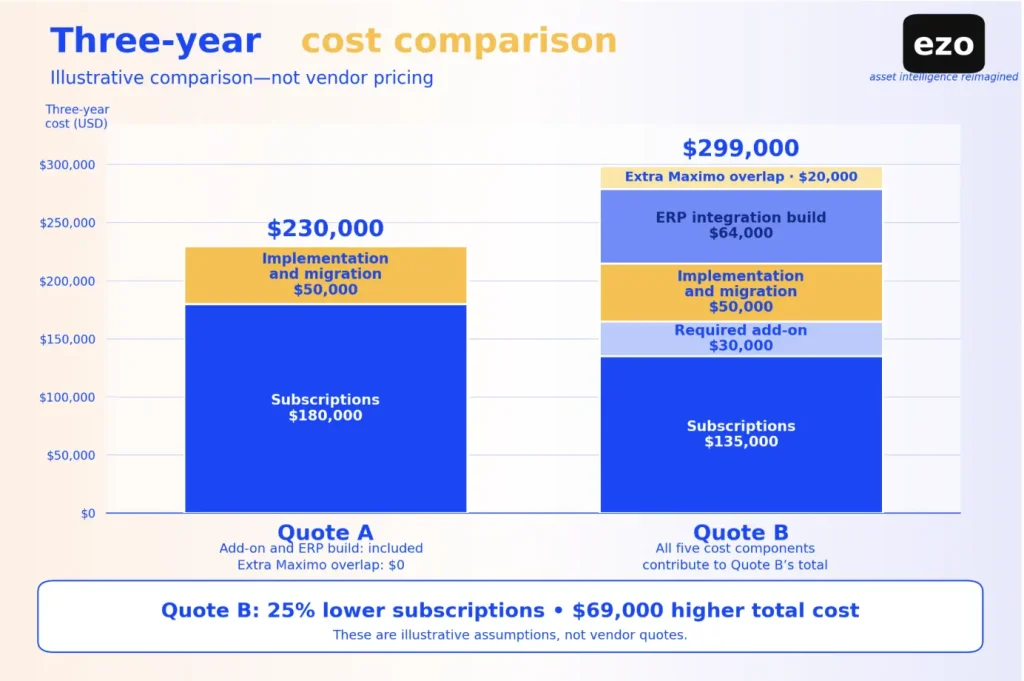
Quote B’s subscription is 25% lower, yet it costs US$69,000 more over three years once you include the required add-on, the integration build, and the longer overlap.
You can’t defend a savings percentage without comparable quotes and a transparent baseline; later claims should rest on measured changes in inventory, procurement, and maintenance.
What should vendors demonstrate before you choose?
Give every vendor the same data and tasks, then record what happened rather than how the demo felt. A demo should expose your required workflows, not the path the vendor finds easiest to show. Run the scenario that matches your operations, or more than one; all three are illustrative, and none is a test EZO performed.
- Shared equipment operations: Two sites share a portable diagnostic unit with a Maximo ID, a meter reading, an open maintenance requirement, and service history. A team reserves it. After use, it returns for inspection, needs a repair that consumes one stocked part and technician labor, and must be released or held before the next assignment.
- Fixed industrial maintenance: A production-line pump has a position in the equipment hierarchy, a runtime meter, a PM job plan, and failure history. A vibration reading exceeds its limit and triggers a work order that needs an isolation procedure, a reserved spare seal, sign-off, and a failure code at close.
- Reliability or linear assets: A pipeline or rail segment carries linear referencing, condition inspections, and a criticality rating. An inspection finding must change the risk rating, reprioritize the PM program, and roll cost up to the asset class.
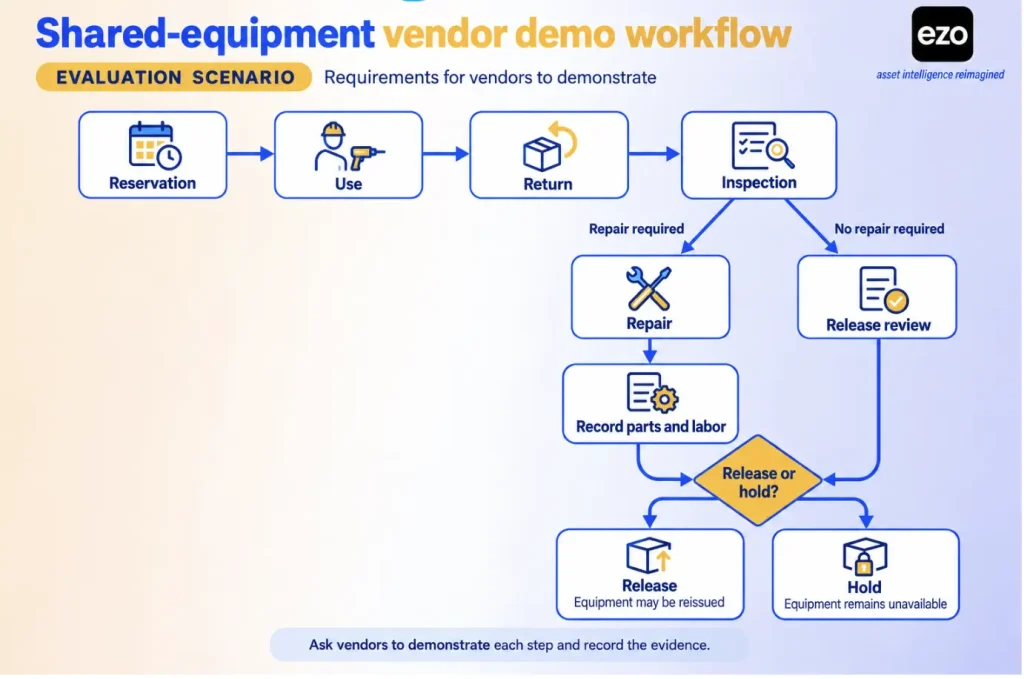
| Task | What to record |
|---|---|
| Import or identify the asset | ID, hierarchy position, meters, and history retained; what was archived |
| Submit and route the request or trigger | Required fields, roles, approvals, manual handoffs |
| Check reservations or reserved stock | Custody, dates, conflicts, parts held for the job |
| Place the asset into maintenance | Whether it can be issued, run, or released prematurely |
| Complete procedures and readings | Required evidence, permits or sign-offs, exceptions, time, user steps |
| Consume a part and record labor | Stock transaction, cost, link to work order and asset |
| Perform the work offline | Cached records, unavailable functions, attachments, sync, conflicts |
| Review records across sites | Role restrictions, consolidated report, traceability |
| Close, then release or hold | Who authorized it; failure code; availability and custody updated |
Then test the exceptions, because they show whether the record stays accurate when operations stop behaving neatly:
- A maintenance requirement is raised after a reservation or production schedule was approved.
- Two sites request the same asset or part for overlapping dates.
- The required part is out of stock at the technician’s site.
- The asset returns damaged or after its expected return.
- Two users edit the same work order while one of them is offline.
Define each measure, and the threshold that counts as a pass, before the first demo:
- Completion: The task finished without vendor staff stepping in.
- Time: Minutes from the first screen to the saved record, for the same user role.
- Errors: Wrong or missing values found when the record is checked against the script.
- Record integrity: Links between asset, work order, part, labor, and history that survive the task.
- Sync outcome: Offline changes that arrive intact, with conflicts resolved as the vendor documents.
- Plan required: The lowest plan and add-ons that performed the task.
Record inspection findings the same way for every vendor. Passing one scenario does not establish suitability for every Maximo deployment.
What to validate before migrating from Maximo
Validate that asset identities, relationships, open work, schedules, meters, history, stock, configuration, and integrations retain their meaning in the new system, and decide what moves, what to rebuild, and what to archive.
Treat each record type separately, because an imported record is not necessarily a working one. Oracle’s import guide, for example, states that imported work order history for a preventive maintenance program “won’t be referenced or respected by the maintenance forecast.” That limitation is specific to Oracle’s forecast, but the question applies to every vendor. Ask whether imported history appears in reports, whether it sets the next PM due date, whether meter history keeps its readings and units, and whether open work arrives with its status and owner.
Importing everything is not automatically safer. Old records with inconsistent codes can make new reports harder to trust. Decide which history must stay active, which can sit in a governed archive with a searchable audit trail, and which contractual or regulatory retention obligations apply.
| Record or process | Acceptance test |
|---|---|
| Asset and location identifiers | Every required identifier reconciles to the Maximo source; remaining duplicates are listed with an owner |
| Organizations, sites, hierarchies | Every mandatory parent-child relationship survives, and site role tests pass |
| Open work and requests | Every open record arrives with its owner, status, priority, and due date |
| PM, job plans, checklists | Each schedule’s next due date matches the Maximo forecast, or the difference is approved |
| Meters and failure data | Units and last readings match; every failure code is mapped or retired by a named owner |
| History, attachments, approvals | A sample of records opens with its attachments in the new system or the archive |
| Parts, inventory, purchasing | No unexplained quantity or value variance; open POs reconcile with finance |
| Users, roles, integrations | Role tests pass for each persona, and each interface handles a failed message as designed |
| Configuration and business logic | Each automation script, escalation, workflow, domain, classification, and custom object has a retain, rebuild, replace, or retire decision |
| Reports | Each retained report reproduces a Maximo baseline from equivalent source data |
| Cutover and rollback | Freeze, reconciliation sign-off, fallback trigger, and legacy read access are agreed by named owners |
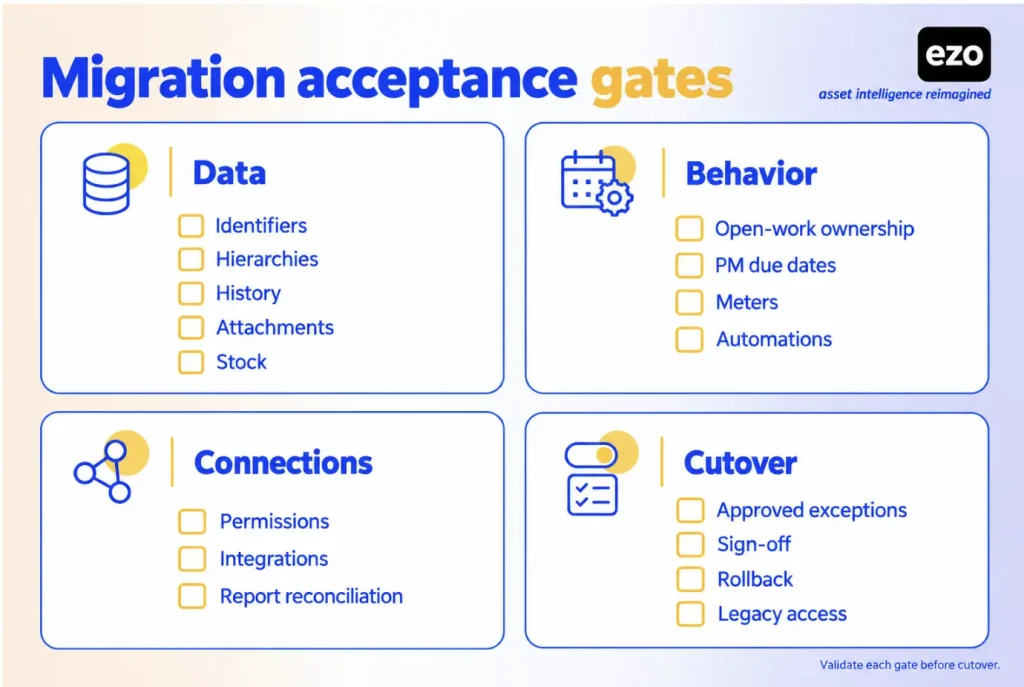
Named owners approve every exception before cutover. Three migration mistakes are still easy to miss:
- Overlooking open work orders and outstanding commitments at cutover
- Canceling Maximo before acceptance criteria pass
- Leaving long-term ownership of the new system unassigned
Which Maximo alternative should you shortlist?
A credible Maximo alternative preserves the workflows whose absence would create the greatest operational, financial, or compliance risk, with an operating model your organization can sustain. To turn this guide into a shortlist:
- Inventory your Maximo workflows and give each a retain, redesign, delegate, or retire decision.
- Apply the hard requirements first: hosting, safety and regulated processes, offline work, retention, and essential integrations.
- Choose candidates from the replacement routes that fit what remains, and keep current Maximo in the comparison.
- Request quotes for identical requirements and normalize them over three years.
- Run the demo scenario that matches your operations, with measures set in advance.
- Decide on what the pilot recorded; keeping or upgrading Maximo remains a valid outcome.