Editorial disclosure: EZO EAM is our product, so it’s listed first. The other nine platforms are ordered by how fully their SAP integration is documented. The numbers show list position only. They are not scores or rankings. We checked capabilities, prices, and plan limits against each vendor’s own documentation.
Key Takeaways:
- An SAP EAM alternative can mean three different projects: replacing the technician interface, moving maintenance execution, or replacing the asset master. Each involves a different integration workload.
- If SAP retains maintenance order costing, validate the complete financial flow. Labor, parts, and external service costs must post to the correct SAP maintenance order and settle correctly at month-end. A documented work-order sync does not establish this.
- EZO EAM combines equipment availability, custody, maintenance management, and lifecycle records in one platform. Formal work orders and preventive maintenance require the CMMS add-on, available on Premium and Enterprise. Connecting EZO EAM to SAP requires a custom API integration.
- IBM Maximo, Octave Attune EAM, and IFS Cloud EAM are candidates for broader SAP EAM replacement where linear asset management or permit-to-work controls are required. Validate the SAP functions and dependencies your operation needs before selecting one.
- For a greenfield S/4HANA project, compare each alternative with rebuilding PM in S/4HANA, while assessing both against your current maintenance requirements, data, and dependencies.
- A simpler mobile app can reduce data entry time, but does not guarantee better maintenance records. Technicians may still leave failure fields incomplete when the immediate effort falls on them, and the benefits accrue to planners months later.
- Do not migrate all SAP history by default. Prioritize recent and critical records, and archive the rest after checking legal, regulatory, warranty, and audit-retention requirements.
Organizations evaluating SAP EAM alternatives are not always trying to replace SAP itself. The real decision is which responsibilities move: SAP can remain the maintenance system of record while technicians get a simpler execution tool, maintenance execution can move to another platform, or broader asset management can move with it. Teams usually start asking the question when symptoms appear: technicians may not update maintenance notifications consistently, equipment conditions change between inspections, and some planners rebuild schedules in spreadsheets to keep work moving.
When these gaps become difficult to manage, organizations begin exploring SAP EAM alternatives. Some look to replace SAP’s broader enterprise maintenance capabilities, while others consider more focused asset lifecycle platforms such as EZO EAM.
The challenge is defining what “alternative” means in each case. An organization might want to replace only the way technicians report issues and receive work assignments, while keeping SAP responsible for maintenance planning and records. Another might want to move work order management, preventive maintenance, and asset histories to a separate platform. These differences determine which capabilities to evaluate and how much integration with SAP will be required.
The 10 platforms below approach these requirements differently. The comparison examines their capabilities, strengths, limitations, and suitability for organizations looking to supplement or replace parts of their SAP EAM environment.
SAP EAM alternatives at a glance
The shortlist spans three distinct groups, each addressing a different set of maintenance requirements.
Enterprise EAM suites: IBM Maximo, Octave Attune EAM, IFS Cloud EAM, and Oracle Fusion Cloud Maintenance offer broader maintenance management capabilities. They are candidates for organizations considering a more extensive replacement of SAP EAM, with capabilities such as linear asset management and permit-to-work, or integration within a wider ERP ecosystem. Their strengths differ: some support linear assets and permit-controlled work, while others integrate maintenance within a broader ERP suite.
Maintenance-first platforms: MaintainX, UpKeep, eMaint, Fiix, and Asset Essentials focus primarily on maintenance execution, including work orders, preventive maintenance, and technician workflows. They can complement SAP by handling day-to-day maintenance activities or replace selected SAP PM functions without requiring a broader ERP replacement.
Asset lifecycle management: EZO EAM focuses on the operational management of physical assets, bringing equipment availability, reservations, custody, maintenance, inventory, costs, and lifecycle records into one platform. It can operate alongside SAP, allowing organizations to manage these asset-related activities without replacing their existing ERP environment.
| Product | Best fit for | SAP route | Deployment | Pricing model |
| EZO EAM | Equipment lifecycle visibility, availability, and maintenance across locations | Custom integration on the REST API and automation engine | SaaS; private cloud on Enterprise | Public tiers by tracked items; CMMS add-on per admin user |
| IBM Maximo Application Suite | Broader replacement in asset-intensive operations | Packaged SAP connector, licensed separately | SaaS or client-managed | AppPoints; entry tier published, others quoted |
| Octave Attune EAM | Asset-heavy operations on SAP S/4HANA procurement | SAP-certified connector for procurement flows | Cloud or on-premises | Custom quote |
| IFS Cloud EAM | Replacing SAP within a broader IFS suite | APIs and a partner connector | IFS-managed cloud or supported customer-managed deployment; confirm hosting requirements. | Custom quote |
| Oracle Fusion Cloud Maintenance | Maintenance inside Oracle Fusion Cloud | Generic Oracle Integration SAP Adapter | SaaS | Published suite price (Supply Chain Execution), not standalone Maintenance pricing |
| MaintainX | Execution layer that writes work data back to SAP | Documented integration on Enterprise, plus a services package | SaaS | Public per user; Enterprise quoted |
| UpKeep | Mobile-first execution with work and purchase orders in SAP | Documented integration on Enterprise, priced annually | SaaS | Public per user; upper tiers quoted |
| eMaint | Reliability-led maintenance with labor and parts charges sent to SAP | Tailored integration on Enterprise | SaaS | Custom quote; user minimums |
| Fiix | Manufacturing CMMS with SAP materials sync | Paid Boomi-based integration for materials and purchasing | SaaS | Public per user; Enterprise quoted |
| Asset Essentials | Facilities and public-sector maintenance | Customer-built on the API or scheduled file exchange | SaaS | Custom quote |
How a platform connects to SAP does not determine how much of the maintenance operation it replaces. The SAP integration scope table following the platform profiles outlines the documented data flows between systems. The capability table at the beginning of the profiles shows how each platform handles the same maintenance scenario.
Which SAP EAM alternative fits your situation?
| Your situation | Platforms to shortlist | Why |
| Replacing SAP EAM in an asset-intensive operation with linear assets or permit-controlled work | IBM Maximo, Octave Attune EAM, IFS Cloud EAM | Each describes linear assets and permit-to-work alongside full EAM depth |
| Keeping SAP ERP and moving work execution to a new layer that reports work data back | MaintainX, UpKeep, IBM Maximo, eMaint | Each documents SAP flows that include work-order data or charges |
| Leaving SAP for another ERP suite | IFS Cloud EAM, Oracle Fusion Cloud Maintenance | Maintenance shares a data model with the suite’s finance and supply chain modules |
| Replacing SAP PM with a maintenance-first CMMS aimed at faster adoption and lighter governance | MaintainX, UpKeep, Fiix, eMaint, Asset Essentials | Mobile-first execution and plan-based packaging, typically with lighter enterprise governance |
| Managing equipment availability, custody, maintenance, and lifecycle records across locations, with or without SAP | EZO EAM | Reservations, custody, maintenance, inventory, and costs in one platform; SAP exchange through a custom API integration |
| Fixing only the technician screen while SAP keeps every record | SAP Service and Asset Manager or a partner mobile app | A mobile layer, not an EAM alternative, so it is outside this list |
If your main requirements are tracking equipment across multiple locations, seeing its availability, and confirming it is ready for its next assignment, and you don’t need linear assets, permit-to-work, or deep finance integration, a lighter asset lifecycle platform may be sufficient. The trade-off is less enterprise governance depth than a full EAM suite provides.
What “SAP EAM alternative” means in 2026
An SAP EAM alternative is a platform that takes over some of the maintenance or asset management functions currently handled by SAP. The term covers several distinct projects, so organizations need to establish what SAP EAM includes and which functions they intend to move.
What SAP EAM refers to today
SAP EAM is a portfolio of products and capabilities, not a single application. Its maintenance core is SAP S/4HANA Asset Management, which carries forward the core functionality of the ECC-era SAP Plant Maintenance (PM) module. PM functionality remains part of S/4HANA Asset Management, with familiar objects such as functional locations, equipment, notifications, maintenance orders, task lists, and maintenance plans. SAP’s S/4HANA 2025 feature scope description also lists Linear Asset Management and Permit to Work (Work Clearance Management) within Asset Management. In this article, “SAP EAM” refers primarily to this maintenance core and its ECC predecessor.
SAP’s broader asset management portfolio extends beyond this maintenance core. It includes SAP Service and Asset Manager, the mobile application renamed from SAP Asset Manager in release 2205, SAP Asset Performance Management, and SAP Field Service and Asset Management, rebranded from SAP Field Service Management. These products are outside the scope of this comparison.
The distinction matters when evaluating alternatives in 2026 because SAP’s maintenance timelines are approaching important deadlines. For SAP ERP 6.0 with enhancement packages 6 to 8, SAP’s maintenance timeline runs mainstream maintenance through December 31, 2027, with optional extended maintenance through December 31, 2030. ERP 6.0 without an enhancement package, or with enhancement packages 1 to 5, reached the end of mainstream maintenance on December 31, 2025.
These timelines affect how organizations evaluate their options. A team planning a greenfield S/4HANA implementation must decide whether to rebuild its maintenance processes in SAP or adopt an alternative platform. The comparison should therefore weigh an alternative against rebuilding PM in S/4HANA, measured against the current operation’s requirements, data, and dependencies. A brownfield conversion, by contrast, carries more of the existing PM design forward, making the case for retaining the current maintenance setup more relevant.
For a broader view of the buying environment, EZO’s 2026 overview of the EAM market examines the wider enterprise asset management landscape.
Three decisions that share one search term
Search results for SAP EAM alternatives often group together solutions designed for very different purposes. Some compare mobile applications that extend SAP’s existing maintenance workflows, while others compare full enterprise asset management suites designed to replace a much broader set of functions.
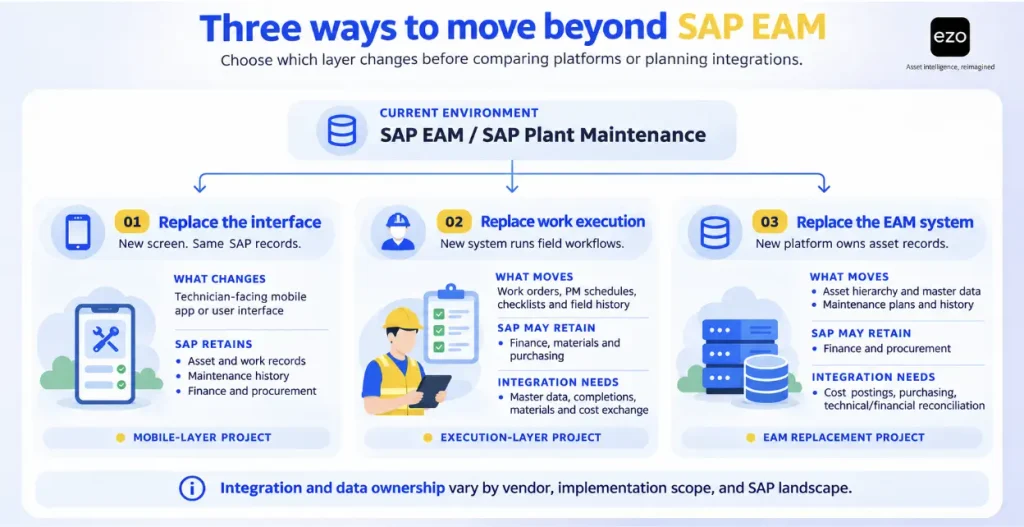
| Decision | What moves out of SAP | What SAP keeps | What must cross the boundary |
| Replace the screen | Nothing; a mobile client reads and writes SAP objects | Authoritative maintenance and financial records. | The same SAP orders and notifications, through the mobile layer |
| Replace the work record | Work orders, PM schedules, checklists, technician history | Financial Accounting and Controlling (FI/CO), Materials Management (MM), procurement | Master data down; completions, material movements, and maintenance costs up for SAP to post and settle |
| Replace the asset master | Asset hierarchy, history, maintenance plans | Financial postings, procurement, material master, fixed-asset accounting if SAP stays as ERP | Cost postings, purchasing objects, and the link between technical and fixed-asset records |
The first decision is a mobile project: adopting SAP Service and Asset Manager or a partner application that extends SAP’s existing maintenance workflows. The second and third are EAM decisions. One replaces maintenance execution while SAP retains responsibility for financial records and postings. The other extends the replacement to asset records and related lifecycle responsibilities. This article focuses on the latter two decisions. These are simplified reference models rather than mutually exclusive patterns: in practice, ownership is often split, so decide separately which system owns technical asset records, financial fixed-asset records, maintenance transactions, and the material master.
The replacement scope also determines the integration workload before you select a vendor. Consider a hypothetical site that closes 400 work orders each month. Under the maintenance-execution replacement model, the new platform runs maintenance work, but SAP remains the system of record for maintenance-order costing. Each of the 400 orders needs its actual costs posted to the matching SAP maintenance order: technician labor, parts issued from stock, and external service invoices. If half of those orders use stocked parts, 200 of them also need one or more material-consumption postings in SAP MM. Settlement is a separate, later step in SAP’s maintenance-order settlement process: finance usually runs it at period-end, and it moves each order’s costs to the receiver set in its settlement rule, such as a cost center, work breakdown structure (WBS) element, or another order. The replacement platform doesn’t settle costs itself, but if a cost posts to the wrong order, or an order is missing a valid settlement rule, the month-end run fails or sends costs to the wrong place.
The integration requirements change if maintenance-order costing moves to the replacement platform. The organization must then determine which financial postings, reconciliations, and records SAP still needs to retain. A broader replacement also requires technical equipment identifiers to stay mapped to their SAP fixed-asset records through transfers, replacements, and retirements wherever technical and financial assets are linked.
A standard product demonstration rarely exposes this workload. The integration requirements depend on which responsibilities move between systems, a decision that must be made before selecting a vendor.
There is another consideration: the people entering maintenance data do not always benefit directly from the information they provide. The technician recording a failure code spends additional time on the shop floor, while the planner or reliability engineer may use that information months later. A simpler mobile workflow can reduce data entry time, making adoption easier. However, it does not eliminate the underlying incentive misalignment, which creates an adoption risk: technicians may leave optional fields incomplete when the effort falls on them, and the benefits accrue elsewhere. Check this during the pilot through completion rates, field observation, and technician interviews.
During a pilot, evaluate both how many steps technicians need to complete a job and how consistently they record failure modes, causes, and remedies. Faster data entry is useful, but the completeness of the resulting maintenance records matters just as much. To improve completeness, use role-specific forms, make fields mandatory only where the data is needed, use structured failure codes, add supervisor review, and track a data-completeness KPI.
EAM vs CMMS vs APM
A computerized maintenance management system (CMMS) primarily handles work orders and preventive maintenance for a maintenance department. Enterprise asset management (EAM) typically extends beyond maintenance execution to cover asset lifecycle management, from acquisition to disposal, along with multi-site oversight, financial and procurement integration, and audit records. The categories overlap, particularly as several platforms that began as CMMS solutions have expanded their capabilities and now position themselves as EAM platforms. Understanding the CMMS vs. EAM distinction helps clarify what each platform actually offers.
Asset performance management (APM) serves a different purpose. It analyzes equipment condition data, failure patterns, and operational risk to help organizations improve asset reliability. However, identifying potential failures is only part of the process. Those insights must translate into maintenance activities through an execution system, which is why SAP describes closed-loop integration between SAP APM and SAP EAM. APM can complement an SAP EAM alternative, but it does not replace the maintenance management capabilities that alternative is intended to provide.
How we selected and ordered these platforms
This is a 10-platform shortlist, not an exhaustive market scan. It includes enterprise EAM suites that organizations consider when evaluating SAP EAM replacements, alongside maintenance-first platforms that SAP PM users may evaluate to improve maintenance execution. Together, the shortlist covers all four levels of documented SAP integration support described in the ordering rule below.
A platform qualified for consideration if its first-party documentation showed, at minimum:
- An asset register with a location or asset hierarchy and support for tracking asset status.
- Work orders and preventive maintenance.
- Reporting capabilities and an audit trail for maintenance activity.
- APIs or connectors that could support integration with an ERP system.
We excluded SAP’s own products, IT asset management and service-desk tools, and APM-only platforms because they do not replace the maintenance execution capabilities examined in this comparison.
Other maintenance platforms meet the same baseline criteria but were not included because the shortlist is limited to 10. Limble is one example. Its documentation covers asset hierarchies, meter-based preventive maintenance, audit logs, a REST API, and an SAP S/4HANA integration. Its audit-log documentation specifically describes the functionality for 21 CFR Part 11 customers. Limble is therefore another platform that could merit evaluation against the same criteria. The 10 included platforms were chosen to cover all four levels of documented SAP integration and three platform groups (enterprise EAM suites, maintenance-first platforms, and asset lifecycle management), so that each represents a distinct buyer requirement.
Evidence standard. The capabilities, prices, and plan restrictions cited in this article were checked against vendor documentation, pricing pages, product announcements, and trust centers. Review sites and aggregators were excluded. Information was last verified in November 2026. Where a finding relies on a product page or customer story rather than help documentation, the relevant profile identifies the source. The comparison evaluates documented functionality rather than tested performance; the pilot section addresses how to assess performance in practice.
Shared scenario. Consider a pump assembly installed in the cooling-water system at one of three plants. It requires a monthly inspection and a seal replacement every 2,000 running hours. A technician working in a basement pump room with no network signal scans the asset, completes the inspection checklist, and records a failure. The job consumes a seal kit. The stock reduction must trigger the agreed replenishment response: an alert, suggested quantity, requisition, or purchase order. Record which level each platform supports. Closing the job must also update the asset’s maintenance history and associated costs. The scenario reflects a plant-maintenance workflow; it does not test linear assets, contractor controls, permit-to-work, calibration, or multi-site governance, which each profile covers under its capabilities and limitations where documentation addresses them.
This scenario assumes SAP retains responsibility for maintenance-order costing. The replacement platform must therefore send the completed order’s labor and parts costs to SAP, where they post to the pump’s maintenance order; month-end settlement then moves them to the plant’s cost center.
Ordering rule. EZO EAM appears first. The remaining platforms are grouped into enterprise EAM suites and maintenance-first platforms. Within each group, their positions reflect the strength of their documented SAP coexistence paths, using the following hierarchy:
- Vendor-documented maintenance integration: Records work-order synchronization, completion confirmations, and labor/parts charge transmission as separate flows.
- Vendor-documented SAP integration for materials and purchasing: Integration covering materials or procurement flows without documented work-order integration.
- Partner or generic integration tooling: SAP connectivity provided through a partner solution or general-purpose integration platform.
- APIs or file exchange only: No documented SAP-specific integration, meaning the customer must build and maintain the connection.
Positions 2 to 10 reflect how well SAP coexistence is documented, not overall product suitability, quality, usability, or cost.
Where platforms fall within the same integration tier, we break ties by whether the integration is a standard offering rather than a customer-specific project, whether the connector is SAP-specific rather than a generic adapter, and finally the breadth of documented SAP data flows. The tiers show what kind of integration is documented, not how complete it is; direction, SAP objects, and cost handling are compared in the SAP integration scope table after the profiles.
MaintainX, UpKeep, and eMaint all document workflows that send work-order data to SAP. eMaint appears after MaintainX and UpKeep under this documentation-based ordering rule because its integration is tailored to individual customers, while MaintainX documents more SAP objects than UpKeep. Readers whose primary requirement is sending maintenance charges to SAP may reasonably evaluate eMaint first, since its documentation explicitly identifies labor and parts charges.
What to look for in an SAP EAM alternative
Define your target architecture: replace SAP EAM or coexist with SAP ERP
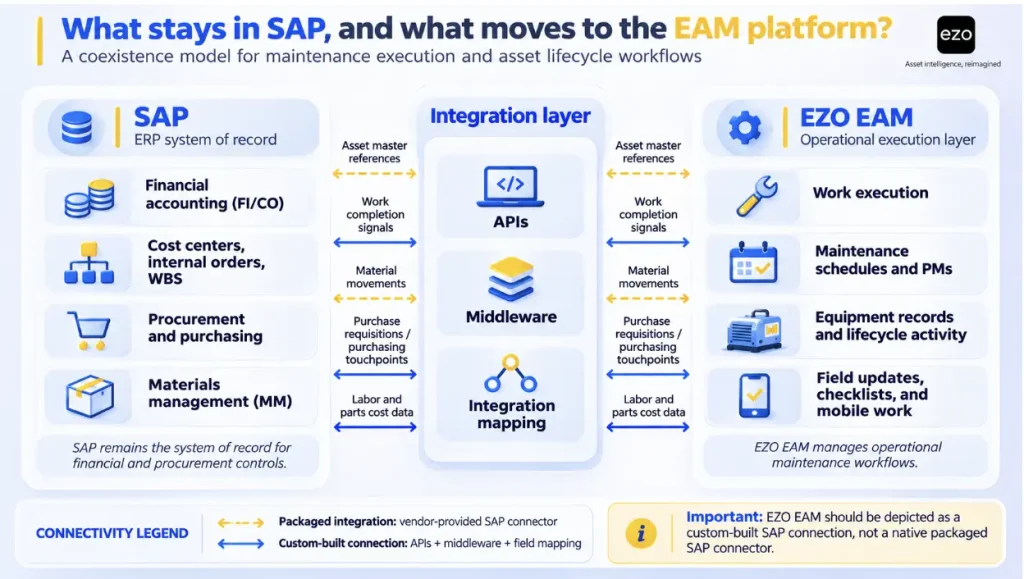
Decide which responsibilities SAP will retain before evaluating vendors. In a coexistence model, SAP may continue handling Financial Accounting and Controlling (FI/CO), Materials Management (MM), and procurement, while the new platform takes over maintenance execution. In a broader replacement, asset hierarchies and maintenance plans may move to the new platform as well.
The SAP coexistence checklist later in this article translates these decisions into specific data objects and ownership responsibilities. Starting with this list also produces more focused RFP questions than evaluating vendors against a generic feature grid. The software evaluation and procurement process should follow the architecture you intend to implement.
Asset hierarchy and master data governance
SAP represents installed assets through equipment records assigned to functional locations. An alternative needs an equivalent structure, including location hierarchies, parent-child asset relationships, asset status, and documents attached to individual records. However, a documented parent-child structure does not necessarily establish functional equivalence. Test whether the platform can represent your installed equipment, its components, and their relationships.
Decide whether SAP or the replacement platform will maintain the authoritative asset records after go-live. Allowing both systems to maintain editable versions of the same records creates a risk of conflicting information and inconsistent updates. For each critical field, record the source system, the system holding the master record, the sync direction, and the rule for resolving conflicting updates, and audit critical asset information more frequently than lower-risk records. This is one of the enterprise asset management best practices that becomes particularly important when migrating an existing asset register.
Maintenance execution depth and control
Check whether the platform supports time-based, meter-based, and condition-based maintenance triggers. A seal replacement scheduled every 2,000 running hours, for example, cannot rely on a calendar-based schedule alone.
Then examine what technicians can record during a job. Look for inspection checklists, readings, failure codes, and photographs. Required fields in a digital maintenance inspection checklist can improve data completeness, but they do not guarantee accuracy. A technician can still satisfy a mandatory field by selecting a default value rather than recording what actually happened.
Auditability matters just as much. Identify the critical fields and events, such as status changes, readings, costs, and approvals, that must be captured in an audit trail with timestamps, user identities, and before-and-after values. Check how long these records are retained and whether they can be exported without relying on the vendor.
Materials, spares, and purchasing touchpoints
Start by deciding which system owns each part of inventory, since stock visibility, quantities, valuation, reservations, and purchasing may sit in different systems. If SAP MM retains inventory ownership, the alternative must support reserving and issuing parts through SAP or send the corresponding goods movements back to it. If the replacement platform manages inventory instead, SAP may still need to receive purchasing transactions, including purchase requisitions and purchase orders, along with any required valuation information.
Also establish how replenishment works. There are four distinct levels: a low-stock alert, a suggested purchase quantity, a purchase order a user creates, and a requisition or purchase order the system generates automatically. These are different levels of automation and should not be treated as equivalent.
Location-based inventory thresholds are particularly relevant to multi-plant operations. A central minimum stock level can conceal a shortage at an individual site, even when total inventory across the organization appears sufficient.
Mobile execution and field adoption
Offline support can mean several different things: viewing cached work orders, editing records, scanning assets, or recording parts consumption without a network connection. Vendors document these capabilities at different levels, so the presence of an offline mode does not establish that technicians can complete an entire job without connectivity.
Test offline functionality at your least connected location, using the devices technicians actually carry. Measure how many steps it takes to scan an asset, complete an inspection, record a failure, consume parts, and close a work order. Also check how the application handles synchronization conflicts when connectivity returns.
Integration and API reality: what must integrate back to SAP
Identify the data objects that must cross the boundary between systems. These may include asset masters, work-order completions, material movements, purchase requisitions, and any maintenance costs that SAP remains responsible for settling. Ask each vendor to demonstrate which of these flows its documented integration actually supports.
If SAP retains maintenance-order costing and settlement, validate how external work, labor, and material consumption reach SAP. If maintenance-order costing moves to the replacement platform, define which financial postings and reconciliation processes SAP must still support.
Four integration capabilities are particularly important to distinguish:
- Work-order synchronization: Transferring work-order details and status updates between systems.
- Cost transmission: Sending labor and parts charges associated with completed work.
- Cost posting: Recording actual labor, material, and service costs on the SAP maintenance order.
- Cost settlement: Moving those costs from the maintenance order to the receiver in its settlement rule, such as a cost center, WBS element, or another order.
A vendor that documents the first two has not necessarily demonstrated support for the last two.
Check each vendor’s API documentation for authentication, rate limits, pagination, delta synchronization, webhooks, idempotency and retries, error handling, schema versioning, monitoring, and bulk-data handling. EZO EAM’s developer documentation provides an example of the technical details to examine.
Identity management is another integration requirement. Single sign-on, user provisioning, and role mapping determine how access is granted and revoked across systems. Check whether the platform supports your identity provider and whether access can be removed promptly when an employee leaves. EZO EAM’s single sign-on documentation illustrates this capability.
Migration scope: what data you must be able to move
Plan migration around the asset lifecycle, rather than simply reproducing existing SAP tables. For each data object, decide whether to convert it to the new platform, retain it in SAP for reference, or archive it in a readable format.
Prioritize the asset register, functional locations, preventive maintenance plans, recent work history, inspection records, associated documents, and spare-parts information. Before go-live, validate record mappings, resolve duplicate or incomplete entries, and confirm that migrated records preserve the relationships needed for maintenance execution.
The migration checklist later in this article provides a starting point for deciding what to transfer, retain, and archive.
10 SAP EAM alternatives compared for 2026
After EZO EAM, the remaining nine platforms follow the ordering rule described earlier. Each profile uses the same structure and evaluates the platform against the shared operational scenario.
The capability table evaluates how each platform handles the individual steps in that scenario. Lifecycle governance is assessed separately in each profile because it is a qualification criterion rather than a step in the operational workflow. Every platform had to document reporting and an audit trail to qualify, so these are not scored in the table; their depth varies, so test audit history and reporting during the pilot. SAP coexistence is examined in a separate table following the profiles.
Each capability cell provides a status, followed by the applicable plan or module and any relevant limitation:
- Documented: First-party documentation describes the capability required for the scenario step.
- Partly documented: Documentation confirms part of the capability, but does not address one or more elements required by the scenario. The missing elements are identified in the cell.
- Restricted: Documentation confirms the capability but identifies a limitation, such as a plan restriction, usage condition, or functional constraint that affects its availability or scope.
- Not stated: The documentation reviewed does not address the capability. This does not establish that the platform lacks it.
| Product | Hierarchy | PM by time and meter | Offline execution | Parts and reorder |
| EZO EAM | Documented: Nested locations; parent-child equipment on Enterprise | Documented: Calendar and meter triggers (CMMS add-on) | Restricted: Enterprise only; synced work orders, work logs, checklist updates, 100 bookmarked assets; scanning and parts not stated | Documented: Low-stock alert; purchase orders (Advanced and above) |
| IBM Maximo | Documented: Asset and location hierarchies | Documented: Time and meter | Partly documented: Maximo Mobile offline mode. Offline material recording documented; validate scanning and the complete technician workflow for the proposed version. | Documented: Reorder points |
| Octave Attune EAM | Documented: Hierarchies and linear assets | Documented: Frequency and meter-reading PM schedules | Partly documented: Offline app; offline scanning not stated | Documented: Requisitions, purchase orders, stock optimization |
| IFS Cloud EAM | Documented: Functional structures and serial objects | Documented: Calendar and running hours | Restricted: Part lookup and ad-hoc purchasing online only | Documented: IFS inventory and purchasing (confirm license scope) |
| Oracle Fusion Cloud Maintenance | Documented: Physical and logical hierarchies | Documented: Calendar and meters | Not established for the scenario: offline Maintenance work order execution requires demonstration. Field Service is a separate offering. | Documented: Material issue; purchase orders need Oracle Procurement |
| MaintainX | Documented: Three levels on Premium, more on Enterprise | Documented: Meter triggers on Premium and above | Partly documented: Cached work orders on all plans; scanning and parts not stated | Documented: Restock view; manual purchase order (Premium and above) |
| UpKeep | Documented: Up to four levels | Documented: Time and meter | Restricted: Professional and Enterprise only; auto-cache capped by plan; parts view-only | Documented: Low-stock alerts; purchase orders on Enterprise |
| eMaint | Documented: Hierarchies with history and cost | Documented: Time, meter, and condition | Documented: Product pages describe offline scanning and parts booking | Documented: Product pages describe automated reorder and purchase orders |
| Fiix | Documented: Assets nested under locations | Restricted: Date, meter, and event triggers; meter and event unavailable with v6 Equipment (Free and Basic plans) | Partly documented: Most features offline; scanning and parts not specified | Documented: Minimum quantities, alerts, purchase orders |
| Asset Essentials | Documented: Parent-child hierarchy; six levels recommended, not an enforced maximum. | Documented: Schedule and meter triggers | Restricted: Parts cannot be added or edited offline | Documented: Parts & POs (paid add-on in the Education edition) |
1. EZO EAM: Best fit for equipment lifecycle visibility across sites
Best fit
EZO EAM is suited to organizations managing physical equipment across multiple locations, particularly where visibility into availability, reservations, custody, maintenance, and lifecycle history matters. It brings these activities into one platform, allowing teams to track equipment assignments, condition changes, maintenance activity, inventory, and associated costs. Basic service records start on Advanced; formal work orders, preventive maintenance, and technician management require the CMMS add-on on Premium (priced per admin user) or Enterprise, and the offline mobile app is Enterprise-only.
Technicians can use the mobile app to scan equipment, check items in or out, transfer custody, and record condition changes. The CMMS capabilities extend this workflow to work orders, inspection checklists, and meter readings, linking maintenance activity to individual equipment records with associated user and timestamp information.
For organizations already using SAP, EZO EAM can address operational equipment-management and field-execution requirements without requiring an ERP replacement. Where information needs to move between the systems, a custom integration can be developed using EZO EAM’s API and automation capabilities.
Key capabilities
- Asset hierarchy and lifecycle tracking: Nested location hierarchies, lifecycle states, and history tracking across all plans. Parent-child equipment relationships support multi-level asset hierarchies through Item Relationships (Enterprise).
- Equipment movement and custody: Check-in, check-out, and reservations (Essential and above), with custody transfer available on Advanced and above.
- Requests and approvals: Request portal and multi-tier approval workflows (Premium and above).
- Maintenance execution: Work orders, checklists, and preventive maintenance with calendar or meter-based triggers through the CMMS add-on (Premium, priced per admin user; included in Enterprise).
- Inventory and cost tracking: Inventory management by location, purchase orders (Advanced and above), and work-order cost tracking for parts and labor.
How it handles the shared scenario
EZO EAM documents nested locations and parent-child equipment relationships on Enterprise. These can help represent the pump assembly and its components, although the relationship structure should be validated against the organization’s installed-equipment hierarchy rather than assumed to be equivalent to SAP’s maintenance asset model.
Calendar-based and meter-based preventive maintenance triggers cover the monthly inspection and the seal replacement at 2,000 running hours. With a connection, the technician can record checklist results and maintenance activity against the pump’s record through the mobile app. In the disconnected pump room, offline execution requires Enterprise and covers up to 20 cached work orders, work logs, and checklist updates by the primary assignee. Offline scanning and parts consumption are not stated, so the seal kit may need to be recorded after reconnecting.
The work order can record the seal kit’s consumption and associated cost. However, the standard workflow raises a low-stock alert rather than automatically generating a purchase order, so replenishment requires a separate action.
Additional equipment-management capabilities
Beyond the pump maintenance scenario, EZO EAM supports shared-equipment workflows across locations. For example, a crew at another plant can request a portable test kit, which can be approved, reserved, checked out, and returned. If its condition at check-in requires servicing, the equipment can be routed for maintenance. These custody changes and handoffs provide visibility into where equipment is assigned and whether it is ready for its next use, so a planner can see before dispatch that the kit is reserved, in another crew’s custody, or out for servicing, rather than discovering it on site.
SAP coexistence and integrations
Organizations retaining SAP can use EZO EAM’s REST API (Advanced and above), which exposes assets, inventory, purchase orders, work orders, and meters. API coverage of these objects is not the same as a proven SAP synchronization workflow, which must be built and tested for each transaction. Its automation engine (Premium and above) supports webhooks and connections to other systems through App Connectors, providing the building blocks for custom integration.
The published integrations list does not include a packaged SAP connector. Organizations therefore need to define which objects must cross between systems, how maintenance costs will be transferred and posted, and who will manage failed messages and reconciliation. API access and the ability to record work-order costs should not be treated as evidence of automated SAP cost posting or settlement.
SAML single sign-on and SCIM provisioning are available on Premium.
Pricing and support
EZO EAM’s pricing page publishes starting prices for Essential, Advanced, and Premium, with pricing scaled by the number of tracked items. The CMMS add-on is charged per admin user only, with other roles free. Compare this model against per-user pricing using your own item and admin-user counts; item-based pricing is not automatically cheaper. Enterprise is available on a quoted basis and includes Item Relationships and the offline mobile app. Self-service plans include a free trial.
EZO’s security page lists SOC 2 Type 2 and ISO/IEC 27001 certifications.
Limitations to validate
- Offline functionality: The offline mobile app is Enterprise-only. Its documented offline scope covers up to 20 cached work orders, work logs, and checklist updates by the primary assignee. The EZO EAM offline FAQ also specifies up to 100 bookmarked assets. The documentation reviewed does not address offline asset scanning or parts consumption.
- Specialized maintenance capabilities: The EZO EAM documentation reviewed does not address failure-code capture, permit-to-work, or linear asset management. Organizations requiring these capabilities should validate whether they can be handled through SAP or another system before implementation.
2. IBM Maximo Application Suite: Best fit for enterprise-scale maintenance in asset-intensive operations
Placement: First among enterprise EAM suites because IBM documents a dedicated SAP connector with work-order integration.
Best fit
IBM Maximo Application Suite suits asset-intensive organizations in utilities, oil and gas, transportation, nuclear, and civil infrastructure. It can take over a broad range of enterprise maintenance functions or operate alongside SAP, with SAP retaining responsibility for financial management and procurement.
Key capabilities
- Asset and location management: Maximo Manage supports asset and location hierarchies, job plans, asset histories, and failure codes. IBM’s MAS 9.2 licensing guide also lists Linear and Calibration capabilities within Manage.
- Preventive maintenance: Supports time-based and meter-based maintenance scheduling, alongside condition-monitoring capabilities.
- Inventory and purchasing: Manage includes inventory management, purchasing, and reorder-point functionality.
- Mobile execution: Maximo Mobile supports online and offline work, including NFC tag scanning for assets and locations.
- Health, safety, and environment: Maximo HSE supports permit-to-work, lockout/tagout, and isolation processes. IBM’s licensing guide lists HSE under Premium or Limited user entitlements.
How it handles the shared scenario
Maximo supports the core maintenance workflow through its asset hierarchy, preventive maintenance, mobile execution, inventory, and work-order capabilities. The pump can be represented as an asset within a location hierarchy, while time-based and meter-based preventive maintenance schedules cover the monthly inspection and the seal replacement at 2,000 running hours. These can be configured as separate maintenance requirements with their respective job plans.
Maximo Mobile supports offline work in the pump room, and IBM documents offline material transactions. Test asset identification, material recording, and synchronization together in the proposed Maximo Mobile configuration. When seal-kit stock falls below its reorder point, Maximo’s reorder process creates a purchase requisition, and it can be configured to create approved purchase orders directly. Work-order cost tracking and audit capabilities support maintenance close-out. The main implementation considerations are licensing and integration scope: the SAP connector is licensed separately, and its middleware requirements must be assessed against the organization’s SAP landscape.
SAP coexistence and integrations
The Maximo Connector for SAP Applications, which succeeds the Maximo Enterprise Adapter for SAP, provides bidirectional integration with SAP ERP, according to IBM’s MAS 9.2 licensing guide. IBM’s current connector documentation covers work orders, purchase orders, and financial integration.
Organizations should confirm which financial transactions and cost postings the connector supports in their specific SAP environment before relying on it for maintenance-order settlement. Maximo Manage also provides REST APIs and an integration framework, while MAS supports SAML and OpenID Connect single sign-on.
Pricing and support
Maximo uses AppPoints-based licensing. IBM’s pricing page lists the Maintenance option in its Essentials package at a starting price below US$40,000 annually. That entry package is MAS SaaS with 150 AppPoints, up to 25 users, and one environment, covering Maximo Manage, Health, Reliability Strategies, Mobile, and Scheduler. It does not include the separately licensed SAP connector, so the cost of the scenario can be substantially higher. Other tiers are available on a quoted basis. Subscription licenses carry a 12-month minimum term, and IBM offers a guided trial of Maximo Manage.
Deployment options include IBM-managed SaaS and client-managed environments running on Red Hat OpenShift, either on-premises or in a public cloud.
Limitations to validate
- Connector and module licensing: The SAP connector is licensed separately in AppPoints, with IBM’s licensing guide specifying 80 AppPoints per installation. HSE also has specific entitlement restrictions: it is available to Premium users or Limited users who select it among their three permitted modules. Include connector licensing, module entitlements, and user requirements when estimating total cost.
- Deployment complexity: Client-managed deployments require Red Hat OpenShift, introducing infrastructure and platform-management requirements that may require additional expertise within the IT team.
- Integration scope: Although IBM documents work-order, purchasing, and financial integration, validate the specific transaction flows required for SAP maintenance-order costing, goods movements, and settlement. General integration support does not establish that every required financial workflow is covered.
3. Octave Attune EAM: Best fit for asset-heavy operations using SAP S/4HANA for procurement
Placement: After Maximo because its documented SAP integration covers materials and purchasing, but does not list work orders or maintenance costs as integrated objects.
Best fit
Attune EAM, formerly HxGN EAM and originally Infor EAM, is suited to asset-heavy organizations managing linear networks or permit-controlled maintenance work while using SAP S/4HANA for procurement. Hexagon acquired Infor’s EAM business in 2021, and Octave’s product page now identifies the product as formerly HxGN EAM.
Key capabilities
- Asset and location management: Supports asset hierarchies, asset groups, linear asset management, and geospatial tracking.
- Maintenance execution: Provides work-order management, scheduling automation, and reliability-centered maintenance capabilities.
- Inventory and procurement: Supports inventory management, requisitions, quotations, purchase orders, and stock-level optimization for spare-parts procurement.
- Mobile execution: Its mobile application supports offline operation in disconnected environments.
- Health, safety, and environment: Supports permits to work, including lockout/tagout steps and isolation points. These capabilities are documented in product help published under the former HxGN EAM name, which may not reflect current Attune EAM packaging. Confirm that the quoted edition includes them, along with the relevant modules and licensing scope.
How it handles the shared scenario
Attune documents the asset hierarchy, inventory, and purchasing capabilities required for the scenario. Its preventive maintenance schedules can generate work orders based on a set frequency or meter reading, covering the monthly inspection and the seal replacement at 2,000 running hours. Configure these as separate maintenance requirements and validate both triggers during the pilot. The pilot should also establish whether barcode scanning is available while the mobile application is offline.
The main limitation appears at the SAP integration stage. Attune’s certified connector sends requisitions to SAP and receives purchase orders, goods receipts, and invoices. However, the documented integration flows do not list maintenance work orders or their associated costs. This means the connector’s published scope does not establish that the full maintenance workflow can be synchronized with SAP.
SAP coexistence and integrations
The Attune EAM SAP S/4HANA Connector 12.3 is SAP-certified for SAP S/4HANA Cloud Private Edition, release 2023, with certification valid through March 2029. It runs on Databridge Pro, Octave’s integration platform, which also supports REST, OData, and SFTP connections.
The documented connector scope is focused on procurement and materials transactions rather than maintenance work-order or cost integration. Organizations should confirm the supported SAP edition, deployment requirements, and identity-provider compatibility during the technical evaluation.
Pricing and support
Pricing is available by quote. Octave describes Attune EAM as a cloud-based product and also states that it can run in on-premises environments. Product deployment options do not establish that the packaged SAP connector supports every deployment model; validate the connector’s hosting prerequisites separately. Octave’s compliance page lists a SOC 1 report, ISO/IEC 27001, and CSA STAR Level 1 and Level 2 certifications for Attune EAM. The SOC 2 report listed on the same page applies to Octave Cloud.
Limitations to validate
- SAP compatibility and integration scope: The published certification names SAP S/4HANA Cloud Private Edition, release 2023, and the documented integration covers procure-to-pay flows. ECC customers and organizations requiring maintenance-cost integration or settlement should validate these requirements before selecting Attune.
- Integration platform costs: Octave does not clearly state whether Databridge Pro is licensed separately. Request a breakdown of the connector and integration-platform costs in the commercial proposal.
- Mobile functionality: Confirm whether barcode scanning and the specific inspection and inventory activities required by the scenario are supported offline, rather than assuming that offline application access covers every function.
4. IFS Cloud EAM: Best fit for replacing SAP within a broader IFS suite
Placement: After Octave because the documentation reviewed does not identify an IFS-built SAP connector with published object coverage. IFS does list a partner-provided SAP connector, which places it ahead of Oracle’s more generic integration route.
Best fit
IFS Cloud EAM suits organizations looking to replace a broader set of SAP functions or those already using IFS for service, finance, or manufacturing. It can operate as a standalone EAM platform, but its strongest proposition is the integration of asset management and maintenance with other business processes within IFS Cloud.
Key capabilities
- Asset and location management: Supports functional structures containing systems, subsystems, and serial objects, alongside parallel mechanical and electrical structures. It also provides linear asset management integrated with standard work orders and preventive maintenance.
- Preventive maintenance: Supports calendar, event, condition, and accumulated-running-hours-based maintenance triggers. Condition data from a predictive maintenance program can therefore be used to initiate maintenance work.
- Inspections and fault reporting: Maintenance surveys and electronic forms support inspections and fault reports, including the capture of symptoms and findings.
- Inventory and purchasing: Inventory and purchasing components are available within the IFS Cloud platform.
- Health, safety, and environment: Provides health, safety, and environment capabilities for digital work permits and lockout/tagout processes.
How it handles the shared scenario
IFS documents the asset hierarchy, preventive maintenance triggers, inventory, and purchasing within IFS Cloud. IFS Maintenance MWO (Mobile Work Order) supports offline work, but IFS documents that some functions, including part lookup and ad-hoc purchasing, are online-only. The technician may therefore be unable to look up the seal kit while disconnected and may need to complete that step after reconnecting.
The SAP integration is not provided as a clearly documented, out-of-the-box maintenance workflow in the sources reviewed. Organizations planning to retain SAP for financial management or procurement will need to establish how the required data flows will be designed and supported.
SAP coexistence and integrations
IFS publishes SAP coexistence material describing certified connectors, open APIs, and integration accelerators. However, the material does not identify who develops or certifies the connectors. Separately, the IFS Marketplace lists a partner-provided SAP connector built on Boomi.
These should be treated as distinct integration options until IFS confirms their relationship and support arrangements. Before selecting either route, establish connector ownership, certification, supported SAP editions, object coverage, and responsibility for ongoing maintenance.
IFS Cloud also exposes OData APIs and outbound events through IFS Connect. Its documentation identifies Microsoft Entra ID and Windows ADFS as supported external identity providers.
Pricing and support
IFS does not publish standard EAM prices. In April 2026, IFS announced a move away from user-based licensing toward asset-based pricing without specifying which products it covers. Ask IFS which pricing basis applies to the proposed IFS Cloud EAM configuration.
IFS offers managed cloud, other cloud, and on-premises deployment options. Its trust center lists ISO 27001 and SOC 1 and SOC 2 Type II reports covering IFS Cloud.
Limitations to validate
- API support responsibilities: IFS’s API usage policy states that support for using APIs is not covered by most IFS support agreements. This is particularly relevant where the organization designs and maintains its own SAP integration. Confirm the support arrangements before implementation.
- Connector ownership and scope: Establish whether the proposed SAP connector is an IFS-supported offering or a partner solution. Confirm its supported SAP editions, integrated objects, and ongoing support responsibilities.
- Licensing scope: Confirm that the inventory and purchasing components required for the scenario are included in the proposed license. Their availability within IFS Cloud should not be taken as evidence that they are included in every EAM package.
5. Oracle Fusion Cloud Maintenance: Best fit for maintenance within Oracle Fusion Cloud
Placement: Last among the enterprise suites because its SAP integration route relies on a generic adapter, while several steps in the shared scenario require additional Oracle Fusion modules.
Best fit
Oracle Fusion Cloud Maintenance is best suited to organizations already using, or planning to adopt, Oracle Fusion Cloud ERP or Supply Chain Management. It is a less natural fit alongside SAP ERP because its inventory, costing, and purchasing workflows are designed to work with other Oracle Fusion modules.
Key capabilities
- Asset management: Supports physical and logical asset hierarchies, meters, attachments, and warranties. Asset retirement can synchronize with Oracle Fixed Assets for fixed asset management.
- Preventive maintenance: Maintenance programs can be driven by calendar patterns, day intervals, meter readings, and condition events.
- Failure reporting: Failure sets capture failure events, causes, and resolutions.
- Materials management: Materials can be issued against work orders through Oracle Inventory Management.
- Mobile execution: A mobile-friendly work execution page supports barcode scanning for items, lots, serial numbers, and assets.
How it handles the shared scenario
Oracle Fusion Cloud Maintenance documents the asset hierarchy, preventive maintenance, and work-order close-out capabilities required for the scenario. Its maintenance user guide describes a mobile-friendly work execution page, but does not establish that maintenance work orders can be executed offline.
Oracle Fusion Field Service provides offline task functionality for subscribers to its Field Service Professional, Enterprise, or Mobility offerings. However, this does not by itself establish that Maintenance work orders can be cached, updated, and posted through the same offline workflow. Organizations should validate this specific requirement in their proposed configuration.
The seal kit can be issued through Oracle Inventory Management. However, creating a purchase order requires Oracle Fusion Procurement, while Oracle documents a Product Management subscription prerequisite for defining and collecting quality inspection plan data; confirm the applicable commercial entitlement. These dependencies affect both the implementation scope and total subscription cost.
SAP coexistence and integrations
The documentation reviewed does not describe a maintenance-specific SAP integration for Oracle Fusion Cloud Maintenance. The generic integration route is the Oracle Integration SAP Adapter, which uses IDocs, BAPIs, and RFCs to connect with SAP systems. This adapter is part of Oracle Integration, a separate Oracle Cloud service.
Oracle Fusion Cloud Maintenance exposes REST APIs for work orders, assets, meters, and maintenance programs. It also supports SAML 2.0 single sign-on. Organizations retaining SAP should assess the integration design required to transfer maintenance data, material movements, and costs between the two environments.
Pricing and support
Oracle positions Maintenance within Oracle Fusion Cloud Supply Chain Execution. Oracle’s global price list, dated October 8, 2026, lists this suite at US$350 per hosted named user per month, with a 10-user minimum and a standard three-year subscription term. This is the price of the broader Supply Chain Execution suite, not a standalone Maintenance subscription.
Procurement, Quality Management, Field Service, and Oracle Integration are priced separately. If purchasing runs in Oracle, include the required Procurement entitlement. If SAP remains the purchasing system, validate requisition, PO, receipt, and material-issue integration instead. Field Service is optional and relevant only if its offline workflow is validated for Maintenance. Oracle Fusion Cloud Maintenance is SaaS-only, and Oracle publishes SOC 1 and SOC 2 reports for Fusion applications.
Limitations to validate
- Additional module requirements: Several scenario steps depend on other Oracle modules, including Procurement, Quality Management, and potentially Field Service. Price the complete set of required capabilities rather than relying on the Maintenance subscription price alone.
- Offline execution: The maintenance documentation reviewed does not establish offline work-order execution. Field Service’s offline capabilities should not be assumed to cover Maintenance without a demonstrated integration and workflow.
- SAP integration effort: The documented SAP Adapter route requires Oracle Integration; a different API or middleware design would need separate validation. The generic SAP adapter does not establish that maintenance work orders, goods movements, costs, and settlement are supported out of the box.
6. MaintainX: Best fit for an execution layer that sends maintenance data to SAP
Placement: First among maintenance-first platforms because it documents the broadest range of SAP-connected objects and workflows in this group, although this does not establish deeper financial integration.
Best fit
MaintainX fits organizations pursuing the second decision: keeping SAP responsible for finance and procurement while moving maintenance execution to a simpler platform for technicians. It is particularly relevant to teams whose main challenge is field adoption rather than the depth of their asset governance system. Autodesk completed its acquisition of MaintainX on August 3, 2026, so confirm roadmap, packaging, and pricing commitments during the evaluation.
Key capabilities
- Asset management: Supports parent and sub-asset hierarchies, with three hierarchy levels on Premium and additional levels on Enterprise. Asset records also track equipment operating status (online or offline for planned or unplanned maintenance) and downtime types.
- Preventive maintenance: Supports meter-based triggers on Premium and above, alongside condition-based maintenance.
- Work-order execution: Procedures include pass, flag, and fail checks, with failed checks able to generate corrective work orders.
- Inventory and purchasing: Parts management includes minimum and maximum stock levels, a restock view, and purchase orders on Premium and above.
- Mobile execution: Offline mode is available on all plans for cached work orders, alongside QR code and barcode identification.
How it handles the shared scenario
MaintainX documents the asset hierarchy, meter-based preventive maintenance, and procedures on Premium and above. Its offline mode allows technicians to update cached work orders, but the documentation reviewed does not establish whether scanning assets or recording parts consumption is supported offline. Both activities should therefore be tested in the pump room.
When seal-kit stock falls below its minimum, the part appears in the restock view, but creating a purchase order requires a separate manual action. The SAP integration covers a broader range of objects than the other maintenance-first platforms reviewed here. MaintainX’s help center lists work orders, work requests, and purchase orders, alongside part-consumption counts sent to SAP. Equipment, locations, vendors, and parts can also be received from SAP.
However, the documented transfer of part-consumption counts does not by itself establish that corresponding goods movements or maintenance costs are posted and settled in SAP.
SAP coexistence and integrations
MaintainX documents support for SAP ECC and SAP S/4HANA, including cloud private and public editions and on-premises deployments. The setup is selected for the relevant environment during onboarding.
Its recommended integration workflow covers parts and purchasing. A second workflow adds SAP Plant Maintenance orders and notifications for organizations that require them. Neither workflow establishes the posting and settlement of labor or actual maintenance costs in SAP.
Integration options include a MaintainX-managed Workato integration, SAP BTP Integration Suite, and the REST API. MaintainX is also listed on the SAP Store. SAML single sign-on is available on Enterprise.
Pricing and support
MaintainX’s pricing page lists a free Basic plan, Essential at US$20 per user per month when billed annually (US$25 monthly), Premium at US$65 per user per month when billed annually (US$75 monthly), and custom Enterprise pricing. Its security page states SOC 2 compliance and ISO/IEC 27001:2022 certification.
Limitations to validate
- Integration costs: SAP integration requires an active Enterprise plan and a paid integration services package scoped through a statement of work. Include both in the implementation budget.
- Multi-site requirements: Multi-site management and SAML single sign-on are Enterprise features. Organizations planning a multi-plant deployment should therefore assess Enterprise pricing from the outset.
- Financial integration: The documented SAP workflows do not establish labor-cost posting, actual-cost transfer, or maintenance-order settlement. Confirm whether these transactions require additional integration work.
7. UpKeep: Best fit for mobile-first execution with work and purchase orders connected to SAP
Placement: After MaintainX because its documented SAP integration covers a narrower set of maintenance and procurement workflows.
Best fit
UpKeep suits maintenance teams looking for a mobile-first execution platform that connects work orders and purchase orders with SAP. It is relevant to organizations that want technicians to manage maintenance activities in a dedicated application while retaining SAP for enterprise procurement and financial processes.
Key capabilities
- Asset management: Supports an asset hierarchy of up to four levels, with asset lifecycle tracking available on Professional.
- Preventive maintenance: Supports time-based preventive maintenance and meter triggers that generate work orders.
- Inspections: Custom checklists and inspection forms support maintenance execution and routine checks.
- Inventory and purchasing: Parts and inventory management includes costing and low-stock alerts. Purchase orders support approvals, and marking an order as fulfilled updates stock automatically. Purchase orders are created manually when parts run low rather than generated automatically, and these purchasing capabilities are available on Enterprise.
- Mobile execution: Offline access is available on Professional and Enterprise, with a higher automatic work-order caching allowance on Enterprise.
How it handles the shared scenario
UpKeep documents the asset hierarchy, inspection workflows, meter-based maintenance, and checklists required for the scenario. In the pump room, technicians can bookmark work orders for offline use. Its pricing page specifies up to five automatically cached work orders on Professional and up to 100 on Enterprise.
However, UpKeep’s offline guide identifies parts as view-only while offline. The technician can therefore access parts information but must record the seal-kit consumption after reconnecting.
Purchase-order functionality requires Enterprise. Work orders created in UpKeep sync with SAP Plant Maintenance, but the documentation does not specify which statuses, completion confirmations, or timestamps transfer. The integration documentation does not establish that associated labor or parts costs are posted to SAP.
SAP coexistence and integrations
UpKeep’s SAP integration supports SAP S/4HANA and SAP ECC through an API connection. Work orders synchronize with SAP Plant Maintenance, while purchase orders are transferred to SAP Materials Management for approval and financial tracking.
UpKeep describes the integration as bidirectional but does not specify which data fields or transactions return from SAP. Organizations should confirm the direction and scope of each workflow rather than interpreting bidirectional integration as evidence that every transaction is synchronized.
The integration costs US$5,000 annually on top of Enterprise, with a standard setup period of approximately three to four weeks. The REST API and SAML single sign-on are also Enterprise features.
Pricing and support
UpKeep’s pricing page lists Essential at US$24 and Premium at US$55 per user per month, with Professional and Enterprise available by quote. UpKeep’s trust center states that the company has completed a SOC 2 Type II examination.
Limitations to validate
- Enterprise dependency: Purchase orders, API access, single sign-on, multi-site support, and the SAP integration require Enterprise. The lower published prices therefore do not reflect the likely cost of an SAP coexistence deployment.
- Offline restrictions: Automatic offline caching is limited by plan. Confirm that technicians can access all required work orders in disconnected areas and understand which activities, particularly parts recording, must wait until reconnection.
- Financial integration: The documented integration covers work orders and purchase orders but does not establish maintenance-cost posting or settlement in SAP.
8. eMaint: Best fit for reliability-led maintenance with labor and parts charges transferred to SAP
Placement: After UpKeep because its SAP integration is described as a tailored customer project rather than a standard, published integration offering.
Best fit
eMaint, from Fluke Reliability, suits maintenance teams that combine work execution with condition monitoring and want labor and parts charges transferred to SAP. Its proposition is particularly relevant to organizations seeking to connect maintenance execution with broader reliability programs.
Key capabilities
- Asset lifecycle management: Supports asset hierarchies, maintenance history, and total cost of ownership from installation to retirement, providing a basis for lifecycle cost analysis.
- Preventive maintenance: Supports time-based, meter-based, and condition-based maintenance. Fluke wireless sensors and Azima analytics can also be used to trigger maintenance work.
- Inspections: PM checklists and routine inspections support consistent maintenance procedures.
- Inventory and procurement: Supports automated reordering and purchase-order generation for spare parts.
- Mobile execution: eMaint describes its mobile application as supporting fully offline operation, including barcode and QR code scanning.
How it handles the shared scenario
eMaint’s product pages describe the in-product steps required for the scenario, including offline execution, asset scanning, parts booking in the field, and automatic purchase-order generation for spare parts. These claims are presented on product pages rather than detailed help documentation, so the complete offline workflow should be demonstrated during the pilot, particularly the recording of seal-kit consumption while disconnected.
Its regulatory compliance page describes an audit trail with password-protected digital signatures that eMaint says align with FDA 21 CFR Part 11. These features do not make an implementation compliant on their own: regulated plants still need to validate the configuration, procedures, and intended use against their asset management compliance requirements.
The SAP integration is described as a tailored project that transfers labor and parts charges to SAP for approval. However, the documentation reviewed does not establish how SAP subsequently posts these charges to maintenance orders or settles them against the relevant cost centers.
SAP coexistence and integrations
eMaint’s SAP integration page describes an integration covering requisitions, purchase orders, new inventory items, and work-order labor and parts charges sent to SAP. Receipts and inventory updates can also be received from SAP.
The integration uses API connections or eMaint’s low-code integration platform and is tailored to each customer. The REST API, single sign-on, and pre-built ERP connectors are available on Enterprise.
Organizations should establish the precise transaction scope during implementation planning, particularly whether transferred labor and parts charges are merely received in SAP or also posted and settled through the relevant maintenance-order processes.
Pricing and support
eMaint does not publish standard prices. Its pricing page lists Professional, with a three-user minimum, and Enterprise, with a five-user minimum, on prepaid annual terms. Buyers are directed to request a demo rather than use a publicly listed free trial.
eMaint completed a SOC 2 Type II audit covering June to December 2025.
Limitations to validate
- Tailored SAP integration: The integration requires its own scope, cost, and maintenance plan. Test how SAP receives, posts, and reconciles labor and parts charges, and establish who owns the integration after go-live.
- Additional reliability products: Condition-monitoring sensors and Azima analytics are separate Fluke products. Include their costs separately when assessing the total solution.
- Integration support: Confirm the support arrangements for the API or low-code integration, including responsibility for failed transactions, changes to SAP interfaces, and ongoing maintenance.
9. Fiix: Best fit for manufacturing maintenance with SAP materials integration
Placement: After eMaint because its documented SAP integration covers materials and purchasing but does not list maintenance work orders or their costs as integrated objects.
Best fit
Fiix, from Rockwell Automation, suits manufacturers looking for a CMMS that synchronizes parts, inventory, and purchasing data with SAP. It fits multi-plant operations where Rockwell Automation systems are already part of the operational environment.
Key capabilities
- Asset management: Supports an asset hierarchy that nests assets under locations, alongside per-asset cost history.
- Preventive maintenance: Supports date-, time-, meter-, and event-based maintenance triggers. However, Fiix’s trigger documentation states that meter and event triggers cannot currently generate work orders with v6 Equipment, the equipment version Fiix’s help center lists for its Free and Basic plans. Condition triggers and failure codes are available on Enterprise.
- Work-order execution: Supports automated task lists within work orders.
- Inventory and purchasing: Supports minimum stock quantities, low-stock alerts, purchase orders, and multi-site inventory management.
- Mobile execution: Supports offline mobile work, with QR codes and barcodes for identifying assets, parts, and work orders.
How it handles the shared scenario
Fiix supports asset hierarchies, parts management, and purchase orders. Its meter-based PM trigger can generate a work order for the seal replacement at 2,000 running hours, except when using v6 Equipment, where meter triggers cannot currently generate work orders. In that configuration, the seal replacement cannot follow the documented meter-triggered workflow.
Fiix’s offline mode covers most mobile features, but the documentation reviewed does not specify whether asset scanning and parts consumption can be recorded while disconnected. These activities should be tested in the pump room. Fiix warns that unsynchronized offline changes can be lost if the user logs out, including certain forced-log-out situations. Test synchronization and device procedures before deployment.
The SAP integration covers part consumption and purchasing, but its documented scope does not list completed maintenance work orders or their associated costs as integrated flows. Organizations retaining SAP for maintenance-order costing will therefore need to design a separate route for work-order completion and cost information.
SAP coexistence and integrations
Fiix became an SAP Build Partner and was listed on the SAP Store in March 2026. Its SAP integration overview identifies support for SAP ECC and SAP S/4HANA through an integration built on Boomi.
The documented integration covers parts, stock, vendors, accounts, charge departments, part consumption, and purchase orders. However, it does not list maintenance work orders or work-order cost postings among the supported SAP flows.
Fiix’s API uses JSON over HTTPS. Its API FAQ clarifies that the API is not RESTful, which is worth noting when assessing compatibility with existing integration architecture.
Pricing and support
Fiix’s pricing page lists a free plan, Basic at US$45 and Professional at US$75 per user per month, and custom Enterprise pricing.
The SAP integration carries a one-time fee of US$16,500 for materials or purchasing integration, or US$33,000 for the full integration, plus US$5,500 annually for Boomi. These amounts are subject to scoping and should be confirmed in a commercial proposal. Fiix’s security page states SOC 2 Type II compliance based on independent audits.
Limitations to validate
- Enterprise requirements: API access, ERP integration, and single sign-on are Enterprise features and may involve additional costs. Include these requirements when comparing Fiix’s total deployment cost.
- Work-order and cost integration: The documented SAP scope does not establish work-order completion or maintenance-cost posting. Organizations requiring SAP maintenance-order costing and settlement will need to scope these workflows separately.
- Preventive maintenance compatibility: Meter and event triggers cannot currently generate work orders with v6 Equipment, according to Fiix’s documentation. Fiix’s help center lists v6 Equipment for its Free and Basic plans; confirm with Fiix which equipment version the proposed plan uses, and the required trigger behavior, before implementation.
10. Asset Essentials: Best fit for facilities and public-sector maintenance
Placement: Last because the documentation reviewed does not describe an SAP-specific integration.
Best fit
Asset Essentials suits facilities management, education, government, and manufacturing maintenance teams that need a CMMS for day-to-day maintenance execution and can work with scheduled file exchange or a customer-built API connection to SAP rather than real-time transactional integration.
Siemens acquired Brightly in 2022, and Brightly completed its transition to the Siemens brand in July 2026.
Key capabilities
- Asset management: Provides a parent-child asset hierarchy, with Siemens recommending no more than six hierarchy levels (a modeling guideline rather than an enforced limit), alongside a document library.
- Preventive maintenance: Supports schedule-based and meter-based maintenance, including threshold, running-total, and accumulated-reading triggers.
- Work-order execution: Supports mobile work-order tasks, with QR code and barcode scanning for parts.
- Inventory and purchasing: Parts & POs provide quick purchase orders and recommended purchase quantities.
- Mobile execution: Supports offline editing of downloaded work orders.
How it handles the shared scenario
Asset Essentials documents the asset hierarchy, both preventive maintenance triggers, and mobile work-order execution required for the scenario. However, its offline documentation states that technicians cannot add or edit parts and attachments while disconnected. The seal-kit consumption must therefore be recorded after reconnecting.
Parts & POs is a paid add-on in the Education edition. Confirm its availability and pricing for the specific edition being considered. The documentation reviewed does not identify an SAP connector.
SAP coexistence and integrations
The documentation reviewed does not describe a dedicated SAP integration. Asset Essentials offers a JSON HTTP API and a paid Connector Tool that runs scheduled CSV imports and exports through a Windows desktop application.
This provides a possible route for exchanging data with SAP, but it is not equivalent to a packaged, real-time SAP connector. Organizations considering this approach will need to design the data mappings, exchange schedules, error handling, and reconciliation processes themselves.
SAML single sign-on is included in the Enterprise tier.
Pricing and support
Pricing is available by quote. Asset Essentials offers an Enterprise tier and paid add-ons for capabilities such as the Connector Tool, inspection programs, and IoT-driven work orders.
Siemens’ trust center lists a 2025 SOC 2 Type II report for the former Brightly software. Request the report to confirm whether Asset Essentials and the proposed deployment are within its scope.
Limitations to validate
- SAP integration: The available integration routes are a customer-built API connection or scheduled file exchange through the Connector Tool. Neither should be presented as a packaged, real-time SAP integration.
- Add-on costs: Several capabilities required for a complete deployment sit outside the base offering. Price the Connector Tool, Parts & POs, inspection programs, and other relevant add-ons against the intended configuration.
- Offline restrictions: Parts and attachments cannot be added or edited offline. Teams that need technicians to record parts consumption while disconnected should account for this limitation in their workflow design.
SAP integration scope compared
The previous table identifies how each platform connects to SAP. This table specifies which data the documented integrations transfer and whether they support the movement of maintenance costs into SAP.
- Not stated: The sources reviewed do not describe the relevant data flow.
- Not established: Related data transfers are documented, but the sources do not establish whether costs are posted and settled in SAP.
- Requires custom build: No packaged integration is documented for that data flow. The customer must build and maintain the connection using APIs, file exchange, or integration middleware. A partner may provide implementation services, but this does not make the connection a packaged integration.
- Requires custom build or partner connector: No vendor-packaged integration is documented for that data flow, but a partner-provided connector may be available. Its scope, licensing, compatibility, and ongoing support arrangements must be confirmed.
These labels describe the documented integration routes, not necessarily the full capabilities available in every customer environment. A flow marked “Not stated” or “Not established” may still exist; verify it during the technical evaluation.
| Product | From SAP | Work-order data to SAP | Costs or charges to SAP | Purchasing with SAP |
| EZO EAM | Requires custom build | Requires custom build | Requires custom build | Requires custom build |
| IBM Maximo | Not stated | Work order integration | Financial integration documented; confirm posting scope | Purchase orders |
| Octave Attune EAM | Items, vendors | Not stated | Not stated | Requisitions to SAP; purchase orders, receipts, invoices back |
| IFS Cloud EAM | Requires custom build or partner connector | Requires custom build or partner connector | Requires custom build or partner connector | Requires custom build or partner connector |
| Oracle Fusion Cloud Maintenance | Requires custom build | Requires custom build | Requires custom build | Requires custom build |
| MaintainX | Equipment, locations, vendors, parts | Work orders and work requests (SAP PM workflow) | Not established; purchase order costs only | Purchase orders |
| UpKeep | Not stated | Work orders (SAP PM) | Not established | Purchase orders (SAP MM) |
| eMaint | Receipts, inventory updates | Not established (charges only; see next column) | Labor and parts charges sent for approval; posting not established | Requisitions, purchase orders |
| Fiix | Documented objects include parts, stock, vendors, accounts, and charge departments; verify direction for each. | Not stated | Not established; part-consumption workflow documented | Purchase orders |
| Asset Essentials | Requires custom build | Requires custom build | Requires custom build | Requires custom build |
A documented integration flow provides a starting point for testing, not proof that maintenance costs will post and settle correctly in your SAP environment. Similarly, certification or documentation for a specific SAP edition does not guarantee compatibility with your release. Confirm both through technical validation before implementation.
The table below summarizes what each platform needs beyond its base subscription for SAP coexistence, along with the SAP editions named in vendor documentation and each platform’s single sign-on support. All entries come from the profiles above.
| Product | SAP editions documented | Single sign-on | Additional dependencies for SAP coexistence |
| EZO EAM | None (custom integration) | SSO: SAML. Provisioning: SCIM. Plan eligibility applies. | REST API (Advanced and above), automation engine (Premium and above), CMMS add-on for work orders, Enterprise for offline; custom integration build and support |
| IBM Maximo | SAP ERP (confirm edition with IBM) | SAML, OpenID Connect | SAP connector (80 AppPoints per installation), middleware assessment, Red Hat OpenShift for client-managed deployments, HSE entitlements |
| Octave Attune EAM | SAP S/4HANA Cloud Private Edition release 2023 (certified). The published certification covers Private Edition release 2023. The integration guide also lists supported on-premises SAP prerequisites; confirm the exact supported versions and required Attune/Databridge hosting model. | Confirm identity-provider compatibility | Databridge Pro (separate licensing not stated) |
| IFS Cloud EAM | Not stated | Microsoft Entra ID, Windows ADFS | Partner Boomi connector or own build; API use outside most support agreements; confirm inventory and purchasing license scope |
| Oracle Fusion Cloud Maintenance | Not stated (generic adapter using IDocs, BAPIs, RFCs) | SAML 2.0 | Oracle Integration; Procurement for purchase orders; Quality Management for inspection plans; Field Service for offline tasks (unverified for Maintenance) |
| MaintainX | SAP ECC; S/4HANA cloud private, public, and on-premises | SAML on Enterprise | Enterprise plan plus a paid integration services package (statement of work) |
| UpKeep | SAP ECC, SAP S/4HANA | SAML on Enterprise | Enterprise plan plus US$5,000 a year for the integration; three-to-four-week setup |
| eMaint | Not stated | On Enterprise | Enterprise plan plus a tailored integration project |
| Fiix | SAP ECC, SAP S/4HANA | On Enterprise (additional cost) | Enterprise plan; US$16,500 or US$33,000 one-time integration fee plus US$5,500 a year for Boomi |
| Asset Essentials | None (customer-built) | SAML on Enterprise | Paid Connector Tool or own API build; Parts & POs add-on in the Education edition |
How to pilot an SAP EAM alternative and plan the migration
A pilot should validate the workflow first, then the integration, and finally the accuracy of the transferred data. A product demo can show how the system works, but it cannot establish that the complete process works in your operating environment.
A pilot plan built on real workflows
Use a representative section of your actual asset hierarchy, covering at least two sites, parent-child asset relationships, and critical assets with existing PM histories. Test complete maintenance workflows across these assets rather than evaluating individual features in isolation. Decide in advance whether your operation requires complete offline execution or can accommodate deferred entry after connectivity returns.
| Workflow to prove | Data to use | Roles to test | Passes when |
| Create, execute, and close corrective work | Real assets and a real fault | Requester, technician, planner | Asset history and cost update with an audit entry |
| Schedule PM by time and by meter | One calendar PM and one running-hours PM | Planner, technician | Both generate work at the configured calendar or meter threshold, with traceable trigger history |
| Consume a spare part and replenish | A stocked part near its minimum | Technician, storeroom, buyer | Stock decrements and a reorder signal or purchase order appears |
| Work offline: full execution | A real job in your least connected location | Technician | Scans, checklist, and parts recorded offline sync after reconnection without conflicts |
| Work offline: deferred entry | The same job, for steps the platform cannot do offline | Technician | Steps that need a connection are flagged and completed after reconnection without data loss |
| Send completed work to SAP, if SAP keeps costing | One completed order with labor and parts | Planner, finance | Costs post to the correct SAP maintenance order, a test settlement run sends them to the receiver in its settlement rule, totals reconcile, and a rejected message is visible and reprocessable |
| Restrict access by role | Two sites, two roles | Administrator, auditor | Each role sees and changes only what it should |
Introduce exceptions to test whether records remain accurate when maintenance workflows encounter problems. Use a part that is unavailable in the storeroom, take an asset out of service after its work order has been created, and enter the same meter reading twice. Then submit a completion to SAP against a maintenance order that is already closed, and run a test settlement for an order whose receiving cost center is blocked. Check whether SAP rejects the transaction, which team receives the rejection, and how it is resolved.
Measure the maintenance KPIs you intend to report and verify that the pilot data contains the information needed to calculate them. Suggested measures include work-order completion rate, percentage of missing failure codes, integration sync success rate, time to complete, reconciliation exceptions, and offline synchronization accuracy.
A three-year cost worksheet
A published list price does not necessarily reflect the configuration required to run the scenario. Compare each shortlisted platform against the same requirements, separating one-time implementation costs from recurring expenses. Enter each year’s cost from the plan, add-ons, and integration quotes the scenario requires, not list prices, then total the three years. For example, Fiix’s published full SAP integration fee (US$33,000 one-time) plus Boomi (US$5,500 a year) adds US$49,500 over three years before any subscription cost:
| Cost line | One-time | Recurring | Year 1 (US$) | Year 2 (US$) | Year 3 (US$) |
| Subscription at the plan or tier the scenario requires | No | Yes | |||
| Add-on modules and companion products | No | Yes | |||
| SAP integration: Connector, middleware, and services | Yes | Yes | |||
| Implementation and configuration | Yes | No | |||
| Migration: Extraction, cleansing, validation, parallel running | Yes | No | |||
| Legacy SAP access for archived history | No | Potentially | |||
| Training and internal administration | Yes | Yes | |||
| Vendor support and maintenance | No | Yes | |||
| Contingency | Yes | Yes | |||
| Three-year total |
SAP coexistence checklist
Document your SAP landscape, including the product, edition, release, interfaces, and middleware. Then assign a system of record for each object:
- Asset master data: Functional locations, equipment, and their hierarchy.
- Financial references: Cost centers, internal orders, WBS elements, and settlement rules.
- Materials and purchasing: Material master data, stock, reservations, purchase requisitions, and purchase orders.
- Notifications and work orders: Identify where maintenance requests originate and which system holds the authoritative work-order record.
- Identity: Identify the identity provider responsible for granting and revoking access to both systems.
Next, document how the systems will exchange data: through a packaged connector, an integration platform such as SAP Integration Suite or Boomi, or a custom API integration. Assign an owner to monitor failed messages, investigate errors, and reconcile transactions.
An EAM integration architecture needs defined error-handling responsibilities. Without them, failed or incomplete transactions can remain unreconciled and distort maintenance costs or inventory records at month-end close.
SAP EAM migration checklist
The checklist below assumes either a maintenance-execution replacement or a broader EAM replacement. A mobile-layer project generally avoids transferring ownership of maintenance records, but may still require initial synchronization, offline data distribution, attachment access, and configuration mapping. In a coexistence arrangement, SAP may also retain ownership of the asset master, with the replacement platform referencing existing asset records rather than migrating and maintaining separate versions.
| Data object | Default position | What to decide |
| Asset register and hierarchy | Convert, or reference if SAP stays the master | How functional locations and equipment map to the new hierarchy |
| Locations and functional-location equivalents | Convert, or reference if SAP stays the system of record | Naming, nesting depth, and site codes |
| PM plans and task templates | Convert after review | Which plans still reflect real failure modes and intervals |
| Work history | Convert recent and critical; archive the rest | How many years of equipment maintenance history you will actually query, and which retention rules apply |
| Documents and images | Convert for active assets | File size, storage location, and link integrity |
| Parts lists and bill of materials (BOM) equivalents | Convert for critical assets | Whether SAP MM stays the material master |
| Warranties and original equipment manufacturer (OEM) fields | Convert | Expiry dates and manufacturer contacts tied to each asset |
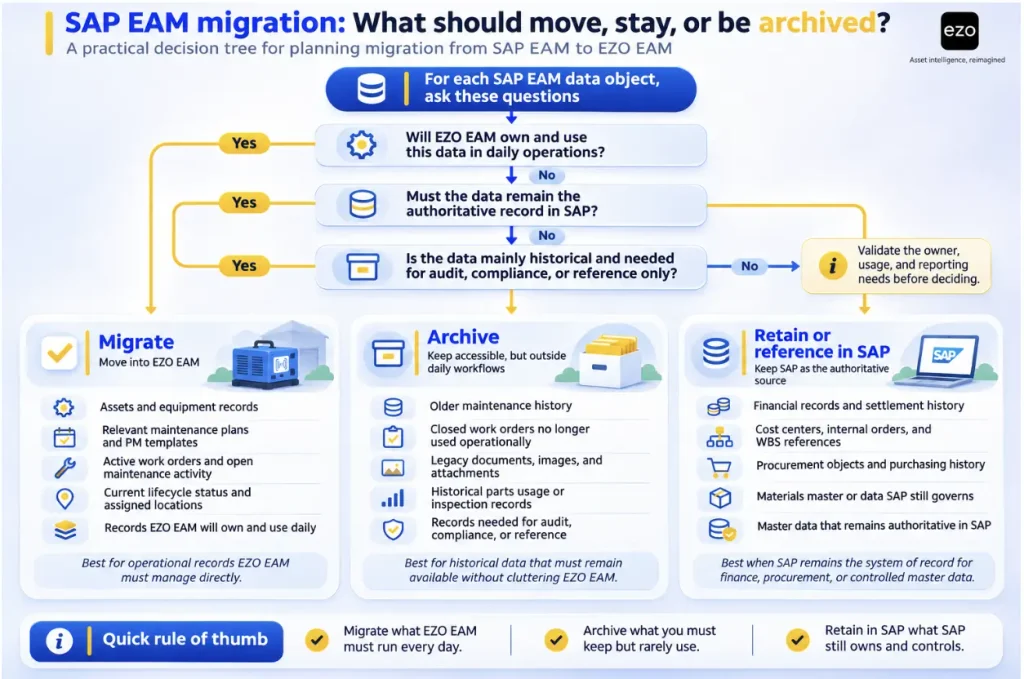
Migrating every record by default increases cost without necessarily improving data quality. Base retention decisions on business use, regulatory and contractual obligations, audit and warranty needs, historical access, and record integrity, not on record age alone. Each record must be mapped, cleaned, and validated, and migrating inaccurate records can carry existing data-quality problems into the new platform. Sequence the work in phases: discovery, data cleansing, mapping, pilot, parallel validation, cutover, reconciliation, and stabilization. Before cutover, establish acceptance criteria covering record accuracy, preventive maintenance schedules, reconciled integration postings, access permissions, retention requirements, and a documented rollback plan that sets rollback triggers, data-freeze rules, ownership of reconciliation exceptions, and the conditions for returning to the previous workflow.
Choosing the right SAP EAM alternative in 2026
The right SAP EAM alternative depends on which responsibilities should remain in SAP, which should move to the replacement platform, and where maintenance-order costing will be managed. Organizations prioritizing governance depth need a different solution than those primarily focused on technician adoption and field execution. Define that boundary first, then test the proposed workflow using actual operating data before committing to a platform. As a starting point, consider the following platforms for each operating model:
- Broader SAP EAM replacement: IBM Maximo, Octave Attune EAM, and IFS Cloud EAM.
- Maintenance execution alongside SAP: MaintainX, UpKeep, eMaint, and Fiix.
- Transition to Oracle’s ERP ecosystem: Oracle Fusion Cloud Maintenance.
- Facilities and public-sector maintenance: Asset Essentials, particularly where file-based or customer-built SAP integration is acceptable.
- Equipment lifecycle management across locations: EZO EAM.
Organizations managing shared equipment across multiple sites can evaluate EZO EAM if they need reservations, custody, maintenance status, and availability connected through a common asset record. A free trial is available, while organizations evaluating Enterprise deployment or SAP integration can request a guided evaluation.