Key takeaways:
- Shadow IT tools differ mainly in their detection surfaces: AssetSonar, Flexera One, ServiceNow SAM, Lansweeper, and Endpoint Central emphasize software or endpoint visibility, while Zluri and Defender target SaaS and cloud activity.
- AssetSonar connects device, software, license, usage, browser, and remediation context; Flexera One and ServiceNow SAM suit larger, more complex enterprise SAM and governance environments.
- Lansweeper is strongest when incomplete inventory is the problem, while ManageEngine Endpoint Central is better suited to enforcing software policies on managed endpoints.
- Zluri fits SaaS and identity-led governance, while Microsoft Defender for Cloud Apps fits security-led SaaS and shadow-AI programs; neither replaces full SAM or ITAM.
- Discovery alone is insufficient; buyers should verify whether findings can trigger software removal, access restriction, license reclamation, approval routing, or another defined response.
- Pilot finalists with real endpoints, SaaS accounts, browser activity, dormant licenses, and lifecycle events, measuring coverage, attribution, remediation, data freshness, administration, and total deployment cost.
A modern software asset management (SAM) platform can help technology leaders find software that enters workflows outside normal purchasing, deployment, or approval processes. The challenge is that shadow IT no longer refers only to an employee installing an unapproved desktop application. It can include unsanctioned SaaS or AI tools, accounts created outside the corporate identity, unapproved software installations, and unmanaged devices outside normal IT oversight.
That visibility gap is measurable. Flexera’s 2026 State of ITAM research found that only 36% of respondents reported complete IT visibility, while only 31% reported visibility into AI software. Another 59% said wasted AI software spend has increased year over year.
For IT managers and CIOs, the buying question is therefore broader than “Can this tool find shadow IT?” A more useful buying question is whether it can detect unauthorized software across relevant surfaces, link findings to users and devices, and give IT or security a practical way to respond.
This guide compares seven software options for shadow IT detection and control, including five SAM-, endpoint-, or discovery-oriented platforms and two adjacent SaaS/security tools.

Shadow IT detection and control tools compared
The tools below solve different portions of the shadow IT problem. The comparison separates device and installed software visibility from SaaS discovery, so buyers can see how a product’s actual operating model fits.
| Tool | Type | Main detection surface | Control model | Best fit | Pricing |
| AssetSonar | ITAM / SAM | Devices, installed software, browser and SaaS | Endpoint, browser, and license workflows | Connected ITAM and SAM | Per asset + Advanced SAM |
| Flexera One | Enterprise SAM / ITAM | Hybrid software, SaaS, cloud | SAM, license, and SaaS workflows | Complex enterprise estates | Custom quote |
| ServiceNow SAM | Enterprise SAM | Platform discovery and SaaS integrations | SAM and platform workflows | Existing ServiceNow estates | Custom quote |
| Lansweeper | Discovery / ITAM | Network, remote endpoints, installed software | Primarily discovery-led | Inventory visibility gaps | Per asset |
| ManageEngine Endpoint Central | UEM / endpoint | Managed endpoints | Endpoint software controls | Endpoint enforcement | Per endpoint/server |
| Zluri | SaaS management / IGA | SaaS, browser, identity, desktop-agent signals | SaaS access and identity | SaaS and identity-led programs | Custom quote |
| Microsoft Defender for Cloud Apps | CASB / SaaS security | Cloud application traffic | Security policies and connected controls | Security-led SaaS governance | Per protected user/bundle |
The three types of shadow IT tools
For this comparison, the relevant tools fall into three broad categories: SAM and endpoint platforms, SaaS management platforms, and CASB or SaaS security products. The right category depends on where unauthorized technology is entering the organization and what action must follow discovery.
- SAM and endpoint tools address different parts of the problem. SAM platforms can connect software discovery with entitlements, usage, and compliance, while endpoint platforms are typically stronger at device-level discovery and enforcement. The depth of license management and remediation varies by product.
- SaaS management platforms (SMPs) concentrate on cloud applications. They commonly discover SaaS through browser activity, SSO, OAuth, direct integrations, financial systems, or endpoint agents. Their strongest control mechanisms tend to involve access, application ownership, spend, provisioning, and deprovisioning.
- CASB and SaaS security tools approach shadow IT primarily as a security problem. They analyze cloud activity, traffic, identities, or connected applications; they apply risk scoring and security controls. They are not replacements for software entitlements, license reconciliation, or broader asset-lifecycle management.
If the main exposure is unmanaged endpoint software, prioritize endpoint-aware SAM or UEM products. If the exposure is primarily browser, SaaS, OAuth, or cloud activity, SaaS security or CASB tools may be a stronger fit.
Here, control means the response available after discovery, such as software removal, access restriction, license reclamation, domain blocking, or workflow routing.
How to manage shadow IT with the right tools
A useful SAM tool should make shadow IT both visible and actionable. Evaluate each finalist against the same operating requirements rather than comparing long feature lists.
Can it discover software across the surfaces you actually use?
Start with installed applications, devices, SaaS, and browser activity. Determine which sources are native, which require agents or extensions, and which depend on integrations with MDM, SSO, identity, or procurement platforms.
Also test remote and intermittently connected endpoints. “Device visibility” should not be interpreted as magical visibility into any device anywhere. A tool still needs a discovery path, such as an endpoint agent, a network sensor, an MDM connection, a directory source, or another integration.
Can IT act after an unauthorized application is discovered?
A dashboard that reports shadow IT without supporting a response leaves a second workflow to build elsewhere. Look for tools that help your team take the next step. That might mean removing an unauthorized application, restricting access, reclaiming a license, notifying affected users or application owners, or routing the finding to the right owner.
Can findings be attributed to users and departments?
Prioritization becomes easier when IT knows who is using an application, where it is installed, which department owns the usage, and whether the activity is widespread or isolated. This also helps separate legitimate business requirements from one-off experimentation.
Does the platform connect discovery with license and compliance context?
Unauthorized software can create more than cybersecurity exposure. It may introduce untracked entitlements, under-licensed installations, redundant products, renewal waste, or incomplete evidence during a software audit.
Look for normalization, purchased-versus-installed reconciliation, usage data, renewal dates, and license allocation. Reporting should also help IT determine whether installations are properly licensed rather than simply flagging an application name.
Can it expose unused and redundant software spend?
Visibility should support both optimization and control. Rising waste in AI, SaaS, and public cloud software reinforces the need for usage and financial context in discovery.
Does it connect with your existing IT stack?
Evaluate identity providers such as Okta or Microsoft Entra ID, MDM and UEM platforms, service desks, procurement sources, and SaaS integrations. Integration depth matters because shadow IT data becomes stale when discovery and user context must be reconciled manually.
Will the deployment model work at your scale?
Ask what needs an agent, a browser extension, a network sensor, an API integration, or administrative credentials. Then test how much configuration must be maintained after implementation. A platform with broad capabilities can still be the wrong fit if an organization cannot support its administration model.
To manage shadow IT effectively, the goal is not just to discover it once. Effective control is a continuous process that moves each finding from discovery and classification through an appropriate response, governance, and ongoing monitoring.

How we chose these tools
We evaluated each product across discovery coverage, remediation, software and license context, integrations, deployment requirements, and commercial transparency.
The list prioritizes SAM, ITAM, endpoint, and discovery platforms because they provide the strongest fit for detecting unauthorized software while maintaining device context. Zluri and Microsoft Defender for Cloud Apps are included as adjacent options for organizations where shadow IT is primarily a SaaS, identity, or cloud-security problem.
Best software for shadow IT detection and control in 2026
The best tools for shadow IT management take different approaches to discovery and control. Some focus on installed software and device visibility, while others specialize in SaaS discovery, access governance, or cloud application security.
1. AssetSonar

Best fit: Mid-market IT organizations that want software discovery, device inventory, usage and license context, and remediation in the same ITAM environment instead of maintaining a separate endpoint inventory for SAM decisions.
AssetSonar approaches shadow IT from an ITAM and SAM foundation, bringing software discovery into the same environment used to manage devices, users, licenses, and lifecycle records.
Advanced SAM extends that foundation with software discovery, browser and SaaS visibility, license reconciliation, compliance monitoring, and optimization. The ITAM Agent also adds usage data and supported software-removal workflows, giving IT a path from identifying an application to understanding its ownership, licensing, and remediation options.
The ITAM Agent adds endpoint-level usage context to discovered software, helping IT distinguish applications that are actively used from those that are dormant or potentially redundant. Because that software context remains tied to users and devices, it can also support offboarding by helping IT identify which licenses to reclaim, which software access to review, and which devices to recover when an employee leaves.
Key strengths:
- Connected device and software inventory: Endpoint and other discovery sources connect installed software with the underlying asset record, reducing the need to reconcile separate inventories before investigating unauthorized software.
- Browser visibility and domain controls: Browser Tracking surfaces browser-based application activity, while Domain Blocking can restrict configured domains on supported managed browsers. Coverage depends on browser, extension deployment, and configuration.
- Software remediation: IT can remotely uninstall unauthorized or redundant installed desktop software from supported Windows and macOS endpoints where the ITAM Agent and required permissions are present.
- License-informed investigation: Discovered software can be evaluated alongside entitlement and usage data, helping IT distinguish a security concern from a licensing, renewal, or software-waste issue.
- Software normalization: Normalized software records make discovery data easier to reconcile with products, licenses, usage, and reporting, rather than treating every detected component or variation as a separate application.
Weaknesses:
- Browser-based discovery depends on supported extensions and the organization’s deployment method. Buyers with mixed browser estates should validate current browser coverage and domain-control behavior during the pilot.
- Organizations primarily seeking granular identity governance and application access certification may still require deeper IGA capabilities than a SAM-led platform offers.
Pricing and evaluation: AssetSonar ITAM is priced per asset, with packages starting at $0.75 per asset per month for 100 assets, billed annually. Advanced SAM is available with ITAM or ITSM for $0.42 per asset per month, or $5 per asset annually. AssetSonar also offers a 14-day free trial, demos, and sales-assisted evaluation.
Review synthesis: AssetSonar has a 4.5/5 rating on G2. Reviewers commonly praise its asset visibility, usability, integrations, and centralized tracking. These capabilities allow IT teams to monitor devices and software more effectively, connect information across systems, and manage technology records from a centralized platform. Some users report room for improvement in reporting, filtering, or advanced configuration.
2. Flexera One
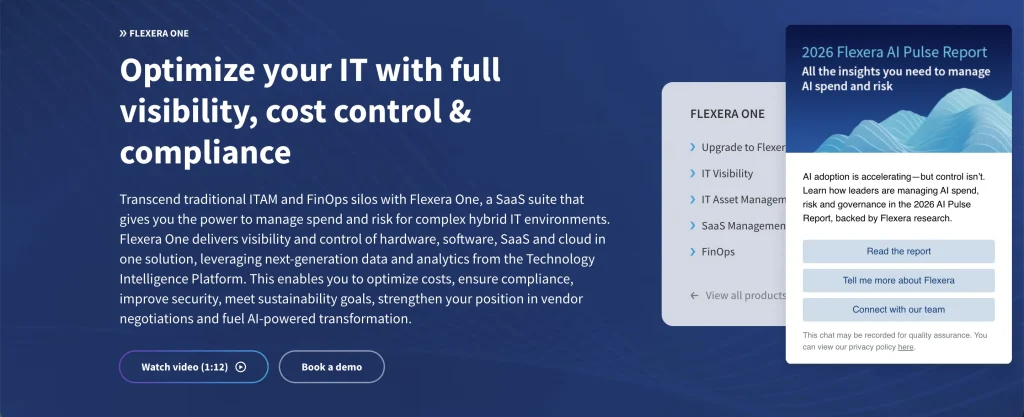
Best fit: Large organizations managing complex publisher licensing and hybrid estates across on-premises software, SaaS, cloud, and containers, where audit exposure and software-cost optimization justify a more extensive SAM program.
Flexera One approaches shadow IT as part of a broader enterprise technology-governance problem rather than as a standalone discovery use case. Its SAM model is designed for organizations managing complex software estates in which unauthorized applications must be assessed alongside publisher licensing, entitlements, spend, and hybrid infrastructure.
That makes it better suited to mature SAM programs that need shadow IT findings to feed into wider compliance, optimization, and technology spend decisions.
Key strengths:
- Hybrid-estate visibility: Flexera One ITAM builds inventory across on-premises, SaaS, and cloud environments, rather than limiting SAM to traditional desktop applications.
- Deep normalization and product intelligence: Flexera’s technology intelligence and publisher use-right data support detailed software recognition, entitlement analysis, and compliance work.
- Audit and compliance workflows: The platform is designed around defensible license positions, software audits, complex use rights, renewals, and enterprise software optimization.
- SaaS management: Flexera One SaaS Management adds continuous SaaS discovery, along with usage, spend, contract, and optimization context for organizations dealing with cloud application sprawl.
- Optimization recommendations: Inventory and entitlement information can be used to identify waste, reclaim value, and support decisions on renewal or negotiation.
Weaknesses:
- Breadth comes with the demands of implementation and administration. G2 users frequently describe initial setup and configuration as complex or time-consuming.
- Buyers need to confirm which combination of Flexera One ITAM, SaaS Management, IT Visibility, and other capabilities is required for their shadow IT use case, rather than assuming that a single subscription includes the full portfolio.
- The platform is designed for larger IT estates. Smaller mid-market teams may not need its depth in publisher licensing, hybrid-cloud governance, and enterprise optimization.
Pricing and evaluation: Flexera does not publish standard list pricing for Flexera One ITAM. Expect custom pricing based on scope and products. Confirm implementation services, support entitlements, and SaaS Management requirements in the commercial proposal.
Review synthesis: Flexera One has a 4.4/5 rating on G2. Reviewers praise its visibility, analytics, reporting, and cost-optimization capabilities, which help teams understand their technology environments and spending. Common criticisms include setup complexity and the administrative effort required to manage the platform.
3. ServiceNow Software Asset Management
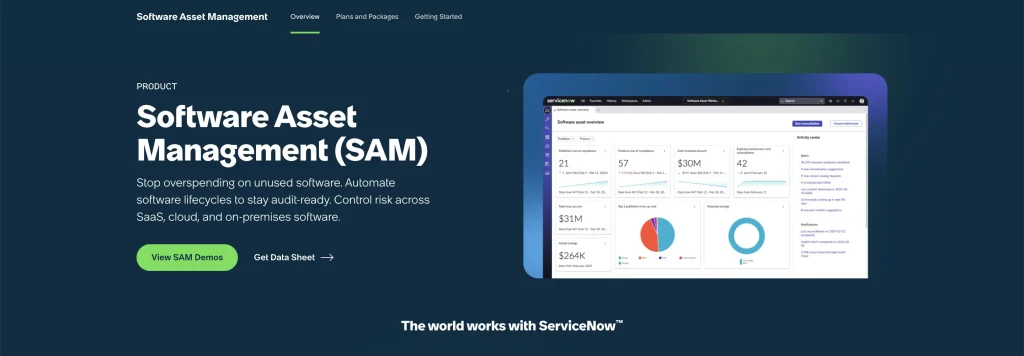
Best fit: Large organizations already using the ServiceNow platform that want software discovery, license compliance, SaaS governance, reclamation, and remediation to participate in broader CMDB and enterprise workflows.
ServiceNow Software Asset Management approaches shadow IT through the broader ServiceNow platform rather than as an isolated software-discovery layer. Its strongest fit is in organizations where software governance already needs to interact with configuration, service, user, security, and enterprise workflow data.
That platform context can make shadow IT findings easier to incorporate into existing governance processes, particularly for organizations already standardized on ServiceNow.
Key strengths:
- Normalization and reconciliation: Discovered software is normalized against ServiceNow’s SAM content before being used for entitlement, compliance, and lifecycle calculations.
- Platform context: In ServiceNow environments, SAM data can integrate with the CMDB and workflows, while broader HR, security, and request use cases depend on the licensed products and their implementation.
- License reclamation: Usage-based reclamation rules help identify underused software rights and SaaS subscriptions that can be recovered or reassigned.
- Restricted-software governance: ServiceNow positions SAM around application rationalization, vulnerability exposure, restricted lists, compliance, and lifecycle automation.
- SaaS and on-premises scope: The product covers traditional software while supporting SaaS integrations and subscription-management workflows.
Weaknesses:
- ServiceNow SAM makes the most sense when the organization is prepared to operate within the wider ServiceNow platform. It is not a lightweight standalone shadow IT deployment.
- Licensing and implementation are less straightforward to model than products with public unit pricing. The final cost depends on the organization’s ServiceNow requirements and contract.
- Configuration depth can create administration overhead for teams without dedicated ServiceNow ownership or implementation support.
Pricing and evaluation: ServiceNow does not publish standard list pricing for SAM. Pricing is quote-based and depends on the selected products, entitlements, scale, and contract structure. Custom demos are available.
Review synthesis: G2 rates ServiceNow Software Asset Management 4.4/5. Reviewers commonly mention its workflow integration, automation, reporting, and usability. Some users note performance, navigation, and configuration challenges, particularly in larger or more complex environments.
4. Lansweeper
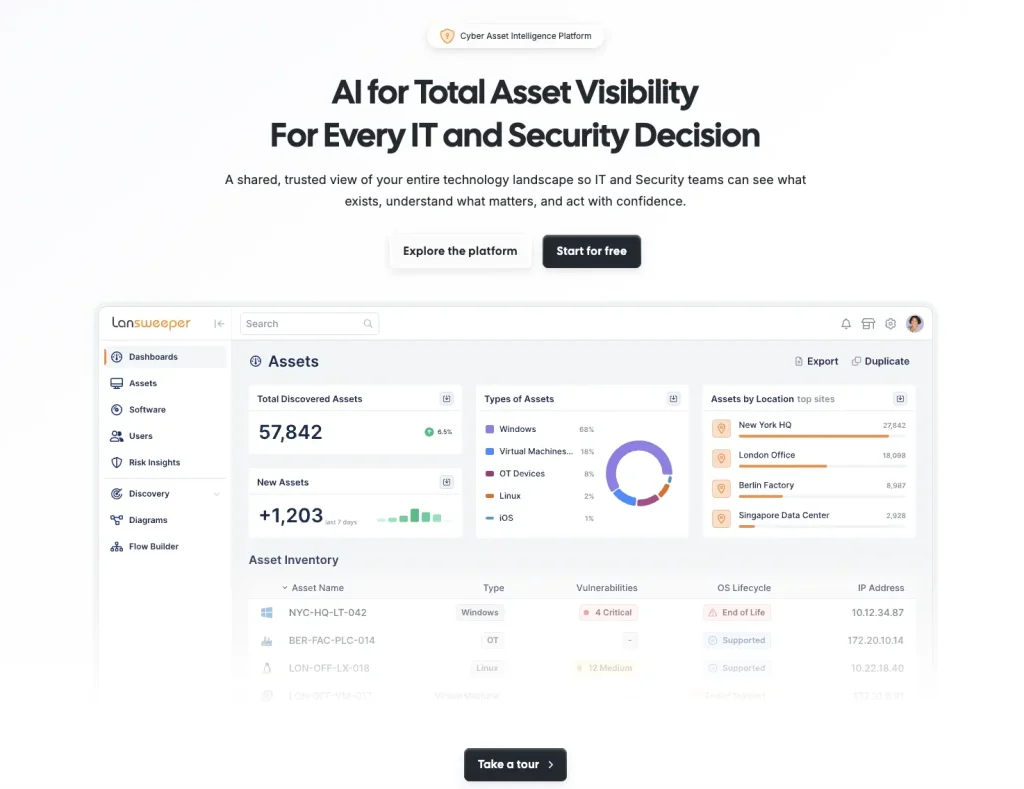
Best fit: Organizations whose shadow IT problem starts with incomplete device and software inventory and that need better attribution before adding deeper enforcement or license governance.
Lansweeper approaches shadow IT primarily as a visibility problem. It is most relevant when IT suspects that devices or software exist outside the official inventory but does not yet have enough reliable data to determine the scale of the gap.
Its role in a shadow IT program is therefore often discovery-first: establish a more complete picture of the environment, then decide which assets, applications, or findings require governance, remediation, or deeper SAM processes.
Key strengths:
- Multiple discovery methods: Active, passive, credentialed, agent-based, and agentless methods help identify assets that a single endpoint-management source can miss.
- Unknown and unmanaged device detection: Passive, credential-free discovery can expose devices that were never added to the official asset inventory.
- Remote endpoint visibility: IT Agent Discovery continues collecting endpoint information from devices that are off-network or intermittently connected.
- Installed-software inventory: Deeper scans provide application and configuration information, helping IT identify software running across discovered systems.
- Inventory consolidation: Connectors can import data from tools such as SCCM, Intune, AirWatch, and MDM systems and reconcile it with Lansweeper discovery.
Weaknesses:
- Discovery depth does not automatically equal remediation depth. Organizations needing strict software installation controls or identity-driven SaaS governance should test how those workflows will be handled.
- Some advanced SAM capabilities sit alongside the core discovery platform, so buyers should verify plan availability for the workflows they need.
- Large inventories can generate substantial amounts of data for classification and governance after discovery. Finding an unknown device is only the first step in the operating process.
Pricing and evaluation: Lansweeper offers a 14-day full trial. Starter begins at $239 per month, billed annually, with 2,000 assets; Pro starts at $439 per month with 2,000 assets; and Enterprise starts at 10,000 assets with custom pricing.
Review synthesis: Lansweeper has a 4.4/5 rating on G2. Reviewers commonly value its broad scanning, agentless discovery, reporting, and detailed asset information, while some note that the interface and volume of data can feel overwhelming for new administrators.
5. ManageEngine Endpoint Central

Best fit: IT and security teams that want to inventory software on managed endpoints and enforce prohibited-software policies through an endpoint-management platform rather than building the process around SaaS governance.
Endpoint Central approaches shadow IT from an endpoint-management perspective. It is most relevant when the organization’s primary concern is software being installed or used on managed employee devices rather than SaaS accounts created outside the endpoint environment.
That operating model makes it a stronger fit for teams that want shadow IT detection to sit close to the endpoint controls they already use to manage software and device configurations.
Key strengths:
- Cross-platform inventory: Hardware and software inventory covers managed Windows, macOS, and Linux environments.
- Prohibited-software workflow: Endpoint Central can detect prohibited Windows desktop applications through inventory scans and apply configured actions, including automated uninstallation.
- Installation alerts: IT can monitor newly installed or removed software and use inventory reports to investigate changes.
- License compliance: Purchased, installed, remaining, and compliance data can be tracked for software recorded in the license-management workflow.
- Usage and optimization context: Software metering can support usage-based license decisions, although current documentation notes that metering support differs by operating system.
- Endpoint remediation: The wider UEM platform adds software deployment, patching, remote administration, and configuration controls beyond inventory alone.
Weaknesses:
- Prohibit Software currently applies only to Windows desktop applications, so buyers should not assume identical enforcement across Windows, macOS, Linux, and SaaS.
- Software metering is available for Windows and macOS endpoints, while Linux is limited to broader software inventory rather than the same usage-metering depth.
- The platform is endpoint-centric. SaaS discovery via OAuth, expense systems, identity activity, and deep application access governance is not its primary operating model.
Pricing and evaluation: Endpoint Central publishes pricing by edition, deployment, endpoint count, and server count. For example, its Professional cloud plan lists 100 endpoints at $1,895 annually. Both cloud and on-premises options are available, with pricing changing by edition and scale.
Reviews: ManageEngine Endpoint Central has a 4.5/5 rating on G2. Reviewers frequently mention broad device visibility, dependable integrations, and streamlined administration. Common reservations involve report customization, filtering depth, setup requirements, and the need to navigate more sophisticated features.
6. Zluri
Best fit: Organizations focused on unsanctioned SaaS, shadow AI, identity governance, and SaaS license utilization rather than full endpoint lifecycle management.
Zluri approaches shadow IT primarily through SaaS management and identity governance. It is therefore an adjacent option for organizations whose main concern is understanding which cloud applications employees use, who has access to them, and how those applications should be governed across the user lifecycle.
Its fit is strongest when SaaS ownership, access, licenses, and application governance matter more than complete hardware lifecycle management or OS-level endpoint enforcement.
Key strengths:
- Layered SaaS discovery: Browser agents, desktop agents, and direct integrations help uncover applications outside the centrally managed SaaS inventory.
- Installed-application signals: Desktop agents can collect installed-application and device information to support SaaS discovery and usage attribution. These signals are not equivalent to a full UEM or ITAM software inventory.
- SaaS and shadow-AI visibility: Zluri positions discovery around unsanctioned SaaS and AI applications, user activity, departments, licenses, and spend.
- Identity governance: Access requests, reviews, provisioning, and deprovisioning provide security and IT with a direct governance path once an application or account is identified.
- License and spend optimization: Application activity can be linked to assigned licenses and cost data to identify underused SaaS subscriptions.
Weaknesses:
- Device information collected for SaaS discovery should not be treated as equivalent to a complete ITAM endpoint lifecycle, hardware custody, a CMDB, or an endpoint remediation system.
- Its control model is strongest for identities, accounts, SaaS access, application administration, and spend. Teams needing OS-level software policy enforcement should evaluate a complementary endpoint tool.
- Initial setup and integration work can require time. G2 reviews mention implementation effort alongside strong SaaS visibility and automation.
Pricing and evaluation: Zluri uses a sales-led pricing model. Public product pages emphasize booking a demo rather than publishing standard per-user or per-application pricing, so buyers should request a complete quote that covers required SaaS management and identity governance capabilities.
Review synthesis: Zluri holds a 4.6/5 rating on G2. Customers often highlight clear SaaS oversight, streamlined automation, employee lifecycle workflows, and responsive assistance. Common reservations include implementation demands, occasional configuration complexity, and gaps in available integrations.
7. Microsoft Defender for Cloud Apps

Best fit: Microsoft-centric organizations where security owns the shadow IT program and the priority is discovering risky SaaS or AI services, assessing application risk, and enforcing cloud security controls.
Microsoft Defender for Cloud Apps approaches shadow IT from a cloud-security perspective rather than a SAM or ITAM model. It is most relevant when the primary objective is to identify risky SaaS or AI usage and to bring those findings into existing security investigation and policy workflows.
Its inclusion here reflects that different teams may encounter the same shadow IT problem through different operating models. Security-led organizations may prioritize application risk and cloud controls, while SAM teams typically need deeper entitlement, licensing, and asset context.
Key strengths:
- Cloud application discovery: Traffic and connected security sources can reveal applications that have not undergone approved procurement or IT deployment.
- Risk scoring: Discovered applications are evaluated against more than 90 risk factors, helping security teams prioritize investigation rather than treating every unknown application equally.
- Security response: Policies and alerts can surface risky applications, while enforcement depends on the connected Microsoft controls and configuration in use.
- Shadow-AI relevance: Microsoft explicitly positions Defender for Cloud Apps to discover and secure SaaS and generative AI usage.
- Microsoft ecosystem fit: Organizations already standardizing on Microsoft security can incorporate shadow IT into existing investigation and response processes.
Weaknesses:
- Defender for Cloud Apps is not a software entitlement or license-reconciliation system. It does not replace a SAM platform for purchased-versus-installed positions, license reclamation, or software audits.
- Cloud Discovery relies on Microsoft’s app catalog for identification. Unknown or non-catalog services may require manual handling or a custom app definition.
- It focuses on cloud application security rather than on maintaining the complete hardware and installed software lifecycle expected of an ITAM platform.
Pricing and evaluation: Microsoft lists Defender for Cloud Apps capabilities within Microsoft Defender Suite at $12 per user per month, paid annually, with qualifying Microsoft 365 or Office 365 plus EMS licensing required. Trial and sales options are available.
Reviews: Microsoft Defender for Cloud Apps has a 4.4/5 rating on G2. Reviewers frequently mention broad Microsoft integration, improved visibility into unsanctioned applications, and useful threat detection. Common drawbacks include a steep learning curve, complex deployment, and configuration demands for smaller teams.
Which shadow IT tool fits your operating model?
The best tools for managing shadow IT depend on who owns the problem and where the visibility gap exists.
| If your priority is… | Start with… | Main tradeoff to validate |
| Connected device, software, license, and remediation context | AssetSonar | Deeper IGA may require another tool |
| Complex publisher licensing across hybrid infrastructure | Flexera One | Higher implementation and administration effort |
| Governance inside an existing ServiceNow estate | ServiceNow SAM | Strongest fit when ServiceNow is already a core platform |
| Closing device and software inventory gaps | Lansweeper | Discovery is stronger than remediation |
| Enforcing software policy on managed endpoints | ManageEngine Endpoint Central | SaaS and identity discovery are not the primary focus |
| SaaS discovery and identity governance | Zluri | Not a full ITAM or UEM lifecycle platform |
| Security-led SaaS and shadow-AI governance | Microsoft Defender for Cloud Apps | Does not replace SAM entitlement reconciliation |
A shortlist should normally contain products from the category that matches the primary problem. Do not buy a traditional SAM platform solely for identity access reviews if SaaS governance is the dominant use case.
How should you pilot software for shadow IT detection and control?
Pilot finalists with representative production-like data, including duplicates, stale records, and incomplete attribution. Measure coverage, attribution, and actionability rather than feature count.
Start with a representative set of remote and office-based endpoints, approved and unapproved applications, SaaS accounts, browser activity, dormant licenses, shared devices, and users who have recently changed roles or left the organization.
Then validate the complete workflow:
- Can it detect software or SaaS outside the approved inventory, and how does it handle uncataloged applications?
- Does it connect that application to the correct user, device, department, and source?
- Can administrators distinguish legitimate software from risky or redundant software?
- What happens after IT marks something as prohibited?
- Can the software be removed, blocked, reclaimed, or routed to an owner?
- Does the action leave enough evidence for audit and security review?
- How quickly does data update when a device is remote or temporarily offline?
- What manual normalization or reconciliation remains after the pilot?
- Which modules, integrations, agents, and professional services are required?
- What is the total annual cost at your actual scale, including required modules and services?
Include ongoing administration in the evaluation. A pilot that works only because the vendor’s solutions engineer maintains every connector does not reflect the operating cost after deployment.
What common mistakes should buyers avoid?
Choosing the wrong category: SAM, UEM, SMP, and CASB platforms overlap, but they are not interchangeable. Determine whether the main problem is endpoint software, SaaS, identities, licenses, security, or a combination of these.
Comparing incompatible pricing units: Per-asset, per-endpoint, per-user, CI-based, and custom enterprise pricing cannot be compared directly. Include minimum quantities, required modules, implementation, support, and existing platform dependencies.
Treating discovery as remediation: Finding an unauthorized application is not the same as controlling it. Determine who receives the finding and whether the platform can remove software, restrict access, reclaim a license, request approval, or initiate another response.
Ignoring lifecycle events: Joiners, movers, and leavers change software ownership and access. Offboarding is especially useful for testing whether the platform can identify applications, devices, licenses, and accounts that should be recovered when an employee leaves.
Leaving data ownership undefined: IT, security, procurement, finance, and application owners may all act on shadow IT data. Decide which system is authoritative for devices, identities, contracts, application approvals, and security decisions before deployment.
Which SAM software for shadow IT detection and control should you start with?
Start with the part of shadow IT your current stack cannot reliably see, attribute, or control. If the main gap is unauthorized software on endpoints, prioritize SAM or endpoint-aware platforms that connect discovery with device, user, license, usage, and remediation context. If the problem is primarily unsanctioned SaaS, identity, or cloud-application risk, focus on tools designed around those discovery and governance surfaces.
The right choice should also reflect what happens after something is found. Visibility has limited value if IT still needs separate tools or manual processes to investigate ownership, assess risk, reclaim licenses, remove software, or route approvals. Build your shortlist around the discovery methods your environment actually requires, then validate coverage and remediation using real devices, applications, and users during the pilot.