



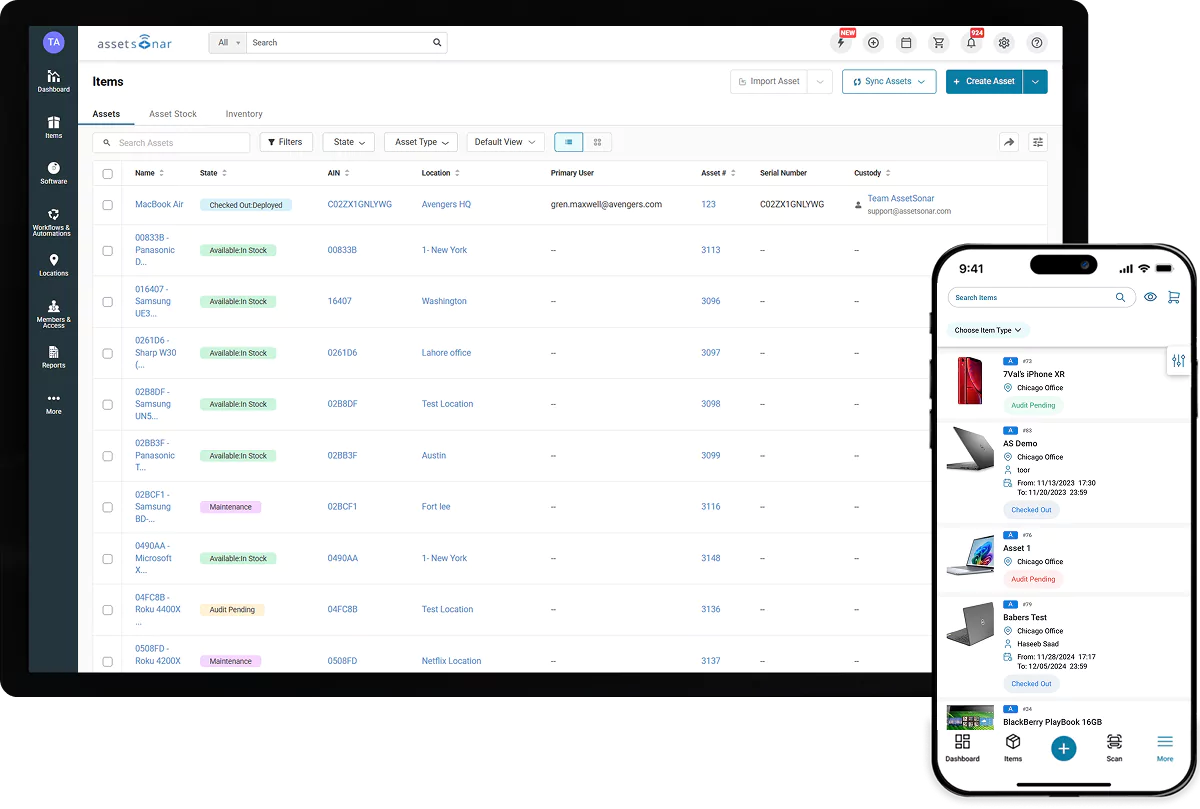






AssetSonar Features Hardware Asset Discovery
Hardware Asset Discovery & Tracking
Build an Accurate, Audit-Ready Hardware Inventory
Proven Impact Across IT Teams
90%
Automated Asset Discovery
30%
More Accurate Asset Data
Hourly
Automated Syncs
Everything You Need to Discover and Track Your Hardware
Discover Devices Automatically
Find Windows, macOS, and Linux endpoints with the ITAM agent. Scan your network for servers, printers, switches, and other devices, without daily manual updates.
Reconcile Sources Into One Record
Match Agent, MDM, and network data by serial number, UDID, or custom rules. AssetSonar merges duplicates so each device has one accurate, current record as sources sync.
Catch Unknown & Unmanaged Devices
Compare devices found on your network with MDM enrollment data. Surface equipment that is unknown, unmanaged, or missing from the systems your team trusts right away.
Track Ownership, Location & Custody
Connect every asset to a user, team, and location. Check devices in and out, verify custody, and keep assignment history current as they move from one site to another.
Track Assets With QR, Barcode & RFID
Use barcode, QR code, or RFID labels to identify equipment in the field. Scan devices during handoffs, inventory checks, and physical audits across offices and storerooms.
Keep Hardware Records Audit-Ready
Turn discovery data into dashboards, reports, and a traceable hardware register linked to owners, locations, warranties, and change history for faster, easier audits.
Trusted by High-Performing Teams


See Automated Hardware Discovery in Action
How AssetSonar Discovers & Tracks Hardware
Agent & Agentless Discovery
Discovery Integrations
Record Reconciliation
Auto-Populated CMDB
Ownership & Location
Reporting & Audit Readiness
Agent & Agentless Discovery
Discover Hardware Across Every Environment
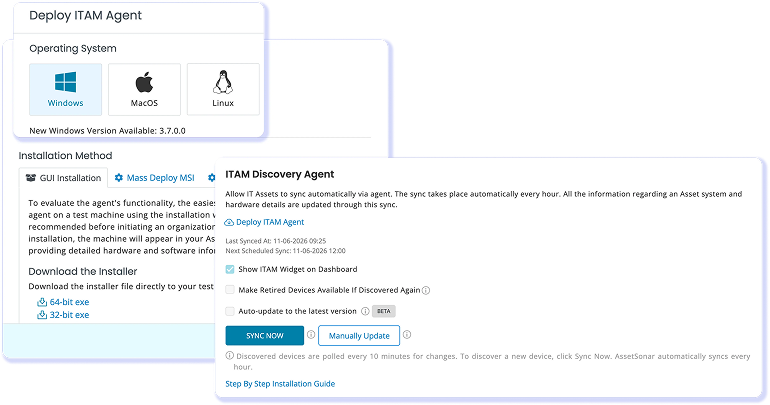
Deploy the AssetSonar ITAM Agent to Windows, macOS, and Linux endpoints to collect model, OS, serial number, and system details. Use agentless network discovery for servers, printers, switches, and other connected equipment. Run scans on demand or on a schedule so devices enter your inventory with the source and last-sync details needed to validate them.
Discovery Integrations
Sync Devices From the Tools You Already Use
Connect discovery and device management tools, including Microsoft Intune, Jamf Pro, Kandji, Google Endpoint Management, Cisco Meraki, and other MDM and network sources. AssetSonar consolidates device data from your existing stack into one workflow, reducing exports and giving IT a consistent daily view across office, remote, and network environments.
Record Reconciliation
Unify Sources Into One Trusted Record
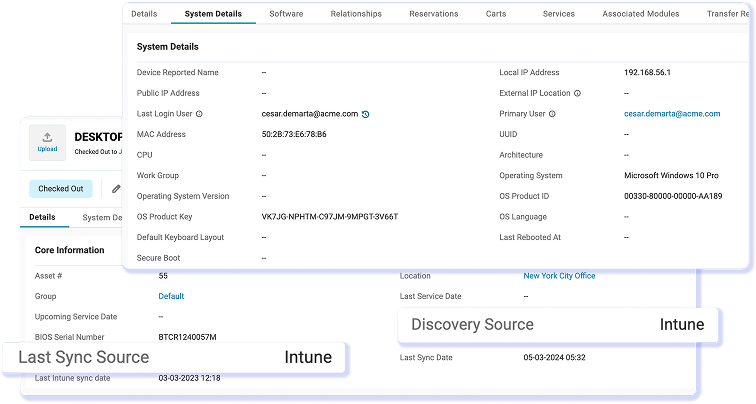
AssetSonar reconciles ITAM Agent, MDM, and network scan data using serial numbers, AIN #, and configurable matching rules. Duplicate findings merge into one record instead of inflating inventory counts. IT teams can view the discovery source, last sync source, and last sync date, then refresh data on demand or on schedules as frequent as hourly without rework.
Auto-Populated CMDB
Turn Discovery Into a Unified IT Graph
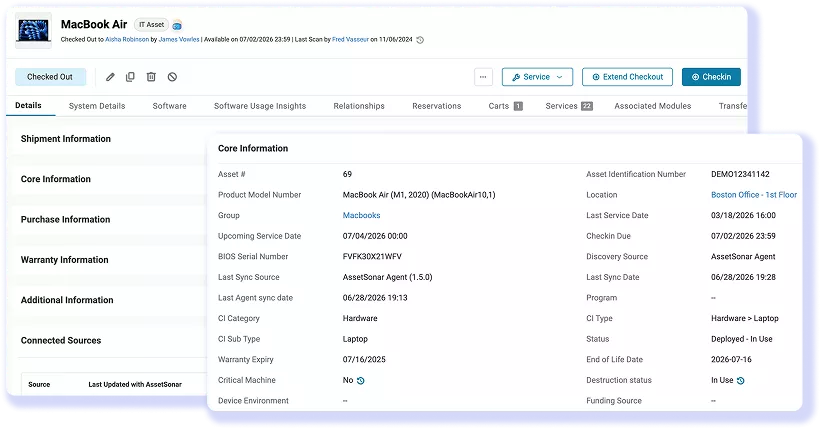
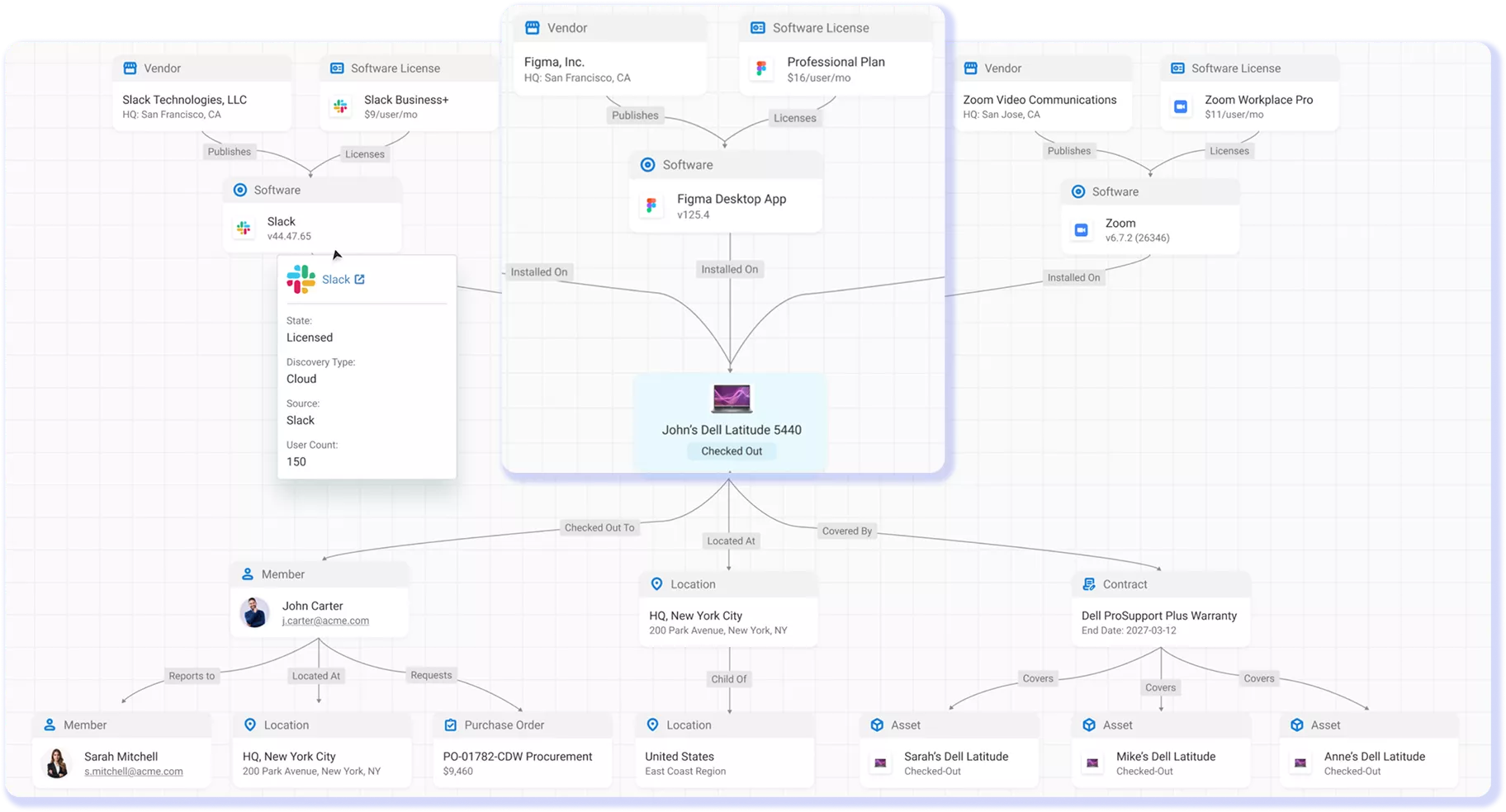
Discovery does more than list devices. AssetSonar folds every discovered asset into an auto-populated CMDB on the IT Graph, linking each device to its owner, location, warranty, and service history. Technicians see how a device connects to the rest of the environment without building that map by hand, and the relationships stay current as discovery data updates. That connected context is what a standalone list or a spreadsheet cannot match.
Ownership & Location
Know Who Has Each Device & Where It Is
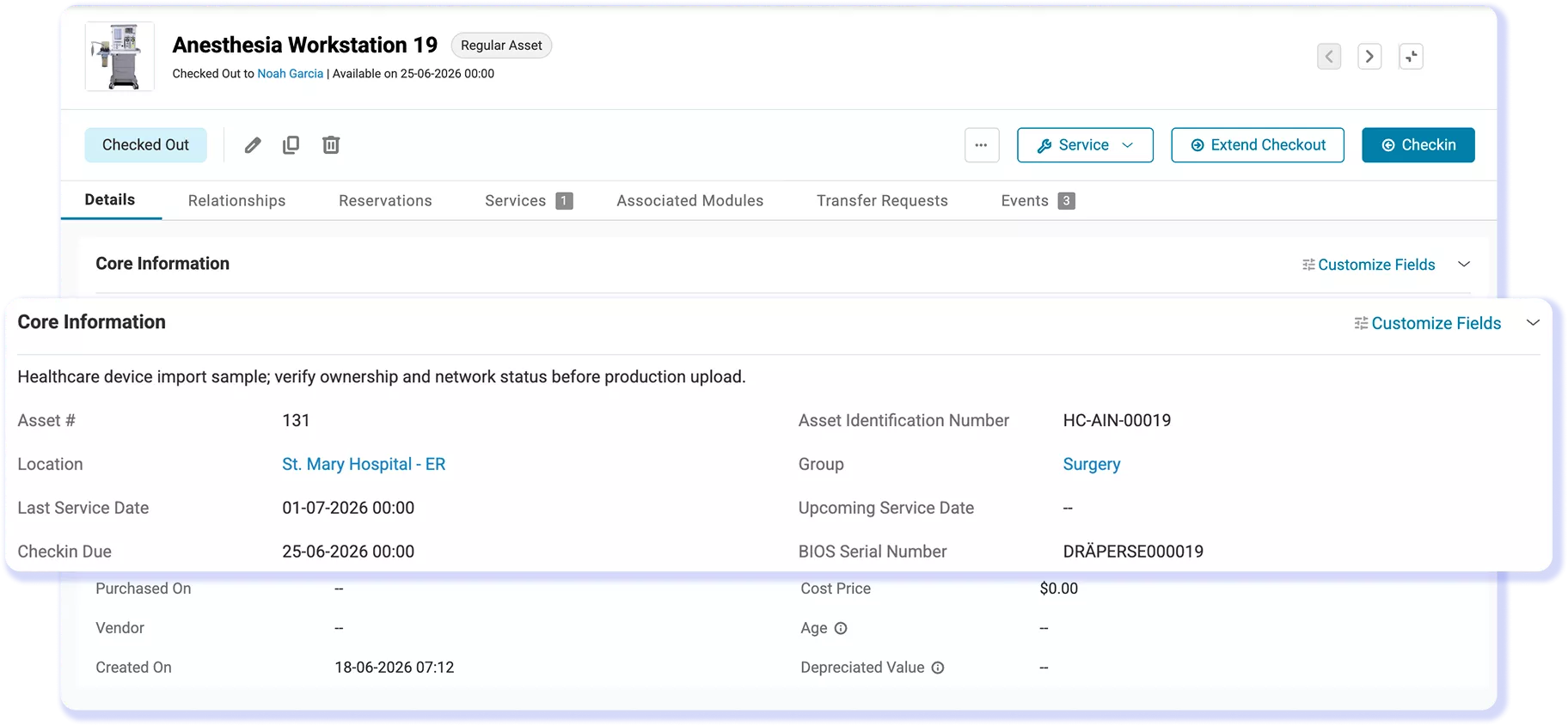
Assign hardware to the right user, team, and location, then keep custody records current as devices move. Check equipment in and out, sync identity data, and retain an audit log of every handoff. Barcode, QR, and RFID scanning help verify assets in offices and storerooms, while Agent, MDM, and identity updates prevent ownership records from going stale.
Reporting & Audit Readiness
Turn Discovery Into Evidence You Can Use
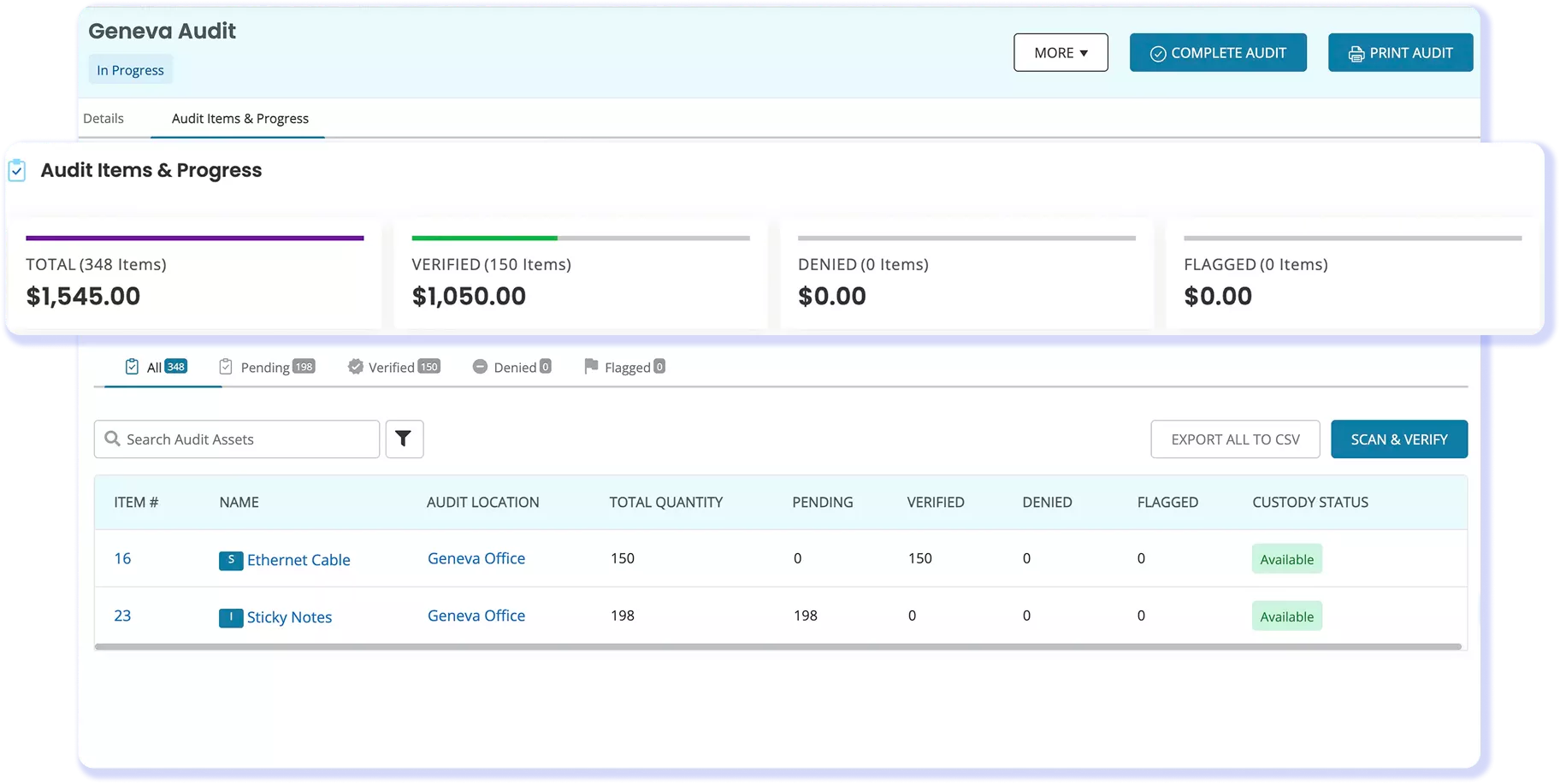
Build dashboards and reports from current hardware records. Filter by discovery source, last sync, owner, location, device type, or status to spot gaps before an audit request arrives. AssetSonar keeps the asset register linked to its change history, giving reviewers a traceable view without manually rebuilding evidence from scattered spreadsheets.
Customer Testimonials
Discover Every Device. Trust Every Record.
Read More on Hardware Asset Discovery & Tracking
Frequently Asked Questions
AssetSonar should work alongside your mobile device management (MDM) platform, not replace it. MDM and endpoint management tools handle device configuration, encryption, security policies, remote wipe, and access restrictions. AssetSonar uses that device data for broader hardware asset management, including ownership, custody, lifecycle tracking, audit history, and reporting. Together, they provide device control and complete asset visibility.
Test whether the platform discovers the endpoint and network devices you expect, merges duplicates, retains ownership and location data, and refreshes records within your required interval. Include an MDM-enrolled device, a remote endpoint, and a network-only asset. Compare the results with your current inventory, then document missing devices, incomplete fields, duplicate records, and other exceptions before expanding the rollout.
AssetSonar can connect hardware data to an external configuration management database (CMDB) through a supported or custom integration, depending on the target system. Not every CMDB offers a native, bidirectional connector. Before implementation, confirm which system owns each field, what data will sync, the direction and frequency of synchronization, and how duplicate values, failed updates, and other conflicts will be handled.
Yes. Paying customers can use the AssetSonar API to retrieve and update assets, users, locations, and asset histories, as well as export custom reports. API access is disabled by default, secured with an authenticated token over HTTPS, and subject to fair-usage limits. Before implementation, confirm the required endpoints, fields, pagination, permissions, and export formats to ensure the integration supports your hardware data and portability needs.
AssetSonar hardware discovery typically takes about two weeks to implement, although timing varies based on asset volume, data quality, integrations, matching rules, and rollout scope. Teams can begin with users, locations, existing hardware records, and one discovery source, then add more systems, reports, and workflows in phases. AssetSonar matches discovered devices with existing records to reduce duplicates and maintain one consolidated hardware inventory.
Yes. Existing hardware records can be imported from spreadsheets and validated before automated discovery sources are connected. Plan the migration around required fields, record ownership, historical data, attachments, and duplicate handling. Use AssetSonar custom fields and duplicate-detection rules to standardize records, reduce inconsistencies, and prepare the inventory before completing the full import.
AssetSonar provides guided setup, managed implementation, a dedicated customer success contact, and access to knowledge base resources. Documentation covers the ITAM Agent, data imports, user roles, reports, and integrations. Support may also include training, response targets, escalation procedures, and service-level commitments, depending on the agreement. Confirm the channels and services included in your plan before implementation.
AssetSonar hardware discovery and tracking are included in the ITAM plan, currently priced at $1.00 per asset per month. Plans start at 100 assets, with volume discounts available for deployments of 1,000 assets or more. Final pricing may vary by billing term, contract scope, and additional modules. Buyers should confirm what qualifies as a billable asset and whether implementation, onboarding, and support services are included.
EZO maintains SOC 2 Type 2 compliance, ISO/IEC 27001 certification, and CSA STAR Level 1 registration. It also publishes GDPR-related commitments and a Data Processing Addendum. During security review, IT teams should verify the latest compliance reports, hosting arrangements, data residency and retention policies, subprocessors, access controls, and other requirements relevant to their organization.
Evaluate ROI by comparing annual subscription and implementation costs with measurable savings from automated workflows, duplicate cleanup, audit preparation, missing-device follow-up, lost hardware, and unnecessary purchases. Use your organization’s current costs and pilot results instead of relying on a universal savings estimate. Actual ROI will depend on adoption, data quality, and the consistency of your asset management processes.
Take Control of Every Device You Own
Discover devices, merge duplicates, and keep ownership, location, warranty, sync history, and changes connected in one accurate, audit-ready IT Graph.