





AssetSonar Integrations Jumpcloud
JumpCloud integration with AssetSonar
Native
Asset Discovery & Scanning
Import JumpCloud Endpoints as Tracked Assets
No Credit Card Required
From the JumpCloud Directory to Your AssetSonar Records
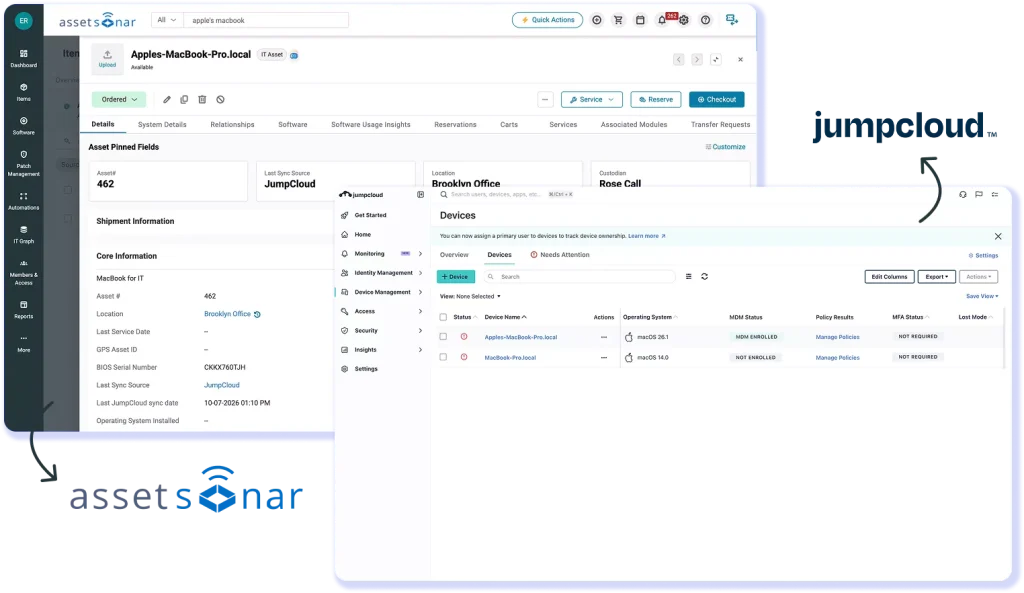
JumpCloud is an open directory and device management platform that manages user identities and endpoints. AssetSonar imports its endpoint records into the system where they sit alongside data from other connected sources for inventory reporting and lifecycle tracking.
Keep ITAM in Sync With JumpCloud
When JumpCloud endpoints are missing from the asset system, asset reports stay incomplete, and reconciliation work grows. AssetSonar imports them as assets IT can filter and report on.
Deploy the ITAM Agent Fleet-Wide
AssetSonar’s ITAM Agent adds installed software and hardware specs to each asset record. Deploy it to Windows and macOS devices remotely with a JumpCloud command, with no manual installs.
Coordinate Asset Recovery at Exit
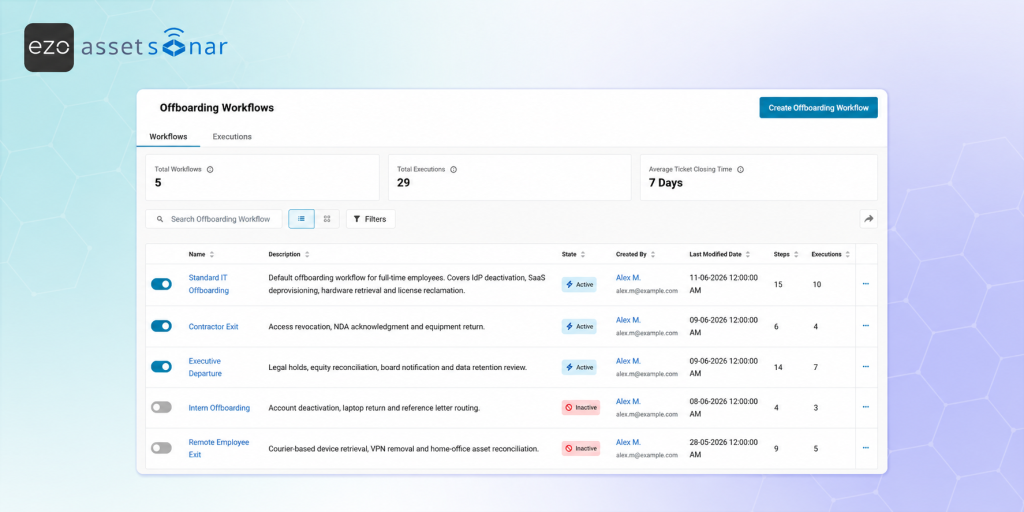
Deactivating a user in your directory doesn’t return their devices or free their licenses. AssetSonar offboarding workflows track each device return, while JumpCloud keeps device records current in AssetSonar.
How JumpCloud Device Data Flows Into AssetSonar
ENDPOINT IMPORT
Import JumpCloud Endpoints as Assets
ITAM AGENT DEPLOYMENT
Deploy the ITAM Agent Through JumpCloud
USERS & OFFBOARDING
Keep User Records in Sync With JumpCloud
Asset assignment depends on accurate user records. With SCIM user provisioning and SAML SSO configured separately, set up separately, JumpCloud creates, updates, and deactivates AssetSonar users as the directory changes. When an employee leaves, a configured offboarding workflow lists their devices and licenses and assigns recovery tasks to IT. Deactivated members keep their assignment history.
Trusted by High-Performing Teams


Bring JumpCloud Endpoints and Agent Data Together
Set Up the JumpCloud Integration in AssetSonar
Requirements
- JumpCloud administrator access to generate the API key AssetSonar requests.
- An AssetSonar administrator account that can enable integrations under Settings.
- Endpoints enrolled in the JumpCloud directory.
- For ITAM Agent rollout, rights to create and assign commands in the JumpCloud Admin Portal, plus Windows or macOS system groups.
- Set up ITAM Agent deployment, single sign-on, and SCIM user provisioning separately.
Setup in simple steps
- Enable the integration: go to Settings > Integrations > Mobile Device Management & Network Discovery and set JumpCloud Integration to "Enabled".
- Add credentials: click "Add Credentials", enter the JumpCloud API key, then click "Add".
- Save the configuration: click "Update" at the top right to finish enabling it.
- Sync and verify: click "Sync Now", then filter assets by Discovery Source = JumpCloud and check the count against JumpCloud.
Other Integrations in Asset Discovery & Scanning
Read More on JumpCloud Integration
Frequently Asked Questions
AssetSonar imports device records from the JumpCloud directory, and each one arrives as an asset with JumpCloud recorded as its discovery source. Imported fields include device name, serial number, operating system and version, model, and last contact time. IT can filter the asset list by Discovery Source and report on these assets alongside the rest of the inventory. The ITAM Agent provides installed software and detailed hardware specs, which IT deploys through JumpCloud Commands.
The device import is one-way, from JumpCloud into AssetSonar. AssetSonar does not write device changes back, and policies, commands, and endpoint configuration stay in JumpCloud. AssetSonar uses the imported data for assignment, lifecycle tracking, audits, and reporting. Devices removed from JumpCloud are archived in AssetSonar on the next sync, with their history kept. ITAM Agent deployment runs as a JumpCloud command, and SCIM user provisioning is configured in its own settings.
Admins can click “Sync Now” in the JumpCloud Integration settings at any time to start an on-demand import. A scheduled sync also runs every 24 hours, so endpoints added to JumpCloud reach AssetSonar without a manual step from IT. Each asset shows its last sync source, and the Connected Sources table shows which systems contributed to it and when. Before an audit or hardware review, IT can run “Sync Now”, confirm the sync has finished, and then work from the updated asset records.
The integration needs a JumpCloud administrator to generate an API key and an AssetSonar administrator to enter it. In AssetSonar, go to Settings > Integrations > Mobile Device Management & Network Discovery > JumpCloud Integration, click “Add Credentials”, enter the key, and click “Add”. Agent deployment also needs rights to create and assign commands in the JumpCloud Admin Portal.
Yes. The JumpCloud integration is included on both the ITAM and ITSM plans. AssetSonar is priced per asset, so adding JumpCloud as a discovery source does not add a separate integration fee, and deploying the ITAM Agent across a JumpCloud fleet adds no per-device agent cost. The ITSM plan adds native ticketing, SLA management, and a service catalog around the imported assets. Current per-asset rates and the full plan feature comparison are listed on the AssetSonar pricing page.
No. AssetSonar reconciles records from every connected source and matches devices by serial number, UDID, or custom rules, so an endpoint reported by JumpCloud and by Jamf Pro or Microsoft Intune becomes one asset record, not two. Each asset keeps a discovery source and a last sync source, and the Connected Sources table shows what each system contributed and when it last synced. IT can review any record described by more than one source before an audit, renewal, or refresh.
Yes. AssetSonar supports SAML 2.0 single sign-on, so JumpCloud can act as the identity provider. In AssetSonar, go to Settings > Add Ons > SAML Integration to copy the ACS URL and entity ID. First Name, Last Name, and Email attributes are required. In JumpCloud, add the prebuilt AssetSonar connector, which requires the SSO package or the SSO add-on, and authorize the users or groups who need access. Those users then sign in to AssetSonar with their existing JumpCloud credentials.
Yes. JumpCloud’s AssetSonar connector supports SCIM provisioning, so JumpCloud creates, updates, and deactivates AssetSonar users as the directory changes. In AssetSonar, open the User Provisioning via SCIM settings to generate a SCIM Connector Base URL and a Connector Key. In JumpCloud, paste the Base URL into the Base URL field and the Connector Key into the Token Key field, then turn on provisioning for the app. Directory changes then reach AssetSonar without any manual upkeep.
When JumpCloud deprovisions a user over SCIM, that member is deactivated in AssetSonar. With an automation configured for member deactivation, AssetSonar can start an offboarding workflow that lists the person’s devices and licenses and assigns recovery tasks to IT. Managers can also start the same flow through the offboarding request form. Members with activity history are deactivated rather than deleted, so the record of what each person held stays available for later review.
Yes. Admins deploy the ITAM Agent to Windows and macOS endpoints through JumpCloud Commands, with no manual installs. AssetSonar publishes OS-specific deployment scripts under Company Settings & Add Ons > ITAM Discovery Agent > Mass Deploying the Agent, and macOS also needs its installer and configuration files prepared. Create commands in the JumpCloud Admin Portal, assign them to system groups, and run them now, on a schedule, on repeat, or via a webhook as new devices join.