





Live webinar · Nov 19, 1 PM EST: SolarWinds, PHP, and the Software Security Wake-Up Call

AssetSonar Integrations Microsoft 365

Microsoft 365 integration with AssetSonar

Native

SaaS Integrations

Bring Microsoft 365 Seats Into One License Record

The AssetSonar Microsoft 365 integration imports license plans, seats, and entitlements so IT can track them by user.

No Credit Card Required

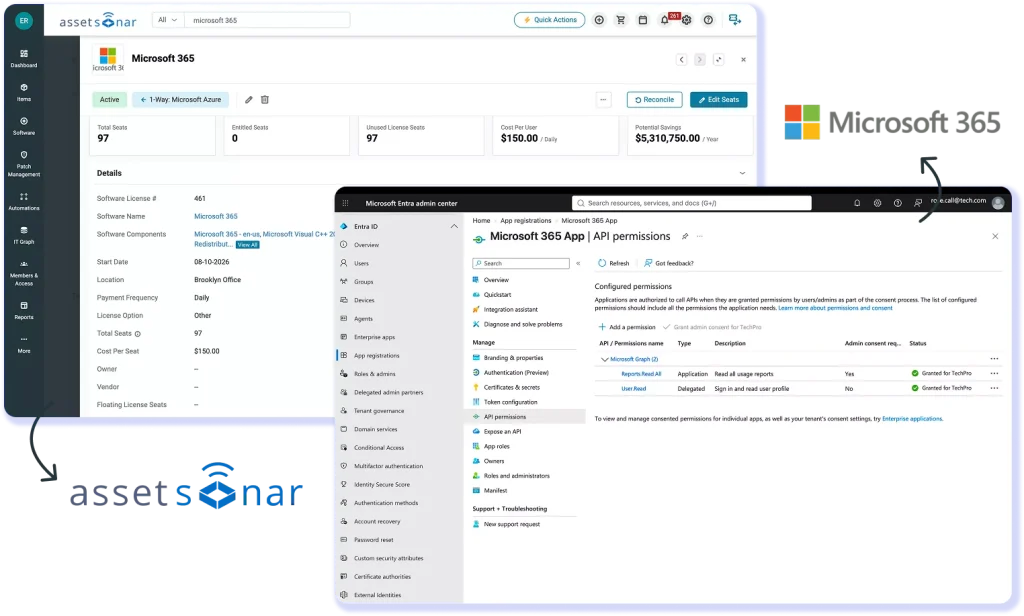
AssetSonar License Detail Page displaying an imported Microsoft 365 plan with its seat count and entitlements

Track Microsoft 365 Licenses In Your Wider IT Record

Microsoft 365, formerly Office 365, is Microsoft’s cloud productivity suite, licensed by plan and seat. The AssetSonar Microsoft 365 integration brings those plans, seats, entitlements, and term dates into the IT Graph beside devices and users.

Centralize Microsoft 365 Licenses

License positions no longer sit in admin center exports and spreadsheets. Plans, seats, entitlements, and term dates live in AssetSonar next to the devices and users.

Spot Unused Seats Before Renewal

Unused Microsoft 365 licenses stay hidden when seat counts and usage live in separate tools. AssetSonar shows them against users while you still have time to act.

Unify Suites and Multiple Tenants

Multi-application plans and multiple tenants turn seat counts into manual reconciliation. AssetSonar groups them into suites and keeps each tenant in one record set.

Microsoft 365 License Management in AssetSonar, Step by Step

TENANT CONNECTION & IMPORT

Import License Plans and Entitlement Data

AssetSonar connects to a Microsoft 365 tenant and imports license plans, total seats, and entitlements as AssetSonar license records. Admins run Import Licenses on demand, and a scheduled sync refreshes each tenant every 24 hours. Term dates sit on the record, so renewal and true-up dates are visible well before the plan comes due.
AssetSonar Direct SaaS Integrations screen listing Microsoft 365 with a Connect option for a new tenant
AssetSonar license usage view listing Microsoft 365 seat holders beside their recorded sign-in activity

SEAT & USAGE VISIBILITY

Microsoft 365 License Tracking by User

Comparing license assignments and available activity data across exports is manual. AssetSonar brings Microsoft 365 seat assignments and available activity data together, helping IT review potentially inactive assigned seats by user before renewal. For licenses with two-way sync enabled, AssetSonar sends entitlement changes back to Microsoft 365.

SUITES & MULTI-TENANT

Manage Suites and Tenants in One Place

AssetSonar creates a suite for licenses tied to multiple applications and links normalized software to imported licenses. Multi-tenant setups show Tenant Name and Tenant ID on the License Detail Page. Manage each tenant separately. Every tenant card shows its Last Sync Date and lets you import licenses, sync, update credentials, or remove the connection.
AssetSonar software details page screen showing Microsoft 365 details like source, creation date, publisher, category etc.

Trusted by High-Performing Teams

Microsoft 365 License Tracking for Mid-Market IT Teams

Four Steps to Connect Microsoft 365 to AssetSonar

Requirements

Setup in simple steps

Other Integrations in SaaS Integrations

Connect Adobe Cloud to AssetSonar for audit-ready license tracking & spend control.
Connect Slack to AssetSonar to track licenses, automate provisioning & cut SaaS waste.
Integrate Zoom with AssetSonar to monitor usage, manage seats & control SaaS spend.
Link HubSpot to AssetSonar for real-time license visibility & automated SaaS management.

Read More on Microsoft 365 Integration

Frequently Asked Questions

AssetSonar imports Microsoft 365 license plans, total seats, and entitlements, along with users, seats, and usage. Multi-tenant setups also show Tenant Name and Tenant ID on the License Detail Page. Term dates on each record give IT the evidence for a Microsoft 365 license audit report, a true-up, or a renewal review. Devices and identity come from the separate Microsoft Intune and Azure AD integrations, which add their own device and user records to the same IT Graph.

License data imports from Microsoft 365 into AssetSonar. For licenses with two-way sync enabled, IT teams can assign or remove entitlements through “Update Entitlements” or the bulk entitlement sheet. Entitlement changes are sent to Microsoft 365 when saved in AssetSonar.

Admins can run Import Licenses at any time for an immediate refresh. A scheduled sync also runs every 24 hours for every connected tenant, so plans, seats, and usage stay current without a manual step from IT. Entitlement changes on licenses with two-way sync turned on follow a separate path: they are sent to Microsoft 365 when the change is saved and do not wait for the next 24-hour cycle.

The integration uses four Microsoft Graph application permissions: AuditLog.Read.All to read the user sign-ins for the tenant, Reports.Read.All to read the user access event details, Directory.Read.All to read the list of users, and LicenseAssignment.ReadWrite.All to manage entitlements. Admins add them in the Azure portal under App registrations, API permissions, Microsoft Graph, Application permissions, then select Grant admin consent before connecting the tenant in AssetSonar.

The Microsoft 365 integration requires the Advanced SAM module, which is available with both the ITAM and ITSM plans. SaaS & Cloud Integrations and License Optimization & Reclamation are both listed inside that module, so the license import and the seat analysis that draws on it ship together in one module. Teams on a plan without Advanced SAM add the module before connecting Microsoft 365.

Yes. AssetSonar connects to and manages multiple Microsoft tenants at once. Manage Connections shows each tenant as a card with its Tenant Name, Tenant ID, and Last Sync Date. Each card has its own Import Licenses, Sync, Update Credentials, and Remove Connection actions, so you can refresh or re-authenticate one tenant without affecting the others. Imported licenses show Tenant Name and Tenant ID on the License Detail Page, keeping each plan tied to the tenant it came from.

Yes. AssetSonar imports users, seats, and usage from Microsoft 365, so IT can see who holds each seat alongside that user’s sign-in and access activity. Advanced SAM inactivity thresholds and metering use that data to surface potentially inactive assigned seats, without a separate export. When two-way sync is enabled for the license, IT can release the seat from the same record by removing the entitlement, and AssetSonar sends the change back to Microsoft 365.

AssetSonar connects to Microsoft 365, Microsoft Entra ID (Azure AD), and Microsoft Intune through separate integrations that cover different objects. The Microsoft 365 integration brings in licenses, seats, and usage. The Microsoft Entra ID integration covers users, provisioning, and SSO, and the Intune integration covers devices. Each populates a different part of the same IT Graph record, so IT can see license, identity, and device data together rather than across three separate tools.

Bring Microsoft 365 Licenses Into Your IT Graph

Connect Microsoft 365 to AssetSonar and hold license plans, seats, entitlements, and usage in one record beside the users and devices they belong to.