
Automating IT onboarding and offboarding starts with a verified employee event. That event launches a coordinated workflow across the systems responsible for employee access, equipment, and service records.
A reliable workflow validates the input and uses task routing to send each action to the right system or owner. It also handles exceptions and records completion, so IT does not have to coordinate every handoff manually. This guide explains how to build that workflow and verify that it works as intended.
Why do IT onboarding and offboarding break across tools?
Employee lifecycle work touches more systems than most teams expect.
Human resources (HR) owns the employee record. Identity and access management (IAM) handles account provisioning and access removal. Mobile device management (MDM) manages device enrollment, locking, and wiping. IT asset management (ITAM) tracks hardware custody. Software asset management (SAM) tracks software and SaaS licenses. IT service management (ITSM) manages tickets, approvals, IT service-level agreements, and closure.
That split is normal. The problem starts when these systems do not share enough context.
Tool sprawl is the accumulation of separate tools, workflows, and handoffs that solve individual parts of a process without sharing context or ownership. It occurs when each team automates its own step, but IT must still connect access, equipment, license, and service tasks manually.
Once the ownership gaps are clear, the next step is to define what the end-to-end workflow must do.
What should IT lifecycle automation do?
IT lifecycle automation uses employee status changes, HRIS updates, or service catalog requests to trigger repeatable workflows for accounts, devices, access, software, licenses, approvals, recovery, and proof.
That is different from a checklist.
A checklist tells IT what to do. A workflow assigns the work, enforces dependencies, routes approvals, triggers system actions, tracks exceptions, and records completion.
A complete IT lifecycle workflow should include:
| Workflow element | Why it matters |
| Trigger | Starts work from an ITAM workflow, service catalog, or identity event |
| Data validation | Confirms role, location, manager, department, dates, and access needs |
| Task creation | Turns the lifecycle event into assigned work |
| Owner assignment | Routes tasks to IT, security, managers, facilities, or finance |
| Approval logic | Controls elevated access and sensitive tools |
| System actions | Provisions or revokes access, devices, and licenses |
| Exception handling | Captures failed, delayed, or non-standard steps |
| Completion record | Shows what happened, when, and by whom |
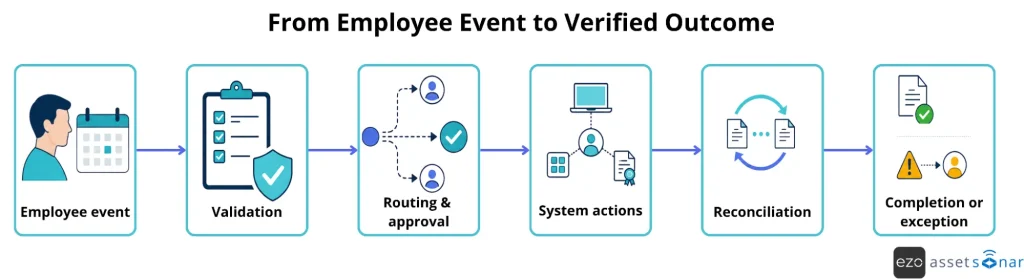
The workflow below shows how an employee event moves toward a verified outcome, while keeping exceptions visible and assigned instead of losing them between systems.
What is the best trigger for onboarding and offboarding automation?
The first automation decision is the trigger.
A new-hire workflow should not depend on IT finding out through a Slack message. An offboarding workflow should not wait until someone opens a ticket after the employee has already left.
| Trigger | Best for | Risk |
| HRIS update | New hires, terminations, role changes | Bad HR data can trigger wrong workflows |
| Service catalog request | Manager-submitted onboarding or offboarding | Still depends on timely submission |
| Identity lifecycle event | Access provisioning and deprovisioning | Can miss devices, tickets, and licenses outside identity |
For onboarding, the best trigger is usually a verified HRIS event or a service catalog request. For offboarding, the best trigger is usually a termination or last-day event from HR.
Validate the event at the workflow intake layer before any downstream task is created. Require an employee ID, event type, effective date and time, manager, department or cost center, location, worker type, and requested access.
Hold the workflow for review if the manager is missing, the effective date is invalid, or another active workflow already exists. Then route work by policy: privileged access to security, nonstandard hardware to procurement, remote returns to the recovery owner, and unresolved exceptions to the service desk queue.
What happens when an automation step fails?
Treat failures as workflow states, not side messages. Retry temporary connector or API errors according to a defined retry policy. If a connected system remains unavailable, pause additional calls and create a manual task after the retry limit.
Stop dependent tasks when a critical action, such as access revocation, fails. Alert the named owner, keep the workflow open, and record the request, response, timestamps, retry attempts, and final outcome. Do not reverse a completed security action because a later operational task failed.
How to automate IT onboarding without tool sprawl
IT onboarding automation should move a new hire from an approved employee record to ready-to-work status.
A practical workflow looks like this:
- Trigger: Start when HR marks the hire as approved or a standardized service request is submitted.
- Validate: Hold records missing the employee ID, start date, manager, location, worker type, or role.
- Apply a template: Map the role, department, location, and employment type to a baseline device, software, and access bundle.
- Create work: Open one parent workflow with child tasks for identity, devices, software, facilities, and approvals.
- Route conditions: Send elevated access to security, out-of-stock devices to procurement, and remote shipments to the logistics owner.
- Execute in order: Create the core identity first, provision dependent applications, and reserve the required device.
- Handle exceptions: Keep failed or delayed tasks open and notify the assigned owner.
- Reconcile and close: Confirm that the device, licenses, access, approvals, and completion timestamps match the employee record before marking the hire ready.
Each system retains its domain: HR owns employment data, IAM owns access state, MDM owns device configuration, ITAM owns custody, SAM owns licenses, and ITSM owns service work. The workflow layer coordinates those records and shows progress in one place. It does not merge or replace the underlying systems.
The goal is not to merge all systems into one tool but to connect the necessary records, enabling a new hire to be ready on day one without tool sprawl.
How to automate IT offboarding without missed access or lost devices
IT offboarding automation should move a departing employee from termination trigger to closure proof.
A practical workflow looks like this:
- HR records a termination, or a manager submits an offboarding request.
- The workflow identifies assigned devices, licenses, tickets, services, and access context.
- Access removal tasks are created.
- Devices are locked, recovered, wiped, checked in, or reassigned.
- Software licenses are revoked or reclaimed.
- Pending tickets and services are closed or transferred.
- Exceptions are routed for review.
- The workflow closes with a timestamped record.
Offboarding carries more risk than onboarding. A delayed onboarding step slows productivity. A missed offboarding step can leave access open, devices unrecovered, and licenses running. Remote and hybrid teams need extra clarity. The workflow should show who contacts the employee, who sends return labels, who tracks shipment, who checks the asset back in, and who approves exceptions.
Remote and hybrid teams need extra clarity. The workflow should show who contacts the employee, who sends return labels, who tracks shipment, who checks the asset back in, and who approves exceptions, making IT teams feel organized and in control.
Offboarding automation should answer:
- Which devices does this employee have?
- Which licenses are assigned?
- Which apps sit outside SSO?
- Which tickets or services are still open?
- Who owns each step?
- What evidence proves closure?
How should emergency and privileged offboarding work?
Use a separate high-risk path for involuntary departures, privileged users, service-account owners, and employees with access to sensitive systems. HR or security should trigger it at a controlled effective time.
Revoke privileged sessions, tokens, VPN access, administrator roles, and recovery methods before routine asset or license work. Do not send advance user notifications. Transfer ownership of shared mailboxes, service accounts, API keys, scheduled jobs, and encrypted repositories to a named owner. Keep the workflow open until access checks and ownership transfers are verified.
Offboarding automation should follow requirements already defined by security, legal, privacy, and control owners. Before configuring the workflow, determine which approvals, access changes, retention actions, exceptions, and timestamps must be recorded. Route deletion requests and other exceptions to the appropriate owner for review. This helps teams apply internal policies consistently and maintain evidence for audits without treating automation as proof of compliance.
Which systems should you connect before automating?
For each record, choose one authoritative source and one update method.
Document whether updates are event-driven, scheduled, or manual. Route conflicting updates for review instead of allowing one system to overwrite another system’s authoritative data silently.
| System | Onboarding role | Offboarding role |
| IAM/SSO | Creates and grants access | Revokes access and deactivates accounts |
| MDM/UEM | Enrolls and configures devices | Locks, wipes, or checks in devices |
| ITAM | Assigns hardware | Shows what must be recovered |
| SAM/SaaS | Allocates software licenses | Reclaims unused seats |
| ITSM | Tracks tasks, approvals, and SLAs | Tracks closure and proof |
| Finance/procurement | Supports purchasing | Measures recovered value |
When these records are connected, IT no longer has to rebuild the employee lifecycle from separate screens.
How to choose IT onboarding automation tools and approaches
There is no single automation method for every team. The right approach depends on systems, internal skills, audit needs, and workflow complexity.
| Approach | Choose it when | What your team still owns |
| PowerShell or scripts | You have stable, atomic administrative actions and a clear technical owner | Orchestration, secrets, logging, retries, testing, and succession |
| Low-code automation | You have a small number of low-risk cross-application flows | Flow governance, connector limits, failure monitoring, and ownership |
| IAM lifecycle tools | Access provisioning and deprovisioning are the primary requirement | Device custody, license reclamation, tickets, recovery, and operational proof |
| iPaaS | You need to connect many APIs and have integration engineering capacity | Mapping, connector monitoring, costs, and source-of-truth conflicts |
| ITAM and ITSM platform | You need connected asset, license, ticket, approval, and recovery workflows | Clean upstream data, connector configuration, and IAM or MDM action ownership |
An ITAM platform with built-in workflow automation is often the right choice for offboarding. It can identify assigned assets, create and route tasks, coordinate license reclamation, track exceptions, and retain audit evidence in one place. AssetSonar supports these steps through no-code workflows, reducing the need for custom scripts or separate integrations.
How to pilot onboarding and offboarding automation
- Select one role, location, and planned departure type.
- Record the current baseline for access removal, recovery, and manual effort.
- Configure test users, devices, licenses, and approval rules.
- Test the normal path plus missing data, connector failure, delayed approval, and unreturned equipment.
- Confirm every exception creates an owner, deadline, and escalation.
- Expand only after the process owner, security owner, and service desk approve the results.
Growing mid-market teams can begin with supported connectors and standardized role templates. Enterprises may also need integration monitoring, segregation of duties, regional workflow variations, and separate risk tiers.
How AssetSonar helps automate onboarding and offboarding without tool sprawl
AssetSonar acts as a central visibility and workflow layer across IT asset management and IT service management. It does not replace the systems that own employment, identity, or device policy.
Supported connections can synchronize user records through SCIM with identity providers such as Microsoft Entra ID and Okta, import device context from platforms such as Microsoft Intune and Jamf, and pass workflow events through webhooks and APIs.
Employee records, asset custody history, software and license context, service tasks, approvals, exceptions, and execution logs can then be monitored together. AssetSonar centralizes employee offboarding and integrates with HR, IAM, and MDM platforms to connect employment status, access state, device configuration, asset custody, and workflow evidence.
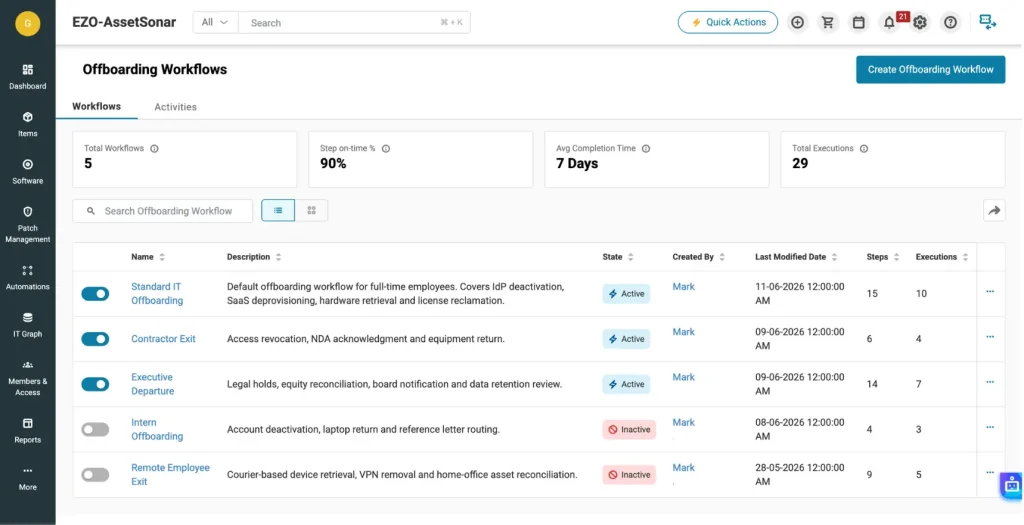
Turn offboarding tickets into workflow records
A ticket should not only describe the request. It should carry the work.
For offboarding, that means the ticket should show the employee, assigned devices, software licenses, access tasks, approvals, deadlines, child tickets, and status.
The parent ticket should not close while any required child task remains failed, pending, or excepted. Link the employee, devices, licenses, access tasks, ownership transfers, due dates, and approvals to the same workflow record so progress can be reviewed without reconstructing it from separate tools.
This is where a connected offboarding ticket helps: it brings the employee, assigned assets, licenses, and access tasks into one working record.
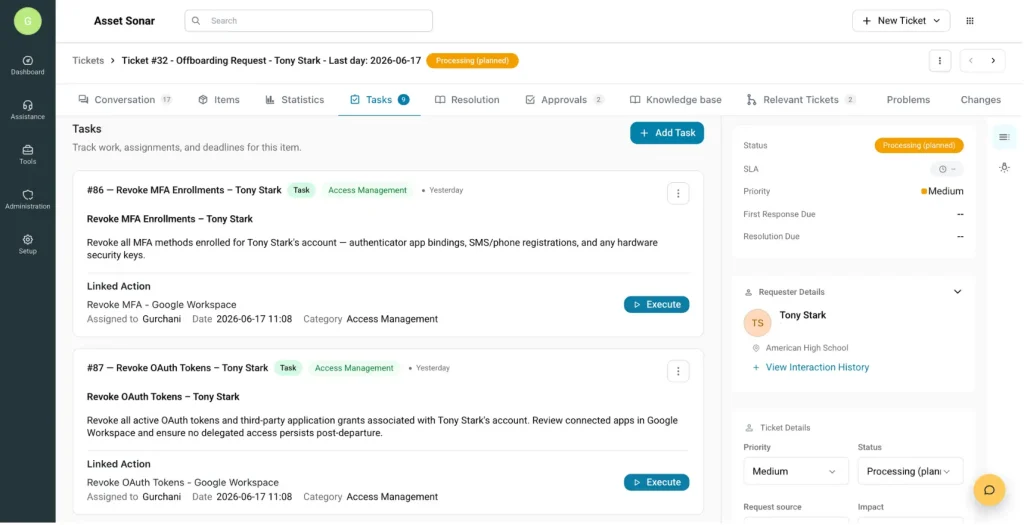
Track proof, exceptions, and completion
Offboarding is not complete when a ticket is created. It is complete when IT can show what was revoked, recovered, reassigned, approved, and still needs follow-up.
Good offboarding automation should track:
| Evidence | What it proves |
| System response or API log | The requested action and its result |
| Owner and timestamp | Who completed the step and when |
| Asset return evidence | Shipment scan, check-in, and inspection status |
| License confirmation | Whether the seat returned to the available pool |
| Access verification | Whether the account, session, or token was revoked |
| Approval history | Who approved standard and exception paths |
| Exception record | The unresolved item, owner, deadline, and escalation |
After tasks are assigned, IT still needs a live view of what is complete, what is blocked, and which offboarding steps need follow-up.
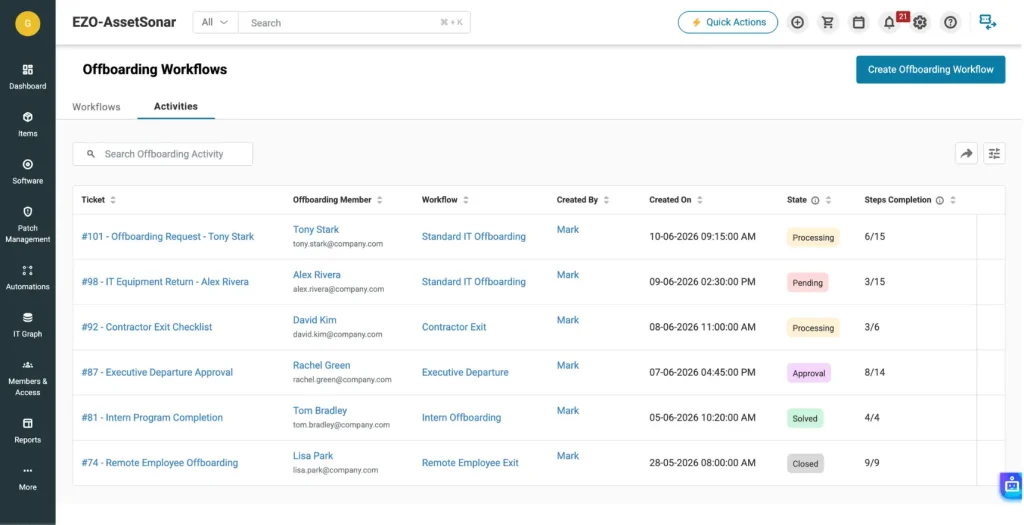
Customer proof: faster offboarding starts with asset visibility
Specialty Building Products shows why asset visibility matters during offboarding.
Before AssetSonar, the team relied on spreadsheet-based asset tracking. They struggled to know which employees had which equipment, where assets were located, and whether records were accurate.
After implementing AssetSonar, SBP gained visibility across 8,300 assets and roughly 4,000 users. The team also integrated AssetSonar with Intune, which helped pull device and user data into a unified view.
The result was faster offboarding. SBP cut offboarding time by 75% because IT could see which devices needed to be collected when employees left. The team also avoided about $5,000 in monthly hardware costs by recovering and reusing older equipment.
SBP’s results are specific to its environment, but the mechanism is broadly relevant: reliable custody data helps IT identify assigned equipment sooner, recover it faster, and reuse it instead of purchasing replacements. As Jeremy Schmit, IT Manager at Specialty Building Products, explained:
“When you can’t trust the data you’re looking at, it’s of very little use.”
At DMG Events, automating device assignment, record updates, and check-in or check-out work saves 5 to 10 minutes per onboarding or offboarding event. With approximately 30 events each month, the team reports saving more than 300 minutes monthly.
Common automation mistakes and how to avoid them
The biggest mistake is automating before mapping the process.
If the current workflow is unclear, automation only accelerates confusion.
| Mistake | How to avoid it |
| Automating before mapping the process | Document the trigger, owners, dependencies, success state, and failure path first |
| Trusting incomplete HR data | Validate required fields and hold incomplete records before downstream tasks begin |
| Automating accounts but ignoring assets | Make devices, licenses, tickets, and ownership transfers closure requirements |
| Running scripts without governance | Add logging, retries, alerts, testing, and a named owner |
| Treating every worker the same | Create variations for movers, rehires, contractors, interns, and privileged users |
| Closing the ticket too early | Prevent closure while required tasks remain pending, failed, or excepted |
Which onboarding and offboarding metrics should you track?
Track metrics that show whether workflows finish on time, require fewer manual interventions, and retain the required records. Define targets by risk tier and internal policy instead of treating external benchmarks as universal.
| Metric | Formula |
| First-day readiness rate | New hires with required devices, access, and software ready by the agreed cutoff ÷ total new hires × 100 |
| Access revocation SLA attainment | Departures completed by the policy deadline ÷ total departures × 100 |
| Device recovery rate | Devices returned by the due date ÷ devices due for return × 100 |
| License reclamation rate | Eligible seats returned to the license pool ÷ seats assigned to leavers × 100 |
| Audit evidence completeness | Closed workflows containing all required evidence ÷ total closed workflows × 100 |
| Manual touchpoints | Total human interventions ÷ total workflows measured |
| Unreturned asset value | Total replacement cost or net book value of overdue assets |
Choose either replacement cost or net book value for unreturned assets. Label and apply the selected valuation method consistently.
Targets should reflect the workflow’s timing and risk. For example:
- Standard onboarding should be completed by the internal cutoff before the employee’s start date.
- Planned offboarding access should be removed at the scheduled effective time.
- Emergency or privileged access should be removed at or before notification.
- Failed critical actions should be escalated immediately.
Use these metrics to identify bottlenecks, not simply report activity. Low device recovery may indicate unclear custody or return ownership. Slow license reclamation can reveal incomplete software visibility. Repeated approval delays may point to unclear routing or decision ownership.
How to build the business case for automation
Use your current workflow data rather than generic ROI claims.
Annual benefit = administrative hours saved + avoided first-day delays + recovered asset value + reclaimed license costs + reduced audit effort
Net value = annual benefit – implementation and ongoing maintenance costs
Note: This is an example formula and may vary by business.
Keep risk reduction separate unless finance approves a defensible monetary estimate.
Conclusion
IT onboarding and offboarding automation works when each system keeps its authority, and the workflow connects them through clear triggers, validation, routing, exception handling, and proof. Start with one high-volume or high-risk path, test both the normal workflow and common failures, and expand only after ownership and escalation rules are clear.
Before launch, confirm that:
- every required field has a source and validation rule;
- every task has an owner, deadline, and failure path;
- access, assets, licenses, approvals, and exceptions are reconciled before closure.
The next step is to map one current workflow from trigger to evidence, measure its baseline, and run a controlled pilot.






