
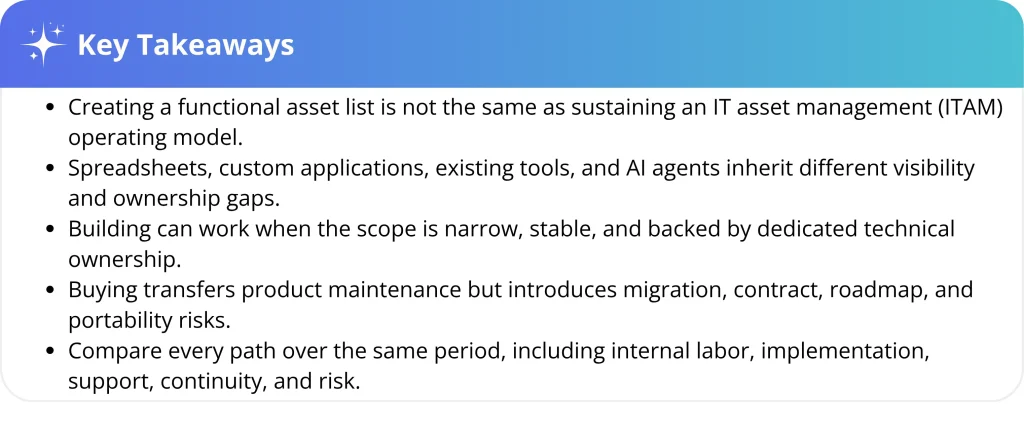
Over the last 12 months, we followed nine IT teams that faced the same decision: buy an IT asset management platform or build their own. Some relied on spreadsheets, while others created custom databases or SharePoint lists. One team even explored using AI agents to automate asset management.
Although their approaches differed, similar challenges emerged as their environments grew. Records became harder to maintain, workflows required more manual oversight, and responsibilities that initially seemed minor demanded ongoing attention. Their anonymized experiences reveal what IT leaders should consider when comparing an internal build with a purpose-built ITAM platform. We draw insights on the challenges mid-market IT teams face when building an ITAM tool from scratch rather than using a pre-built one.
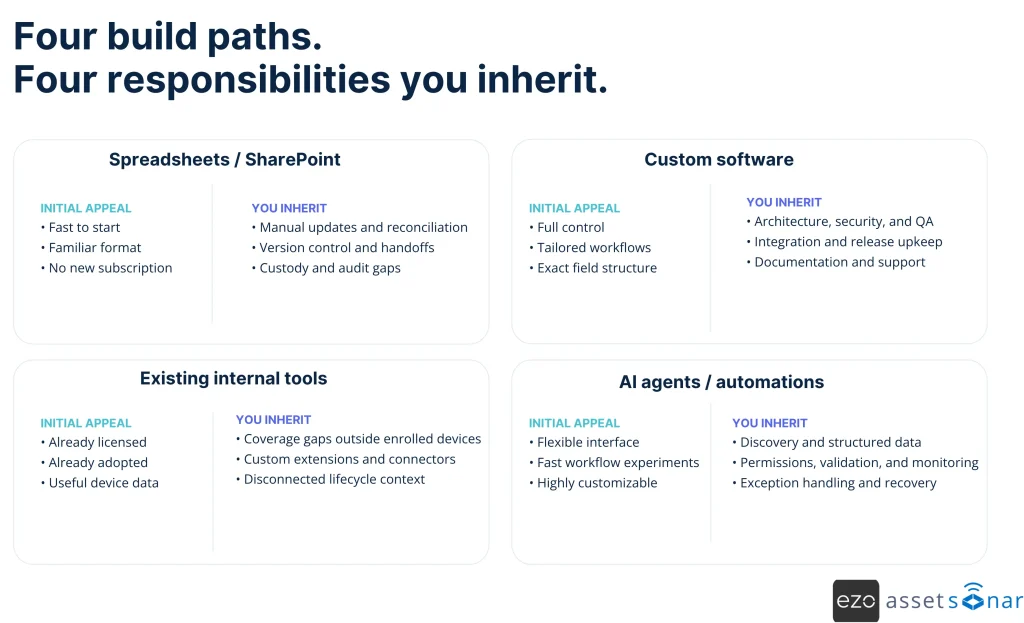
The four ways teams try to rebuild ITAM
1. Spreadsheets and SharePoint lists
This may seem like the fastest route from no inventory to basic visibility. The fields often feel familiar, the format is relatively flexible, and most people can start using it with little training.
The first crack appears when the inventory must reflect continuous change. Assets move, employees leave, licenses renew, and several people edit the same records. Someone then has to compare the sheet with data from a mobile device management (MDM), an identity provider, a purchasing system, a service desk, and a physical audit. The spreadsheet still stores rows. It does not reconcile the truth between them.
The reliance on manual updates contributes to inaccuracies and a lack of coherence. A mistyped serial number or a missed transfer can remain in the record until someone has a reason to check it.
2. A custom database or full-stack application
A custom build can provide greater flexibility and tailored control. In a healthcare scenario, an internal system spanned assets, users, locations, licenses, assignments, warranties, and service history. On paper, it could closely mirror the organization’s specific operational workflow.
That flexibility also adds to administrative and operational workload.. The business must maintain the data model and interfaces while handling permissions, integrations, security, testing, documentation, and support. An upstream API change can break a connector, while the departure of the engineer who built it can leave the remaining team without the context needed to repair it quickly. Full control, therefore, also means full accountability.
3. Existing internal tools
An existing RMM, MDM, Jira project, or service desk may already contain useful service data. Extending it may feel efficient because the license and user adoption are already in place.
The limitation here is usually scope. An endpoint tool may provide detailed data for enrolled devices while missing hardware outside the standard process, such as printers, monitors, and accessories.
A ticketing tool may work well for recording an assignment, but it does not automatically become a lifecycle, license, custody, and audit system.
4. AI agents and internal automations
AI agents are the newest of these build paths. They can make it easier to retrieve data from the existing asset records and support automated workflows. For example, an IT team can query assets in a conversational way, generate reports, or automate handoffs without having to design each screen individually.
AI can serve as an interface or coordination layer, but its value depends on the integrity of its inputs. Beneath the surface, the system must reconcile sources, resolve identities, enforce access, and track change. The challenge is not posing questions, but ensuring that the underlying data is reliable enough to produce accurate answers.
Each route starts with a practical appeal. However, the longer-term question is which operating responsibilities the team inherits once the first version goes live.
Where in-house ITAM gets hard: five recurring failure modes
The nine evaluations do not prove that every internal build fails. They surface five operating burdens that deserve explicit treatment before a team commits.
Failure mode 1: The RMM coverage gap
A pattern we see repeatedly is a team with strong endpoint management but incomplete asset visibility. Managed laptops may appear automatically. A monitor in a home office, a spare phone in a cabinet, or an unenrolled device may not.
The gap can remain invisible until an audit or recovery request forces a full count. IT then has to reconcile tool exports, purchase records, employee confirmations, and a manual inventory. If the sources conflict, someone must decide which is authoritative and document the correction. This additional reconciliation step consumes valuable IT time and introduces another opportunity for human error.
This is why asset recovery is more than collection. NIST’s Cybersecurity Framework 2.0 calls for maintained inventories of hardware, software, systems, and services along with lifecycle management. The operative word is maintained, not merely created.
Failure mode 2: The scale break
In a financial services evaluation, a simple internal database was deemed sufficient for the organization’s current stage. The phrase “current stage” highlights the real risk: a system can suit today’s asset count yet remain ill-prepared for tomorrow’s operating model.
Complexity does not grow only with headcount. It grows with the number of locations, hybrid work, asset types, compliance needs, approval paths, and change frequency.
A spreadsheet that serves 75 office-based employees may become fragile at 300 hybrid employees, even if the company does not consider itself enterprise-sized.
This leads to internal teams facing a difficult choice. They can build features early and carry the burden of complexity, or wait and rebuild when the need becomes urgent.
Designing for extensibility from day one is possible, but it increases upfront costs and requires better product planning. Similarly, creating functionality on the spot often leads to technical debt and less cohesive system design over time.
Failure mode 3: The resource dependency
An internal tool often has an unofficial owner: the engineer who designed its schema and connectors and understands the undocumented dependencies behind them and the scheduled jobs. If that person changes roles or leaves, the organization inherits a system with limited documented context.
Building in-house may start with a generalist, but reliable operation requires specialists across engineering, integrations, security, testing, and support. A mature vendor has those functions in place, providing maintenance, implementation guidance, and ongoing support.
Failure mode 4: The audit evidence gap
An internal inventory can support day-to-day tracking without preserving all the evidence an audit may require. A current record shows the latest status. It may not show who changed it, when custody moved, whether a return was verified, or how a software entitlement was reconciled.
When that history is not captured as part of the workflow, IT may have to reconstruct it from tickets, emails, purchasing records, and employee confirmations. If sources conflict, someone must resolve the discrepancy and document the final position.
As an organization matures, audit readiness depends less on producing a list on demand and more on maintaining a consistent history of changes, approvals, and exceptions.
These controls can also support broader compliance requirements. They can vary by organization but often depend on controlled access, traceable changes, retained evidence, and repeatable reporting.
Failure mode 5: The AI infrastructure gap
An educational organization wanted AI agents and automation to help manage assets for a very large user population. The ambition was sound. The immediate gap, however, involved reliable hardware discovery through its MDM environment.
An AI agent cannot determine which device is missing if the source inventory is incomplete. Without reconciled user, entitlement, and usage records, a license cannot be safely reclaimed. Moreover, it cannot produce defensible audit evidence if changes lack consistent history.
This foundation remains difficult across the market. In Flexera’s 2026 survey of more than 500 IT professionals, 78% of ITAM teams named maintaining an accurate inventory their leading software asset management priority. This means that AI can make a good infrastructure easier to use, but it cannot make the infrastructure optional.
What buying changes beyond the software
Buying does not remove IT’s responsibility for process design, governance, or adoption. It changes who owns the product work that goes into them.
An internal system needs ongoing ownership across discovery, data design, integrations, security, QA, releases, documentation, training, and support. A company can hire those specialists, but doing so creates an ongoing staffing and budget commitment. Continuity may also suffer if critical system knowledge remains with people who later change roles or leave.
A mature vendor, on the other hand, already has specialists who maintain the platform and support implementation after go-live. That standing team provides continuity across implementation, maintenance, updates, and support without requiring the organization to staff each function internally.
Asset and service work should not operate as separate systems. Service requests, incidents, onboarding, and offboarding all depend on accurate content and context about the users, devices, software, and lifecycle events involved.
Connecting ITAM with ITSM through a shared model or IT graph gives both functions that context. A complete IT management platform can then use integrations and workflow automation to keep records synchronized, reduce manual handoffs, and maintain a shared source of truth.
The real cost of build vs. buy IT asset management
“Build” is not a single project, and “buy” is not a single subscription. Compare both options over the same period, ideally three years, and include the work required to keep the system useful.
A recurring pattern in our evaluations was an uneven comparison: the price of a dedicated platform was measured against an in-house option treated as free. Additional costs such as staff time, maintenance, support, upgrades, reconciliation, and audit risk were excluded from the calculation.
The table below shows how the main costs and responsibilities are allocated across each path.
| Cost area | Build internally | Buy a purpose-built platform |
| Direct spend | Development, infrastructure, and tools | Subscription, implementation, and add-ons |
| Data and integrations | Build, reconcile, and maintain | Migrate, configure, and connect |
| Product upkeep | Fixes, security, testing, and releases | Vendor-led |
| Support and training | Internal function | Shared with the vendor |
| Change and scale | Further development | Reconfiguration or plan changes |
| Opportunity cost | Engineering and IT capacity | Evaluation and administration time |
| Risk | Data, audit, and continuity | Vendor, migration, and adoption |
Buying also offers evidence before commitment. Teams can test a working product, review how it integrates with their existing environment, and examine proof from current customers. An internal build is usually judged from requirements and estimates before comparable evidence exists. That does not make every vendor a fit, but it gives buyers more to evaluate before making a buy-versus-build decision.
For a manual system, a practical annual cost model is:
Administration time + reconciliation time + employee delays + asset losses + license waste + audit effort + expected security exposure
For example, if two IT employees each spend four hours per week reconciling asset records, that represents 416 hours of annual labor before accounting for audit preparation, support, asset losses, or license waste. Multiply those hours by loaded labor cost, then add documented losses and probability-weighted risk. Model the purchased option with equal care by including subscription, migration, implementation, training, and administration.
Convert time to loaded labor cost. Measure asset and license losses from actual records where possible. For risk, use probability multiplied by likely impact instead of inserting a dramatic worst-case number. Apply the same discipline to the buy case, including implementation, training, and operational modules.
Then calculate return on investment (ROI) using benefits both options can credibly produce:
ROI = [(Measurable Benefits – Total Cost of Ownership) / Total Cost of Ownership] × 100
Building can make sense for narrow, stable, or highly specialized requirements when dedicated engineering ownership is available. Open-source, self-hosted, and hybrid approaches offer a middle ground but leave different levels of maintenance with the customer. Buying transfers product upkeep, but teams must still assess migration, adoption, renewal terms, roadmap dependency, support, and data portability.
Download the 15-Question Build vs. Buy ITAM Checklist before you commit.
What IT teams actually need from an IT asset management system
Before estimating an in-house build, scope the full operating model and required features of IT asset management software rather than the initial asset list.
Those features matter most when discovery and integrations create shared context that can drive dependable IT workflows.
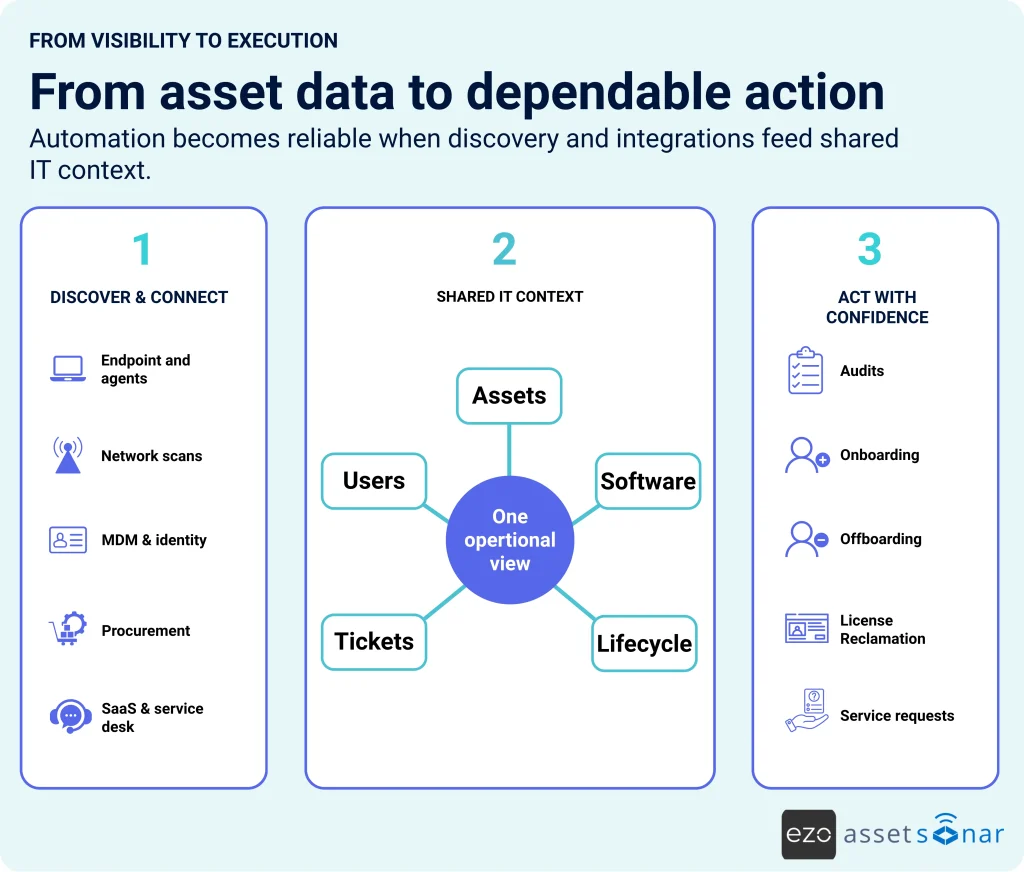
A connected ITAM platform extends beyond an asset list. Each capability below represents a separate build and maintenance responsibility.
| Capability | What building actually requires | What to verify when buying |
| IT Asset discovery | OS-specific agents, network scans, MDM connectors, peripheral and software discovery, and scheduled synchronization | Cross-platform agent and agentless discovery, network and MDM coverage, physical intake, and defined sync intervals |
| Hardware lifecycle management | Procurement, deployment, custody, checkout, reservations, maintenance, depreciation, recovery, disposal, and mobile scanning | Workflows from purchase through assignment, service, recovery, repurposing, and retirement, with barcode or RFID support |
| Software license management | On-prem and SaaS discovery, software normalization, entitlements, usage, spend, renewals, reclamation, and audit logic | A unified software catalog, license position, usage, renewals, reclamation, shadow IT visibility, and policy actions |
| Shared IT context and CMDB | CI schema, relationships, deduplication, change history, custody records, and service-desk links | Current relationships across assets, users, software, locations, tickets, and lifecycle events |
| Audit and compliance records | Role controls, timestamped history, custody verification, physical audits, alerts, and evidence exports | Traceable changes, repeatable audits, compliance records, configurable reports, and alerts |
| Integrations | Connectors for identity, MDM, SaaS, procurement, and service-desk tools, plus ongoing API upkeep | Supported integrations, documented synchronization, APIs, and vendor-maintained connectors |
| IT service management | Ticketing, SLAs, service catalog, routing, approvals, knowledge, and asset context | Asset-linked tickets, service workflows, SLAs, approvals, self-service, and reporting |
| Patch management | CVE mapping, OS-specific deployment, scheduling, exceptions, and compliance reporting | Device-aware vulnerability context, cross-platform patching, deployment controls, and compliance dashboards |
| Workflow automation | Triggers, conditions, branching, connectors, data transformation, monitoring, and failure handling | Configurable workflows for onboarding, offboarding, approvals, record updates, and external actions |
| Dashboards and reporting | Data pipelines, KPI definitions, dashboards, alerts, permissions, scheduling, and exports | Configurable dashboards, alerts, lifecycle, utilization, audit, license, and service reporting |
Together, these capabilities show why recreating basic IT asset tracking is not the same as sustaining a connected ITAM operating model.
This is the distinction AssetSonar is designed around. Its IT Graph connects assets, users, software, tickets, and lifecycle data in shared context. Workflow automation handles repetitive handoffs. Automated employee offboarding helps bring device recovery, license reclamation, and custody into a traceable process. Integrations with systems such as Microsoft Intune, Jamf, Okta, Jira, and Zendesk connect that context so the offboarding process is smooth and reliable.
The value is no longer a feature list. It is transferring product maintenance to a vendor while retaining IT’s control over its processes and data. A capable vendor should help map requirements, configure the system around real workflows, and remain accountable for the product after implementation.
That operating support produces measurable results. Specialty Building Products uses AssetSonar to manage over 8,000 assets for roughly 4,000 users. The company’s IT team reports that Intune automation saves several hours each week, offboarding is about 75% faster, and recovered or repurposed equipment avoids roughly $5,000 in monthly spending.
IT Manager Jeremy Schmit also said, “The team has been great and very responsive. We’ve never felt like we were on an island. Support has made a big difference.”
The better question is not “Can we build it?” but “Can we sustain it?”
Most mid-market IT teams can recreate basic IT asset tracking processes. The more useful question is whether they can sustain accurate visibility, connected workflows, support upgrades, and audit evidence at a lower cost than a dedicated system.
If you are considering an in-house ITAM build, price the maintenance phase before approving the build phase. Identify every data source, integration, owner, expectation, and future requirement. Then compare the three-year cost and expected return against a purpose-built alternative.
That comparison may still support a build. It may also reveal that your team’s highest-value work lies elsewhere.