






Live webinar · Nov 19, 1 PM EST: SolarWinds, PHP, and the Software Security Wake-Up Call

CDW Integration with AssetSonar

Native

Procurement

Turn CDW Orders Into Tracked Assets and Licenses

Each CDW order creates a purchase order in AssetSonar, including the assets, stock, and licenses it covers.

No Credit Card Required

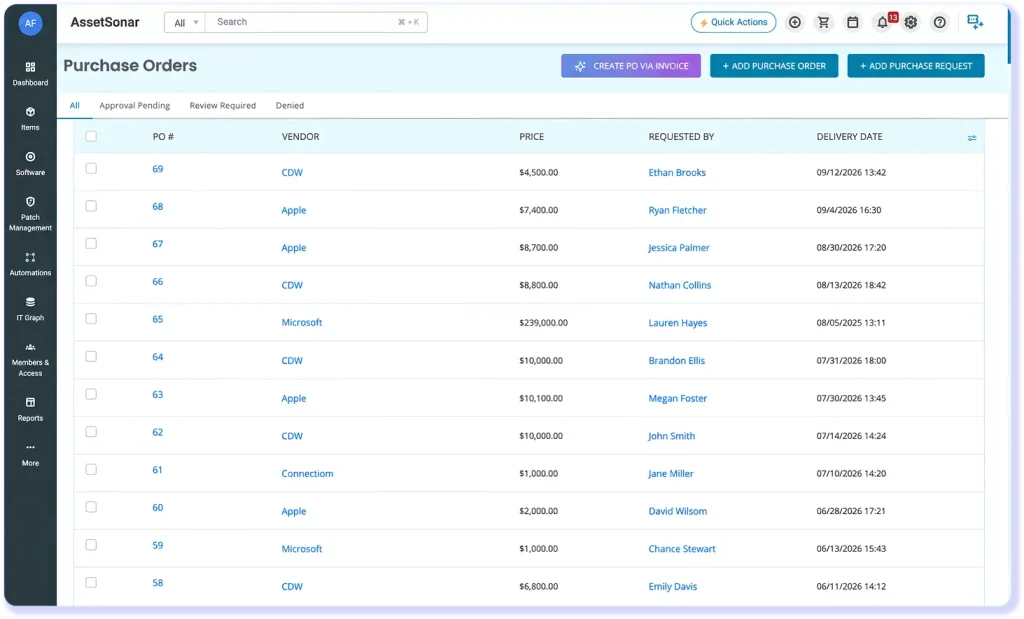
AssetSonar Purchase Orders list showing CDW orders, prices, requesters, and statuses.

Connect CDW Orders to Your Asset Records

CDW is a technology reseller that provides mid-market IT teams with hardware and software. With the CDW integration, AssetSonar receives each order’s item details, costs, dates, and requester details, and links them to the purchased assets, stock, or licenses.

Track Every CDW Purchase Order

Each CDW order creates a completed purchase order linked to hardware assets, asset stock, or software licenses in AssetSonar, keeping purchases and costs connected.

Eliminate Manual Purchase Entry

For each purchase order CDW sends, AssetSonar creates a completed PO with item, pricing, and requester details, plus license records for software orders, so IT teams skip manual data entry.

Keep Purchase Costs Audit-Ready

Non-editable CDW purchase orders keep costs, dates, and vendor details unchanged, so IT and finance can trace hardware and software spending to the original record.

See How CDW Purchases Flow Into AssetSonar

PURCHASE TO ASSET RECORD

Auto-Create Records From CDW Purchases

Each CDW order creates a completed purchase order in AssetSonar and links it to the items purchased. Hardware with a serial number becomes an asset with its manufacturer and model, while items without one become asset stock with quantity. Software purchases create license records with seat counts and costs, so everything stays tied to the original order.
AssetSonar CDW vendor page showing tracked hardware assets and software licenses with purchase details.
AssetSonar Sync Logs showing CDW purchase order, asset, stock, and license sync activity.

ORDER SYNC AND MONITORING

Capture CDW Orders Without Scheduled Imports

CDW posts each order to AssetSonar through a webhook as it’s processed, so purchase information stays current without waiting for scheduled syncs. If CDW isn’t already listed as a vendor, AssetSonar adds it on the first order. The Sync Logs tab under Purchase Orders lets you review each sync’s status and view the specific error details whenever one fails.

MATCHING AND DATA INTEGRITY

Keep CDW and Discovery Data on One Record

When a CDW order matches the serial number of a device tracked by an agent or MDM, AssetSonar adds purchase details and links the order to the record without creating a duplicate. CDW supplies purchase data, discovery supplies hardware details, and neither overwrites the other. The purchase order stays locked, so auditors can trace the original cost to CDW.
AssetSonar MacBook record showing BIOS serial number and CDW purchase information.

Trusted by High-Performing Teams

Bring New CDW Purchases Into Your ITAM Workflow

Set Up the CDW Integration in Five Steps

Requirements

Setup in simple steps

Other Integrations For IT Asset Lifecycle

Automatically sync Connection purchase orders with AssetSonar to track hardware purchases, software licenses, and costs.
Sync Android, iOS & Windows devices with AssetSonar for real-time visibility and compliance.
Connect Iru (formerly Kandji) with AssetSonar to automate Apple device tracking and enforce security policies.
Import endpoint data into AssetSonar to automate ITAM workflows and support compliance.

Read More on CDW Integration

Frequently Asked Questions

The integration brings CDW purchase information into a completed purchase order in AssetSonar. In addition to item names, quantities, and pricing, the order includes the CDW number, delivery city, order and purchase dates, requester, invoice number, and shipment terms. Hardware and software lines are linked to the resulting asset, asset stock, or license records. This lets IT and finance see what was ordered, who requested it, what it cost, and which purchase order the record came from.
The integration syncs one way, from CDW into AssetSonar. CDW sends order information as it is processed; changes made in AssetSonar are not sent back to the reseller. The resulting purchase order is marked Source: CDW and Status: Completed, with those values preserved in the record. If the serial number matches a device previously found by an agent or MDM, the CDW feed provides the purchasing fields, while discovery continues to supply the device’s hardware details and specifications.
AssetSonar does not pull orders on a schedule. CDW sends each order as it is processed, and AssetSonar creates the purchase order when the order arrives, with no import or manual refresh required. To confirm that an order arrived, open Purchase Orders and select the Sync Logs tab. It lists the source, time, and status of each sync attempt, and displays the error on a failed attempt. Administrators can check this log after each CDW purchase to confirm receipt.
You need administrator access in AssetSonar and your CDW account number to enable the integration. AssetSonar provides the endpoint, username, and password CDW uses to post orders, so customers don’t need to generate API credentials. After enabling CDW under Procurement Integration and entering the account number, inform your CDW representative. The representative coordinates the CDW-side activation with the AssetSonar team; saving the setting alone does not complete that process.
No second asset record is created when an incoming CDW order matches a device already in AssetSonar by serial number. Instead, the existing device gains the CDW purchase details and a link to that order. The sequence works the other way as well: if CDW creates the asset first, an agent or MDM can later recognize the serial and enrich that record with discovered hardware details. That serial-number match keeps purchase information and discovered hardware details together on one device record.
CDW purchase information is available in the completed purchase order and the linked asset or software license records. Open Purchase Orders and select the relevant CDW order to view it. For hardware, open the asset’s Purchase Information tab to review its purchasing details. For software, open the license record to view the linked purchase order, seat count, and pricing. IT and finance teams can use these records to trace purchases without switching between separate order documents.
A CDW software purchase creates a license record with its name, seats, per-seat price, total cost, and linked purchase order. If CDW later sends a purchase for the same license, AssetSonar updates the existing license and attaches the new order, including upgrades, downgrades, or renewals. A CDW license can also be merged with one found through a SaaS integration when seat counts match. CDW then supplies cost data, while the SaaS integration provides entitlement information.
AssetSonar keeps purchase orders created through the CDW integration locked to protect procurement data integrity, including the Source: CDW value and Completed status. This preserves the original costs and invoice information for audits. For additional items or purchases from another vendor, IT teams can create a separate manual purchase order in AssetSonar using the full field set. That keeps CDW’s purchase information intact while giving IT teams the flexibility to record other purchases.

Trace CDW Purchases in AssetSonar

Keep new CDW orders tied to the items purchased and their costs, from hardware to software licenses, so IT and finance have purchase context.