




AssetSonar Integrations Google Workspace
Google Workspace Integration With AssetSonar
Native
Identity Management
Sync Your Directory, Run Offboarding Actions
No Credit Card Required
Google Workspace Identity, Connected to IT Assets
Google Workspace holds an organization’s people, their access, and the applications they use. AssetSonar imports members and cloud software from it, and sends offboarding actions back to Google when someone leaves.
Import Members From the Directory
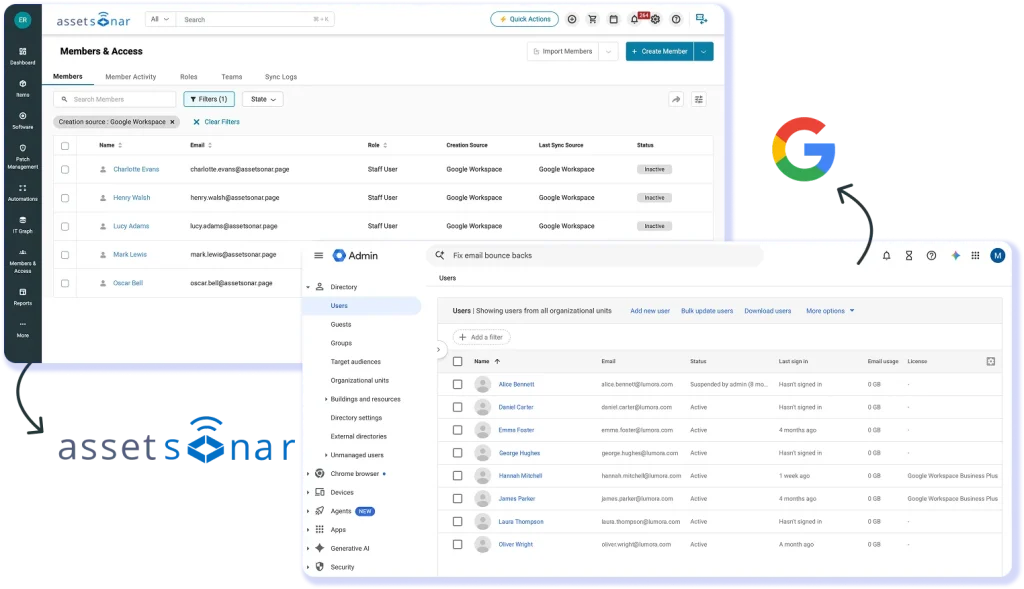
Manually recorded members often drift from Google Workspace with each hire and move. With the integration, members arrive from the directory with default settings applied.
Close Access Gaps When People Leave
When a device returns and account cleanup runs in separate tools, session and app-grant steps are easy to miss. Google offboarding actions run directly from the member record, avoiding missed steps.
See the Cloud Software People Use
Software owners lack user data when apps used through Google Workspace are excluded from the inventory. Apps are recorded as software records, and auto-entitlement maps licenses.
Manage People and Their Apps From Hire to Exit
DIRECTORY USER SYNC
Import Members From Your Google Directory
OFFBOARDING ACTIONS
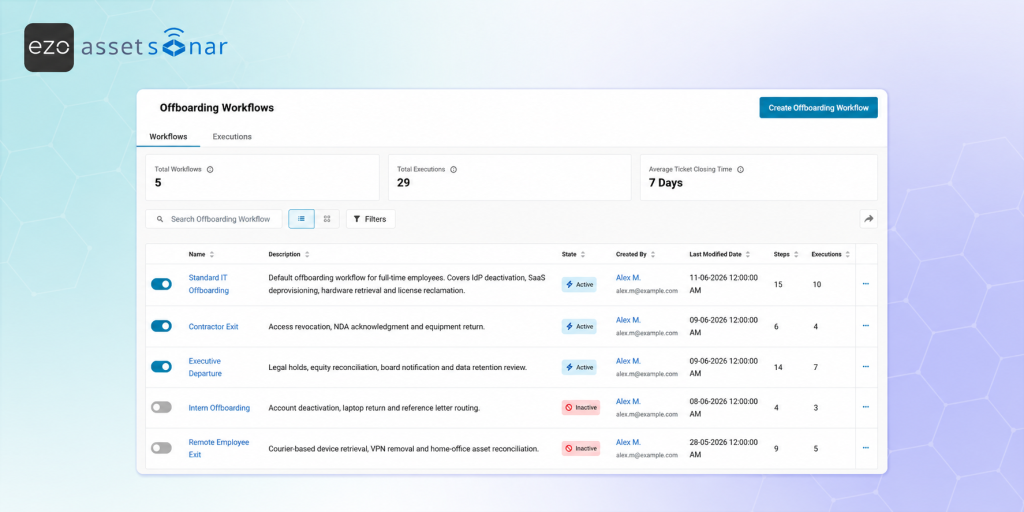
Finish the Employee Exit Inside Google Workspace
CLOUD SOFTWARE DISCOVERY
Turn Google Apps Into Software Records
Trusted by High-Performing Teams


Run Google Offboarding From One Member Record
Set Up the Integration in Three Parts
Requirements
- Directory sync, sign-in, and cloud software
- A Google Workspace admin to grant Users access, plus optional Domains and Organizational Units.
- AssetSonar admin access; custom attributes added in Members first.
- Offboarding actions
- Super Admin access and rights to create Google Cloud Console service accounts.
- Members with primary emails matching Google Workspace users.
Set up in simple steps
- Directory sync, sign-in, and cloud software
- Enable Google Workspace Users Integration in Settings > Integrations; click ALLOW PERMISSIONS.
- Map attributes, click Update, then run Sync with Google Workspace > Import New Members.
- Enable Google Workspace Cloud Software Integration, click Add Credentials, then click Connect and Update.
- Offboarding actions
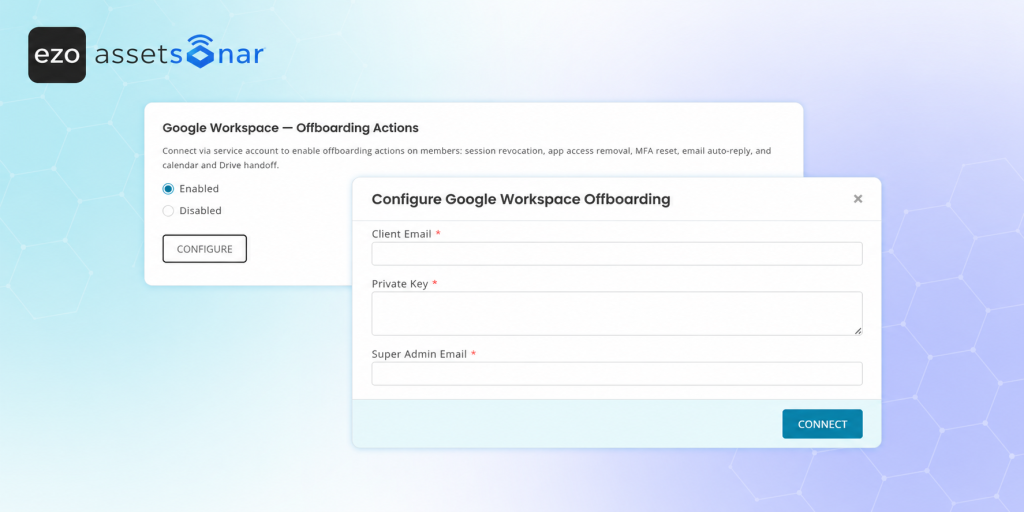
- In Google Cloud Console (IAM & Admin > Service Accounts), create one with Domain-Wide Delegation and a JSON key.
- A Super Admin authorizes its Client ID in the Google Admin console.
- Enable Google Workspace Offboarding Actions under User Provisioning & SSO, add Client Email, Private Key, and Super Admin Email, and Connect.
Other Integrations in Identity Management
Read More on Google Workspace Integration
Frequently Asked Questions
Three flows carry data, and each is enabled on its own. The directory sync brings member records with mapped basic, address, and custom attributes. The cloud software flow brings applications as software records, with associated users and each user’s last login. Offboarding actions run from AssetSonar in Google Workspace for a departing member, and AssetSonar records the status and any error details.
Directory and cloud software imports are one-way, from Google Workspace into AssetSonar, so Google Workspace stays the source of record for the imported fields. Offboarding actions are separate commands: AssetSonar runs named actions in Google Workspace for a departing member, acting as the Super Admin you nominate, and records the status Google returns. Each flow has its own settings and credentials, so a team can start with the directory sync and add cloud software or offboarding later.
It depends on the flow. The directory sync runs on demand through Members > More > Sync with Google Workspace > Complete sync, or every 24 hours once you enable the daily sync in the integration settings. The cloud software flow offers the same optional 24-hour schedule. Offboarding actions are not a sync: they run when an administrator selects them on a member record. Google processes Drive transfers asynchronously, so Transfer Drive Data can take longer to complete than the other five actions.
For the directory sync, a Google Workspace administrator grants access through Google: Users is required, and Domains and Organizational Units are optional filters. For cloud software, an administrator signs in through Add Credentials and grants the permissions Google requests. Offboarding actions need a service account with Domain-Wide Delegation, authorized in the Google Admin console for the scopes in the setup guide, acting as the Super Admin Email you enter.
Yes. Single sign-on and user provisioning, which cover the directory sync, Google sign-in, and offboarding actions, are included in both AssetSonar plans: ITAM at $0.75 per asset per month and ITAM (with ServiceDesk) at $1.08, billed annually, with packages from 100 assets. Seats and agents are unlimited on both plans, and there is no per-user charge because pricing is per asset. No upgrade is needed to connect it.
Existing members are matched to their Google Workspace users rather than added twice when their primary email addresses align, and people who are not in AssetSonar yet are created. Members first added through SAML or by hand (CSV or single entry) are merged when the directory sync brings them in. A member without a primary email address cannot be matched, and offboarding actions need that same address, so reconcile primary emails and test a small import before the first full sync.
Yes. AssetSonar supports several login options, including Google Workspace, Microsoft, LDAP, and SAML. Members choose Sign in with Google and use the Google Workspace account they already have. This is a login option rather than a SAML configuration, so it sits apart from the SAML provider setup. Members imported through the directory sync can sign in this way, and Google keeps applying its own sign-in policies before they reach AssetSonar.
Yes. Domains and Organizational Units are optional filters on the directory sync, so a large tenant imports only the people it selects, and a Refresh Domains button re-reads the domain list. Attribute mapping sets which basic, address, and custom fields fill each member record, such as EmployeeID and work phone. A custom attribute must exist in the Members module before it can be mapped. Imported members take the Staff User role by default, and unmatched roles can go to a default role you set.
Chromebooks and mobile devices are recorded from the separate Google Endpoint Management integration, which imports Chrome OS devices and mobile devices. Other supported devices can come from a compatible MDM integration, the ITAM Agent, or a network discovery scan. This integration brings in the people and their applications, and the device integrations bring in the hardware itself, so devices can be checked out to the members this integration imports and tracked under IT asset custody.
Yes. Each offboarding action is recorded on the member detail page with the action taken, when it ran, who initiated it, whether it succeeded or failed, and any error or status details. When an employee offboarding workflow is configured, the asset side of the same exit, such as device recovery and license removal, is tracked there too, so an auditor reviewing a departure finds the account actions and the steps in AssetSonar rather than piecing them together from two consoles.
Yes, and connecting AssetSonar changes none of them. Google enforces multi-factor authentication and your access policies on its own side, before a person reaches AssetSonar, so the controls configured in the Google Admin console keep applying to Google sign-in. Separately, AssetSonar offers its own two-step authentication for accounts that sign in directly rather than through Google, which suits administrators who keep a direct login alongside their Google Workspace account.