
Key Takeaways:
- An inventory can contain thousands of records and still overlook equipment, duplicate devices, or show ownership details that no longer reflect reality.
- Audit readiness depends on completeness, accuracy, and traceability. A strong discovery or record-quality score alone cannot establish all four.
- Missing assets, stale records, inconsistent identifiers, and unrecorded handoffs are different problems that require different evidence.
- Trustworthy records can be corroborated through discovery, procurement, custody, lifecycle history, and, where appropriate, physical verification.
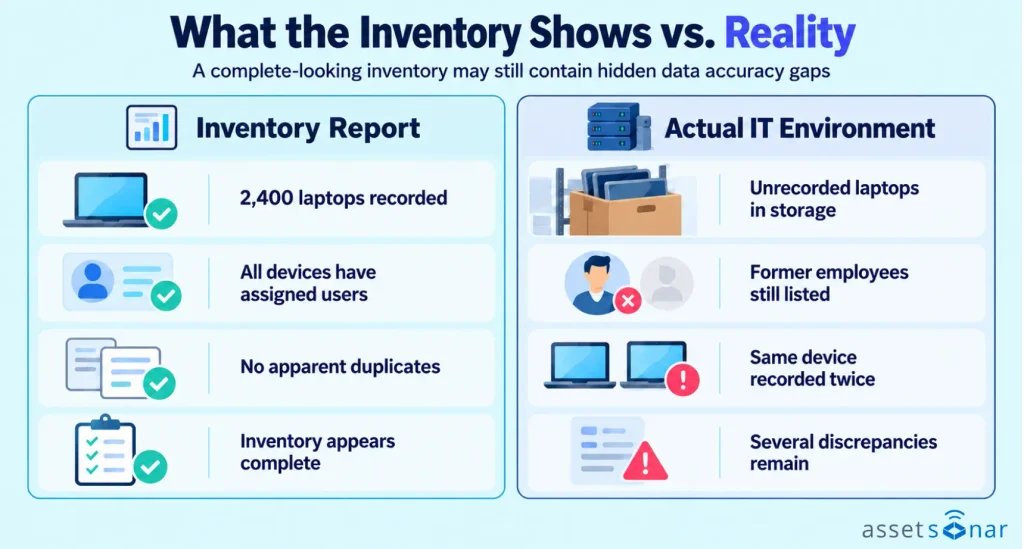
A report shows 2,400 company laptops. Every row has a name, serial number, and assigned user. Yet a storeroom contains unopened devices missing from the report, and two former employees still appear as custodians. Which number would the organization defend in an audit?
The report may look complete, but it fails to account for every device and accurately reflect who is responsible for it. Data gaps rarely appear as dramatic system failures. They accumulate through ordinary events: a device changes hands, a replacement is enrolled twice, or a purchased laptop never reaches the central register.
An IT asset inventory audit exposes these inconsistencies. Understanding their origins helps IT teams spot unreliable records before they affect security reviews, financial reporting, or asset accountability.
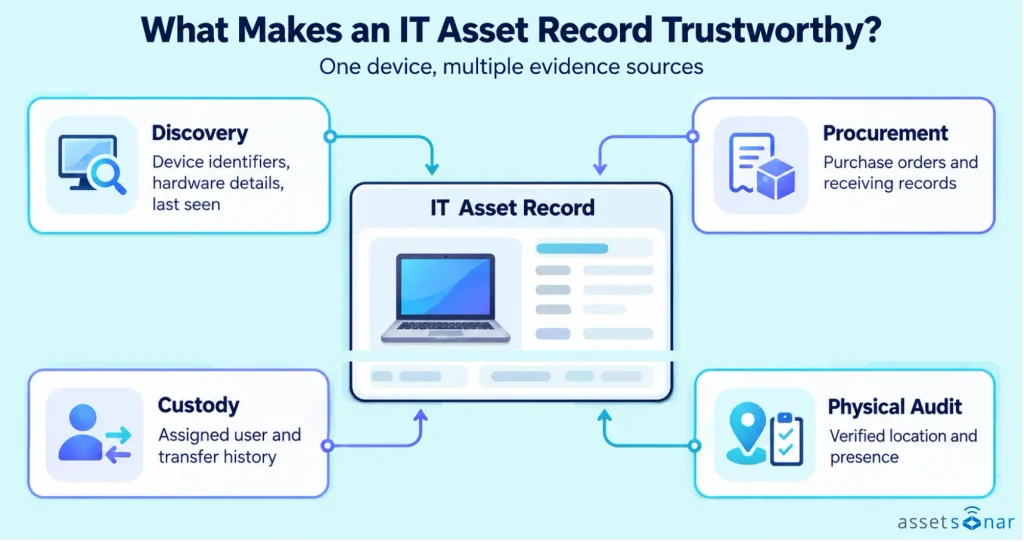
A complete-looking asset database can still be inaccurate
An inventory is often judged by its size or apparent completeness. A dashboard shows a device count, populated columns, and recent sync timestamps that suggest everything is current. None of those signals independently prove that the underlying population is correct.
Four distinct qualities determine whether the information can be trusted:
- Completeness: Every relevant asset is represented.
- Accuracy: Details in each record match the actual asset.
- Timeliness: Those details still reflect the asset’s current circumstances.
- Traceability: Evidence explains how the record reached its current state.
Consider two laptops. The first appears in the register, but its employee transferred it without updating custody. The second sits in a storeroom and has never been enrolled or entered. One is an inaccurate record; the other is missing entirely. A report that evaluates only existing entries may overlook the second laptop.
Scope matters too. A count of enrolled Windows and macOS endpoints will not automatically include monitors, stored spares, network equipment, or deliberately offline devices. Two reports can legitimately disagree when they count different populations. Trouble begins when their definitions are treated as interchangeable.
The CIS Critical Security Controls recognize enterprise asset inventory as a foundational control. Control 1 emphasizes coverage across physical, virtual, remote, and cloud environments. A particular audit may still have a narrower or different scope.
Why asset data drifts away from reality
An inventory captures information at particular moments. The real environment changes between them. Procurement receives equipment, IT deploys it, employees move, devices disconnect, and assets return for repair. Every handoff creates a chance for the record to diverge from reality.
This divergence is sometimes called inventory drift. It does not necessarily indicate negligence. An endpoint agent can report hardware specifications but cannot confirm who physically holds a laptop. Procurement knows what was ordered; receiving knows what arrived. HR knows an employee has left, but not whether they returned their device.
There is no universal refresh interval for every field, either. Device configurations update through management tools, custody changes are recorded in checkout records, and stockroom locations may require a scan. A single “last updated” timestamp can conceal which details are actually current.
Distributed work makes these disconnects easier to miss. A remote laptop can remain technically managed after its custodian changes. Equipment can move between offices without visiting a central stockroom. Temporary equipment assignments and replacements may be convenient but poorly documented.
Over time, the inventory becomes a mixture of current facts, reasonable assumptions, and historical information. Even a centralized IT asset management system relies on the quality and coverage of its connected sources and operational records.
The hidden gaps that weaken IT asset inventory accuracy
Not every discrepancy looks like a blank field. Some of the most consequential gaps involve records that look valid until you compare them with another source or a physical asset.
Missing assets: equipment that never enters the register
A missing record is harder to spot than an incorrect one because there is no row to flag. It may represent a newly received laptop, a disconnected network device, a departmental spare, or equipment beyond an IT asset discovery tool’s reach.
A single system cannot prove total inventory coverage. The consequences extend beyond counting. An unmanaged device may lack expected security controls, while unrecorded spares can distort replacement purchasing. An inventory may be highly accurate among devices it knows about while remaining incomplete overall.
Stale records: devices whose reported state has stopped changing
An old last-seen date is a warning, not a verdict. A device might be powered down in storage, temporarily disconnected, under repair, or retired without an updated status. Its management agent or integration may also have stopped reporting.
Age and accuracy are not identical. A recently synchronized laptop might be assigned to the wrong user. An offline spare might still have the correct serial number, custodian, and location. Risk emerges when old information is presented as current: IT can count retired endpoints as active, overlook unreachable devices, or plan refreshes around obsolete configurations.
A defensible record explains inactivity rather than relying solely on the last technical update.
Duplicate entries: one physical device counted as several assets
Duplicates can emerge when systems use different identifiers. A laptop may be recorded at purchase and again after enrollment. Reimaging can also create a new management identifier while the manufacturer serial number remains unchanged.
This inflates device counts and complicates assignments, warranties, and reports. It can also split one asset’s history: the return sits in one record and its later deployment in another. AssetSonar’s guide to IT asset duplicate management explains how imports and identifier choices can create these records.
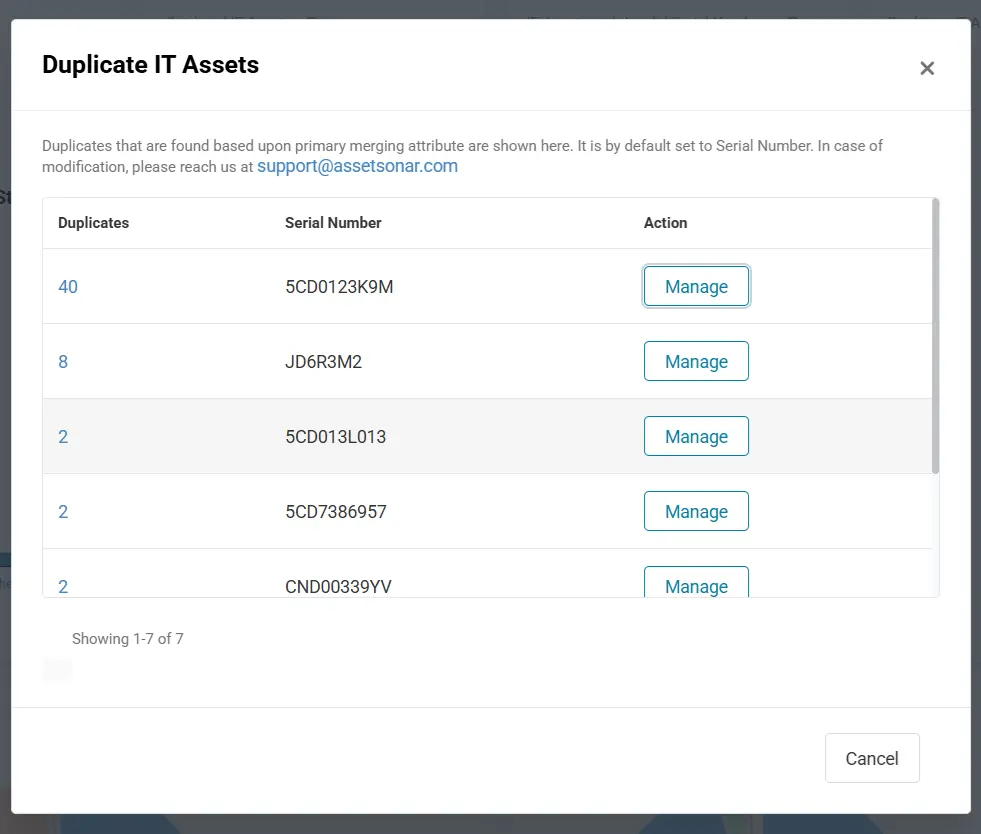
Matching names or serial values alone do not always justify a merge. Some identifiers are blank, generic, or unreliable, and virtual assets may require different rules. The question is whether the records describe the same asset, supported by identifiers and history.
Incomplete identifiers: records that cannot be confidently matched
“Marketing Laptop” may make sense to a colleague but becomes ambiguous when several identical models exist. Missing serial numbers, inconsistent asset tags, and placeholder values weaken the connection between inventory entries and real devices.
That becomes clear during reconciliation. Procurement lists a manufacturer serial, endpoint management supplies a device ID, and the ITAM record holds only a hostname. Without a reliable link between those identifiers, the same device can appear unmatched in all three systems.
Required fields should also reflect the asset class. A laptop, network switch, consumable accessory, and virtual machine do not always need identical identifiers. A genuinely inapplicable field is different from a missing value that prevents verification.
Incorrect owners and locations: assets accounted for on paper only
An employee departure does not mean their equipment was returned. A department transfer does not prove a monitor moved with its assigned user. The recorded custodian may simply be the last person entered in the system.
These mistakes can remain invisible because the devices still work. A management console may show a healthy endpoint while the ownership record names the wrong person. Shared rooms and stockrooms complicate matters further: accountability may belong to a site or designated owner rather than an individual user.
Custody verification provides additional evidence of whether an employee has acknowledged or denied possession of an assigned asset.
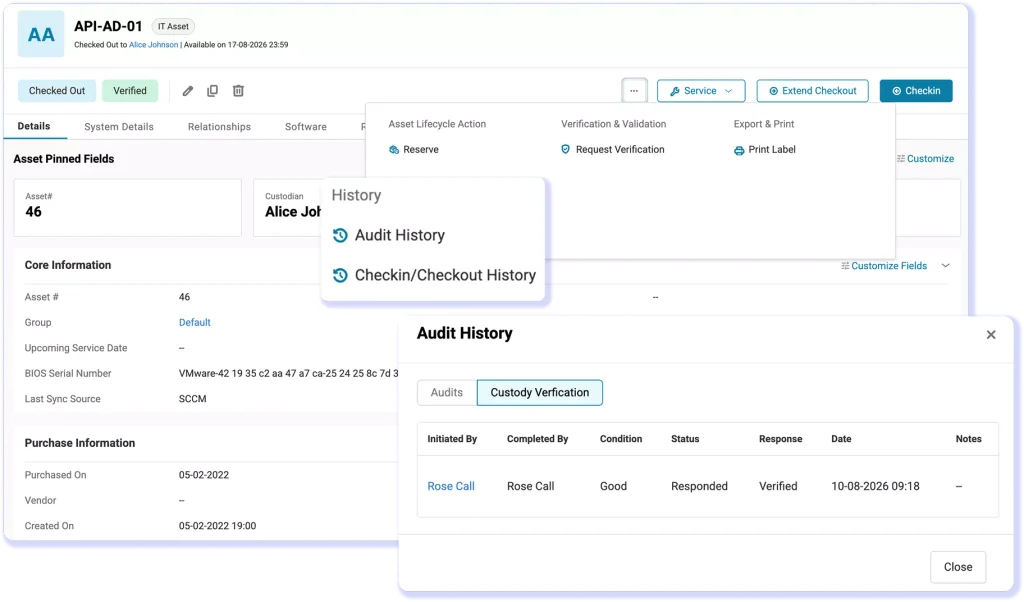
Transfer history, user acknowledgment, and physical scans provide stronger evidence than a name beside a device. They matter when an auditor asks who is responsible for an asset and where it actually is.
Lifecycle gaps: status changes without supporting history
A laptop marked “retired” may still be in storage. Another may have gone to a disposal vendor while the register still says “deployed.” Neither discrepancy is solved by choosing a plausible status from a dropdown.
The hardware asset lifecycle involves receipt, deployment, reassignment, repair, return, retirement, and disposal. Each event has different supporting evidence. A returned laptop needs custody and location details; disposed storage media may require sanitization or destruction records.
Without transaction history, IT cannot readily distinguish missing equipment from delayed recordkeeping. The same disconnect can affect depreciation schedules, recovery efforts, and replacement purchasing.
What do the warning signs tell you about your inventory?
Individual warning signals are easier to interpret than a single unexplained “accuracy” percentage. Each has plausible causes and limits.
| Warning signal | What it may indicate | What it does not prove |
| Asset counts differ across systems | Coverage differences, delayed updates, or missing records | That either system is automatically wrong |
| Many devices have old sync dates | Offline equipment, failed integrations, or outdated lifecycle statuses | That those devices are lost |
| Repeated serial numbers | Duplicate records or unreliable manufacturer values | That every matching record should be merged |
| Custodian and employment records conflict | Unrecorded transfers or incomplete offboarding | That the former employee still has the asset |
| High record-quality score | Known records meet particular validation rules | That undiscovered assets are accounted for |
AssetSonar’s IT Asset Accuracy overview below provides a practical example, with separate indicators for outdated assets, invalid serial numbers, and duplicate records.
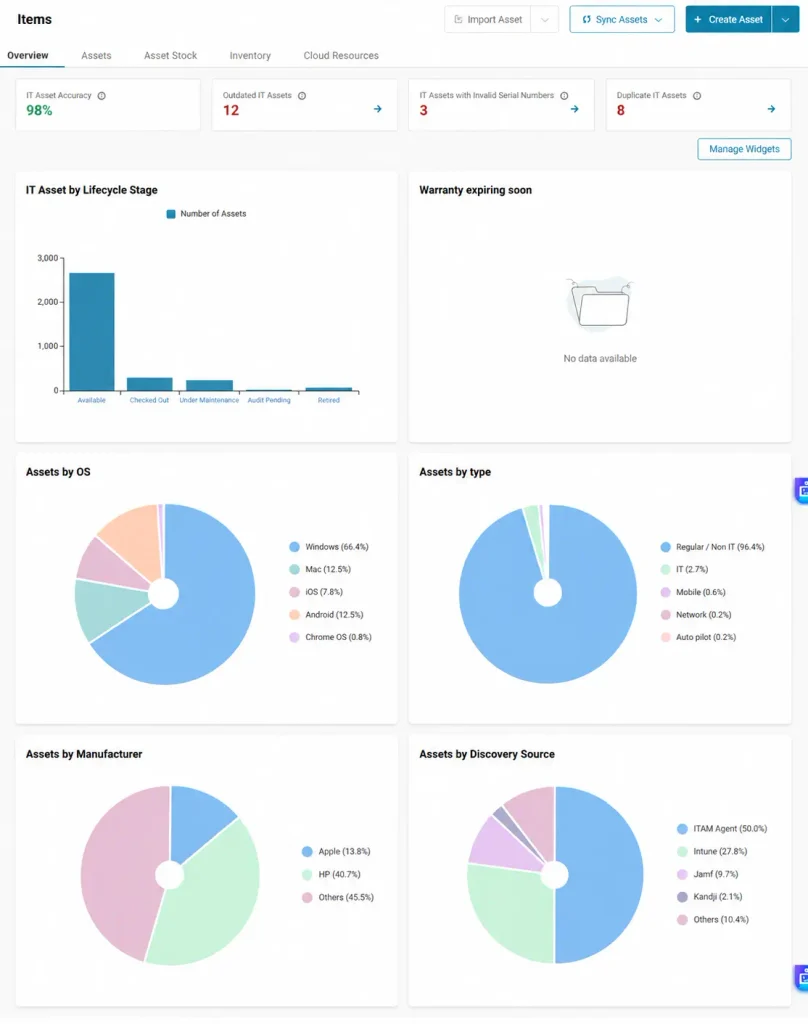
These distinctions matter when figures seem consistent but unresolved issues remain. For example, deleting stale records can reduce an exception count while removing an asset that still belongs to the organization.
The key question is whether discrepancies can be explained and whether the inventory can be trusted within its stated boundaries.
Why inaccurate inventory data matters beyond an audit
The same unreliable record creates different operational problems. A security analyst may need to identify endpoints exposed to a vulnerability. If the inventory omits devices, the review can miss them. Duplicate records can also waste investigation time and create a misleading impression of coverage.
Financial decisions suffer in different ways. A department might purchase laptops while usable spares sit unrecorded. Duplicate entries complicate reconciliation with purchasing or fixed-asset records, while missing equipment may be excluded from maintenance and refresh planning.
Custody errors affect day-to-day support. IT may contact the wrong user for a return, ship a replacement to the wrong location, or investigate equipment already recovered. These costs arise even without a formal audit underway.
Asset data accuracy is therefore an operational dependency, not just an audit concern. Security coverage, spending, support, and asset recovery rely on the same question: do the recorded facts still match the assets and people involved?
What makes asset data trustworthy enough to defend?
An audit-ready record needs more than populated fields. It needs a credible basis for its information and evidence explaining what changed. The following five best practices help IT teams maintain the completeness, accuracy, timeliness, and traceability of their inventory records.
Define inventory scope and assign responsibility
A reliable inventory begins with clear rules about which assets belong in the register. These rules should distinguish active equipment, stored spares, leased devices, retired assets, and employee-owned equipment according to the organization’s tracking requirements.
Just as important is establishing who maintains each record. Procurement, IT, and other departments may handle different stages of an asset’s lifecycle. Clear responsibilities help prevent information from being lost when equipment moves between them.
Standardize asset identifiers and record requirements
Consistent identification rules help IT teams match equipment across systems without creating conflicting records. Manufacturer serial numbers, asset tags, and device management identifiers serve different purposes, so organizations should define how these identifiers relate to one another.
Required fields should also reflect the asset category. Applying consistent rules to new records, imports, and updates reduces ambiguity while ensuring that missing or conflicting identifiers are investigated rather than overlooked.
Preserve evidence throughout the asset lifecycle
Inventory records should retain the history behind important changes, not just an asset’s latest status. Assignments, transfers, returns, repairs, and retirements need relevant dates, responsible users, and supporting records.
Capturing this information when an event occurs makes it easier to establish accountability later. A documented asset custody management process also helps preserve evidence of who received, transferred, or returned equipment without relying entirely on retrospective confirmations.
Establish authoritative sources for asset information
Different systems may hold reliable information about different aspects of the same asset. Endpoint management tools provide technical details, procurement records establish acquisition history, and custody records help confirm responsibility.
IT teams should define which source is authoritative for each important field. When records conflict, those rules provide a basis for determining which information should be retained or investigated. This prevents the latest system update from automatically replacing information that may still be correct.
Review data quality and keep exceptions visible
Inventory accuracy requires ongoing attention because records continue to change between formal audits. Periodic reviews can identify outdated information, incomplete identifiers, unresolved custody questions, and other discrepancies requiring investigation.
Not every exception can be resolved immediately. Keeping the reason, responsible person, supporting evidence, and review date visible helps distinguish outstanding issues from verified records. Review frequency can also reflect asset criticality and operational risk rather than applying the same schedule to every device.
Together, these practices make IT asset inventory accuracy easier to maintain and defend. They give IT teams a clearer understanding of which records are trustworthy, how that information was established, and where further verification remains necessary.
Where spreadsheets and discovery tools leave blind spots
A spreadsheet can record assets accurately when people maintain it carefully. The weakness is not the file format itself. It relies on timely handoffs, manual reconciliation, consistent identifiers, and a separate record of who verified each change. Such dependencies also expose the limits of spreadsheet-based asset lifecycle tracking as devices and locations multiply.
Automated discovery reduces some manual work but has its own boundary. A discovered device is not necessarily a received, assigned, physically located, or correctly retired asset.
An effective inventory connects these views without pretending they are identical. One laptop’s serial number may tie together its purchase, discovery, assignment, and return records. Disagreements remain visible until resolved. That provides a stronger explanation than a fresh export from any single system.
How AssetSonar brings asset inventory data quality into focus
AssetSonar addresses specific record-quality problems through its documented IT Asset Accuracy indicators. These flag discovered IT assets with outdated syncs, missing or invalid BIOS serial numbers, and duplicate valid serial numbers.
The indicator counts a discovered asset as accurate when it synced within the previous 30 days and has a valid, unique BIOS serial number. The percentage appears green at 90% or higher. This is a defined product metric, not proof that the organization’s entire inventory is audit-ready.
Other evidence calls for other functions. Custody verification supports acknowledgments and denials of possession. Location audits help verify equipment at a site. Custom reports can combine asset, custodian, location, and transfer information for review.
Together, these capabilities illustrate the broader principle: trustworthy inventory combines technical data with operational evidence. Automated checks surface inconsistencies, but cannot independently account for every undiscovered device or disputed custodian.
Audit readiness begins with data you can explain
The most revealing gaps are not always blank fields. They can be plausible records with the wrong custodian, accurate device details attached to duplicate entries, or equipment that never entered the register.
An audit-ready asset inventory does not pretend discrepancies never occur. It has clear scope, credible identifiers, supporting history, and visibility into what remains uncertain. When IT teams can explain both reliable records and unresolved exceptions, the inventory becomes useful far beyond the next audit request.