Key Takeaways:
- ITAM software tracks costs most accurately when each cost is captured on the asset or license record at the point of purchase, rather than added later from a spreadsheet.
- Connect discovery, MDM, and identity sources before reconciling costs and usage. Every cost needs a matching asset or license record, and discovery confirms those records reflect the managed estate.
- Each software license record should show seats purchased, seats assigned, and active users, plus installations for installed software.
- Potential savings and realized savings must be reported separately. A reclaimed seat becomes a realized saving only when a subsequent invoice reflects the reduction.
Many IT teams can report total technology spend for a quarter but cannot state what a specific laptop or license costs, who holds it, or whether it is in use. The gap usually comes from disconnected records rather than a lack of effort. Purchase data, inventory, and usage records sit in separate systems, and spreadsheets that combine them need repeated reconciliation and go stale between updates.
This guide is for IT managers and IT asset managers at mid-market organizations planning to use an IT asset management (ITAM) platform to close this gap. It explains how to configure the platform so costs remain attached to every asset and license, how to report those costs, and how to turn findings into savings Finance can verify.
Scope of the process
The process begins when an organization decides to manage cost tracking within an ITAM platform. It is complete when every in-scope device and license has a verified or clearly labeled estimated cost, open exceptions have owners, and Finance has signed off on a reconciled reporting cycle. Invoice-verified savings follow as contract terms allow.
The scope is limited to asset-related spending: devices, peripherals, installed software, and SaaS subscriptions. The process depends on two conditions: discovery that keeps the inventory complete, and purchase records that contain accurate prices. IT financial management (ITFM) tools handle budgeting and chargeback, and FinOps practices manage cloud and other variable technology spend. An ITAM platform supplies asset and license data to both and informs strategies to optimize IT costs, but it does not replace their billing or budgeting functions.
Before you start
Confirm these inputs with IT, Procurement, and Finance before configuration begins.
- Administrative access to the ITAM platform, plus approval from each system owner to connect MDM tools, the identity provider, and the primary SaaS administration consoles with the minimum permissions each connector requires.
- Finance approval of three rules: the capitalization threshold, the depreciation method and useful life for each asset type, and the method for allocating shared costs across departments.
- A defined list of mutually exclusive cost categories, such as Endpoints, Peripherals, Installed Software, and SaaS, with the agreement type (purchase, subscription, lease, or support) recorded in a separate field.
- Purchase orders, invoices, and expense reports for the previous 12 months, plus original purchase records for older assets still in service and every active software contract with its renewal and notice dates.
- A designated data owner within the platform, typically the IT asset manager, with named contacts in Procurement and Finance.
How to track IT hardware and software costs in an ITAM platform
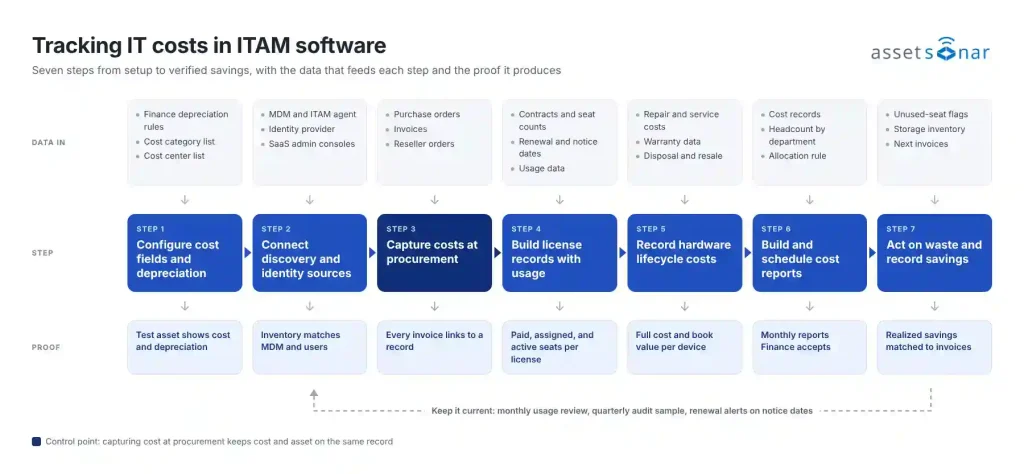
Step 1: Configure cost fields and depreciation rules
Configure cost fields before you import any data, so hardware and license records capture cost in a consistent format.
- Map each cost category to an asset type or group, and add custom fields for data the platform does not track by default, such as cost center or contract ID.
- Enable depreciation and apply the method and useful life approved by Finance for each asset type. Depreciation calculations typically use purchase cost, purchase date, salvage value, useful life, and the chosen method, so confirm each input and the start-date convention with Finance.
- Set the default currency and fiscal period so that reports align with Finance’s reporting calendar, and flag purchases below the capitalization threshold as expensed rather than depreciated.
Proof of completion: A test asset with a known price, purchase date, and useful life shows the depreciation value Finance expects for that date.
Exception: If Finance has not yet approved a depreciation method, record purchase cost now and enable depreciation once the method is approved. Depreciation reports stay out of scope until then.
Step 2: Connect discovery and identity sources
Discovery confirms that the records holding costs match the devices and users that actually exist. Connect these sources before reconciling costs and usage.
- Connect MDM tools, such as Intune or Jamf, and deploy the ITAM agent wherever you need software and usage data or where MDM does not reach. Add peripherals, stock, and offline equipment through CSV import or manual entry.
- Connect the identity provider, such as Okta or Entra ID, and confirm which user attributes, departments, and application sign-ins each connector syncs.
- Connect the administration consoles for the largest SaaS subscriptions, such as Microsoft 365, Google Workspace, Adobe, Slack, or Zoom.
- Review normalized software names so each product appears under one name, while edition and version stay visible for license matching.
Proof of completion: Device serial numbers in the platform reconcile against MDM and agent records, with unmatched, duplicate, and stale records listed, and every active employee on the HR roster appears as a user.
Exception: Devices that appear on invoices but not in discovery data go on an exceptions list. Check receipt, return, and retirement status before scheduling physical verification.
Step 3: Capture purchase costs at the point of procurement
Cost data is most accurate when it enters the platform with the purchase itself and is reconciled to the final invoice.
- Create or record purchase orders in the platform with unit prices, quantities, taxes, and vendor details.
- Receive delivered items against the purchase order and select the option to update the product catalog, so the cost carries into the new asset records. Match serial numbers to discovered devices to avoid duplicate records.
- Where a reseller integration is available, such as CDW, activate it with the reseller and check the first imported order before replacing manual entry.
- Backfill the previous 12 months from the invoice export, and mark any value that cannot be traced to an invoice as estimated.
Proof of completion: Each invoice in a sample of at least 10, drawn from different vendors, categories, and months, links to a purchase order or an approved no-PO record and to the assets or licenses it funded.
The following example shows one fully traced purchase (illustrative data):
| Record | Example | What it confirms |
|---|---|---|
| Purchase order | PO-2291: 40 laptops at $1,350 | What was approved |
| Invoice | INV-88412: $54,000 plus $4,320 sales tax | What was billed |
| Asset records | 40 serial numbers, received March 4 | What was delivered |
| Assignment | 36 assigned, 4 in storage | Who holds the devices |
Step 4: Build license records with contracts, seats, and usage
Create a license record for each paid software product that includes both the commercial terms and usage data.
- Enter seat count, cost per seat, billing period, contract value, renewal date, and notice period.
- Assign seats to users manually, or import existing assignments from the SaaS or identity integration. Adding or removing seats in the vendor’s console remains a separate action.
- Enable usage tracking through the agent, browser extension, or SaaS integrations, and define an inactivity threshold, such as 90 days. Separate users with no activity from users with no usage data.
| Field | Example (illustrative) |
|---|---|
| Product | Adobe Acrobat Pro |
| Cost per seat/billing | $144 per seat, annual (illustrative, not Adobe pricing) |
| Renewal/notice date | January 31/December 31 |
| Seats purchased/assigned/active/installed | 20/18/12/N/A (SaaS) |
| Flag | 2 unassigned, 6 unused for 90 days |
Proof of completion: Each license record shows the seat values that apply to its license type, and a renewal alert fires before the notice date as well as the renewal date.
Exception: Applications without an integration require manual usage evidence, such as an administration console export or a dated confirmation from the application owner with a review date.
Step 5: Record lifecycle costs on hardware records
The purchase price represents only part of a device’s total cost. Record the remaining costs on the same asset record.
- Log repairs and maintenance as service events with their associated costs.
- Synchronize warranty dates through warranty integrations where available, so the service desk can check warranty status and confirm the fault is covered before approving a paid repair.
- Record disposal fees and resale proceeds as separate entries when a device is retired, and confirm with Finance when depreciation stops.
Proof of completion: A device with a repair history shows purchase cost, service cost, warranty status, and current book value on a single record. Service costs do not change book value unless Finance capitalizes them.
Step 6: Build and schedule cost reports
Once costs are recorded on every asset and license, configure reports that answer Finance’s standard questions with minimal manual preparation.
- Spend by category and vendor: Hardware compared with software, then broken down by vendor and product for the reporting period.
- IT spending by department: Direct costs by owner, with shared costs allocated according to the agreed rule.
- IT cost per employee: In-scope spend for the period divided by average employee headcount for the same period, with included cost categories and contractor treatment stated.
- Depreciation and renewal exposure: Book value by asset type and contract value due within the next 90 days, each shown as a separate measure and never added to cash spend.
Reconcile report totals to the period’s invoices, including credits, tax, and currency, then schedule the reports monthly for the designated Finance contact.
Proof of completion: Finance signs off on one full reporting cycle that reconciles to approved totals, with any differences documented.
Step 7: Act on unused licenses and devices, then verify savings
Use the platform’s flags to identify savings opportunities, and track each one until the reduction appears on an invoice.
- Software: Reassign unassigned seats to new employees first. For seats held by inactive users, confirm with the application owner that no essential use or dependency exists, notify the user, then revoke and reassign. Reduce the purchased quantity at renewal.
- Hardware: Fulfill new requests from devices in storage, recover equipment from departing employees, and avoid paid repairs on devices still under warranty.
- Classify each result as potential savings, cost avoidance, or realized savings. Record a saving as realized only when the subsequent invoice reflects the lower amount. A signed contract reduction remains potential savings until that invoice arrives.
Proof of completion: Each realized saving is recorded with the invoice that confirms it and compared against a frozen, dated baseline report.
Handling exceptions in IT cost tracking
- Missing purchase record: Use vendor order history first, or a standard model price if no history exists, mark the value as estimated, and assign the IT asset manager a review date to replace it with a verified figure.
- Reductions permitted only at renewal: Reassign idle seats once the owner confirms they are not needed, record the planned reduction as potential savings, and schedule a task for the notice date.
- Infrequent but essential users: Quarter-end finance users, seasonal staff, employees on leave, and new hires may appear inactive. Document an exception before reclaiming their seats.
- Service accounts and shared devices: Service accounts rarely generate interactive sign-ins, so confirm system dependencies with the application owner before removing access. For shared devices, check usage and custody records before reassigning them.
- Device-based or concurrent licenses: Per-user activity is not a reliable measure. Use installation counts or peak concurrent usage instead.
- Repair or replacement: Compare the repair cost with the replacement cost, expected remaining service life, downtime, and failure history. Book value is an accounting figure and should not decide the outcome alone.
How ITAM software supports each step
An ITAM platform does not decide what to reduce. It reduces the manual reconciliation that stalls many cost-tracking efforts, although mapping, exceptions, and Finance validation remain. In this workflow, software provides the greatest value at four points:
- Steps 2 and 4: Discovery, MDM, identity, and SaaS integrations keep inventory and seat assignments current without manual exports.
- Step 3: Purchase orders carry the price into each new record, so cost and asset data remain linked.
- Steps 1 and 6: Depreciation is calculated automatically from the approved method, and scheduled reports reach Finance on a fixed cycle.
- Step 7: Unused-seat flags and savings records document each finding and action, and attaching the confirming invoice completes the audit trail.
When evaluating a platform, confirm which of these capabilities are native, which require a paid module, and which depend on an integration that must be configured. These distinctions help estimate implementation effort alongside data quality, permissions, and migration volume.
Comparing ITAM tools for IT cost tracking
The five platforms below are compared on the criteria that affect how this workflow is executed: how hardware costs and depreciation are recorded, how software usage and unused seats are detected, whether savings are tracked, and what evidence the reports provide. All details were checked against each vendor’s public documentation in October 2026 and can vary by plan, edition, or deployment. “Not confirmed” means a capability was not found in the reviewed documentation, not that it is absent. The comparison is not a ranking.
| Product | Best fit | Hardware cost and depreciation | Software usage and unused seats | Savings tracking | Notable boundary |
|---|---|---|---|---|---|
| AssetSonar | Mid-market teams linking hardware and SaaS costs to one record | Native: PO costs, service costs; straight-line and declining-balance | Native: agent, browser, SSO, SaaS integrations | Native: potential and realized | License actions need the SAM add-on |
| Freshservice | Teams already on Freshservice ITSM | Native: purchase cost; three depreciation methods | SaaS Management add-on via IdP and app integrations | Potential savings widget | Add-on on Pro and Enterprise only |
| Oomnitza | Enterprises automating data across many systems | Purchase data via procurement integrations | Native: SSO and activity data | Not verified in reviewed docs | SAM requires Enterprise package |
| InvGate Asset Management | Teams wanting agent-based metering | Native: purchase cost; straight-line documented | Native: agent metering; Microsoft 365 | Not verified in documentation | Metering not on Starter plan |
| ManageEngine ServiceDesk Plus | Teams combining help desk and assets | Native: purchase cost; four depreciation methods | Metering via Endpoint Central; SaaS via SaaS Manager Plus | Not verified in documentation | Metering depends on Endpoint Central |
AssetSonar: Purchase-to-savings cost records
AssetSonar records cost at the point of procurement and carries it through to asset and license records, usage data, and savings reporting.
- Hardware cost tracking: Purchase orders capture unit prices, taxes, and payment terms, and received items carry that cost into new asset records. Users with edit permissions can update asset cost fields, while purchase orders imported from CDW stay read-only. Hardware asset management adds service costs and calculates straight-line or declining-balance depreciation.
- Software cost tracking: With the SAM add-on, software license management holds seats, cost, and renewal dates, and License Optimizer flags unassigned seats, inactive users, and seats unused for 90 days.
- Reporting and savings: License Optimizer calculates the value of reclaimed seats as seats multiplied by cost per seat, which stays potential savings until an invoice confirms it. Reports include Depreciation and Technology Spend per Member, with export and REST API access.
License tracking, usage insights, and License Optimizer require the SAM add-on; the core ITAM plan includes view-only software data.
Freshservice: Cost data inside an ITSM suite
Freshservice manages asset costs within its CMDB and adds software usage data through a separate add-on.
- Hardware cost tracking: Records purchase cost on assets and supports declining balance, straight-line, and sum-of-years-digits depreciation with salvage value.
- Software cost tracking: Contracts hold license counts, total contract cost, and expiry notifications. The SaaS Management add-on detects usage and unused licenses through identity providers and direct app integrations.
- Reporting and savings: An analytics widget lists software with potential savings. Realized savings tracking was not confirmed in the reviewed documentation.
On legacy plans, the SaaS Management add-on is limited to Pro and Enterprise and is priced per employee. Accounts on the ITAM plans offered to new signups from March 31, 2026, should confirm current packaging.
Oomnitza: Integration-led lifecycle data
Oomnitza builds its cost view by connecting to other systems, which suits enterprises with many source systems.
- Hardware cost tracking: Pulls purchase records from procurement tools such as Coupa and Ariba. Depreciation reconciliation is described, but methods are not listed.
- Software cost tracking: Draws renewal dates from contract tools and usage from SSO and application logs, and surfaces licenses held by inactive or departed users.
- Reporting and savings: Ties assets to owners and cost centers in configurable dashboards. Savings tracking was not confirmed in the reviewed documentation.
Software asset management sits in the Enterprise package, and pricing is quote-only.
InvGate Asset Management: Agent-based metering
InvGate Asset Management relies on agent-based metering for software usage and stores financial data on each asset.
- Hardware cost tracking: Stores purchase cost, depreciation schedule, and warranty period on each asset, with straight-line depreciation documented.
- Software cost tracking: The agent reports installed-application usage every five minutes, and filters such as average use over 60 days identify unused licenses. A Microsoft 365 integration shows assigned versus available subscriptions.
- Reporting and savings: Contracts record cost and cost center, with expiry alerts through automation rules. Savings tracking was not confirmed in the reviewed documentation.
Metering, license contract management, and the REST API require the Pro plan or higher.
ManageEngine ServiceDesk Plus: Help desk with asset costs
ManageEngine ServiceDesk Plus combines help desk and asset management, with companion products providing software usage.
- Hardware cost tracking: Records purchase cost and department on each asset and supports four depreciation methods. Contracts cover lease, support, maintenance, and warranty with expiry alerts.
- Software cost tracking: Usage metering works through Endpoint Central, and in ServiceDesk Plus Cloud, SaaS license data comes from the separate SaaS Manager Plus product.
- Reporting and savings: Reports include purchase orders by cost center and purchased versus installed software, and can be exported and scheduled. Savings tracking was not confirmed in the reviewed documentation.
Asset management is included from the Professional edition, and metering covers only applications enabled in Endpoint Central.
Best practices for IT cost tracking in ITAM software
- Route every IT purchase into the platform: Purchases made outside the platform leave inventory and cost records incomplete. Create purchase orders in the ITAM platform or import them from the procurement system, and log card purchases with their receipts.
- Link cost recovery to offboarding: Departing employees leave behind idle seats and unrecovered devices. A recovery checklist tied to employee offboarding reduces this waste when each item is completed and verified.
- Set renewal alerts against notice dates: Count back from each contract’s notice deadline, allowing time for usage review, approval, and vendor response. For many contracts, that means starting 90 to 120 days before renewal.
- Report cash spend and depreciation separately: Adding depreciation to the cash paid for the same asset counts its cost twice and mixes cash flow with accounting expense.
- Validate usage beyond sign-ins: Combine identity provider data with in-application activity where integrations allow.
- Audit a sample each quarter: Trace 10 records from invoice to asset to user, and check each integration’s last successful sync, to identify failures early.
- Communicate usage data practices: Inform employees what data is collected and why, and restrict access to authorized roles.
Completion checklist
| Check | Evidence |
|---|---|
| Cost fields configured | Test asset shows cost, cost center, and the depreciation value Finance expects |
| Inventory complete | Device serials and users reconcile against MDM, agent, identity, and HR records |
| Costs traced | Sample invoices link to purchase orders and records |
| License records complete | Each record shows the seat values that apply to its license type |
| Reports in place | Finance has signed off on one reconciled reporting cycle |
| Savings tracked | Each claimed realized saving is matched to an invoice and a frozen baseline |
| Exceptions tracked | Each open item has an owner and a review date |
| Data health | Each integration shows a recent successful sync |
Make every IT cost traceable with ITAM software
Effective IT cost management starts with connecting each expense to the asset, user, and usage data that explain it. Configure cost fields, connect discovery sources, and record purchase costs so IT and Finance can see where money goes, identify savings opportunities, and verify the results.
The foundation is accurate cost capture at procurement and during the historical data import. Every later report and savings calculation depends on that starting point. A practical first test is to trace one hardware invoice and one SaaS renewal end to end in the platform, then use those records as the model for the rest of the estate.