AI in ITSM can summarize tickets, classify requests, draft responses, and suggest next steps. Those capabilities are useful, but faster output does not automatically produce a better service decision.
The problem is not that AI cannot read a ticket. The problem is that a ticket rarely contains the full operational story.
A request may describe a symptom, but not the affected device, user, software license, warranty, ownership record, IT asset lifecycle status, or previous incident history. Without that context, AI can move work faster and still move it in the wrong direction.
That is why asset context matters. When AI in ITSM can connect tickets to the environment behind them, it builds trust in its ability to support accurate decisions and improves service quality.
The real problem with AI in ITSM is not automation; it’s context
Most conversations about AI in ITSM focus on what the model can automate: ticket intake, conversation summaries, response drafts, knowledge suggestions, classification, and diagnosis. Zoe, AssetSonar’s embedded AI copilot, supports several of these tasks inside AssetSonar.
Their usefulness still depends on the facts available when a recommendation is made.
A ticket that says “my laptop is slow” can mean several different things. The device may have low storage, be missing updates, have unauthorized software, have a history of repeated crashes, or have an expired warranty. It may also be near the end of its hardware lifecycle and better suited for replacement than another temporary fix.
A software request works the same way. A user asking for an application is not only asking for access. The ITSM tool you use may need to check the user’s role, license availability, approval rules, cost center, ownership, and compliance requirements.
Without the relevant asset context, AI can process the request but still miss the details that matter, impacting the final resolution or decision.
What does asset context mean in ITSM?
Asset context in ITSM comprises the user, device, software, ownership, lifecycle, license, custody, ticket history, and service relationship data associated with a ticket.
Here, asset lifecycle refers to an IT asset’s progression from procurement and deployment through repair, reassignment, and retirement. Custody identifies who physically possesses or is responsible for returning an asset, while ownership identifies the person, team, or cost center accountable for it.
It is not just a list of asset fields. It is the relationship between a service request and the operational environment behind it.
The table below breaks down the main context layers and the decisions each one informs.
| Context layer | What AI in ITSM means |
| User context | Who is affected, what role they have, and what access they may need |
| Device context | Which asset is involved, who owns it, where it is, and what condition it is in |
| Software context | What is installed, licensed, used, restricted, or due for review |
| Ticket history | Whether the issue is new, repeated, related to earlier fixes, or part of a pattern |
| Lifecycle context | Whether the asset is active, under repair, due for replacement, retired, or pending return |
| Warranty and support context | Whether the device is covered, repairable, replaceable, or already tied to vendor support |
| Service context | Which systems, dependencies, business services, or teams could be affected |
| Custody context | What must happen during reassignment, transfer, recovery, or offboarding |
More data does not automatically make AI better. Useful data is what changes the service decision.
The affected device shapes diagnosis, while the user’s role and service dependency help determine priority and risk. License and entitlement records influence approval. Custody data determines what must happen during reassignment, offboarding, or recovery.
A configuration management database (CMDB) may already contain some ownership, lifecycle, and support information, especially in a mature environment. The issue is not whether a field is labeled CMDB or ITAM. It is whether AI can access current configuration relationships alongside authoritative asset, financial, contractual, custody, and service-history data. In some environments, this means enriching the CMDB with ITAM context; in others, it means connecting both sources without duplicating ownership.
Where AI falls short when tickets are detached from assets
A model may produce a plausible answer while missing facts that change the decision. For generative AI, this can also create a confabulation risk: the model may assume a device, software version, entitlement, or service relationship that the ticket never established.
NIST identifies confidently presented false or erroneous output as a core risk of generative AI. Verified records provide a basis and make unsupported assumptions easier to detect, but they do not eliminate the need for human review.
Routing and diagnosis lose specificity
A request described as a laptop problem may actually be a software, network, or access issue. Without the affected asset, location, installed version, and previous incidents, AI may route the ticket to the wrong queue or suggest the most common fix rather than the most relevant one.
Business impact can be misread
A VPN failure may be inconvenient for an employee who can work on-site but critical for a remote clinician who cannot access patient systems. Role, location, service dependency, and available workarounds determine priority more reliably than the ticket category alone.
Resolution can leave records outdated
A fix may change an asset record, license assignment, warranty status, custody record, or access right. If the workflow does not update those records and preserve approvals and audit history, the next ticket begins with the same context gap.
How asset context improves core AI in ITSM use cases
AI does not need more ticket text alone. It needs the operational facts that change the right answer.
| AI in ITSM use case | Without asset context | With asset context |
| Ticket classification | Uses ticket wording only | Uses issue details, asset type, user role, software, and history |
| Ticket routing | Sends work to a generic queue | Routes by asset type, location, ownership, assignment, and issue history |
| Smart diagnosis | Suggests broad troubleshooting steps | Checks device state, past tickets, patches, warranty, and known issues |
| Incident management | Treats each incident as new | Connects recurring issues across assets, users, software versions, or locations |
| Knowledge suggestions | Shows generic articles | Matches articles to the user’s asset, software, and support history |
| Request fulfillment | Moves simple approvals forward | Checks entitlement, license availability, ownership, cost, and approval rules |
| Change management | Summarizes change details | Shows affected assets, users, dependencies, and rollback risk |
| SLA prioritization | Uses ticket category only | Considers asset criticality, service impact, user urgency, and operational role |
| Offboarding | Tracks tasks as separate actions | Connects devices, software, licenses, access revocation, security credentials, recovery, custody, and ownership transfer |
| Governance | Recommends next steps without full control context | Keeps approvals, audit trails, ownership, and record updates tied to the workflow |
Context matters most when a recommendation triggers an operational action. Request fulfillment still requires eligibility, license availability, ownership, approval, and a record update. Change planning depends on affected assets, service relationships, risk, and rollback information. During offboarding, devices, licenses, identity access, security credentials, recovery, and custody must all move through a single governed workflow.
Connected asset context can eliminate substantial service desk work even before AI is added. According to an AssetSonar customer case study, CommentSold’s IT team sometimes spent more than an hour identifying the correct device and purchase record for a Zendesk ticket. Once current asset status and custody data became available in Zendesk, the information-gathering process took about 15 minutes, saving up to 80% of the time and increasing asset data accuracy to at least 90%.
This example does not measure AI performance itself. It demonstrates the baseline value of making reliable asset information available during ticket handling.
The data AI needs for reliable service decisions
Teams do not need every field or relationship to be perfect before piloting AI. They do need authoritative, sufficiently current data for the specific decision the model is expected to support.
Before relying on AI-assisted service desk workflows, IT teams should strengthen these data layers:
| Data layer | Why it matters |
| Trusted asset inventory | Shows which assets exist, where they are, and what state they are in |
| User-to-asset assignment | Connects employees to the devices and tools they actually use |
| Software and license records | Helps AI understand entitlement, availability, usage, and compliance risk |
| Lifecycle status | Shows whether an asset is active, under repair, pending return, due for replacement, or retired |
| Warranty and vendor support data | Helps technicians decide whether to repair, replace, escalate, or claim support |
| Ticket and resolution history | Gives AI past fixes, recurring patterns, and known issue context |
| CMDB and service relationships | Shows affected services, dependencies, and change risk |
| Custody and ownership records | Supports reassignment, recovery, transfers, and offboarding |
| Approval and audit history | Keeps sensitive actions governed and traceable |
The goal is not to collect every possible field. The goal is to connect the records that affect service decisions.
If every system holds a different version of asset ownership, software status, or ticket history, AI recommendations become inconsistent. A service desk cannot use automation confidently when the underlying data is fragmented.
How to connect asset context to AI workflows
Start with the decision, not the model. Choose one workflow, such as routing a recurring incident or approving a software request, and list only the fields that can change the outcome. Assign an authoritative source and owner to each field.
Use maintained native connectors where possible. When no connector exists, use a documented REST API or integration platform as a service (iPaaS) rather than copying data into another unmanaged store. Context can be captured at intake through an asset or service selector, or added after submission through an automated lookup. Intake capture is more explicit but depends on good form design. Automated enrichment reduces requester effort, but it should also display the matched record and allow technicians to correct it.
Set refresh targets according to how quickly each field changes. Ticket, assignment, access, and device-state changes may require event-driven or near-real-time updates. Warranty, procurement, and contract data may be suitable for scheduled batches. When freshness affects a decision, show technicians the source and last-updated time.
Pilot the workflow with human review. Measure routing accuracy, technician overrides, time spent gathering context, reopen rates, and whether closure updates the relevant records. Expand only after the data and controls are reliable.
There is no defensible universal implementation timeline. The effort depends on the number of source systems, the availability of connectors, ownership rules, and the quality of existing data.
What an asset-aware AI service desk workflow looks like
Consider a common ticket: an employee says their laptop keeps crashing.
In a disconnected service desk, AI may suggest a generic hardware troubleshooting article. The technician still has to ask basic questions: Which laptop is it? Has this happened before? Is the device still under warranty? Was anything recently installed or updated?
Those questions show a weak starting point. The service desk must gather context before it can diagnose the issue.
In an asset-aware workflow, the ticket links to the employee’s assigned laptop. The technician can see the model, warranty, lifecycle stage, installed software, recent updates, prior incidents, and similar tickets from other users.
The workflow below shows how that context moves with the ticket, from intake to resolution and future support.
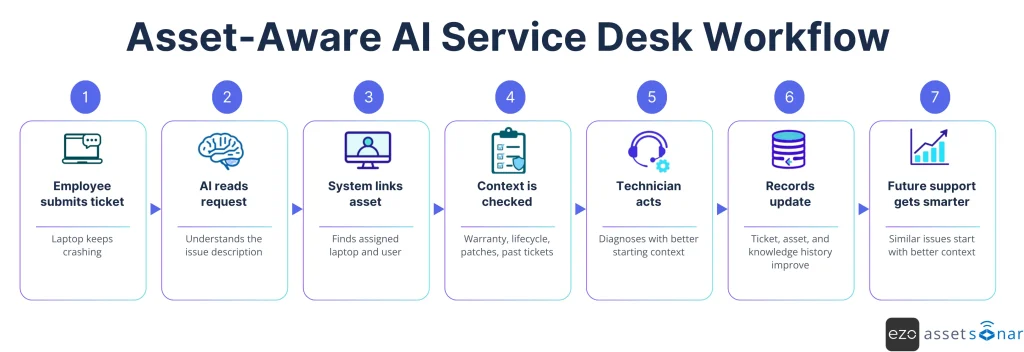
That context changes the resolution path.
If the laptop has a history of repeated crashes, the technician can look for a recurring hardware issue. If a recent patch is linked to similar incidents, the team can investigate a wider pattern. If the device is already due for replacement, the service desk can avoid another temporary fix and move toward a more durable resolution.
The ticket update should then improve the asset record, support history, and knowledge base. If the issue recurs, the next technician starts with a better context.
That is the real value of AI in ITSM. It should help the service desk build operational memory, not just close tickets faster.
Why ITSM, ITAM, and CMDB data need to work together
ITSM, ITAM, and CMDB responsibilities often overlap in modern platforms. What matters is not whether they live in separate products, but whether each source contributes accurate information to the same service decision.
| Data source | What it explains | Why AI needs it |
| ITSM | Incidents, service requests, changes, approvals, SLAs, and workflow status | Shows what work is required and where it currently stands |
| ITAM | Inventory, assignments, lifecycle, software, licenses, contracts, warranty, and custody | Shows the asset’s management status and organizational obligations |
| CMDB | Configuration items, services, relationships, and dependencies; it may also contain selected asset fields | Shows how an affected component relates to wider services and infrastructure |
These are logical responsibilities, not mandatory silos. One platform may support all three, or an organization may connect specialist systems through maintained integrations. The design goal is one authoritative answer for each field, not several repositories competing to be correct.
When the data works together, an incident can be compared with similar issues, a request can be checked against entitlements and approvals, a change can be evaluated against service dependencies, and offboarding can connect recovery, access revocation, license reclamation, and ownership transfer.
When asset context is not enough
Not every AI use case needs an asset link. Translation, tone adjustment, thread summarization, and response drafting can work from ticket content alone. Asset context becomes more important when the output affects routing, diagnosis, priority, entitlement, change risk, recovery, or another action tied to a user, asset, or service.
Connected data also cannot compensate for inaccurate records. Duplicate assets, stale assignments, weak resolution notes, or incorrect service relationships can ground the model in the wrong facts. Teams should expose data sources and timestamps, let technicians correct associations, measure override rates, and retain approval gates for sensitive actions.
Feedback loops keep AI in ITSM useful over time
AI should not operate without correction. Service desk teams need feedback loops that improve the quality of recommendations, routing, knowledge suggestions, and asset links.
Technicians should be able to correct wrong routing, reject weak suggestions, improve outdated knowledge articles, and fix incorrect asset associations. Service desk managers should also review recurring patterns, automation exceptions, and ticket-quality issues.
These corrections matter because AI-assisted workflows are only as useful as the service environment they reflect.
A resolved incident should improve support history. A corrected knowledge article should improve future recommendations. A fixed asset link should make the next ticket easier to diagnose. A rejected suggestion should show where the workflow, data, or knowledge base needs cleanup.
AI should support the workflow, not bypass it. Sensitive actions still need human review, approvals, audit trails, and clear ownership.
How context-led AI improves service quality
Once AI has asset context, the benefit is not just faster ticket movement. The larger benefit is cleaner service operations.
Tickets reach the right queue with fewer manual reassignments. Technicians start with a stronger context and ask fewer basic questions. Knowledge articles improve because resolved tickets feed better support history. Asset records remain more accurate because fixes, replacements, license changes, and ownership updates are tied back to the service workflow.
This also improves governance. AI can recommend next steps, but approvals and audit trails help keep sensitive actions under control. That matters for access requests, software changes, device recovery, and offboarding workflows.
In a healthier ITSM environment, AI does not replace process discipline. It reinforces it. The service desk moves faster because records are easier to trust.
How AssetSonar connects asset and service context
AssetSonar brings ITAM and ITSM records into a single workflow, allowing technicians to link a ticket to the affected asset, assigned user, software, lifecycle state, warranty, and service history.
Zoe is AssetSonar’s embedded AI copilot. Within ticket workflows, it can help route, tag, and summarize tickets; surface similar tickets and previous resolutions; suggest likely causes and fixes; and draft replies or resolution notes for technician review.
The differentiator is not AI alone. It is AI working where the relevant asset relationships and service history are already available.
Conclusion: AI should act on context, not guesses
AI can provide value without asset context when the task is limited to summarization, drafting, translation, or classification. It falls short when a recommendation depends on the affected user, asset, software, service, entitlement, or lifecycle state.
The goal is not to connect every possible field before using AI. It is to ground each workflow in the current records that can change the decision, preserve approval and audit controls, and feed corrections back into the system.
The next stage of AI in ITSM will be defined less by how many tickets a team automates than by how consistently those automations lead to accurate, governed outcomes.