Key Takeaways:
- AssetSonar brings device custody and repair history into incident triage, while Freshservice Enterprise ITAM discovers application dependencies across hybrid infrastructure.
- ServiceNow and BMC Helix reconcile competing discovery feeds, while InvGate lets teams approve proposed relationships and Ivanti requires transferring newly mapped items into the CMDB.
- Jira Service Management carries linked asset records into engineering handoffs, while SolarWinds Service Desk can turn infrastructure monitoring alerts into incidents.
- ManageEngine ServiceDesk Plus offers cloud and on-premises deployments, while Microsoft System Center Service Manager reuses existing System Center data and adds lifecycle tracking through Cireson.
An employee at a retail store reports that the checkout application has stopped working. The incident ticket gives the service desk a time and location, but the switch record and recent network changes live elsewhere. Linking the affected switch gives the agent a starting point. Its dependency map helps the agent identify which systems to check and whom to involve.
ITAM, CMDB, and incident management tools bring those records into the incident workflow. Some products provide all three capabilities in one platform. Others require an additional module, a companion product, or a third-party extension. The comparison identifies the setup to evaluate and shows how each service desk connects an incident to the affected asset or configuration item.
Compare 10 ITAM, CMDB, and incident management tools
| Product | Best fit | Configuration to evaluate | CMDB mapping | Incident linking | Pricing model | User rating |
|---|---|---|---|---|---|---|
| AssetSonar | Mid-market IT teams that start with device custody and history | ITAM with ServiceDesk, including the CMDB and IT Graph | IT Graph maps relationships from asset and service records | Link hardware or software assets | Per managed asset with unlimited agents | 4.5/5 |
| ServiceNow | IT teams controlling which sources update each CI field | IT Service Management and CMDB, with IT Asset Management for deeper lifecycle coverage | CI reconciliation rules and service mapping where configured | Select a primary CI or add affected CIs | Package quote | 4.5/5 |
| Freshservice | IT teams mapping hybrid infrastructure | Freshservice ITSM with Enterprise ITAM for automated dependency mapping | Application dependency mapping on Enterprise ITAM | Associate an asset with the incident | Agents plus weighted Asset Units | 4.6/5 |
| ManageEngine ServiceDesk Plus | IT teams choosing between cloud and on-premises | Enterprise, or Professional with the appropriate CMDB add-on | Custom relationship types and visual maps | Link CIs to incidents | Technicians and IT asset capacity | 4.2/5 |
| Jira Service Management | Service desks working closely with engineering | Service Collection with Assets, with Premium for major incidents | Assets schemas and object references | Select Assets objects in an incident field | Agents plus Assets object allowance | 4.3/5 |
| InvGate | IT teams that want to approve proposed CI links | InvGate Service Management and Asset Management integration | Suggested CI relationships for review | Link an asset through the two-product integration | Service desk subscription plus licensed IP devices | 4.6/5 |
| Ivanti Neurons | Ivanti Neurons users sharing CI records across incidents, changes, and releases | Ivanti ITSM with ITAM and Discovery, plus Service Mapping where required | CI map with optional Service Mapping | Link incidents and CIs | Package quote | 4.0/5 |
| SolarWinds Service Desk | SolarWinds Observability SaaS users that want alerts to open incidents | Premier for the visual CMDB | Typed dependencies and a visual map on Premier | Attach eligible CIs to incidents | Technicians plus quoted asset pricing | 4.3/5 |
| BMC Helix ITSM | IT teams that reconcile staged discovery data before it enters the CMDB | Helix ITSM Service Desk, Asset Management, and Helix CMDB | CI relationships and source dataset reconciliation | Relate multiple CIs to an incident | Named or concurrent cloud user licenses | 3.7/5 |
| Microsoft System Center Service Manager | Existing System Center environments | Service Manager and a lifecycle extension such as Cireson Asset Management | Service relationships and imported CIs | Select a CI on the incident form | System Center management licenses plus extension | 3.8/5 |
How ITAM, CMDB, and incident management work together
When an employee reports that the VPN keeps dropping, the service desk needs to determine where the fault is. Each system answers a different question about the same incident.
IT asset management (ITAM) tracks what IT teams buy, assign, maintain, and retire. If the fault follows one laptop, its asset record can show who has it and whether it has needed repair before.
A configuration management database (CMDB) records configuration items (CIs) and their relationships. If several employees report the same issue, IT teams can trace the VPN gateway’s dependency on an authentication service. This helps them identify which systems to investigate.
Incident management is part of IT service management (ITSM). The incident record gives the service desk a place to assign an owner, document the investigation, and record how service was restored.
How we evaluated each ITAM, CMDB, and incident management tools
Each shortlisted configuration had to meet three criteria. The comparison names any additional product or extension that forms part of the evaluated configuration.
- Manage an IT asset through its lifecycle. Track deployment, reassignment, and retirement against the asset record as part of IT asset lifecycle management.
- Model meaningful configuration relationships. Use named relationships to show how one CI depends on or connects to another.
- Use asset or CI context during incident handling. Give responders a way to reference the affected record while assigning, investigating, and resolving the incident.
10 tools that connect assets, configuration items, and incidents
The records responders need depend on the incident. A technician replacing a laptop needs device history, while an infrastructure engineer investigating an outage needs to trace service dependencies. The profiles below show where each platform gets that context and what IT teams need to configure to use it.
1. AssetSonar

Best fit: AssetSonar suits mid-market IT teams responsible for employee hardware and frontline support. Technicians need device custody and service history when triaging incidents.
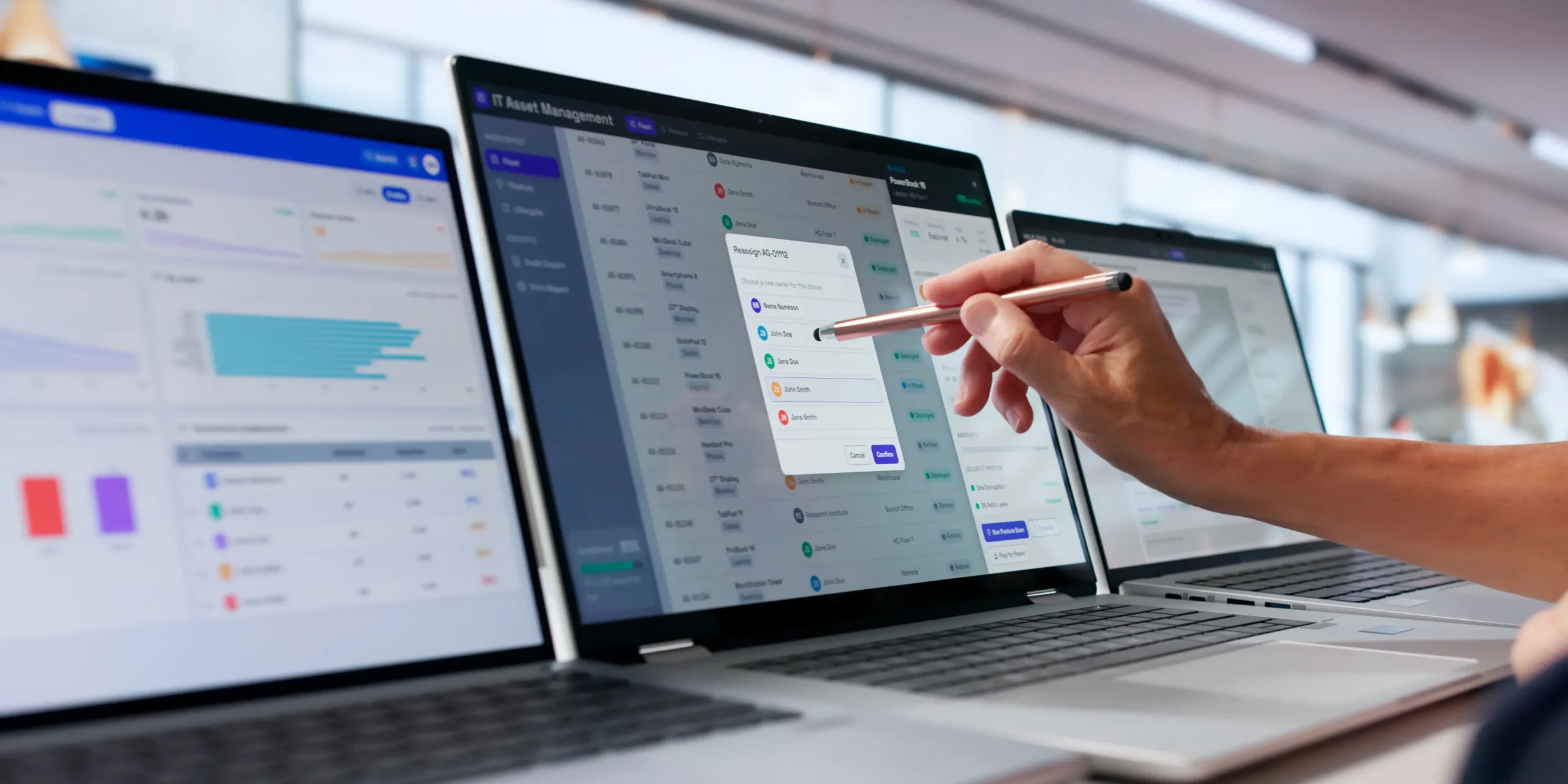
AssetSonar connects hardware records with incident, problem, and change workflows through its native service desk. When an employee reports a recurring laptop fault, the technician can attach the assigned laptop to the ticket. From that record, the technician can check earlier repairs before deciding whether to troubleshoot the device again or arrange a replacement.
If the symptoms point to installed software, the same device record gives the technician a starting point in IT Graph. The technician can follow its software relationships while keeping the affected laptop linked to the original incident.
Key strengths:
- Device context at the point of triage. Agents can link a hardware or software asset during ticket creation or add it later. A linked device gives them access to its specifications and warranty details.
- A graph built from operational records. The built-in CMDB visualizes relationships among CIs such as assets, users, and software. IT teams can start from an asset record and follow its connections.
- Work orders stay with the device record. Hardware asset management keeps maintenance work orders and repair history together. That gives the service desk and maintenance staff a shared record for repair handoffs.
Weaknesses:
- New dependency types need setup. IT Graph shows relationship types that match the two configuration items. If a dependency needs a different type, it cannot be linked until IT teams create a relationship type for that pair.
Pricing:
ITAM with ServiceDesk lists at $1.08 per asset per month, billed annually, with unlimited agents. AssetSonar packages start at 100 assets, and volume discounts are available.
Reviews:
G2 reviewers describe moving hardware records out of spreadsheets and using Jamf and Entra ID integrations in daily asset work. They value a central record for assignments and returns. Some reviewers wanted more flexible reporting or easier filtering when reviewing device records.
2. ServiceNow IT Service Management and IT Asset Management
Best fit: IT teams that need to control which discovery sources can update specific configuration item fields. This suits enterprises where several systems supply overlapping data for the same infrastructure.
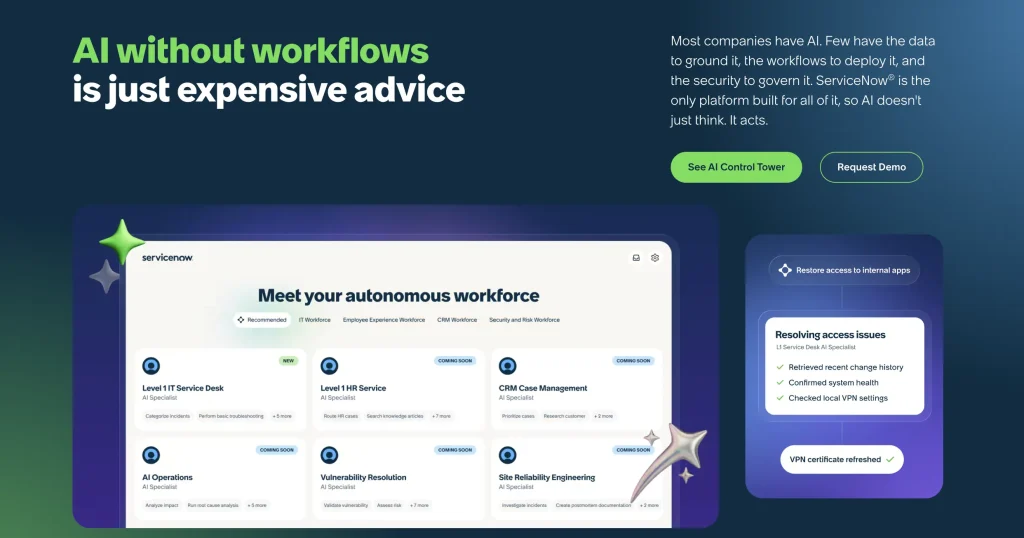
ServiceNow IT Service Management runs incident, problem, change, and request workflows on the same platform as the CMDB. ServiceNow IT Asset Management adds lifecycle controls for hardware and software. This gives responders a configuration record to investigate during an outage while procurement manages the corresponding asset through its own lifecycle.
Key strengths:
- Rules for competing feeds. The Identification and Reconciliation Engine uses CI attributes to identify records and rules to govern updates. IT teams can control which sources update specific CI attributes.
- Asset and CI records serve different owners. ServiceNow separates the financial and contractual asset record from the operational CI. That lets procurement track ownership while operations maintains configuration and service context.
Weaknesses:
- Service context depends on what you model. Responders can trace a CI to a business service only after service discovery and mapping are configured and service owners validate the paths.
Pricing:
ServiceNow offers custom ITSM package quotes. Ask for line items for the ITAM products and discovery capabilities your implementation requires.
Reviews:
Reviewers value being able to adapt built-in incident workflows to their service processes. Automated routing and self-service also help reduce routine manual work. Some reviewers found that building custom reports or changing routing rules took more administrator effort than they expected.
3. Freshservice

Best fit: Freshservice suits a cloud service desk responsible for hybrid infrastructure. Responders can trace which applications depend on the servers and devices they support.
Freshservice combines a cloud service desk with IT asset management for hybrid infrastructure. Agents can associate an asset with an incident while infrastructure operations uses discovery to populate the underlying records. Where dependency mapping is enabled, responders can use those records to see how the affected infrastructure supports an application.
Key strengths:
- Hybrid discovery. Freshservice ITAM supports agent-based and agentless discovery. It covers operating systems, network devices, cloud resources, and storage.
- Infrastructure-to-service maps. The Enterprise ITAM plan supports application dependency mapping and business service mapping. IT teams can use those views to see how infrastructure supports a service under investigation.
Weaknesses:
- Procurement and mapping sit in higher ITAM plans. Freshservice ITAM Growth includes hardware lifecycle tracking. Contracts and purchase orders start at ITAM Pro, while application dependency mapping requires ITAM Enterprise.
- Different asset types consume different capacity. A server, virtual machine, or network device consumes four Asset Units. An end-user computing device consumes one.
Pricing:
Freshservice ITSM costs $19 for Starter, $49 for Growth, and $99 for Pro per agent per month, billed annually. ITSM Enterprise is quote-based. Freshworks also quotes Enterprise ITAM separately. That tier includes application dependency mapping, and Freshworks sells Asset Units in packs of 500.
Reviews:
Users describe getting up to speed on ticket handling quickly and cutting manual follow-ups through automation. Some also use Freshservice to track tickets, assets, and changes together. Reviewers who needed reports across several datasets found the built-in options less flexible.
4. ManageEngine ServiceDesk Plus

Best fit: Organizations can choose cloud or on-premises deployment. ServiceDesk Plus fits buyers who want to manage purchasing, contracts, and support in one platform.
ManageEngine ServiceDesk Plus combines incident handling with hardware and software discovery in its asset-enabled editions. Its CMDB models how configuration items relate to each other and the services they support. When a device fails, that context helps IT teams decide whether to treat it as an isolated incident or investigate a wider disruption.
Key strengths:
- Purchasing within the service desk product. Asset-enabled editions bring purchase and contract management into the same product as support and asset discovery.
- Linked incident and problem work. IT teams can create a problem from an incident and relate other incidents to it. This gives the service desk one place to track a recurring issue and its workaround.
Weaknesses:
- CMDB access depends on the edition. Professional offers the CMDB as an add-on. Enterprise includes it. A Professional quote without the add-on excludes the CMDB, so base edition prices are not directly comparable.
Pricing:
Cloud Professional starts at $645 per year, and Cloud Enterprise starts at $1,595 per year, both for two technicians and 250 IT assets. On-premises Professional starts at $495 per year for two technicians and 250 IT assets, plus $1,195 per year for the CMDB add-on, for a total of $1,690 per year. On-premises Enterprise starts at $1,195 per year for the same starting configuration, with the CMDB included.
Reviews:
Reviewers often highlight the flexibility to tailor ticket workflows and service catalog requests to their own processes. Several also report that advanced forms and workflows take more time and administrator expertise to configure than they expected.
5. Jira Service Management

Best fit: Support and engineering groups already working in Atlassian can keep their incident handoffs there. This suits organizations that regularly escalate application issues to engineering.
Jira Service Management handles service desk incidents within Atlassian Service Collection. Its Assets component uses object schemas to represent hardware, applications, and relationships between them. When an incident moves to application engineering, the linked Assets object gives both groups a common reference for the system under investigation.
Key strengths:
- Objects can appear directly on incidents. An administrator creates an Assets custom field and maps it to a schema. Responders can then search for and select the affected object from the incident.
- Flexible lifecycle modeling. IT teams can define object types, attributes, statuses, and references. A hardware object can carry its assignment and lifecycle state alongside references to other objects.
Weaknesses:
- Schema design belongs to the buyer. IT teams define the object types, identifiers, and imports that agents search when they link an object to an incident. A poorly scoped schema can make the right CI hard to find on an incident.
- Advanced response needs Premium or above. Major incident management and post-incident reviews sit above Standard. Standard still includes Assets and core incident capabilities. Because one plan covers every agent, teams that need those features pay Premium rates across the whole service desk.
Pricing:
With monthly billing, Atlassian’s Service Collection calculator shows example rates of $21.50 per agent per month for Standard and $55.28 per agent per month for Premium. The subscription price varies by agent count and billing cycle. Standard includes 5,000 Assets objects, Premium includes 50,000, and quote-based Enterprise includes 500,000.
Reviews:
Some reviewers found field and permission settings hard to locate across project and global administration, which adds to the setup work a custom schema already requires. Others describe using the Jira Software integration to pass issues to engineering and keep progress visible across teams, and value the ability to customize ticket fields.
6. InvGate Service Management and Asset Management
Best fit: Separate asset and support teams can manage their work in dedicated applications. Configuration owners can review proposed CI relationships before accepting them into the CMDB.
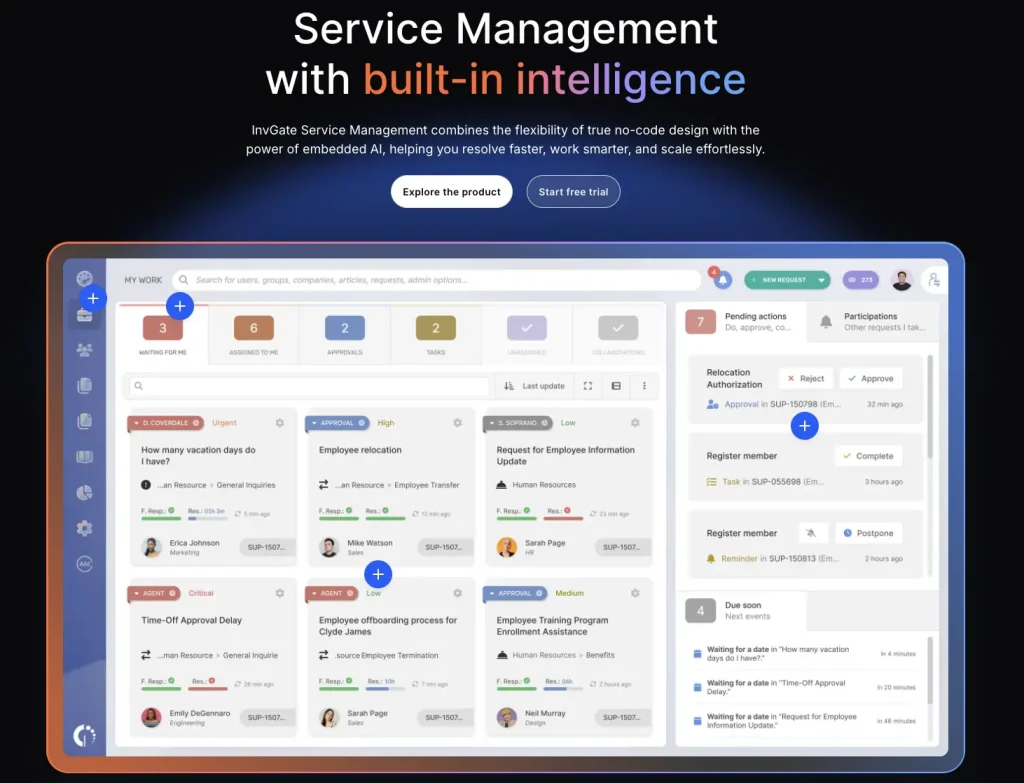
InvGate Service Management handles incidents and requests, while InvGate Asset Management holds asset and configuration records. The integration lets technicians reference the relevant asset during diagnosis. Asset specialists can continue to maintain the source record in Asset Management while the service desk works on the incident in Service Management.
Key strengths:
- Suggested relationships with approval. InvGate Asset Management can propose CI relationships from discovered information. IT teams can review suggestions before accepting them into the CMDB.
- Support context at intake. The integrated service desk can associate a relevant asset with a request or incident. Agents can use the asset record during diagnosis, including when the requester leaves device details out of the ticket.
Weaknesses:
- The technician view depends on the integration. Technicians see asset details from an incident through the integration between Service Management and Asset Management, so what agents can reach during diagnosis depends on how that integration is configured across the two products.
Pricing:
InvGate Service Management Starter costs $1,499 per year for five agents. Pro costs $500 per agent per year, with a $2,500 annual minimum. Asset Management is priced separately, by device rather than by agent. Its Pro plan includes automatic CMDB mapping and costs $5 per IP device per year, starting at $2,500 per year. Each licensed IP device also covers two non-IP devices at no extra charge.
Reviews:
Users highlight the distinct views for requesters, agents, and administrators, and describe an interface that helps end users get started. Reviewers who needed more specialized reporting wanted additional filters. Some also reported extra setup when connecting third-party applications to the service desk.
7. Ivanti Neurons for ITSM and ITAM

Best fit: IT teams already using Ivanti Neurons that want shared configuration records across incidents, changes, and releases. Service Mapping is available when responders need deeper dependency analysis.
Ivanti Neurons for ITSM provides the service desk within a solution package that also includes ITAM and Discovery. The shared configuration model gives support and operations a common reference across different types of work. A responder can check whether an affected CI already has related incidents or changes before escalating.
Key strengths:
- CI links carry across service processes. IT teams can relate configuration items to incidents, problems, changes, and releases. Those links let a responder review work associated with a specific CI.
- Lifecycle data can sit alongside service records. The ITAM component covers asset lifecycle, vendors, and contracts. Procurement and support can manage their records in the same vendor suite.
Weaknesses:
- Service Mapping adds a workflow to administer. Ivanti Neurons for Service Mapping extends the ITSM CI map. With Service Mapping, newly discovered CIs must be moved into the CMDB before IT teams can use them in related ITSM work.
Pricing:
Request a quote for the Ivanti ITSM package. Confirm which modules it includes and how Ivanti prices additional service mapping capabilities.
Reviews:
Some users found advanced setup difficult, especially when administrators needed to understand how business objects relate. Others describe tailoring approval paths and routing so tickets follow their own service processes, and using automation for repetitive work.
8. SolarWinds Service Desk

Best fit: IT teams using SolarWinds Observability SaaS that want monitoring alerts to open incidents. Premier adds the visual CMDB responders use to trace the affected configuration items.
SolarWinds Service Desk combines incident management and IT asset management in a cloud service desk. Agents can attach the same CI to incidents, problems, and service requests. That gives the next technician a specific infrastructure record to investigate when several kinds of service work involve the same device.
Key strengths:
- Typed dependency links. IT teams can define the nature of a CI relationship. A named relationship gives an agent more context than an unlabeled link between records.
- Monitoring alerts can open incidents. Integrate SolarWinds Observability’s cloud version with Service Desk to create incident records from monitoring alerts. Decide which alerts warrant a ticket before enabling the integration.
Weaknesses:
- Visual mapping sits in Premier. The Premier visual map lets responders start at a CI and explore related items. On lower tiers, agents trace CI relationships without the diagram, so teams that want it during triage pay the Premier technician rate.
Pricing:
SolarWinds Service Desk Premier starts at $124 per technician per month, billed annually. SolarWinds quotes asset pricing separately.
Reviews:
Users describe a straightforward interface for handling tickets, service requests, and asset records together, and automation that reduces repetitive ticket work. A recurring request is more flexible reporting and dashboard customization, along with smoother connections to systems outside SolarWinds.
9. BMC Helix ITSM

Best fit: IT teams that stage discovery data in separate source datasets and run reconciliation jobs before those records enter the production CMDB. This suits enterprises with separate incident, problem, and asset owners.
BMC Helix ITSM connects its Service Desk and Asset Management applications through BMC Helix CMDB. Responders can use configuration records in service work while asset specialists maintain their own records. When a fault recurs, a problem investigation can bring together the incidents and CIs involved.
Key strengths:
- Incident relationships support investigation. Responders can relate CIs and other work items to an incident. A problem investigation can then bring related incidents and relevant asset information into the same investigation.
- Discovery records can be staged. Helix CMDB uses separate datasets for sources. Reconciliation jobs merge eligible data into the production dataset that Asset Management uses.
Weaknesses:
- Source onboarding requires operational ownership. Each new discovery feed adds reconciliation jobs and rejected records that someone has to monitor. Without that ownership, the production dataset that Asset Management uses can fall out of date.
Pricing:
The BMC Helix ITSM cloud suite offers named and concurrent user licenses. Request a quote that identifies the service desk, Asset Management, CMDB, and discovery entitlements.
Reviews:
Some reviewers describe extra navigation for routine actions or more configuration than expected when building reports. Others value following ticket status and history across incidents, requests, and changes from one workspace, which helps them coordinate work across support teams.
10. Microsoft System Center Service Manager with Cireson Asset Management

Best fit: An established Microsoft System Center deployment is the starting point. Organizations can keep their monitoring and endpoint data while adding coverage for the asset lifecycle.
Microsoft System Center Service Manager provides incident management and a CMDB for existing System Center deployments. It can use Configuration Manager data for CI records and Operations Manager alerts for incident intake. Cireson Asset Management adds purchase records, software license tracking, and asset lifecycle management through retirement.
Key strengths:
- Configuration Manager supplies CI data. The connector imports selected inventory into Service Manager. IT teams can start with managed devices that Configuration Manager already tracks.
- Operations Manager alerts can create incidents. A separate alert connector can turn eligible monitoring alerts into Service Manager incidents. IT teams can map eligible alerts to incident templates.
Weaknesses:
- The lifecycle extension adds an upgrade dependency. Asset lifecycle tracking comes from Cireson, a separate product, so every Service Manager upgrade also depends on Cireson supporting the new version.
Pricing:
Microsoft lists System Center at $1,455 for Standard and $3,968 for Datacenter, based on a 16-core, two-processor server. Both editions include Service Manager. Budget separately for Cireson Asset Management, which requires a quote.
Reviews:
Gartner Peer Insights reviews highlight stability and configurable service request workflows. Feedback also points to an older interface and limits on customization and reporting. The reviews cover System Center Service Manager itself, the Microsoft component of the configuration evaluated here.
How to choose ITAM, CMDB, and incident management tools
Start with an incident that frequently slows down the service desk. Decide which records the responder needs, who can maintain them, and what it will cost to keep them available as the rollout grows.
- Match the tool to the incident that needs the most work. For device support, prioritize access to device assignment, warranty, and repair records. For application outages, check whether the platform can discover the dependencies responders need or whether IT teams must maintain those links.
- Decide which systems will stay. If engineers already handle escalations in Jira, check what the service desk integration can pass along with a linked asset or CI. If endpoint and monitoring data will stay in System Center, factor the existing connectors and extension into the rollout.
- Assign ownership before importing data. Decide which source supplies each field and who resolves conflicts. For example, endpoint management may supply the hostname while the asset register supplies the assigned custodian. Give a CMDB owner responsibility for reviewing unresolved dependencies.
- Compare quotes for the same rollout. Ask each vendor to price the same agent count, device mix, and expected number of CIs. Include mapping, discovery, or response modules the shortlist depends on, plus any implementation work needed to connect them.
Keep the options your IT team can support with the data, integrations, and budget available. Turn any unresolved assumptions into pass criteria for the pilot.
Run a pilot with one incident and two data sources
Use the same sanitized incident for every finalist. For example, a retail store loses access to its checkout application after a network change. Start with the incident ticket, the store’s switch, the application, and one known dependency. Import the switch from two discovery sources, with an outdated location in one. Name both feeds in the pilot plan, such as a network scan and a spreadsheet import from the asset register, and confirm that each finalist can run them together.
| Pilot task | What a passing result looks like |
|---|---|
| Import the switch from both sources | The correct switch is available to responders. IT teams can identify the source of the current location and explain how duplicates are handled. |
| Open an incident and identify the affected service | The agent can select the switch and distinguish it from the affected application. Another responder can follow the relevant dependency from the records. |
| Update the incident as the diagnosis changes | The first responder’s notes remain available after the handoff. The final record identifies who owned the fix and which CI the resolver confirmed. |
| Replace the switch and review the original incident | The closed incident still points to the device involved at the time. The current dependency view reflects the replacement. |
Run the scenario using ordinary agent and administrator roles. Ask the agent to complete it without a vendor specialist navigating the interface. Use the incident management comparison if your pilot also needs to assess on-call response or major incident coordination.
Linking an asset to an incident in AssetSonar
Technicians can link an asset to a ticket from the Items tab in AssetSonar. For the checkout outage, the store’s switch is not among the requester’s assigned items, so the technician uses Browse Item to find and link it. From Linked Items, the technician can open the switch record to review its status, details, and earlier incident history.
The technician can then open IT Graph from the ticket to view the switch and its related configuration items. If the graph does not yet show the switch’s relationship to the checkout application, add it manually from the switch record’s Relationships tab before responders rely on it. For the pilot’s two-source import, pair the Network Scanner or the Cisco Meraki integration with a spreadsheet import, since AssetSonar cannot run those two feeds together.
Decide what the first rollout should cover
Shortlist ITAM, CMDB, and incident management tools based on the records responders could reach during the pilot. Use those results to choose which services and asset classes go live first. Assign owners for the links responders rely on before expanding to other services.
If your service desk needs device and dependency context on the same incident, walk through the checkout outage in an AssetSonar demo. Ask the team to link the store’s switch, open its incident history, and show the relationships available for that record.