Key Takeaways:
- Review what the tool can reach. Check which devices, accounts, and data it can access or change in the proposed deployment.
- Check the software the tool depends on. Verify both application and runtime versions. Confirm who supplies, deploys, and verifies fixes.
- Compare approvals with actual installations. Flag unexpected deployments, missing version details, and stale device records for follow-up.
- Test vulnerability scanning and patching in a pilot. Check whether findings identify affected devices. Where patching is in scope, review rollout results and verify the fix.
- Reassess tools as their use changes. Reopen the review when privileges, deployment scope, or support responsibilities change. At renewal, confirm the tool still meets the team’s needs.
A remote support agent can run commands on hundreds of laptops. A backup console can access copies of sensitive data. That reach makes the software IT teams rely on a valuable target.
The PHP2Shell flaws, disclosed during a wave of critical October 2026 vulnerability reports dubbed “Black October,” brought the risk into focus. AI helped researchers find and test exploitable flaws in a runtime used by many web applications. As AI-assisted vulnerability research accelerates, IT teams need to know which tools depend on shared components before an advisory lands.
Software security vetting means verifying what a tool can reach, what it depends on, and who can maintain it. Start before the first production pilot and revisit the decision when access or deployment changes. A useful review leaves IT teams with a clear approval scope and enough evidence to act on a security advisory. Keep that evidence with the software asset record in your IT asset management (ITAM) system.
Why trusted IT software still needs security reviews
Past supply chain incidents have shown how compromised updates can reach customer networks through trusted management software. Because these platforms often connect to many systems, a problem in one product can affect several services. A familiar vendor name provides a starting point, but the review must account for how the product is built, maintained, and deployed.
Some of that software may enter your environment through a service provider. Your organization might approve the supplier while its technicians choose the remote support agents and management consoles they use. Those applications may never appear on your purchasing list, even though they connect to your devices.
Vetting therefore needs to follow the software through that relationship. Knowing which tools a provider operates helps IT teams establish what evidence to request and who is responsible when something changes.
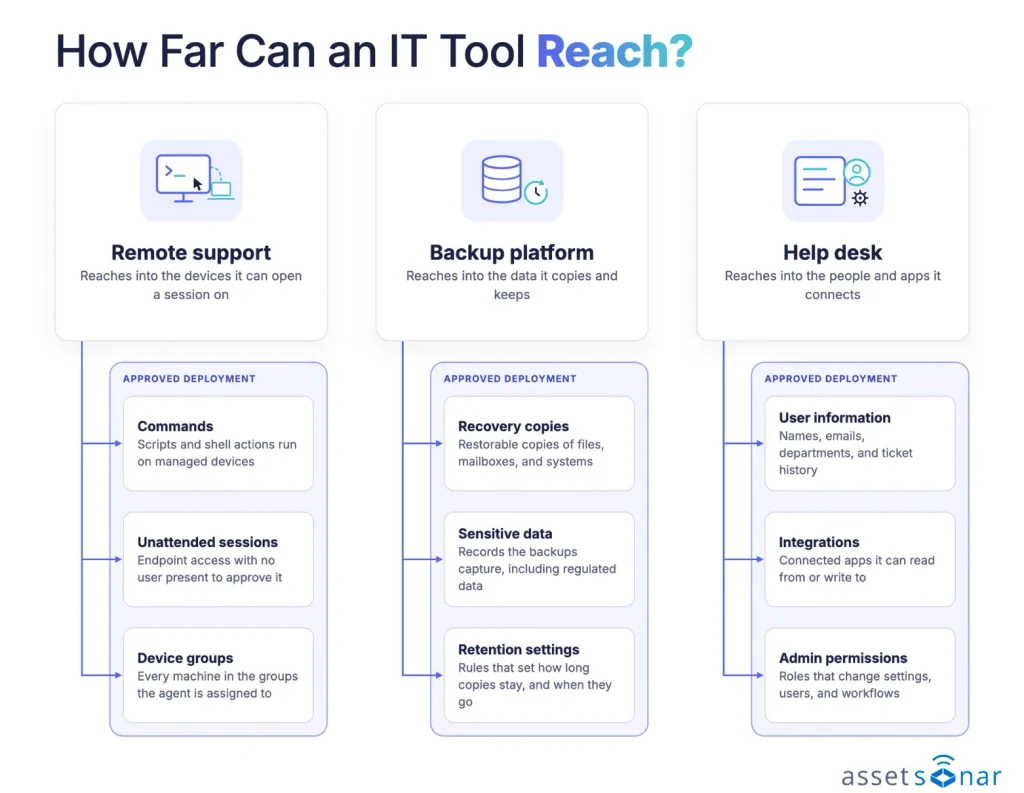
The examples below map potential access through remote support, backup, and help desk software.
Where software security reviews leave gaps
Public-facing services may receive immediate attention when a critical advisory appears. Internal applications also need review, especially when their original developers or service owners have moved on.
The Reddit post below describes patching external sites before checking internal applications during the PHP2Shell response. Those checks reportedly uncovered PHP 5 and 7, alongside applications whose engineering teams had left without replacements.
Best practices for vetting IT tools
These practices focus on ITAM software used for device discovery and software inventory. The checks depend on the features IT teams plan to enable. For discovery, verify how the platform accesses devices. If it also deploys patches, check how IT teams control which devices receive an update.
Assess risk by access and deployment scope
Base the depth of review on what someone could do with the tool if its highest available privileges were misused. A reporting integration with read-only access warrants a different review from an agent that can install software across production devices.
Ask the requester where the tool will run and map service dependencies. For a remote support platform, include unattended access, script execution, and whether technicians can reach servers as well as laptops. For a backup platform, include whether operators can delete recovery copies or change retention settings.
Have the IT service owner approve a defined use case, such as attended support for corporate laptops. Bring in security when the tool can alter production systems, reach sensitive data, or act across large device groups. Record the approved scope against the affected IT services and assets so later expansion has a clear baseline.
Verify software and runtime versions
A product name alone gives IT teams limited information about a deployment. Check the application version and any separately installed runtime it relies on. These details help establish which devices need review when a security advisory appears.
On October 21, 2026, PHP released fixes for two critical flaws known as PHP2Shell. Fixed releases included PHP 8.5.12, 8.4.27, 8.3.36, and 8.2.35. Because the flaws sat in the PHP runtime, a fully updated management console could still be exposed if the PHP beneath it had not been updated.
During evaluation, ask the vendor to demonstrate how IT teams can find devices running a particular application or runtime version. Compare the results with the version installed on a representative device to check the accuracy of the discovery data.
Use those records to identify deployments that need checking against the vendor’s advisory. Confirm which release addresses the vulnerability and who is responsible for updating each affected deployment. After the update, refresh the device record and verify the reported version.
Validate access controls and audit logs
A vendor demo usually runs with broad permissions. A useful pilot tests what a technician, service account, or external support user can actually do under your intended configuration.
Create a restricted technician role and verify if it can support its assigned device group. Then attempt to open a session outside that group. Check whether the tool can enforce multifactor authentication (MFA) for privileged sign-ins, including local accounts outside your identity provider. Give integrations only the API permissions they need and confirm the connector still works.
During the pilot, have a technician perform an administrative action, such as changing a device assignment. Review the activity history to check whether it identifies who made the change, what changed, and when. Confirm how long those records remain available and whether the plan you plan to buy supports that history.
Verify update delivery and support commitments
The software developer that releases a fix may differ from the vendor responsible for delivering it to customers. For example, a provider may update its hosted application while IT teams remain responsible for updating agents on managed devices.
A fix can pass through several organizations before it reaches the devices IT teams manage.
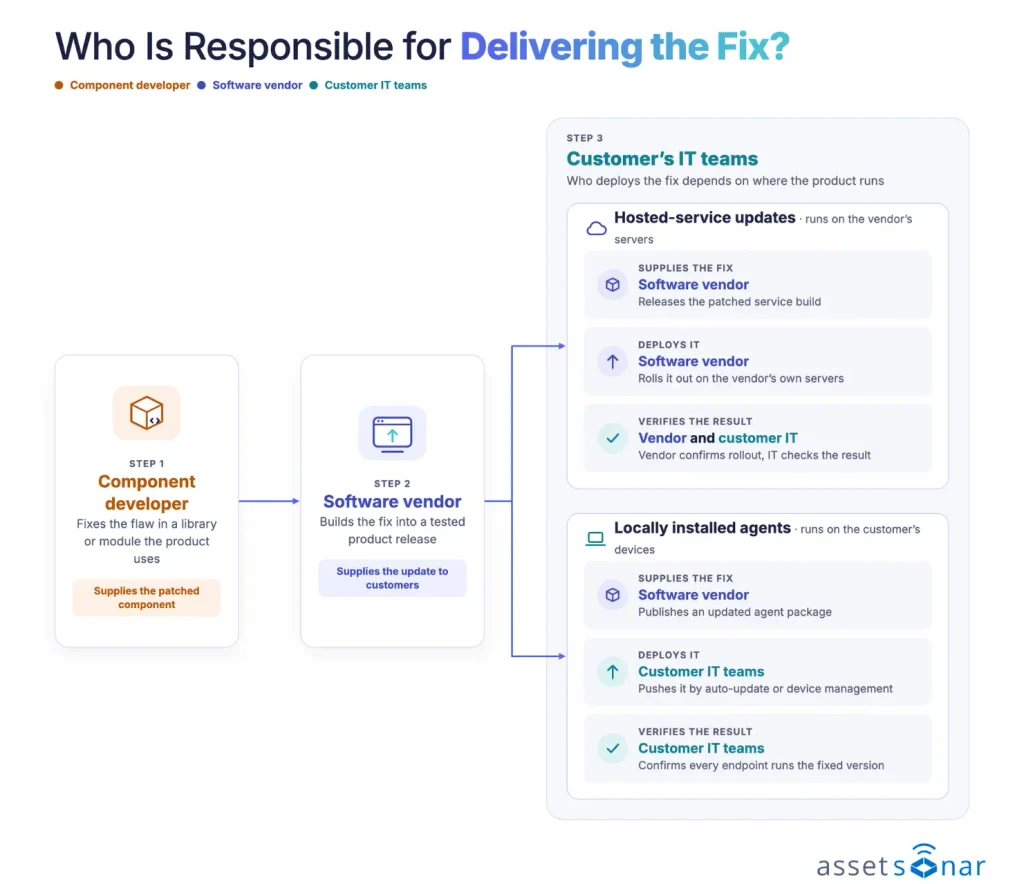
Ask for the support window for each relevant component and a sample security advisory. Check whether the advisory names the affected versions, fixed builds, and any actions the customer must take. For self-hosted software, identify the official update channel and how the installer’s authenticity is verified. Ask who can pause a rollout and what the recovery plan looks like if an update breaks a critical service.
After an update, the change owner should confirm the fixed build is running and the service works, especially for components such as gateways that need a restart. Linux distributions may backport a security fix to an older release, so the version number alone can look unpatched. Verify the full package release against the distributor’s advisory.
Record support deadlines and security commitments alongside software contracts. An essential tool may lose support before IT can replace it. Document temporary restrictions, an owner, and an exception expiry date.
Reconcile approvals with discovered installations
A purchase record shows what IT approved. For installed tools, IT teams also need evidence of where the software is present and when they collected that evidence.
The inventory below in AssetSonar brings discovered applications and their sources into one view.
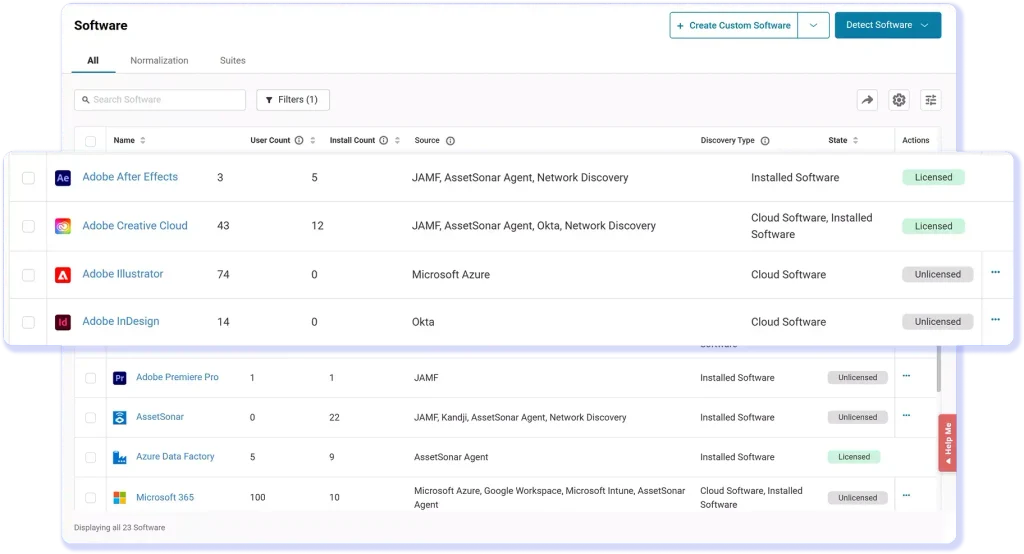
Compare these three pieces of evidence before deciding whether an installation matches the approved deployment.
| Evidence | Question it answers | What IT teams should compare |
|---|---|---|
| Approved tool list | What software has IT authorized, and for which use? | Approved scope against actual deployments |
| Discovered software records | Which managed devices report the application or runtime, and which version? | Observed versions and sync dates against the approved list |
| Vendor security advisory | Which versions are affected, and what action does the vendor recommend? | Affected-version guidance against discovered installations |
Include a remote device and any server or gateway that uses a different installer. Where discovery identifies only the parent product, request a vendor build manifest or package evidence from the host. Flag installations with stale observations for follow-up.
When the same application appears under several names, normalize the software entries under a consistent application name. Preserve the version details reported on each device. Ask the service owner to review discrepancies and document why an unexpected installation is needed or should be removed.
These records help IT teams answer client and security questions about the software used to manage their environment. For more on using software records during a security review, register for the AssetSonar webinar.
Reassess tools at renewal and retirement
A renewal is an opportunity to review what the tool has become since approval. A read-only connector may now have write access. A support agent may have expanded from laptops to production servers. Reopen the review when the deployment, privileges, hosting model, or maintenance responsibility changes.
Have procurement flag the renewal notice deadline early enough for IT and security to review the tool. Review software license usage, then ask the service owner which workflows still depend on it. Include integrations that use service accounts when assessing whether the tool remains necessary.
For retirement, ask the vendor for a sample export before you depend on it for recovery or audits. Assign responsibility for removing agents, revoking API credentials, and confirming any agreed data deletion. In AssetSonar Change Management, link the affected devices to the change so IT can compare any later detections of the old agent with the approved removal scope.
Test vulnerability scanning and patch management
During the pilot, use a known vulnerability to check whether the ITAM platform identifies the affected devices and installed versions. If a separate scanner supplies the findings, check how reliably those findings match device records. Include a device with missing or stale data to see whether IT teams can spot gaps in coverage.
Where patching is in scope, ask the vendor to demonstrate an approved patch rollout to a small test group. Check whether IT teams can see which devices succeeded, failed, or still need attention. Use a follow-up scan to confirm whether the original finding cleared. Before approving the platform, confirm which operating systems and applications the proposed plan covers.
How AssetSonar supports software security reviews
The AssetSonar ITAM Agent reports PHP runtime installations and versions across managed Windows, macOS, and Linux devices. This includes installations through package managers.
After acquiring several businesses, Hoffmaster used AssetSonar’s ITAM Agent and software normalization to consolidate fragmented software records. Its IT team reported above 90% accuracy across its hardware and software database within the first year.
Kevin Anderson, Hoffmaster’s Sr. IT Support Specialist, described reviewing consolidated software and license information in one view.
“Within a minute or two, I can see what’s there, what’s being used, what’s not being used.” – Kevin Anderson, Sr. IT Support Specialist, Hoffmaster
This illustrates the value of establishing reliable records before an urgent advisory arrives.
Check when the device last synced before comparing its software records with the vendor’s advisory. Confirm which release addresses the vulnerability and who is responsible for updating each affected deployment. For containerized PHP, verify the runtime version using the image’s package manifest or a container-aware scanner. After the update, refresh the device record and verify the reported version.
Once IT teams have reviewed a tool, they need a practical way to keep it under ongoing oversight. AssetSonar helps organize the software records that require attention and connect supported vulnerability findings to the devices involved.
A software review can miss installations when the devices hosting them fall outside the asset register. AssetSonar’s automated Network Discovery helps IT teams identify connected computers, servers, and network hardware across configured networks and subnets.
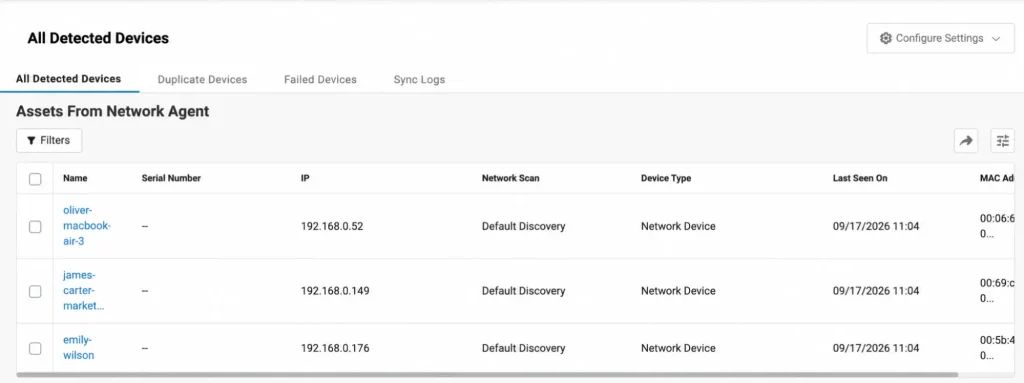
IT teams can schedule recurring scans and review discovered devices before adding them to AssetSonar. Compare those results with the systems already included in the software review, then investigate additional hosts that need attention. The scanner must reach the selected networks and have appropriate credentials for detailed device information.
Reviewing discovered devices can reveal hosts that belong in the software assessment.
The Managed Software View lets IT teams focus on selected applications within the broader software list. Licensed, blacklisted, normalized, and custom software are marked “Managed” by default, and administrators can adjust that selection. Use this field to define the review scope and document security approval separately.
A focused software list helps IT teams define which applications require ongoing oversight.
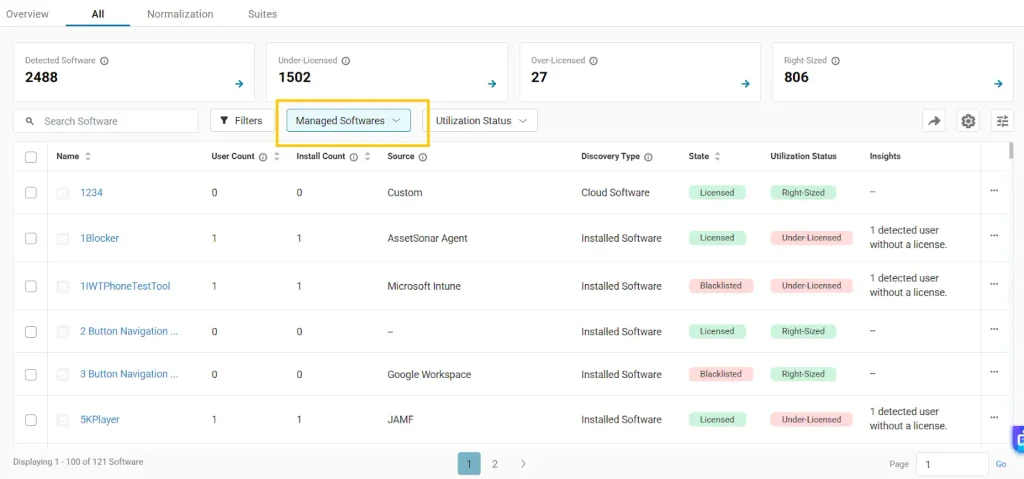
The Managed field is also available in custom software reports. IT teams can filter reports around the applications they actively track, making the selection available for recurring reviews. This is useful when a security reviewer needs a focused list of IT tools instead of every discovered application.
For applications requiring investigation, AssetSonar’s vulnerability management connects supported software findings with known Common Vulnerabilities and Exposures (CVEs). With the module enabled and the required ITAM Agent versions deployed, IT teams can examine affected devices, severity, and available reference information. Those details help determine which findings need security review and remediation planning.
Supported vulnerability findings connect the review to specific software versions and affected devices.
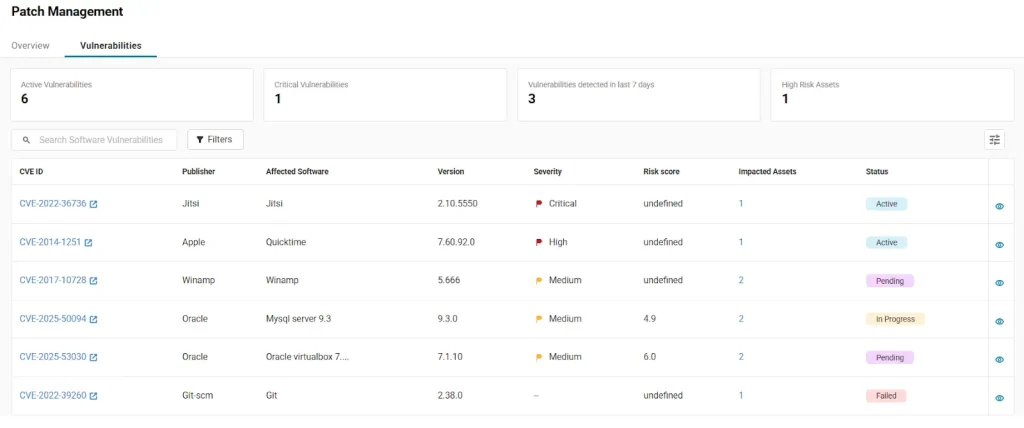
The underlying discovery data also has value between formal reviews. Capterra reviewer Drew L., a senior systems administrator, described that experience:
“Setting up automated discovery agents across our laptops and workstations gave us complete visibility into active endpoints without constant manual audits.” – Drew L., SR SYS Admin.
Prioritize high-impact tools for review
Start with an IT tool already deployed across your organization, such as a help desk or monitoring platform. Choose one recent security advisory and time how long it takes IT teams to identify the relevant installations, their versions, and the owner responsible for reviewing them.
Track the percentage of high-privilege tools with a named owner and current support evidence as the review expands. Recheck overdue exceptions on a regular schedule. If only one administrator can retrieve the evidence, give the backup owner access before widening the program.