Key Takeaways:
- Most offboarding failures begin earlier, when a handoff, replacement, or return is never recorded against the right device and person.
- An MDM sync shows that a device is online. Custody comes from assignment history and verified check-ins.
- Recovery and redeployment are separate decisions, so a returned device stays unavailable until inspection and data handling are complete.
- Lost, disputed, or retained devices need a recorded exception with an owner, an approver, and a review date before the ticket closes.
IT offboarding can expose asset record problems that have remained hidden for months. These could include a laptop still assigned to its previous custodian on paper, a replacement device with no assignment history, or returned equipment appearing available before inspection.
These discrepancies make routine departures harder to close. IT teams must reconstruct custody through old tickets, employee messages, and device-management records instead of working from reliable asset information.
For mid-market IT teams, the answer begins earlier in the hardware lifecycle. Accurate IT offboarding asset records must identify each company device, document its current custodian, and preserve what happened when it changed hands. This article examines the record-quality failures behind missed returns and the practices that prevent them.
Why accurate asset records matter in IT offboarding
An offboarding request identifies who is leaving, but it does not establish which equipment that person still holds. That depends on the quality of the underlying IT asset records. A device can appear in the register yet have the wrong user, an outdated status, or no verifiable identity.
Hardware asset management addresses the equipment lifecycle from issuance to recovery and eventual retirement. Custody is one part of that lifecycle. The organization owns the device, while the assigned employee is responsible for possession.
The distinction matters during departure. A serial number can identify a physical laptop, but it cannot confirm who currently holds it. The assignment and transfer history must supply that evidence. CIS Control 1.1 similarly calls for an accurate enterprise asset record with relevant identifying and ownership information.
There is also a security obligation to consider. NIST SP 800-53 PS-4 addresses retrieving security-related organizational property during personnel termination. Asset records support that control, but a completed inventory entry is not proof of physical recovery.
Five asset record problems that cause offboarding failures
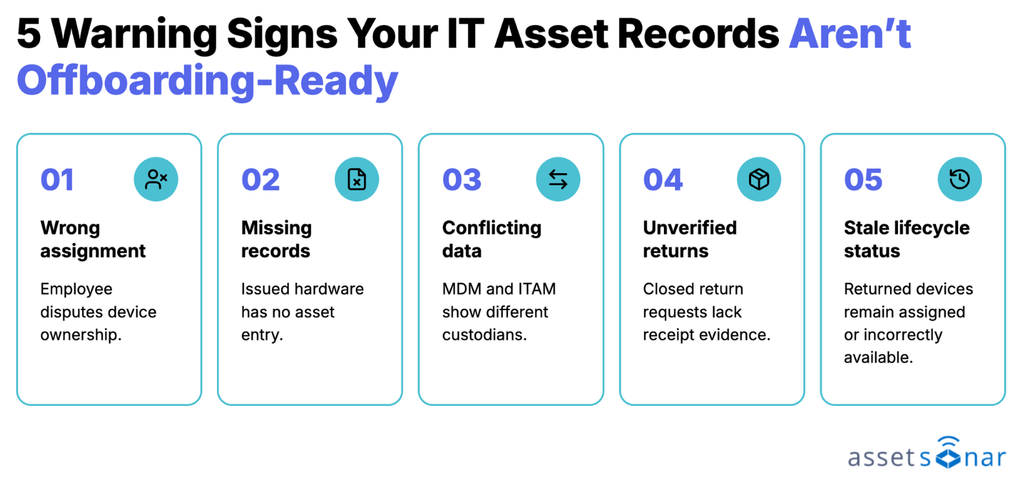
Poor records usually reflect ordinary IT activity that was never documented correctly. Device replacements, informal handoffs, and delayed updates can each create a different recovery problem. The graphic below shows the warning sign that usually points to each one.
1. Asset assignments point to the wrong employees
A transferred laptop can remain assigned to its previous custodian if nobody records the handoff. The offboarding request identifies the wrong person as responsible for returning it. The device may be in active use elsewhere.
The absence of assignment history makes the dispute difficult to settle. A hardware custody record should preserve previous checkouts and transfers alongside the current assignment.
Warning sign: Employees frequently dispute assigned equipment or report that a requested device was transferred to someone else months earlier.
2. Issued equipment never enters the asset register
Automated discovery may capture an enrolled laptop without recording the monitor, docking station, or security key issued alongside it. Temporary loans and departmental purchases introduce similar gaps when staff bypass the normal asset-creation process.
The resulting recovery list is incomplete even if every listed device is returned. IT teams need a record of equipment outside agent or MDM discovery coverage, with an identifiable custodian and recovery expectation.
Warning sign: Equipment issue records or physical checks reveal company devices that have no corresponding asset assignments.
3. MDM and ITAM records disagree
Mobile device management (MDM) systems report endpoint enrollment, configuration, and last contact. An IT asset management (ITAM) system maintains asset identity, custody, and lifecycle context. A device’s enrolled user may differ from its current assigned custodian because of reassignment or delayed synchronization.
Two discovery sources can also produce separate records for one machine. Invalid serial numbers make matching harder, while a hostname alone may be insufficient evidence. AssetSonar’s IT Asset Accuracy checks flag stale syncs, invalid BIOS serial numbers, and duplicate valid serials. For the relationship between these systems, see MDM and ITAM integrations.
Warning sign: The same device appears under different employees or duplicate records, with no documented transfer explaining the discrepancy.
4. Return status is updated before equipment is verified
A delivery confirmation proves that a package reached its destination, not which device was inside. The same uncertainty applies when a manager reports a laptop returned without checking its asset ID or condition.
Physical receipt should be recorded against the expected hardware identifier and receiving person. AssetSonar’s Quick Check-In supports asset identification by name, identification number, and barcode. A return should remain unresolved when the device received does not match the assignment.
Warning sign: Completed return requests lack matching asset identifiers, receiving-person details, or documented physical inspection.
5. Recovered devices retain the wrong lifecycle status
A laptop may be physically checked in but still appear assigned to a former employee. Another may be labeled available before inspection or approved data handling. Both errors affect subsequent deployment decisions.
Accurate IT asset lifecycle records distinguish custody changes from readiness for reuse. After recovery, the record should reflect the equipment’s actual condition and next action, including maintenance or retirement where appropriate.
Warning sign: Former employees still appear as device custodians, or equipment marked available cannot actually be deployed.
What makes an asset record ready for offboarding?
The asset register needs enough information to establish identity, custody, and disposition without reconstructing events from scattered tickets. These fields serve different purposes and should remain distinguishable.
| Record element | Useful information | Offboarding purpose |
|---|---|---|
| Device identity | Asset ID, verified serial, model | Match the record to physical equipment |
| Custody | Current custodian, assignment date | Establish who should return it |
| Assignment history | Transfers and previous checkouts | Resolve conflicting ownership claims |
| Location | Site or approved remote location | Plan collection or shipping |
| Discovery | Source, identifier, last sync | Investigate stale or conflicting technical data |
| Recovery status | Check-in, receiver, condition, next state | Separate receipt from readiness for reuse |
The most important distinction is between technical presence and physical possession. A recent MDM sync suggests that a managed device communicated with the platform. It does not demonstrate that the person named in the asset record still holds it.
Likewise, a department or cost center is not necessarily a custodian. The company may own the device, IT may manage it, and an employee may hold it. The record should represent those relationships accurately rather than forcing them into one ownership field.
How to prevent IT offboarding asset record failures
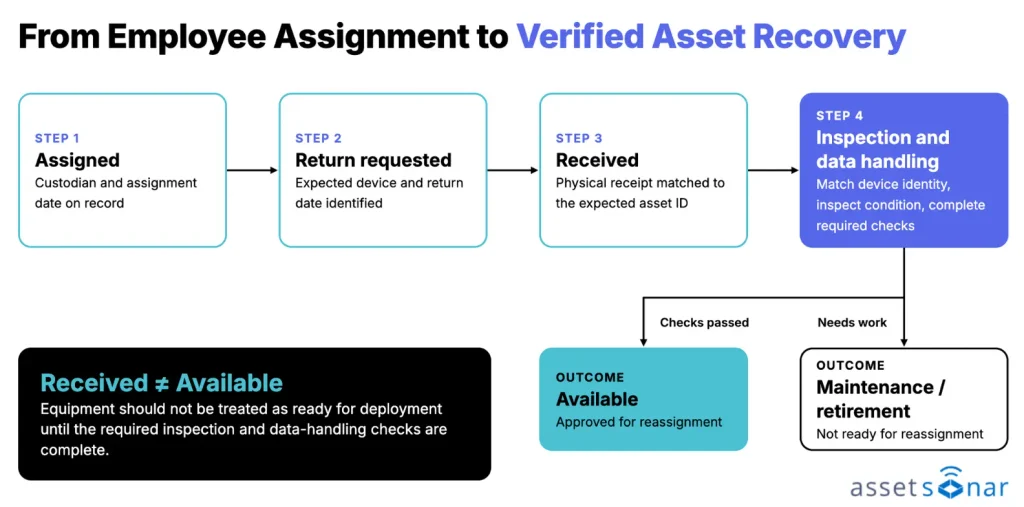
The best time to correct IT offboarding asset records is before a departure is announced. That requires small controls at the points where equipment is issued, moved, reconciled, and recovered. The lifecycle below shows the stages a device moves through during recovery. Each stage needs its own action or verification, and a received device is not yet an available one.
1. Reconcile assignments before requesting returns
Start with the departing employee’s current assignments, then compare them with prior checkouts, approved transfers, and relevant endpoint data. Check in both directions: which devices are assigned to the employee, and which devices still reference that employee elsewhere?
Investigate conflicts before finalizing the recovery list. Where custody cannot be confirmed, record the discrepancy and its owner rather than deleting a questionable assignment. This keeps the return request accurate without hiding unresolved equipment.
2. Capture custody changes when devices change hands
Each issue or transfer needs a recorded recipient, identifiable device, and effective date. Where staff exchange equipment directly, require a formal custody update instead of relying on a message to IT after the fact.
AssetSonar’s custody verification lets the assigned person confirm possession or deny it with a reason (Lost, Stolen, or Other). A denial gives IT teams a specific discrepancy to investigate while the people involved remain reachable.
3. Define which system controls each field
An MDM may be authoritative for enrollment and device configuration, while ITAM maintains assignment and lifecycle records. HR remains the source for employment status. Define that division before enabling imports or accepting updates that could overwrite existing information.
When reconciling duplicates, validate stable hardware identifiers and review conflicting records before merging. For example, the Microsoft Intune integration imports supported device attributes and can filter on ownership. An endpoint reported as personally owned should not automatically be treated as recoverable company hardware.
4. Record evidence when equipment is physically returned
Match each received item against the expected asset ID or serial number. Record its receiving location, date, condition, and any missing components. For remote employees, distinguish shipment creation, carrier delivery, and physical inspection.
Equipment with a mismatched identifier needs investigation before the recovery obligation is cleared. If the physical item matches, record the check-in while preserving its previous custodian in the history. Asset actions from tickets let technicians check in the device and update custody directly from the offboarding ticket.
5. Keep recovery separate from redeployment
After check-in, assess the device against internal repair, security, and disposal requirements. A recovered laptop may need inspection or sanitization before it can return to the deployable pool.
Update the asset’s lifecycle state as each decision is completed. Equipment that cannot be safely reused may require maintenance or retirement instead. This prevents the next onboarding request from drawing on devices that exist in the register but are unavailable in practice.
6. Give unresolved devices an explicit exception path
Some departures involve lost equipment, disputed custody, or authorized retention. Do not close those items as returned simply to finish an offboarding ticket. Record the exception, responsible owner, decision authority, and next review date.
The final outcome should distinguish verified recovery from an approved exception. IT teams can connect that decision to the broader employee offboarding workflow, while leaving device accountability visible for follow-up.
Where AssetSonar fits into the process
AssetSonar combines IT asset records with assignment and discovery data. Its accuracy indicators flag the technical data problems described earlier, but physical custody still requires a separate verification or check-in event.
For departure coordination, the Employee Offboarding solution connects assigned hardware, software license context, and work assigned to stakeholders. The Offboarding Center shows workflow steps and their completion status. Account revocation and endpoint policy actions remain subject to their respective systems and permissions.
What accurate records changed for Specialty Building Products
At Specialty Building Products, IT previously relied on spreadsheets to track equipment across multiple locations.
After implementing AssetSonar and integrating Microsoft Intune, the organization gained clearer asset and user records across approximately 8,300 assets and 4,000 users.
Its IT team reported a 75% reduction in offboarding time, largely because technicians could identify which devices employees held without reconstructing assignments manually.
The company also reported avoiding approximately $5,000 in monthly hardware spending through improved tracking and equipment reuse.
These are customer-reported results from a specific environment, rather than universal performance benchmarks.
The Specialty Building Products case study demonstrates how reliable assignment records can reduce the work required to recover equipment during employee departures.
How to measure IT offboarding asset record accuracy
Completion time alone can conceal poor records. A fast-closed ticket may still leave a disputed laptop or incorrectly available device. Measure the accuracy of the underlying evidence alongside workflow progress.
| Measure | Practical definition |
| Assignment accuracy | Employee-device pairings confirmed correct ÷ pairings checked (%) |
| Unresolved custody disputes | Number of devices with unconfirmed or disputed custodians |
| Verified return rate | Physically received devices with matching receipt evidence ÷ devices due for return (%) |
| Former-employee backlog | Number of devices assigned to departed employees without an approved outcome |
| Record update delay | Average time between confirmed receipt and the corresponding record change |
Review changes by office or device category to identify where errors originate. Frequent custody disputes may point to informal transfers; long update delays may indicate incomplete receiving procedures. The objective is to find and correct the data failure before it becomes another offboarding exception.
Accurate IT offboarding starts with verifiable handoffs
Accurate IT offboarding depends on asset records created and maintained throughout the device lifecycle. Start by reviewing a sample of recent departures and tracing disputed devices to their last confirmed handoff. Identify where the records diverged.
Fix that handoff first, then expand the practice across equipment categories and locations. A dependable recovery process begins with asset information that can be checked against physical evidence.