AssetSonar’s integration with HubSpot enables organizations to streamline their SaaS management by bringing their HubSpot usage data directly into AssetSonar. IT managers and administrators can now track their HubSpot users through AssetSonar, hence improving compliance readiness and visibility into license usage and associated costs.
Benefits of HubSpot and AssetSonar integration
This direct SaaS integration can benefit your business in the following ways:
- Improved reporting and insights: Generate comprehensive reports to generate deeper insights on how your HubSpot licenses are being used.
- Staying compliant: With all user data available in real-time, you can always stay compliant and audit-ready.
Now let’s see how to enable the integration.
Enabling HubSpot integration
Follow this pathway to enable the integration: Settings -> Integrations -> Direct SaaS Integrations. Now click the ‘Connect’ button under the HubSpot logo.

A popup will appear prompting you to enter the Token. Here is a snapshot of the popup:

Follow these steps to extract the required token for this integration:
- Log in to your HubSpot account and go to the integrations tab from the left navigation bar.

- A dropdown will open up. Go to the ‘Private Apps’ tab and click the ‘Create a private app’ button.
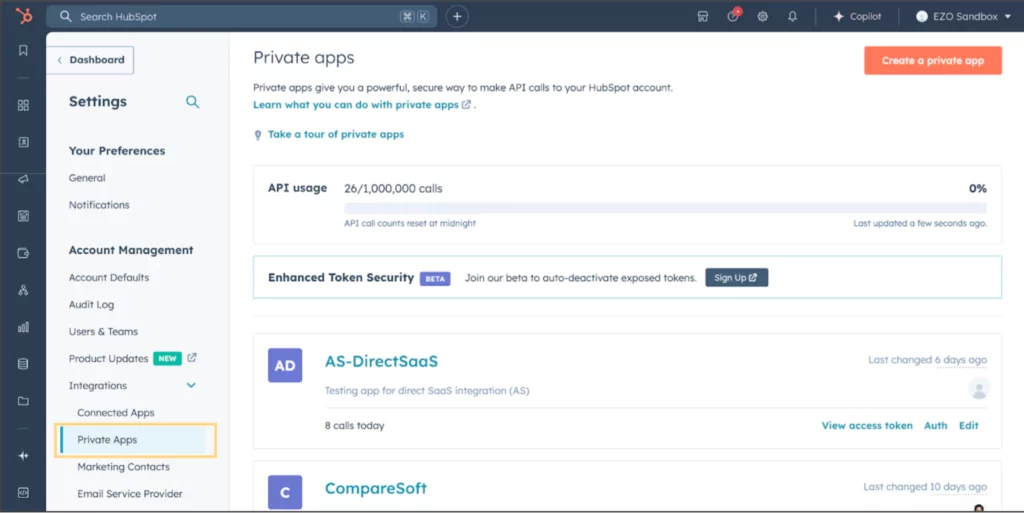
- A new page will open up where you will be required to add the application’s name and description as shown below:

- Now go to the Scopes tab and add the following scopes:
- settings.users.read
- account-info.security.read
Once you have added the scopes, click the ‘Create app’ button at the top right.

- Your app will be successfully created and a private token would be generated:

Now copy this token and add it to the popup on your AssetSonar’s setting page and click ‘Add’.
Your integration would be successfully created. You’ll be able to view the ‘Sync now’ button under HubSpot integration on AssetSonar. Click the ‘Sync now’ option to start importing your user data.

Once the integration is successfully created, a software named ‘HubSpot’ would be created automatically on the software listing page. Here is a snapshot of the software:

You’ll also be able to view the users’ details and login activity by going to the ‘Associated Users’ tab.

